


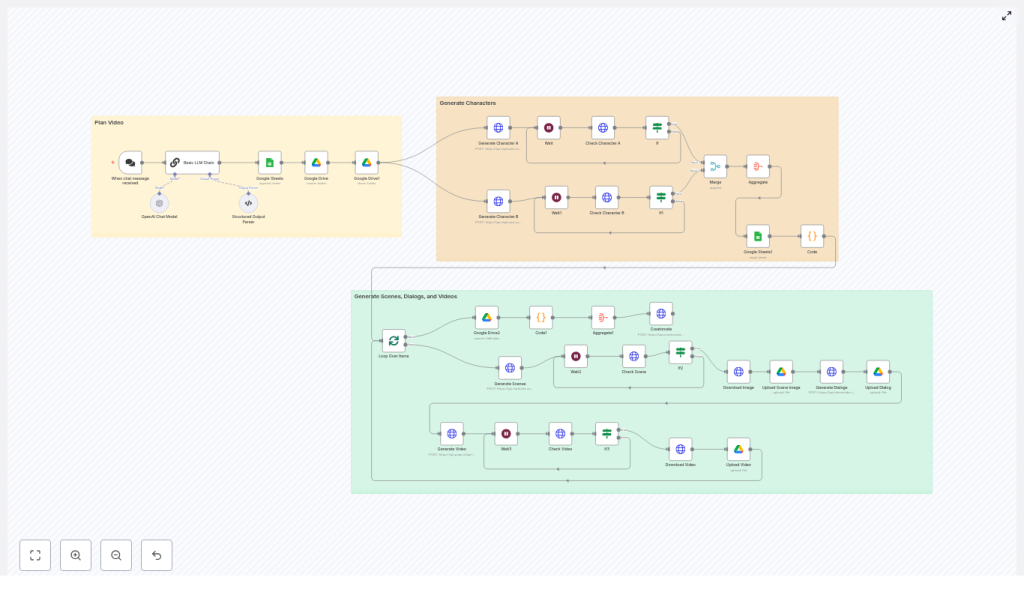
Consistent Characters Video Generation Template
Imagine sitting down with a single idea for a short story and, a few minutes later, watching a fully rendered, character-driven video come to life without touching a video editor. That is the kind of shift this n8n workflow makes possible. It turns scattered manual tasks into a smooth, automated pipeline so you can focus on creativity, storytelling, and growth instead of repetitive production work.
This consistent characters video generation template uses n8n to connect an LLM, image generation models, Google Sheets, Google Drive, text-to-speech, and a video rendering service. Together, they create four-scene, YouTube Shorts style videos where your characters stay visually consistent from one scene to the next. The result is a repeatable system that can power a growing content engine, not just a one-off experiment.
From manual production to an automated creative system
If you have ever tried to create short-form animated content, you know the pain points:
- Characters look slightly different from scene to scene.
- Every video requires fresh prompts, new images, separate voiceovers, and manual editing.
- Tracking assets and versions quickly becomes messy and time consuming.
These challenges limit how often you publish and how far your ideas can scale. The goal is not just to generate one good video, but to build a dependable workflow that lets you create many, consistently, with less effort each time.
This is where automation shines. By turning your process into an n8n workflow, you shift from one-off tasks to a reusable, improvable system. You gain time, mental space, and the freedom to experiment with more stories, more characters, and more channels.
Adopting an automation mindset
Before diving into the technical steps, it helps to approach this template with the right mindset. Think of it as your first building block in a larger automation strategy:
- Start small, think big – Begin with one video, learn from the results, then gradually scale to daily or batch production.
- Iterate on prompts and structure – Your first prompts will not be perfect. That is expected. Use the workflow to quickly test, refine, and improve.
- Build a reusable asset library – Once you have strong, consistent characters, you can reuse them across many stories, series, or campaigns.
- Let automation handle the routine – Offload rendering, file management, and polling to the workflow so you can focus on story, style, and strategy.
With that perspective, this template becomes more than a single n8n workflow. It becomes a stepping stone to a more automated, focused, and scalable creative process.
How the template works at a glance
The workflow is organized into three main sections that mirror a natural storytelling pipeline:
- Plan Video – Captures your input, uses an LLM to design the story structure, and stores everything in Google Sheets.
- Generate Characters – Creates two consistent, anime-style characters and saves their images for later use.
- Generate Scenes, Dialogs, and Videos – Produces scene images that reference each character, generates voiceovers, adds subtle animation, and assembles the final video.
Each section is modular. You can swap providers, refine prompts, or extend the pipeline without breaking the core logic. That flexibility is what makes this a powerful template to build on as your automation skills grow.
Deep dive into the n8n workflow
1. Trigger and planning – turning ideas into structure
The journey begins with a chat trigger, typically a webhook that receives your input. You might send a short description of the story, characters, or theme you want.
An LLM (such as an OpenAI chat model) then takes over. It receives a concise instruction set and returns a structured JSON payload that includes:
- Two character prompts (Character A and Character B).
- Four scene prompts for a short, four-part narrative.
- Brief dialogue lines for each scene, usually limited to 75 characters.
This JSON is parsed and written into Google Sheets. That sheet becomes your single source of truth for prompts and metadata. It gives you:
- Auditability for each video generated.
- An easy way to review and tweak prompts over time.
- A persistent record that can be reused for future experiments or reruns.
2. Google Drive and Sheets – building a reliable backbone
While the creative magic happens in models and prompts, the operational backbone lives in Google Sheets and Google Drive:
- Google Sheets stores:
- Character prompts and scene prompts.
- Dialogue lines.
- API job IDs and final asset URLs.
- Google Drive stores:
- Character renders.
- Scene images.
- Voiceover audio files.
- Intermediate and final video files.
By centralizing everything in Sheets and Drive, you create a transparent production log that is easy to inspect, share with collaborators, and scale across multiple projects.
3. Character generation – designing consistent protagonists
Next, the workflow moves into character creation. Two separate image generation jobs are triggered, one for Character A and one for Character B, using Replicate or a similar image model.
The prompts are intentionally constrained to support consistency:
- Front-facing, full-body characters.
- Anime-inspired 2D cel-shading, clean linework, smooth color fills.
- No props and a blank background.
- Modest, clearly described clothing.
The workflow polls the job status until the renders are complete. Once ready, it aggregates the outputs and saves them to Drive. These images then act as subject references for the scene generation step so that the characters keep their look across multiple images and videos.
4. Scene generation – keeping characters consistent across shots
With your characters defined, the workflow turns to the four scenes that make up the short video. It alternates between Character A and Character B, combining:
- The scene-specific prompt from the LLM.
- A
subject_referencethat points to the chosen character image.
The image model uses this combination to generate vertical images suitable for short-form platforms. The workflow can produce a 9:16 or 3:4 aspect ratio depending on the step and your preferences.
As with character generation, n8n polls the image jobs until they are complete, then uploads the resulting images to Google Drive. Each image is linked back to the corresponding row in Google Sheets so you always know which file belongs to which scene.
5. Dialog and voiceover – giving your characters a voice
The short dialogue lines created earlier are now transformed into audio. The template integrates a text-to-speech service such as ElevenLabs to generate voiceover files for each scene.
Key details:
- Dialogue is kept concise, usually under 75 characters, to match the fast pace of Shorts style content.
- Each voiceover file is uploaded to Google Drive and linked to its scene in Google Sheets.
- You can swap ElevenLabs for another TTS provider without changing the overall workflow design.
With visuals and audio ready, your scenes are almost complete.
6. Image-to-video and final rendering – bringing everything to life
To move from static images to engaging video, the workflow uses an image-to-video model or video generation API. Each scene image receives subtle, natural motion such as:
- A character gesture.
- Hair swaying gently.
- Environmental movement like drifting petals.
Tasks are queued, then polled until the video outputs are ready. The resulting clips are downloaded and stored in Google Drive.
Finally, a composition service such as Creatomate assembles:
- The four animated scene clips.
- The corresponding voiceover audio tracks.
into a single, short-form video. At this point, your initial idea has traveled through a fully automated pipeline and emerged as a polished, shareable asset.
Key features that unlock growth
This n8n template is designed not just for one-time use, but for ongoing content production. Some of the most impactful benefits include:
- Consistent characters across scenes using subject references, careful prompt design, and a structured generation flow.
- End-to-end automation from initial prompt to final rendered short, saving hours of manual work per video.
- Modular architecture that lets you swap image, video, or TTS providers without rewriting the core logic.
- Centralized tracking via Google Sheets so you can review prompts, track versions, and maintain a clear production history.
As you refine this workflow, you can repurpose it for new series, campaigns, or clients, turning your automated system into a strategic asset for your brand or business.
Prompt design and character consistency best practices
Consistent characters are the foundation of this workflow. To improve results and reduce rework, follow these guidelines:
- Describe characters head to toe, including:
- Hair color and style.
- Face shape and notable facial features.
- Body type and posture.
- Outfit materials, colors, and shoes.
- Specify a clear art style, for example:
- “2D anime-inspired, cel-shaded, clean linework, smooth color fill”.
- Always use a
subject_referenceor seed image produced by the character generation step when calling scene generation APIs. - Keep clothing consistent or define a small, controlled wardrobe list to avoid accidental redesigns.
- Limit background detail in character prompts and reserve environment descriptions for the scene prompts.
These habits not only improve visual consistency but also make it easier to scale your characters across multiple episodes or series.
Operational tips for reliability and scale
As you move from a single test video to a larger content pipeline, operational details become more important. Use these practices to keep your workflow robust:
- Rate-limit parallel jobs so you do not hit API throttling when generating many images or videos at once.
- Implement robust polling with exponential backoff when checking async job statuses for image, video, or TTS tasks.
- Maintain an audit trail in Google Sheets, including prompts, API job IDs, timestamps, and final file links.
- Cache successful character renders and reuse them across multiple videos that feature the same characters to save credits and time.
These improvements turn your workflow into a production-ready system that can support daily or batch video generation with confidence.
Privacy, safety, and legal considerations
When you automate content creation, you also need to automate responsibility. Keep these guidelines in mind:
- Do not recreate or impersonate real people without explicit, documented consent.
- Ensure that clothing, themes, and scenes are appropriate for your audience and comply with platform terms of service.
- Follow the license terms and content policies of all third-party models and APIs you use.
Building ethical, compliant workflows from the start protects your brand and gives you a solid foundation for long-term growth.
Troubleshooting common issues
Characters look different between scenes
First, confirm that the scene generation step is correctly using the subject_reference for the intended character. Then, review your scene prompts and remove any repeated character descriptions that might override the reference. Focus those prompts on environment, pose, and mood instead.
Jobs stuck in pending or status mismatches
Check your API keys, quotas, and rate limits for each provider. Next, review your polling logic to ensure you are correctly handling status fields and response paths. A small adjustment in how you detect “succeeded” or “failed” states often resolves these issues.
Real-world use cases and growth paths
Once you have this template running, you can adapt it to many scenarios:
- YouTube Shorts creators producing daily micro-stories with recurring characters and consistent visual branding.
- Indie studios and agencies rapidly prototyping character-driven ads, social content, or pitch concepts.
- Educational channels building short, character-first explainers that make complex topics more engaging.
Each use case can start with this exact template, then evolve with your own prompts, art styles, and extensions as your automation skills grow.
Your next step in the automation journey
If you are ready to free up more creative time and build a repeatable video pipeline, you can get started with this n8n template in just a few steps:
- Import the n8n workflow file into your n8n instance.
- Configure API keys for:
- OpenAI or your preferred LLM provider.
- Replicate or your chosen image generation model.
- ElevenLabs or an alternative text-to-speech service.
- Your video rendering or composition service, such as Creatomate.
- Connect your Google Drive and Google Sheets credentials, then test the workflow with a single story idea or topic.
Once you see your first automated short come to life, you can start iterating. Adjust prompts, refine character descriptions, test new voices, or plug in different models. Every small improvement compounds, turning this template into a powerful engine for ongoing content creation.
If you would like a guided walkthrough or help adapting this workflow to your style, such as changing the art direction, adding lip-sync, or enabling batch processing, reach out or join our newsletter. You will receive monthly automation templates, n8n tips, and prompt engineering guides to keep expanding what you can automate next.
