

Deep Research + RAG in n8n: Build a Knowledge Pipeline That Thinks With You
If you ever find yourself sinking an afternoon into “just a bit of research,” this one’s for you. Retrieval-Augmented Generation (RAG) paired with n8n can turn those messy, ad-hoc deep dives into a clean, repeatable research pipeline. Think of it as a research assistant that never gets tired, remembers everything, and hands you a polished report at the end.
In this walkthrough, we will unpack what this Deep Research + RAG workflow in n8n actually does, when you should use it, and how all the pieces fit together. We will also go step by step through the main stages so you can adapt the template to your own stack.
What this n8n Deep Research + RAG template actually does
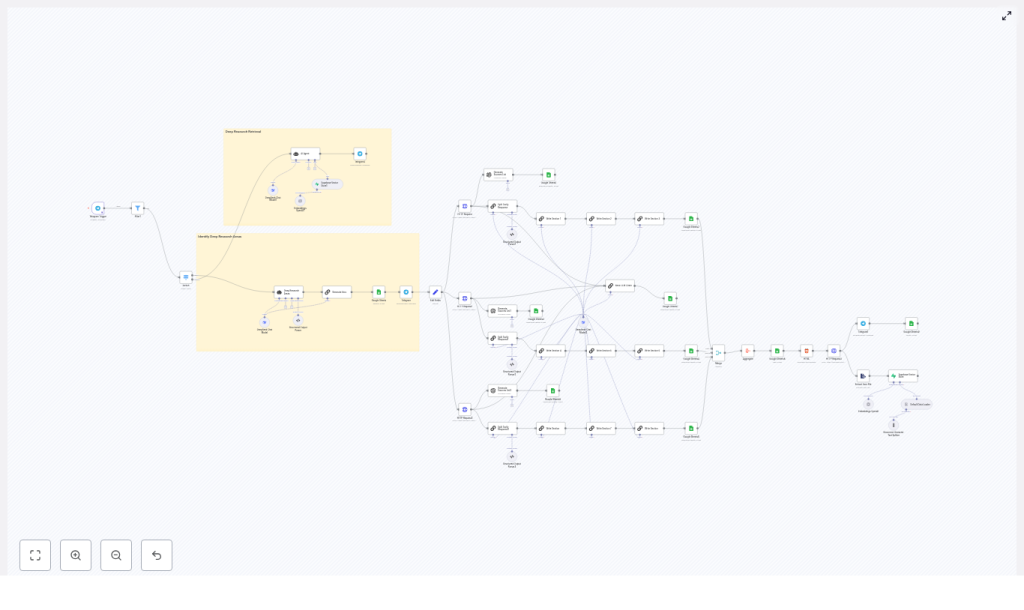
At a high level, this workflow takes a question or topic, runs a deep research process behind the scenes, and delivers a structured, sourced report back to you. Along the way it also builds a reusable “second brain” of knowledge you can query later.
Here is what happens under the hood:
- You send a research request (for example over Telegram).
- n8n triggers the workflow and validates what kind of request it is.
- The workflow calls search APIs such as Tavily or your own custom search to gather relevant sources.
- Content is chunked, embedded with an embeddings model like OpenAI, and stored in a Supabase vector database.
- RAG retrieval pulls the most relevant chunks back out and feeds them into LLM nodes (DeepSeek, OpenAI, etc.) for synthesis.
- The workflow assembles a structured report, logs it to Google Sheets, generates HTML and a PDF, and sends it back to you on Telegram or by email.
The result: a repeatable deep research pipeline that turns a simple question into a traceable, source-backed knowledge artifact.
When to use n8n + RAG for deep research
This template shines whenever you need more than a quick one-line answer. It is a great fit if you:
- Regularly produce long-form research reports, briefs, or deep dives.
- Want every answer to be backed by verifiable sources, not just model guesses.
- Need a “second brain” that stores both raw sources and final summaries in a searchable way.
- Work with a mix of tools like Supabase, Google Sheets, Telegram, PDFs, and LLM APIs.
Research teams, content studios, knowledge managers, and product teams all benefit from this type of workflow. The ROI comes from faster report creation, consistent structure, and a growing knowledge base that you can reuse instead of starting from scratch each time.
How the deep research pipeline is structured
The template is built around a simple idea: separate each part of the research process into clear stages, then let n8n orchestrate the flow.
Core building blocks
- Trigger & input acquisition – For example a Telegram trigger or webhook that captures the user’s request.
- Search & retrieval – External search APIs such as Tavily or your own data sources.
- Embeddings & vector storage – OpenAI (or another embeddings provider) plus Supabase as the vector database.
- LLM orchestration – Structured LLM chains using DeepSeek, OpenAI, or other models.
- “Second brain” storage – Google Sheets and Supabase for human-friendly logs and machine-friendly indexes.
- Delivery & exports – HTML generation, PDF conversion, and Telegram or email delivery.
Data flow at a glance
Here is how information moves through the workflow from question to final report:
- The user sends a topic or question. The Telegram Trigger node (or webhook) receives it.
- Validation logic checks what kind of request it is, for example “deep research report” vs “quick answer.”
- Search nodes call Tavily or other APIs to pull in URLs, snippets, and content.
- Content is normalized, de-duplicated, and split into chunks ready for embedding.
- Embedding nodes create vector representations and store them in a Supabase table with rich metadata.
- Retrieval queries Supabase for the most similar chunks to the user’s question.
- LLM nodes run a chain of prompts to propose sections, write the report, and summarize sources.
- Final outputs are logged to Google Sheets, turned into HTML and PDF, then sent back to the requester.
By the end, you have both a nicely formatted report and a persistent record of what was searched, what was used, and where it came from.
Deep dive into the main components
1. Trigger and input handling
Everything starts with a trigger. In this template, you typically use a Telegram Trigger node, but a webhook works just as well if you want to integrate with other apps.
Right after the trigger, you add filters or a Switch node to route different request types. For deep research flows, you might look for phrases like “deep research report” or “long-form” in the incoming text.
Why bother with early validation? It keeps your costs under control and avoids unnecessary API calls. If the request does not match your deep research pattern, you can send a quick reply instead of running the full pipeline.
2. Retrieval layer with Tavily and search APIs
Once you know you are handling a deep research request, the workflow moves into the retrieval layer.
- An HTTP Request node calls Tavily or another search endpoint.
- The API returns a list of results such as URLs, titles, snippets, and possibly full content.
- n8n parses these results into a consistent JSON structure so later nodes do not have to guess field names.
- Duplicate or near-duplicate results are removed, then content is prepared for chunking.
You can also combine multiple sources here, such as:
- Web search via Tavily or similar APIs.
- Your own internal document store or knowledge base.
- Other APIs that expose structured data.
By tweaking search depth and chunk size, you can balance between coverage and noise. Deeper search and smaller chunks usually improve recall but will use more tokens and storage.
3. Embeddings and Supabase vector store
Next comes the embeddings layer, which is what makes RAG possible in the first place.
The basic steps:
- Split each document into chunks, often in the range of about 500 to 1,000 tokens, using semantic boundaries such as paragraphs or sections.
- Send those chunks to an embeddings provider such as OpenAI.
- Store the resulting vectors in a Supabase table along with metadata like:
- URL or document ID
- Title and snippet
- Original text content
- Timestamp and query that produced it
Why store embeddings instead of recomputing them every time? Two big reasons:
- Cost – You avoid paying for the same embeddings repeatedly.
- Speed – Retrieval from a vector store is much faster than re-embedding large volumes of text.
With vectors saved in Supabase, you can run fast cosine similarity queries whenever a new research question comes in and immediately reuse your existing knowledge base.
4. LLM orchestration with chains, not just one prompt
Instead of throwing everything at a single giant prompt, this workflow uses modular LLM chains. That means multiple smaller, focused steps, each with a clear job.
Typical stages in the chain include:
- Proposing sub-topics or research angles based on the original question.
- Drafting a strong introduction that sets context and scope.
- Writing individual sections, each grounded in the retrieved sources.
- Compiling a list of references or source summaries.
- Generating a conclusion that ties everything together.
This approach gives you several advantages:
- You can re-run a single step, such as “rewrite the conclusion,” without regenerating the entire report.
- Each step is easier to debug and audit because you see exactly which prompt produced which output.
- You can swap models or prompts for specific stages without breaking the whole chain.
In n8n, you can implement these chains using LLM nodes connected in sequence, with clear instructions and, where useful, a few-shot example or two for more consistent style.
5. Second-brain storage with Google Sheets and Supabase
One of the most powerful parts of this setup is that it does not just give you a one-off answer. It builds a persistent knowledge pipeline.
The template uses a dual storage pattern:
- Google Sheets for human-readable logs and reports.
- Store the final report text.
- Log source URLs and key metadata.
- Track when a report was generated and by whom.
- Supabase for machine-readable indexes and embeddings.
- Store vectors and raw chunks for RAG retrieval.
- Keep metadata like retrieval scores and timestamps.
Sheets give your team a familiar place to browse, comment, and review. Supabase gives you a robust retrieval backbone that LLMs can use to stay grounded in actual data.
6. Delivery and export: HTML, PDF, Telegram
After the LLM chain finishes, the workflow still has a bit of work to do: turning the text into a nice deliverable and getting it to the right person.
Typical steps:
- Convert the report into a styled HTML document.
- Use a PDF conversion API such as PDFShift or wkhtmltopdf to turn that HTML into a shareable PDF.
- Send the PDF back to the requester via Telegram or email.
- Store a copy of the PDF in your knowledge base so it is easy to find later.
The end user just sees a clean, formatted report show up in their chat or inbox, while all the complexity stays safely hidden inside n8n.
Step-by-step: building or customizing the workflow in n8n
Let us walk through the main build steps so you can adapt the template to your own environment.
Step 1 – Set up triggers and routing
- Add a Telegram Trigger node or a webhook trigger in n8n.
- Use a Filter or Switch node to detect deep research requests by keywords such as “deep research report” or “long-form.”
- Route non-research messages to a lighter, cheaper response path if needed.
Step 2 – Fetch sources via search APIs
- Add one or more HTTP Request nodes to call external search providers like Tavily.
- Normalize the results into a consistent JSON schema, for example:
titleurlsnippetcontent
- Optionally query both web search and internal document stores to broaden your coverage.
Step 3 – Split content and create embeddings
- Implement a text-splitting step that chunks content into roughly 500 to 1,000 token segments, using semantic boundaries where possible.
- Send each chunk to an embeddings provider such as OpenAI.
- Store the resulting vectors plus metadata in a Supabase vector table.
Make sure you save provenance information like the original URL and title so you can reference sources directly in your final report.
Step 4 – Retrieve and assemble context for the LLM
- When you are ready to write the report, query Supabase for the top N nearest neighbors to the current question or sub-topic.
- Combine those retrieved chunks into a context window for your LLM nodes.
- Attach source attribution tags so the LLM can mention where each fact came from.
This is the R in RAG: retrieval. Instead of relying purely on the model’s training data, you give it fresh, relevant context from your own vector store.
Step 5 – Run the LLM synthesis chain
- Define a sequence of LLM nodes that:
- Propose sub-research areas or a table of contents.
- Generate an introduction.
- Write each section using the retrieved context.
- Compile a source list with links and descriptions.
- Produce a conclusion and optional executive summary.
- Keep prompts explicit and clear about style, citations, and length.
- Use few-shot examples if you want consistent tone or formatting.
Step 6 – Store, export, and distribute
- Write the final report and key metadata to Google Sheets for easy review.
- Generate an HTML version of the report.
- Convert HTML to PDF using a conversion API such as PDFShift or wkhtmltopdf.
- Send the PDF back to the original requester via Telegram or email.
- Log the PDF and related metadata to Supabase so you can reuse it later.
Best practices for a reliable n8n RAG workflow
Once the basic pipeline is working, a few tweaks can make it much more robust and cost efficient.
- Log rich metadata Always store source URL, retrieval score, timestamp, and original query. This gives you an audit trail and makes debugging much easier.
- Chunk on semantic boundaries Split by paragraphs or sections instead of arbitrary character counts. It usually improves retrieval quality and makes the LLM’s job easier.
- Cache intermediate results Save embeddings, search results, and partial outputs so repeat or similar queries are faster and cheaper.
- Keep context tight Do not overload the LLM with every chunk you have. Use retrieval to keep the prompt concise and focused on the most relevant pieces.
- Design for modularity Structure your chain so you can re-run one piece, like “rewrite the introduction,” without rebuilding the whole report.
Security, privacy, and compliance
Because this workflow touches APIs and potentially sensitive data, it is worth setting up guardrails from day one.
- Store API keys for OpenAI, Tavily, Supabase, and others using n8n credentials and environment variables, not hardcoded in nodes.
- Avoid storing sensitive personal data


AI-Powered n8n Workflows
🔍 Search 1000s of Templates✨ Generate with AI🚀 Deploy InstantlyTry Free Now