


n8n + Milvus Workflow Template: Indexing Paul Graham Essays for AI-Powered Search
Introduction
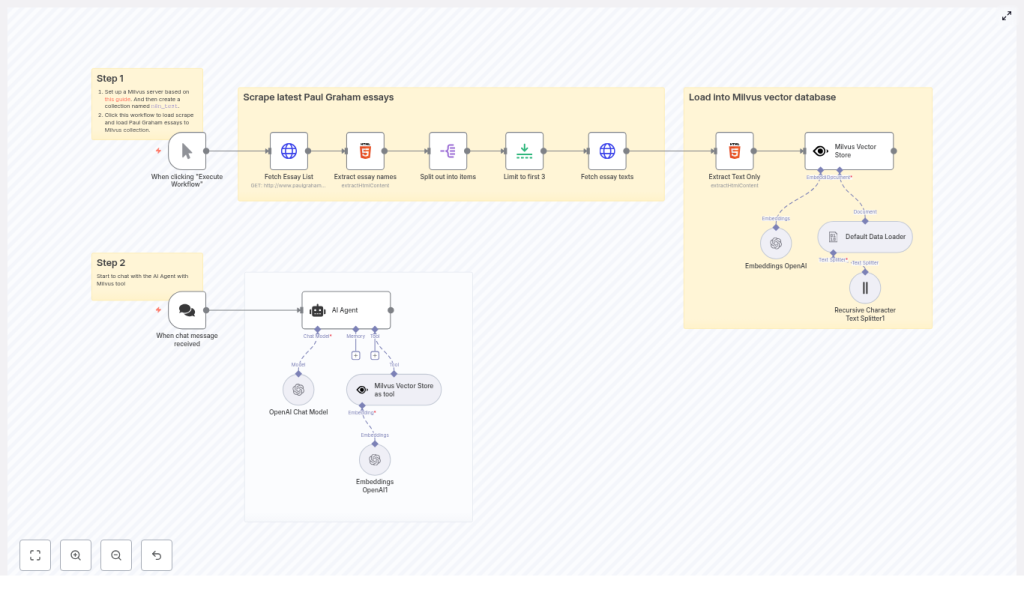
This guide describes how to implement an end-to-end retrieval augmented generation (RAG) pipeline using n8n, Milvus, and OpenAI embeddings. The workflow automatically scrapes Paul Graham essays, converts them into vector embeddings, stores them in a Milvus collection, and exposes that collection to a conversational AI agent for high-quality, context-aware responses.
The template covers the complete lifecycle: scraping, text extraction, chunking, embedding, vector storage, and conversational retrieval. It is designed for automation engineers and AI practitioners who want a reproducible pattern for building private knowledge bases backed by vector search.
Architecture Overview
The n8n workflow is organized into two primary phases that run as part of a single automated pipeline:
- Indexing phase – Scrapes Paul Graham essays, extracts clean text, splits it into chunks, generates embeddings, and inserts them into a Milvus collection named
n8n_test. - Chat and retrieval phase – Uses an AI Agent backed by an OpenAI chat model and Milvus as a retrieval tool to answer user questions grounded in the indexed essays.
By separating indexing from retrieval in a single orchestrated workflow, you can easily re-index content, tune chunking and embedding settings, and immediately validate changes through the same conversational interface.
Why Use n8n, Milvus, and OpenAI Together?
This combination provides a robust and scalable pattern for production-grade RAG systems:
- n8n – Handles orchestration, scheduling, retries, and integration with multiple data sources through a visual workflow engine.
- Milvus – A high-performance vector database optimized for similarity search over large embedding collections.
- OpenAI embeddings – Provide dense vector representations of text that enable semantic search and context retrieval for LLMs.
With this setup you can:
- Index long-form essays into a searchable vector store.
- Expose a chat interface that retrieves semantically relevant passages from your Milvus collection.
- Automate refresh and re-indexing workflows as new content is published or updated.
Prerequisites
Before importing or recreating the workflow, ensure the following components are available:
- An n8n instance (self-hosted or n8n Cloud).
- A running Milvus server (standalone or cluster). This template assumes a collection named
n8n_test. You can use the official Milvus Docker Compose setup to get started. - An OpenAI API key configured in n8n credentials for both embeddings and the chat model.
- Basic familiarity with n8n nodes, especially the AI and LangChain-style nodes used for loading, splitting, embedding, and retrieval.
Workflow Breakdown
1. Scraping and Document Preparation
The first part of the workflow focuses on acquiring the essays and converting them into a structured document set suitable for embedding.
1.1 Fetching the Essay Index
- HTTP Request (Fetch Essay List)
The workflow starts with an HTTP Request node that performs aGETon the Paul Graham essays index page, for examplepaulgraham.com/articles.html. The response contains links to individual essays. - HTML Extract (Extract Essay Names and URLs)
An HTML Extract node parses the index page, targeting anchor tags that represent essay links. This node outputs a structured list of essay URLs that will be processed downstream.
1.2 Controlling the Volume for Testing
- Split Out
The Split Out node converts the list of essay links into individual items, allowing n8n to iterate over each essay independently. - Limit
During development or testing, a Limit node can be used to restrict processing to the firstNessays. The template uses a limit of 3 essays as an example. You can remove or adjust this limit when running in production.
1.3 Retrieving and Cleaning Essay Content
- HTTP Request (Fetch Essay Texts)
For each essay URL, an HTTP Request node fetches the full HTML page. - HTML Extract (Extract Text Only)
Another HTML Extract node isolates the main article body, excluding navigation, images, and other non-essential elements. The result is clean textual content that can be converted into documents for embedding.
2. Chunking and Embedding
After the raw text is extracted, the workflow transforms it into embedding-friendly chunks.
2.1 Document Loading and Splitting
- Default Data Loader
The Default Data Loader node converts the extracted HTML or text into document objects compatible with the downstream AI nodes. - Recursive Character Text Splitter
This node segments each document into smaller chunks based on character length. In the template, thechunkSizeis set to 6000 characters. This value can be tuned depending on:- The token limit of your embeddings model.
- The desired granularity of retrieval.
- The typical length and structure of the source content.
For many RAG systems, smaller chunks (for example, 500-2,000 characters) improve retrieval precision but increase the number of embedding calls and overall storage.
2.2 Generating Embeddings
- Embeddings OpenAI
The OpenAI Embeddings node computes vector representations for each chunk. These vectors are later inserted into Milvus. When running at scale, consider:- Batching embedding requests to reduce API overhead.
- Monitoring cost and rate limits from OpenAI.
- Implementing retry and backoff strategies for robustness.
3. Vector Storage in Milvus
Once embeddings are generated, they are persisted in a Milvus collection that serves as the knowledge base for the AI agent.
3.1 Connecting to Milvus
- Milvus Vector Store
The Milvus Vector Store node writes embeddings into the specified collection, for examplen8n_test. In the template:- The node uses Milvus credentials stored in the n8n credentials manager.
- You can configure the node to clear the collection before inserting new data, which is useful when you want a fresh index on each run.
3.2 Collection and Metadata Strategy
For production use, it is advisable to:
- Define a stable collection schema and naming convention, such as one collection per domain or content type.
- Store metadata alongside each vector, for example:
- Essay URL
- Title
- Publication date
- Paragraph or chunk index
This enables the AI agent or downstream applications to provide citations and traceability.
4. Conversational Retrieval with AI Agent
The second major phase turns the Milvus collection into a tool that an AI agent can use during conversations.
4.1 Exposing Milvus as a Tool
- Milvus Vector Store as Tool
This node exposes Milvus retrieval as a callable tool for the AI Agent. It is configured to query the same collection that was populated during indexing, such asn8n_test. At runtime, the agent can perform similarity search to retrieve the most relevant chunks for a given user query.
4.2 Configuring the AI Agent and Chat Model
- AI Agent + OpenAI Chat Model
The AI Agent node is wired to an OpenAI chat model, for examplegpt-4o-mini. Key configuration points include:- Defining a system prompt that instructs the agent to rely on Milvus retrieval as its primary knowledge source.
- Ensuring the agent is allowed to call the Milvus tool whenever it needs additional context.
- Controlling temperature and other model parameters to balance creativity and factual accuracy.
With this setup, user questions are answered based on semantically relevant passages from the Paul Graham essays stored in Milvus, which reduces hallucinations and improves answer grounding.
Configuration Guidelines and Best Practices
Milvus Collections and Credentials
To ensure reliable indexing and retrieval:
- Create a Milvus collection such as
n8n_testbefore running the workflow. - Configure Milvus credentials securely in the n8n credentials manager.
- Decide whether each workflow execution should:
- Clear the collection and fully re-index, or
- Perform incremental updates and upserts for new or changed essays.
- Implement collection lifecycle policies as your dataset grows to manage storage and performance.
Chunking Strategy
Chunking is a key lever for retrieval performance:
- Align
chunkSizewith the context window of your embeddings and chat models. - Experiment with smaller chunks (for example, 500-2,000 characters) if you observe low relevance or overly broad matches.
- Include overlaps between chunks if you want to preserve context across paragraph boundaries.
Embeddings Model and Cost Management
- Use the OpenAI embeddings node with a suitable model for your use case.
- Batch requests where possible to reduce latency and cost.
- Monitor error rates and apply retry/backoff logic to handle transient API issues.
Chat Model Configuration
- Select a chat model such as
gpt-4o-minithat balances quality and cost. - Design a system prompt that:
- Emphasizes use of the Milvus tool for factual information.
- Discourages speculation when no relevant context is found.
- Optionally instruct the agent to surface citations, for example by including essay titles or URLs from metadata in its responses.
Security and Operational Maintenance
- Store all API keys and Milvus connection details in n8n credentials, not in plain-text nodes.
- Audit indexing runs by logging timestamps, number of documents processed, and any errors encountered.
- Implement incremental indexing where feasible:
- Detect new or updated essays.
- Only re-embed and upsert affected chunks instead of reprocessing the entire corpus.
- Plan for backup and restore of your Milvus data if the collection becomes a critical knowledge asset.
Troubleshooting Guide
- No results during chat
Verify that:- Embeddings were successfully inserted into Milvus.
- The Milvus Vector Store as Tool node is configured to read from the correct collection.
- There are no credential or connectivity issues between n8n and Milvus.
- Low relevance or off-topic answers
Consider:- Reducing chunk size to create more granular vectors.
- Storing and using metadata such as URL and paragraph index for filtering or re-ranking.
- Increasing the number of retrieved neighbors per query.
- Rate limits or API errors from OpenAI
Address by:- Batching embedding requests.
- Implementing retry with exponential backoff.
- Monitoring usage against your OpenAI account limits.
- HTML extraction misses or truncates content
Improve the HTML Extract node by:- Refining CSS selectors to precisely target the article body.
- Testing against several essays to ensure consistent extraction.
Example Scenarios
- Interactive Q&A over Paul Graham essays
Ask the AI Agent: “What does Paul Graham say about startups and product-market fit?”
The agent queries Milvus, retrieves the most relevant essay chunks, and synthesizes a response grounded in those passages. - Internal research assistant
Build an assistant that not only answers questions, but also cites the specific essay and paragraph where the information originated, using metadata stored in Milvus. - Automated periodic refresh
Schedule the workflow to run periodically, detect newly added essays, and update the Milvus collection without manual intervention.
Implementation Best Practices
- Always attach source metadata (URL, title, publication date, chunk index) to each embedded document to support provenance and debugging.
- Maintain an audit trail of indexing runs, including counts of documents and embeddings, to track growth and diagnose issues.
- Test on a small subset of essays with the Limit node before scaling to the full corpus, so you can tune chunking, embedding, and retrieval parameters safely.
Getting Started
To deploy this workflow in your environment:
- Clone or recreate the template in your n8n instance.
- Create a Milvus collection named
n8n_test(or adjust the workflow to use your preferred collection name). - Configure Milvus and OpenAI credentials in the n8n credentials manager.
- Execute the workflow to scrape and index the sample Paul Graham essays.
- Start a chat session with the AI Agent node and validate that responses are grounded in the indexed content.
Need assistance? If you require help setting up Milvus, tuning chunk sizes, or refining AI Agent prompts for your specific domain, feel free to reach out or leave a comment. Follow our blog for more patterns and templates focused on production-ready RAG workflows and n8n automation best practices.
