


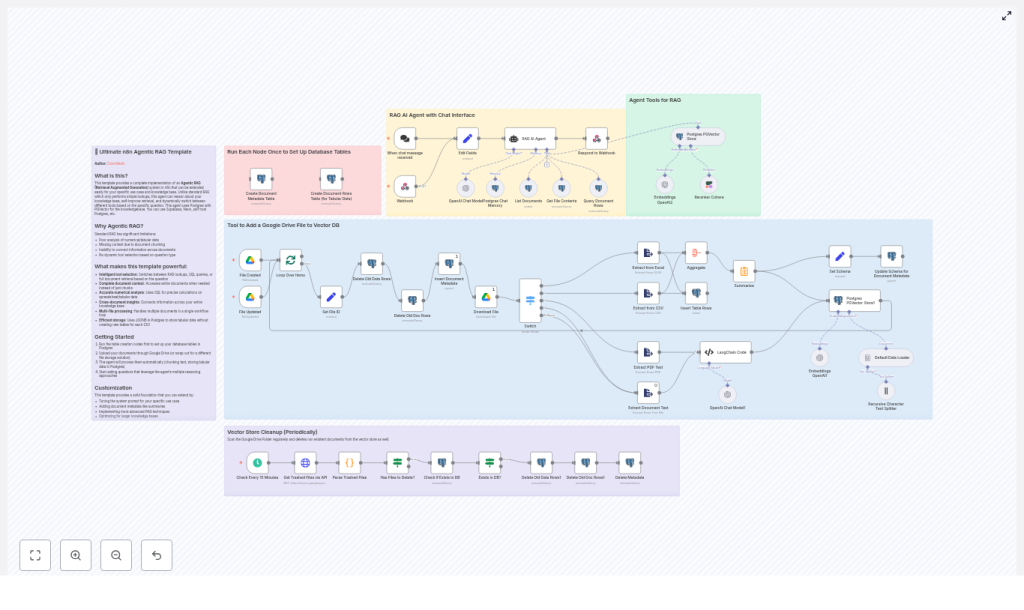
Agentic RAG n8n Template – Technical Reference & Configuration Guide
This guide provides a technical deep dive into the Agentic RAG (Retrieval-Augmented Generation) n8n template (RAG AI Agent Template V4). It explains the workflow architecture, node responsibilities, data flow, and configuration details for building a knowledge-driven agent using Postgres + PGVector, Google Drive, and OpenAI embeddings. All steps, nodes, and behaviors from the original template are preserved and reorganized into a reference-style format for easier implementation and maintenance.
1. Conceptual Overview
1.1 What is an Agentic RAG Workflow?
Traditional RAG implementations typically follow a simple sequence: retrieve semantically similar document chunks from a vector store, then generate an answer with an LLM. The Agentic RAG template extends this pattern with an agent that can:
- Select among multiple tools (RAG retrieval, SQL over JSONB, or full-document access).
- Perform precise numeric and aggregated computations using SQL.
- Handle both unstructured content (PDFs, Google Docs, plain text) and structured/tabular data (spreadsheets, CSV files).
- Fallback to whole-document analysis when chunk-based context is insufficient.
This architecture improves answer accuracy, especially for numeric and tabular queries, supports deeper cross-document reasoning, and reduces hallucinations by grounding responses in explicit data sources.
1.2 Key Capabilities and Benefits
- Agentic tool selection – The agent chooses between RAG, SQL, and full-document tools based on the query type.
- Accurate numeric analysis – SQL queries run against JSONB rows stored in Postgres for spreadsheets and CSVs.
- Whole-document reasoning – The agent can fetch entire file contents if chunked retrieval does not provide enough context.
- Automated ingestion for tabular data – Schemas and row data are inferred and stored without creating new SQL tables per file.
- Vector store hygiene – Scheduled cleanup keeps PGVector in sync with Google Drive, removing vectors for trashed files.
2. Workflow Architecture
2.1 High-Level Data Flow
The n8n template is a complete end-to-end workflow with the following main phases:
- Triggering:
- Google Drive Trigger for file creation and updates.
- Chat/Webhook Trigger for user queries and agent sessions.
- File ingestion:
- File type detection and content extraction for Google Docs, Google Sheets, PDFs, Excel, CSV, and plain text.
- Normalization of extracted content into a consistent text or tabular representation.
- Text preprocessing:
- Recursive character-based text splitting for unstructured content.
- Chunk size control to optimize embeddings and retrieval quality.
- Embedding & storage:
- OpenAI embeddings for text chunks.
- Storage of vectors, metadata, and tabular rows in Postgres with PGVector.
- Agent execution:
- LangChain-style agent that calls tools exposed via n8n Postgres nodes.
- RAG retrieval, SQL queries, and full-document access for answering user questions.
- Maintenance:
- Periodic cleanup of vectors and metadata for deleted or trashed Google Drive files.
2.2 Core Storage Schema in Postgres
The template uses three primary Postgres tables:
- documents_pg (vector store)
- Stores embeddings for text chunks.
- Includes original chunk text and metadata fields such as
file_idand chunk indices.
- document_metadata
- Contains file-level metadata, including:
- File identifier.
- Title or name.
- Source URL or Drive link.
- Creation timestamp.
- Schema information for tabular files.
- Contains file-level metadata, including:
- document_rows
- Stores tabular data rows as
JSONB. - Enables flexible SQL queries using JSON operators.
- Supports numeric aggregations and filters without creating a dedicated SQL table per file.
- Stores tabular data rows as
Using JSONB for rows allows the agent to run queries like sums, averages, or maxima over spreadsheet data while keeping the schema flexible across different files.
3. Node-by-Node Breakdown
3.1 Trigger Nodes
3.1.1 Google Drive Trigger
Purpose: Start the ingestion pipeline whenever a file is created or updated in a specific Google Drive folder.
- Credentials: Google Drive OAuth credentials configured in n8n.
- Configuration:
- Target a specific folder by its folder ID.
- Set the trigger to watch for file creation and update events.
- Behavior:
- Emits file metadata to downstream nodes for extraction and processing.
- Supports different file types, which are later routed to the appropriate ExtractFromFile node.
3.1.2 Chat / Webhook Trigger
Purpose: Accept user messages or session inputs and pass them into the agent execution flow.
- Typical usage:
- Integrate with a chat UI.
- Expose an HTTP endpoint for programmatic queries.
- Data passed:
- User query text.
- Optional session or user identifiers for context management.
3.2 File Extraction & Text Processing Nodes
3.2.1 ExtractFromFile Nodes
Purpose: Convert various file formats into normalized text or structured rows.
File types handled include:
- PDF documents.
- Google Docs.
- Google Sheets.
- Excel files.
- CSV files.
- Plain text files.
Behavior and configuration notes:
- Each node is configured to:
- Detect and extract the main textual content or tabular data.
- Produce consistent output fields so that downstream nodes can handle all file types uniformly.
- Tabular sources (Sheets, Excel, CSV) produce row-based outputs that will be inserted into
document_rowsas JSONB. - Unstructured sources (PDF, Docs, text) produce raw text that is later split into chunks for embeddings.
3.2.2 LangChain Code + Recursive Character Text Splitter
Purpose: Segment large text documents into semantically coherent chunks that are suitable for embedding and retrieval.
- Implementation:
- Uses LangChain-style code inside n8n to implement a recursive character text splitter.
- Leverages an LLM to detect natural breakpoints when appropriate.
- Chunking strategy:
- Ensures each chunk falls within configured minimum and maximum character sizes.
- Merges smaller segments to avoid overly short chunks that degrade embedding quality.
- Output:
- Array of chunks, each with text in a specific property expected by the Embeddings node.
Edge case consideration: If no text is extracted or the splitter receives empty input, no chunks are produced and no embeddings will be created. This is typically surfaced as “no vectors inserted” and should be checked during troubleshooting.
3.3 Embeddings & Vector Storage Nodes
3.3.1 OpenAI Embeddings Node
Purpose: Convert text chunks into embedding vectors.
- Model: Typically configured with
text-embedding-3-small, although any supported OpenAI embedding model can be used. - Inputs:
- Chunk text from the Recursive Character Text Splitter.
- Outputs:
- Vector representations for each chunk, along with the original text and metadata fields.
Configuration notes:
- Ensure the property name containing the text matches what the Embeddings node expects.
- Verify that OpenAI credentials are correctly set in n8n and that the model name is valid.
3.3.2 PGVector Storage in Postgres
Purpose: Persist embeddings in a PGVector-enabled Postgres table and expose them as a vector store tool for the agent.
- Table:
documents_pg - Data stored:
- Embedding vectors.
- Original chunk text.
- Metadata fields such as:
file_id.- Chunk index.
- Any additional attributes needed for filtering.
- Usage:
- Configured as a LangChain-style vector store tool within the agent.
- Supports top-K similarity search for RAG queries.
3.4 Postgres Metadata & Tabular Data Nodes
3.4.1 document_metadata Table Initialization
Purpose: Maintain file-level metadata for all ingested documents.
- Initialization:
- Dedicated n8n nodes named similar to “Create Document Metadata Table” must be executed once to create the table.
- Typical fields:
- Document ID or file ID.
- Title or filename.
- Source URL or Drive link.
- Creation or ingestion timestamp.
- Schema definition for associated tabular files.
3.4.2 document_rows Table Initialization
Purpose: Store tabular rows from spreadsheets and CSV files as JSONB, enabling flexible SQL queries.
- Initialization:
- Run the “Create Document Rows Table” node once to generate the
document_rowstable.
- Run the “Create Document Rows Table” node once to generate the
- Data model:
- A
row_datacolumn of typeJSONBfor each row. - References to the originating document via a document or file ID.
- A
- Benefits:
- No need to create one SQL table per spreadsheet or CSV file.
- Queries can use JSON operators and explicit casting for numeric fields.
3.5 Agent & Tool Nodes
3.5.1 Agent Node (LangChain-style)
Purpose: Orchestrate calls to tools based on the user query, using a system prompt and reasoning loop.
- Inputs:
- User message from the Chat/Webhook Trigger.
- Available tools exposed via PostgresTool nodes and vector store integration.
- Outputs:
- Final chat response, optionally including references or citations.
- Behavior:
- Prefers RAG-based vector retrieval for general Q&A.
- Uses SQL tools for explicit numeric or aggregated questions.
- Falls back to whole-document access when retrieval is insufficient.
3.5.2 PostgresTool Nodes (Agent Tools)
The agent is given several tools, each exposed via n8n PostgresTool nodes:
- List Documents
- Queries
document_metadatato enumerate available documents. - Used by the agent to discover what content exists before choosing a retrieval strategy.
- Queries
- Get File Contents
- Retrieves full text for a specific file.
- Supports deeper analysis when chunk-level context is not enough.
- Query Document Rows
- Executes SQL queries over
document_rows, including aggregations and numeric computations. - Ideal for questions like sums, averages, or maximum values in tabular data.
- Executes SQL queries over
- Vector Store RAG
- Runs top-K similarity search against
documents_pg. - Returns the most relevant chunks for grounding the agent’s response.
- Runs top-K similarity search against
Prompting strategy: The system prompt instructs the agent to:
- Use RAG retrieval as the default for general questions.
- Use SQL tools only when explicit tabular or numeric precision is required, such as sums or averages.
- Inspect available documents and call the full-document tool if vector retrieval does not yield sufficient context.
3.6 Cleanup & Synchronization Nodes
3.6.1 Vector Store Cleanup
Purpose: Keep the vector store aligned with Google Drive by removing embeddings and metadata for trashed or deleted files.
- Triggering:
- Typically scheduled using an n8n Cron node or similar mechanism.
- Behavior:
- Queries Google Drive for trashed files in the watched folder.
- Removes corresponding entries from
documents_pgand metadata tables.
Edge case: If the Google Drive API is not authorized to list trashed files, cleanup will not remove those vectors. Ensure the OAuth scope includes access to file metadata and trash status.
4. Configuration & Deployment Checklist
Use this checklist to bring the template into a working state:
- Provision Postgres with PGVector
- Use a provider like Neon, Supabase, or a self-hosted Postgres instance.
- Install and enable the PGVector extension.
<
