


AI Agent to Chat with Airtable: Build a Smarter, More Focused Workflow with n8n + OpenAI
Imagine talking to your Airtable data like you talk to a teammate. No more digging through views, building complex filters, or exporting to spreadsheets. With a single message, you ask a question and get back exactly what you need – summaries, charts, maps, and insights that help you act faster.
This is what an AI chat agent for Airtable makes possible. Using an n8n workflow template powered by OpenAI, you can turn natural language questions into precise Airtable searches, filters, and visualizations. In this guide, you will walk through the journey from manual data wrangling to conversational data access, and see how this template can become a foundation for a more automated, focused way of working.
From Manual Filters To Conversational Insight
Most teams already rely on Airtable to store business-critical information. Product catalogs, orders, leads, support tickets, projects, campaigns – they all live there. The challenge is not storing the data, it is turning that data into answers quickly.
Without automation, you might find yourself:
- Clicking through multiple views and filters to answer simple questions
- Exporting CSVs into spreadsheets to run basic calculations
- Copying and pasting data into other tools to create charts or maps
- Losing time context-switching between tools and tabs
These tasks are important, but they are not the best use of your focus or creativity. An AI agent changes the dynamic. Instead of you adapting to the tool, the tool adapts to you.
Shifting Your Mindset: Let the Agent Do the Heavy Lifting
Building an AI agent for Airtable is not just a technical exercise. It is a mindset shift. You are moving from “I need to build a view for this” to “I will just ask a question.”
With a conversational AI agent connected to Airtable, you can:
- Turn natural-language questions into Airtable searches and filters
- Automatically aggregate, count, and summarize records
- Generate visual outputs like maps and charts on demand
- Keep context across multiple questions in the same conversation
Instead of manually configuring filters every time, you describe what you want: “Show me orders where Status is Shipped in March” or “Find tickets mentioning timeout or error with priority greater than 3.” The agent translates those requests into Airtable formulas and API calls for you.
This template is a practical way to start thinking in terms of automation-first workflows. You do not have to reinvent your entire system. You can start with one workflow, see the impact, then expand.
Meet Your New Workflow: n8n + OpenAI + Airtable
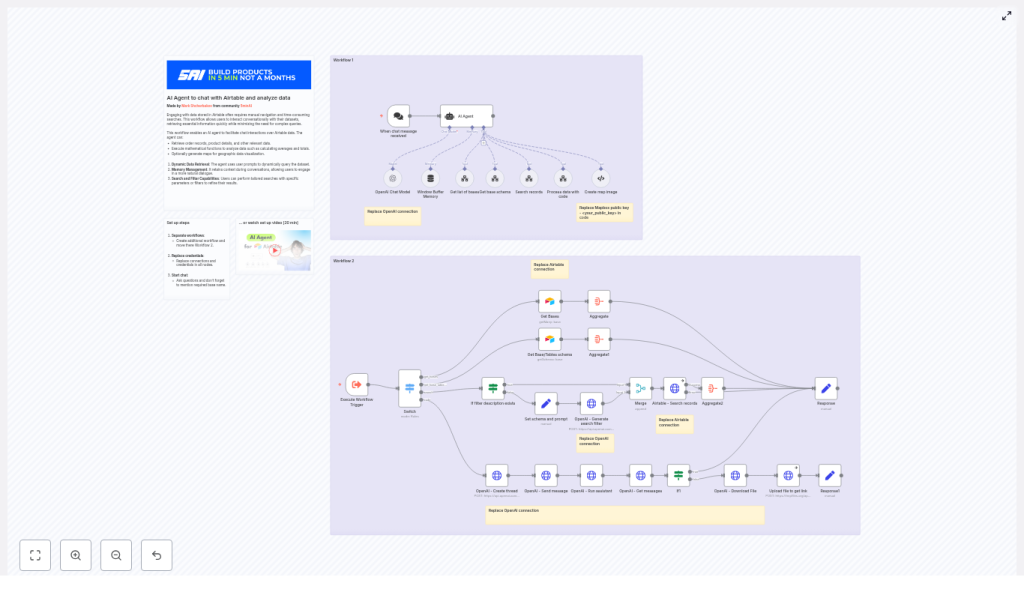
The provided n8n workflow template orchestrates a full conversational agent around your Airtable data. It is designed to be modular, safe, and extensible, so you can adapt it to your needs as you grow.
At a high level, the workflow connects four key pieces:
- A chat entry point that receives user messages
- An AI agent powered by OpenAI that interprets intent and chooses tools
- Specialized tools and sub-workflows that talk to Airtable and other APIs
- Code and visualization helpers that transform raw data into insights
Let us walk through the main components so you can see how everything fits together and where you can customize and extend it.
Core Components of the n8n AI Agent Workflow
1. Chat Trigger: The Conversation Starting Point
The journey begins when a user sends a message. The Chat Trigger node in n8n:
- Starts the workflow whenever a new chat message arrives
- Captures the message content
- Includes a session identifier so the agent can maintain conversational context
This context is what allows the agent to understand follow-up questions like “What about last month?” without you repeating all the details.
2. AI Agent (OpenAI): The Brain of the Operation
The AI agent node, backed by OpenAI, is responsible for understanding what the user wants and deciding what to do next. It:
- Interprets the user’s message and intent
- Chooses which tools to call, such as search, code, or map generation
- Builds structured requests to Airtable and other services
- Uses a memory buffer to store recent conversation history for coherent follow-ups
Instead of you manually choosing views or writing formulas, the agent uses the available tools and your Airtable schema to construct the right queries on the fly.
3. Tools and Sub-workflows: Your Agent’s Skill Set
The power of this template comes from a set of reusable tools that the agent can call whenever needed. Each tool focuses on a specific task:
- Get list of bases – Retrieves all available Airtable bases so the user can select the correct one. This is especially helpful if your organization has multiple bases for different teams or products.
- Get base schema – Fetches table and field definitions so the agent knows exactly which fields exist and what types they are. This is essential for building accurate filters and queries.
- Search records – Sends search requests to the Airtable API using formulas or filters generated by the agent. This is where natural language is turned into precise Airtable filter formulas.
- Process data with code – Runs custom logic for aggregations, math operations, or transforming data into formats suitable for charts or images. This helps ensure numerical accuracy and flexible post-processing.
- Create map image – Uses Mapbox to convert geolocation fields into a static map image link, enabling quick geographic visualizations of your Airtable records.
Each of these tools is a building block. You can use them as-is, combine them in new ways, or add your own tools as your automation needs expand.
Turning Natural Language Into Airtable Filters
One of the most transformative aspects of this workflow is its ability to convert free-text filter descriptions into valid Airtable formula filters. This is what allows you to speak in plain language while still getting precise results.
The workflow uses a staged approach to generate robust filters:
- Fetch the table schema so the agent knows the exact field names and data types it can work with.
- Send a structured prompt to OpenAI that describes Airtable formula best practices and examples, such as:
- Using
SEARCH(LOWER(...))for case-insensitive text matching - Combining conditions with
AND()andOR() - Handling date comparisons and type-specific checks
- Using
- Validate and merge the generated formula into the HTTP request body sent to the Airtable API.
This approach helps ensure that:
- Filters are syntactically correct and aligned with Airtable’s formula language
- Text comparisons are case-insensitive when needed
- Field types are respected, so numeric and date fields are handled properly
The result is a workflow that reliably turns “Find tickets mentioning timeout or error and priority greater than 3” into a working Airtable formula without manual intervention.
Quick Setup: From Template to Working AI Agent
You do not need to start from scratch. The provided n8n template gives you a ready-made foundation that you can adapt in minutes. Here is how to get it running:
- Clone the workflow into your n8n instance or import the template directly.
- Update the credentials:
- OpenAI API key
- Airtable token
- Optional Mapbox public key if you want map visualizations
- Confirm
base_idandtable_idvalues, or rely on the Get list of bases tool to let users choose the base interactively. - Start with simple test queries, such as “Show me orders where Status = Shipped in March.”
- Enable pagination and set sensible limits for large datasets so the workflow remains fast and reliable.
Once the basics are in place, you can iterate. Try different prompts, add new tools, and refine the system message or schema prompts to better match your business logic.
Working Safely: Best Practices for Reliable Automation
As you give an AI agent more power over your data, it becomes even more important to design for safety, clarity, and control. This template already bakes in good practices, and you can strengthen them further as you grow.
Data Minimization and Field Exposure
- Expose only the minimum necessary fields to the agent.
- Avoid including sensitive or confidential fields in conversations if they are not needed for the query.
Logging and Observability
- Log user queries, generated filters, and returned record IDs.
- Use these logs for auditing, debugging, and improving prompts or tool behavior over time.
Model Control and Prompt Safety
- Limit the OpenAI model scope with a clear and controlled system message.
- Reduce prompt injection risk by validating outputs against strict JSON schemas when possible.
- Keep the agent’s capabilities focused and predictable.
Accurate Calculations and Aggregations
- Use the dedicated code tool node for arithmetic, aggregations, and chart preparation.
- Avoid relying on the language model itself to compute numbers.
These practices help you build an AI agent that is not only powerful but also trustworthy, auditable, and compliant.
Troubleshooting and Fine-tuning Your Agent
As you experiment and expand the workflow, you may run into common issues. These are not roadblocks, they are opportunities to tune your system and deepen your understanding.
Incorrect Filter Syntax
If the Airtable API returns an error, inspect the generated filter formula. Common adjustments include:
- Wrapping text comparisons with
SEARCHandLOWERfor case-insensitive matches - Using
VALUE()when comparing numeric values stored as text
Missing Fields in the Schema
Always fetch the table schema before generating filters. If a field is missing from the schema, the agent might reference a non-existent column, which will cause failures. Ensuring the schema is fresh and accurate helps the agent build valid queries every time.
Handling Large Result Sets
When working with large tables:
- Set a default limit on the number of records returned.
- Ask for explicit user confirmation before fetching all records.
- Use pagination and aggregation to reduce payload sizes and keep responses fast.
Seeing It in Action: Example User Journeys
To understand the impact on your day-to-day work, it helps to see how typical flows feel when powered by this AI agent.
1. Sales Summary in Seconds
User: “Show me total revenue for Q2 by region.”
Agent actions:
- Retrieve the schema to understand which fields represent revenue, dates, and regions
- Search or filter records for Q2
- Send the matching records to the code node to sum revenue and group by region
- Return a table of totals, along with an optional map image to visualize performance by region
What might have taken several exports and pivot tables becomes a single conversation.
2. Support Ticket Investigation
User: “Find tickets mentioning ‘timeout’ or ‘error’ and priority > 3.”
Agent actions:
- Generate an Airtable formula using
SEARCHfor case-insensitive substring matching - Combine conditions with
ANDandORso both text and priority filters apply - Return the matching records and a short summary of counts or trends
Instead of building a complex filter manually, you describe the problem, and the agent does the rest.
Extending the Template as Your Automation Matures
This workflow is not a closed box. It is a starting point you can grow with. As your confidence and needs evolve, you can extend the template in powerful ways.
- Role-based access control so only certain users can view specific fields or tables.
- Webhook triggers that notify Slack or email when the agent finds critical records, such as high-priority tickets or overdue tasks.
- Scheduled reports that run the same prompts automatically on a schedule and upload CSV results to cloud storage.
Each extension brings you closer to a fully automated, insight-on-demand environment where your team spends more time making decisions and less time preparing data.
Security and Compliance for Production Data
When you connect AI to live business data, security is non-negotiable. This template can fit into a secure, compliant environment when you follow a few essential guidelines.
- Mask or redact PII before sending content to the OpenAI API if that data is not strictly needed for the query.
- Use environment secrets in n8n for all keys and tokens, and avoid hardcoding credentials in shared workflows.
- Maintain an audit trail of model prompts, generated filters, and actions for regulatory and internal compliance.
These practices help you scale your AI usage without compromising trust or governance.
Your Next Step: Turn Curiosity Into Automation
This n8n workflow template brings together a conversational AI agent, Airtable, and optional Mapbox visualization to make data exploration intuitive and fast. With schema-aware filter generation, dedicated code tools for accurate math, and modular tools for maps and more, it gives non-technical users a powerful new way to interact with data.
Most importantly, it is a stepping stone. You can start small, automate a single repetitive reporting task, then gradually build a richer AI-powered layer on top of your Airtable bases.
Ready to try it?
- Import the workflow into your n8n instance.
- Add your OpenAI and Airtable credentials, plus Mapbox if you want maps.
- Run a few test queries and see how it changes the way you think about your data.
From there, keep iterating. Adjust prompts, refine safety rules, add new tools, and let your workflow evolve with your business.
Want support tailoring it to your specific base and logic, or need a security review before going live? Reach out for a guided setup and customization so you can move faster with confidence.
