


AI Agent to Chat with YouTube in n8n
Introduction
This guide explains how to implement a production-grade AI agent in n8n that can interact with YouTube data in a conversational way. The workflow combines the YouTube Data API, Apify, OpenAI, and Postgres to deliver an end-to-end automation that:
- Fetches and analyzes YouTube channel and video metadata
- Transcribes video content
- Evaluates and critiques thumbnails
- Aggregates and interprets viewer comments
- Maintains chat context across sessions using persistent memory
The result is an AI-powered YouTube analysis agent that creators, growth teams, and agencies can use to generate content ideas, optimize thumbnails, and understand audience sentiment at scale.
Business context and value
For most YouTube-focused teams, three operational challenges recur:
- Audience intelligence – Identifying what viewers care about based on real comments and engagement signals.
- Content repurposing – Turning long-form video content into blogs, social posts, and short-form formats efficiently.
- Creative optimization – Iterating on thumbnails and titles to improve click-through rates and watch time.
This n8n-based AI agent addresses those challenges by centralizing data retrieval and analysis. It leverages:
- YouTube Data API for channel, video, and comment data
- Apify for robust video transcription
- OpenAI for language understanding and image analysis
- Postgres for chat memory and multi-session context
Instead of manually querying multiple tools, users can ask the agent questions such as “What content opportunities exist on this channel?” or “How should we improve our thumbnails?” and receive structured, actionable outputs.
Solution overview and architecture
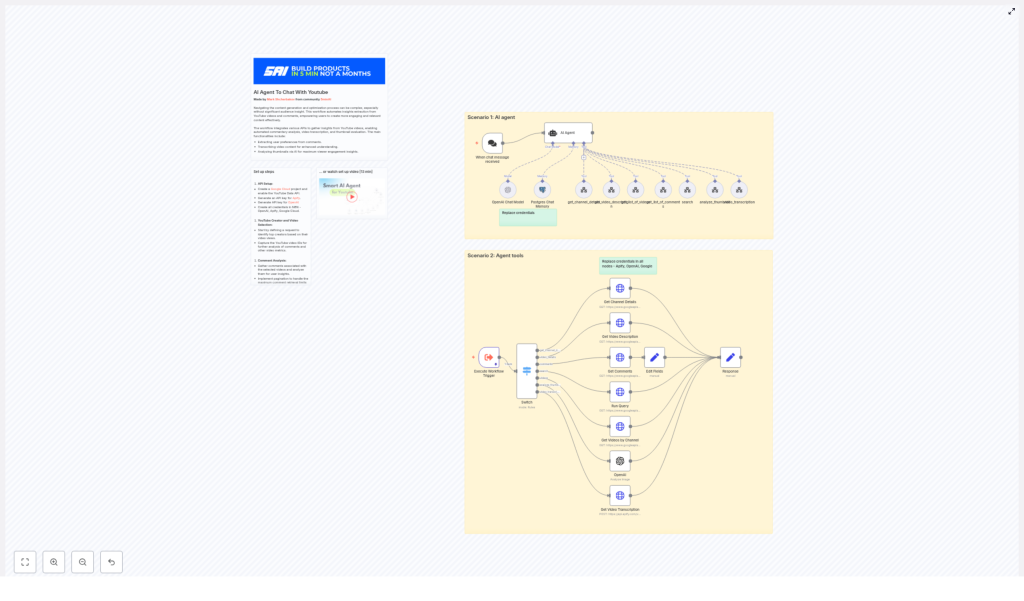
The solution is organized into two main components:
- The AI agent workflow – A LangChain-based n8n agent node that receives user prompts, decides which tools to invoke, and synthesizes final responses.
- Supporting tool workflows – A collection of specialized nodes and subflows that perform concrete tasks such as API calls, transcription, comment aggregation, and thumbnail analysis.
Core components and integrations
- n8n Agent node (LangChain Agent) – Orchestrates tool calls, interprets user prompts, and composes final answers.
- YouTube Data API via HTTP Request nodes – Retrieves:
- Channel details
- Video lists
- Video metadata and statistics
- Comments and replies
- Apify actor – Executes video transcription based on the video URL.
- OpenAI (chat and image models) – Handles summarization, topic extraction, sentiment analysis, and thumbnail critique.
- Postgres Chat Memory – Stores conversation history and contextual data across sessions.
Key capabilities of the workflow
The template is designed to support a broad range of expert-level YouTube analysis tasks. Key features include:
- Retrieve channel details using a handle or full channel URL.
- List videos with filtering and ordering options (for example, by date or relevance).
- Fetch detailed video metadata, including descriptions, statistics, and runtime.
- Collect top-level comments and replies for deeper audience analysis.
- Transcribe video content through Apify and feed transcripts to OpenAI.
- Evaluate thumbnails using OpenAI image analysis with structured critique prompts.
- Persist conversation context in Postgres for consistent, multi-turn interactions.
Prerequisites and credential setup
Before importing or running the workflow, configure credentials for all external services inside n8n. Using n8n’s credential system is critical for security and maintainability.
1. Required APIs and accounts
- Google Cloud
- Create a project in Google Cloud Console.
- Enable the YouTube Data API.
- Generate an API key and store it as a credential in n8n.
- Apify
- Create an Apify account.
- Generate an API token to run transcription actors.
- Add the token as an Apify credential in n8n.
- OpenAI
- Create an API key with access to both chat and image models.
- Configure the key in n8n’s OpenAI credentials.
- Postgres
- Provision a Postgres database instance.
- Create a dedicated database or schema for chat memory.
- Add connection details (host, port, database, user, password) to n8n credentials.
2. Updating core n8n nodes
The template includes preconfigured nodes that must be adjusted to match your environment and API keys. Key nodes include:
- Get Channel Details
- Uses the YouTube
channelsendpoint. - Accepts either a channel handle (for example,
@example_handle) or a channel URL. - Returns channel metadata including
channelId, used downstream.
- Uses the YouTube
- Get Videos by Channel / Run Query
- Uses the YouTube
searchendpoint. - Supports ordering (for example, by date) and filters such as
publishedAfter. - Provides a list of videos for the specified channel.
- Uses the YouTube
- Get Video Description
- Calls the
videosendpoint. - Retrieves
snippet,contentDetails, andstatistics. - Enables filtering out shorts by inspecting video duration.
- Calls the
- Get Comments
- Requests top-level comments and replies for a given video.
- Configured with
maxResults=100for each call. - Can be extended with pagination logic to cover larger comment volumes.
Advanced processing: transcription, thumbnails, and comments
3. Video transcription with Apify
For long-form analysis and content repurposing, transcription is essential. The workflow uses an Apify actor to:
- Accept a YouTube video URL as input.
- Run a transcription job via Apify.
- Wait for completion and return a full text transcript.
This transcript is then available as input for OpenAI to perform tasks such as summarization, topic extraction, or generating derivative content formats.
4. Thumbnail analysis with OpenAI
The workflow evaluates thumbnails by sending the thumbnail URL to an OpenAI-compatible vision model. A structured prompt is used to guide the analysis, for example:
Assess this thumbnail for:
- clarity of message
- color contrast
- face visibility
- text readability
- specific recommendations for improvement
The AI agent then returns an actionable critique, including suggested improvements and alternative concepts aligned with click-through optimization best practices.
5. Comment aggregation and insight extraction
Viewer comments are often noisy but provide high-value qualitative insight. The workflow:
- Collects comments and replies for selected videos.
- Aggregates them into a structured payload.
- Passes the aggregated content to OpenAI for analysis.
Typical outputs include:
- Common praise and recurring complaints
- Frequently requested features or topics
- Sentiment distribution and notable shifts
- Potential titles or hooks derived from real viewer language
How the n8n AI agent orchestrates tasks
The LangChain-based agent node is the central controller of this workflow. It accepts a natural language input and dynamically selects the appropriate tools to execute.
End-to-end flow
For a request such as: “Analyze channel @example_handle for content opportunities and summarize top themes.” the agent typically performs the following steps:
- Parse the intent
- Identify that channel analysis, video review, and comment insights are required.
- Select tools such as
get_channel_details,get_list_of_videos,get_video_description,get_list_of_comments,video_transcription, andanalyze_thumbnailas needed.
- Execute tools in logical order
- Resolve the channel handle or URL to a
channelId. - List videos for that channel and optionally filter out shorts using duration.
- Pull detailed metadata and statistics for selected videos.
- Collect comments for key videos and, if requested, run transcription.
- Resolve the channel handle or URL to a
- Synthesize the response
- Aggregate all intermediate results.
- Use OpenAI to generate a human-readable summary, content opportunity analysis, thumbnail recommendations, and a prioritized action list.
Throughout the interaction, Postgres-backed chat memory maintains context so the agent can handle follow-up questions without re-running every tool from scratch.
Automation best practices and implementation tips
To ensure this workflow scales and remains reliable in a production environment, consider the following best practices.
- Pagination strategy
- YouTube search results and comment threads are paginated.
- Implement pagination logic if you need more than 50 videos or 100 comments per request.
- Store or cache page tokens where appropriate to avoid redundant calls.
- Rate limiting and quotas
- Monitor YouTube Data API quota usage, especially when running channel-wide analyses.
- Track OpenAI consumption for both text and image endpoints to prevent cost overruns.
- Transcription cost management
- Transcribing long videos can be expensive.
- Focus on high-value videos or specific segments when budgets are constrained.
- Consider rules such as “only transcribe videos above a threshold of views or watch time.”
- Shorts filtering
- Use
contentDetails.durationto identify short-form content. - Exclude videos under 60 seconds when the analysis should focus on long-form material.
- Use
- Security and key management
- Store all API keys in n8n credentials, not in plain text within nodes.
- Rotate keys periodically and restrict their permissions according to least-privilege principles.
Example prompts and practical use cases
Prompt: Derive content ideas from comments
"Analyze comments from the top 5 videos of @example_handle and return 10 content ideas with example titles and 3 short hooks each."Prompt: Thumbnail critique and optimization
"Analyze this thumbnail URL for clarity, emotional impact, and suggest three alternate thumbnail concepts optimized for CTR."Representative business use cases
- Content teams
- Generate weekly topic clusters based on transcripts and comments.
- Repurpose transcripts into blog posts, email sequences, and social snippets.
- Creators
- Identify which videos to prioritize for thumbnail, description, or pinned comment updates.
- Discover new series or playlist concepts informed by viewer feedback.
- Agencies and consultancies
- Run competitive analysis across multiple channels to surface content gaps.
- Produce standardized, repeatable reports for clients using the same automation backbone.
Cost model and scaling considerations
Operational cost typically comes from three primary sources:
- YouTube Data API
- Generally low cost and often free within default quotas.
- Quota usage increases with the number of videos and comment threads analyzed.
- Apify transcription
- Costs vary by actor and total audio length.
- Transcription is usually the most expensive component for long-form content.
- OpenAI usage
- Includes both chat-based analysis and image-based thumbnail evaluation.
- Token usage scales with transcript and comment volume.
Best practice is to start with a limited sample of videos and channels, validate the insights and ROI, then gradually scale up to automated, channel-wide runs.
Extending and customizing the workflow
The template is a solid base for more advanced automation. Common extensions include:
- Adding thumbnail A/B test suggestions and tracking click-through rate changes after implementing recommendations.
- Integrating with content planning tools such as Google Sheets or Airtable to automatically create editorial tasks.
- Building sentiment trend dashboards to detect emerging topics and trigger rapid-response content.
- Developing a frontend chat interface that connects to an n8n webhook and uses Postgres-backed session history for non-technical users.
Security, privacy, and compliance
When working with user-generated content and transcripts, align your implementation with relevant policies and regulations:
- Respect YouTube’s terms of service for data access and usage.
- Avoid exposing personally identifiable information outside secure environments.
- Define and implement data retention and deletion policies for comments and transcripts.
- Ensure access control on your n8n instance and Postgres database.
Implementation checklist
- Create a Google Cloud project and enable the YouTube Data API.
- Obtain Apify and OpenAI API keys and configure them as credentials in n8n.
- Set up Postgres and configure the chat memory integration.
- Import the workflow template and replace credentials in all relevant nodes (Google, Apify, OpenAI, Postgres).
- Run tests against a single channel and a small set of videos to validate:
- Channel and video retrieval
- Comment aggregation
- Transcription output
- Thumbnail analysis quality
- Iterate on prompts, output formatting, and filters to align with your team’s reporting or decision-making processes.
Conclusion and next steps
This n8n-based AI agent provides a scalable, repeatable approach to extracting insights from YouTube channels. By automating data collection
