


AI News Data Ingestion with n8n: Turn Information Overload into an Automated Advantage
AI is moving fast. New tools, research, and announcements land every hour, across dozens of platforms. Trying to track it all manually is exhausting, and it pulls you away from the work that actually grows your product or business.
What if that constant stream of AI news could quietly organize itself in the background, while you stay focused on strategy, writing, or building?
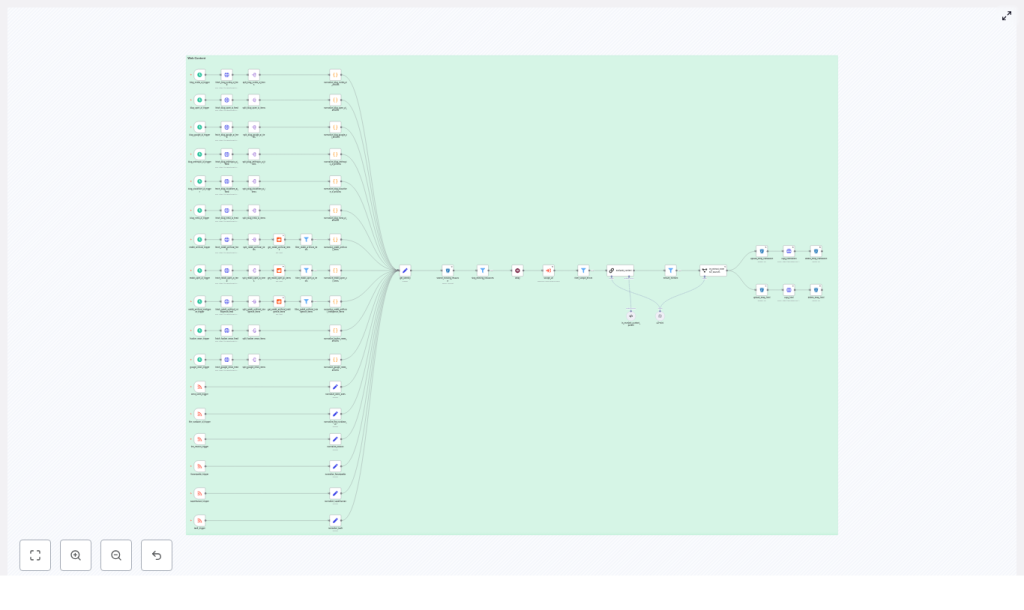
This article walks you through a production-ready n8n workflow template for AI news data ingestion. It polls RSS feeds and social sources, scrapes full content, evaluates relevance with a language model, extracts external sources, and stores canonical files in an S3-backed data store via an API.
More than a technical tutorial, think of this as a journey: from information chaos to a calm, automated system that works for you. Along the way, you will see how this workflow balances speed, deduplication, metadata fidelity, and automated relevance checks so you can power an AI newsletter, research feed, or content product with confidence.
The Problem: Information Everywhere, Focus Nowhere
If you publish an AI newsletter, run a research feed, or curate AI content for your audience, you probably face at least one of these challenges:
- You chase updates across newsletters, Reddit, Google News, Hacker News, and official AI blogs.
- You copy links into documents, then later realize you have duplicates and broken URLs.
- You spend hours deciding what is actually relevant to AI, and what is just noise.
- You wish you had a clean, structured archive of all content and sources, but it feels too big to build.
Manual curation can be rewarding, but when the volume of content explodes, it quickly becomes unsustainable. The result is stress, inconsistency, and missed opportunities.
This is the exact pain this n8n AI news ingestion workflow template is designed to relieve.
The Mindset Shift: Let Automation Do the Heavy Lifting
Automation is not about replacing your judgment. It is about protecting your time and energy so you can use your judgment where it matters most.
By handing off repetitive tasks to n8n, you:
- Free yourself from constant tab-switching and copy-paste work.
- Build a reliable system that works every hour, not just when you have time.
- Turn a fragile, ad hoc process into a repeatable pipeline you can trust and scale.
This workflow template is a concrete starting point. You do not need to design everything from scratch. Instead, you can plug in your feeds, adapt it to your stack, and then iterate. Each improvement becomes another step toward a fully automated, focused workflow that supports your growth.
The Vision: A Calm, Curated AI News Stream
At a high level, this n8n workflow implements an end-to-end content ingestion system optimized for AI news. It is designed to give you:
- Timely coverage of AI updates from multiple sources.
- Automatic filtering so only AI-related content flows through.
- Clean storage in an S3-backed data store, with rich metadata ready for downstream use.
Concretely, the workflow:
- Aggregates signals from RSS newsletters, Google News, Hacker News, and AI-focused subreddits.
- Normalizes feed metadata and generates deterministic file names for reliable deduplication.
- Scrapes full article HTML and markdown, evaluates AI relevance with a language model, and extracts authoritative external sources.
- Uploads temporary artifacts to S3, copies them into a permanent store via an internal API with rich metadata, and cleans up temporary files.
The result is a structured, searchable, and trustworthy base of AI content that you can use to power newsletters, feeds, or internal knowledge systems.
The Architecture: Three Zones That Work Together
To keep things maintainable and easy to extend, the workflow is organized into three conceptual zones. Thinking in these zones will help you customize and grow the pipeline over time.
- Feed & trigger collection – schedule triggers and RSS readers that keep a steady flow of fresh AI content coming in.
- Normalization & enrichment – unify formats, avoid duplicates, scrape full content, and apply AI-based relevance checks.
- Storage & cleanup – persist canonical files and metadata in S3 via an API, then keep your storage clean by removing temporary artifacts.
Let us walk through each of these zones and the core components that bring them to life.
Zone 1: Collecting AI Signals With Triggers and Feed Readers
Bringing multiple AI sources into one flow
The first step toward a calmer workflow is centralizing your inputs. The template uses a combination of schedule triggers (for periodic polling) and RSS triggers (for feed-driven updates). Together, they continuously pull in fresh content from a diverse set of sources, such as:
- Curated newsletters like The Neuron, FuturePedia, Superhuman
- Google News and Hacker News feeds
- AI-related subreddits such as r/ArtificialInteligence and r/OpenAI
- Official AI blogs from OpenAI, Google, NVIDIA, Anthropic, Cloudflare and others
Each feed may look different at the source, but the workflow does the work of making them feel the same to your system.
Normalizing feeds into a unified schema
To make the rest of the pipeline simple and predictable, every incoming item is mapped into a common structure, including fields like:
titleurlauthorspubDateorisoDatesourceNamefeedTypefeedUrl
As part of this normalization, the workflow also constructs a deterministic upload file name. This single detail is powerful. It enables idempotent processing and makes deduplication straightforward, which saves you time and storage later on.
Zone 2: Avoiding Duplicates and Enriching Content
Smart deduplication and identity checks
Before the workflow spends resources on scraping and analysis, it checks whether an item has already been processed. It does this by searching an S3 bucket using a prefix based on the deterministic file name.
- If the item already exists, the workflow skips further processing.
- If it does not exist, the pipeline continues and treats it as a new resource.
This simple identity check prevents duplicate ingestion from repeated feed hits or re-polling, which is essential when you scale to many sources and higher frequencies.
Scraping and content extraction
Once an item passes the identity check, the workflow runs a headless scrape of the article page. This step captures:
- The full HTML of the page.
- A generated markdown version of the content.
These artifacts are then uploaded as temporary files (for example, .html.temp and .md.temp) into a dedicated data-ingestion S3 bucket. Using temporary uploads keeps your permanent store clean and allows for:
- Asynchronous processing.
- Safe retries if something fails mid-pipeline.
- Clear separation between raw ingestion and finalized content.
Relevance evaluation with a language model
Not every article your feeds pick up is worth your attention. To keep your system focused on AI topics, the workflow uses a language model via a LangChain node to evaluate the scraped content.
The model receives the page content and applies rules such as:
- Exclude job postings and purely product-storefront pages.
- Require AI or AI-adjacent subject matter.
- Filter out content that is primarily about unrelated industries.
A structured output parser then maps the model response into a clear boolean flag plus an optional chain-of-thought. Only items flagged as relevant move forward to the next step. This is where you begin to feel the time savings: your attention is no longer spent triaging noise.
Extracting authoritative external sources
For the items that pass the relevance check, the workflow uses an information-extractor AI node to scan links on the scraped page. Its goal is to identify authoritative external source URLs that support the article’s claims, such as:
- Official product announcements.
- Research papers.
- Datasets or documentation.
These external source URLs are added to the metadata, so newsletter editors and downstream systems can quickly reference a canonical source. This helps you build not just a feed of links, but a trustworthy knowledge base.
Zone 3: Persisting Files and Keeping Storage Clean
Copying temporary files into a permanent store
Once content is scraped, evaluated, and enriched with external sources, the workflow is ready to make it permanent. It does this by calling an internal HTTP copy API that moves files from temporary S3 keys to permanent ones.
Along with the files themselves, the API receives a carefully curated metadata object that can include:
- title, authors, timestamp
- source-name and feed-url
- image-urls and external-source-urls
- Custom content types that reflect the
feedType, for example:application/vnd.aitools.newsletter+md
This rich metadata layer is what makes the pipeline so flexible. It lets you plug the same ingestion system into newsletters, internal research tools, dashboards, or even future AI agents that rely on structured content.
Cleaning up temporary artifacts
After the copy is successful, the workflow deletes the temporary files from S3. This keeps your ingestion bucket tidy and avoids long-term clutter from intermediate artifacts.
By the time a single article exits the pipeline, it has gone from a noisy feed item to a fully enriched, deduplicated, and properly stored asset you can confidently use and reuse.
Building Reliability: Retries, Delays, and Error Handling
For automation to truly support you, it has to be reliable. The template includes several patterns that help the workflow run smoothly in production:
- Retries on HTTP copy failures using n8n’s built-in retry settings with backoff, so transient network issues do not break the pipeline.
- Wait nodes (delays) between steps to reduce the risk of hitting rate limits when many feeds fire at once.
- Filter nodes that stop processing early when scrape errors occur or duplicate resources are detected, which saves compute and avoids noisy failures.
These practices make the workflow resilient and give you confidence to let it run on its own, every hour or even more frequently.
Why This Design Works So Well for AI Newsletters
Newsletters and curated feeds thrive on three qualities: timeliness, relevance, and trustworthy context. This n8n template is intentionally built around those needs.
- Timeliness: Schedule triggers and near-real-time RSS triggers keep your content fresh without manual checking.
- Relevance: A language model triages AI-related content so you see fewer false positives and can focus on the stories that matter.
- Context: Automatic extraction of external authoritative links gives you and your readers deeper references and verification.
The result is a system that quietly does the heavy lifting, while you focus on crafting narratives, offering insights, and growing your audience or product.
Ideas to Grow and Customize Your Pipeline
One of the biggest advantages of using n8n is that your workflow can evolve with your goals. Once you have this template running, you can extend and harden it step by step.
Potential improvements and extensions
- Content fingerprinting: Generate a hash of normalized content to strengthen deduplication, even when titles differ slightly.
- Observability and metrics: Emit events or metrics to systems like Prometheus or a logging sink to track ingestion rate, rejection rate, and error rate.
- Incremental content updates: Support re-ingestion with versioning so you can capture late edits to articles over time.
- Dedicated scraping service: Offload scraping to a microservice for more control over render timeouts and better handling of JavaScript-heavy pages.
- Rate limiting: Add rate limits around API calls and S3 operations to avoid hitting provider quotas during traffic spikes.
You do not need to implement everything at once. Start with the core template, then add improvements as your needs grow. Each enhancement is another step toward a powerful, tailored AI content engine that reflects how you work.
Security and Privacy: Building on a Safe Foundation
As you automate more of your content ingestion, it is important to keep security and privacy front of mind. The template already follows sensible practices that you can adopt and extend:
- Store API credentials securely in n8n credentials vaults, not in plain-text nodes.
- Ensure your copy API enforces authentication and accepts only the content types you intend to store.
- Avoid logging sensitive metadata, such as private internal URLs, to any public log sinks.
With these safeguards in place, you can scale your automation with confidence.
Putting It All Together: A Blueprint for Curated AI News
This n8n workflow template is more than a collection of nodes. It is a blueprint for a curated AI news stream, built for maintainability, scale, and editorial quality.
In one integrated pipeline, you get:
- Multiple feed sources across newsletters, aggregators, Reddit, and official AI blogs.
- Deterministic identity and deduplication using S3 prefix checks and consistent file names.
- Machine learning based relevance filtering tailored to AI and AI-adjacent topics.
- Automatic extraction of authoritative external sources for verification and context.
- Clean persistence into an S3-backed system with API-managed metadata and tidy cleanup of temporary files.
It is ideal for AI newsletters, research feeds, or content platforms that want a reliable ingestion foundation without building everything from scratch.
Your Next Step: Experiment, Iterate, and Make It Your Own
The real transformation happens when you take this template and adapt it to your world. Use it as a starting point, then let your creativity and specific needs guide your changes.
How to get started
You can:
- Download or clone the template into your n8n instance.
- Start with a small set of feeds to validate the flow and get comfortable with the structure.
- Iterate on the relevance prompt in the language model step so it reflects your editorial voice and criteria.
If you would like help adapting the workflow to your feeds, APIs, or infrastructure, you can reach out for support. Guidance on scraping strategies, model prompts, or metadata schemas can accelerate your path from idea to
