


AI-Powered Cold Email Icebreakers Workflow Explainer
What This n8n Workflow Actually Does (In Plain English)
If you’ve ever stared at a spreadsheet full of leads thinking, “How on earth am I going to write something personal for all of these people?”, this workflow is for you.
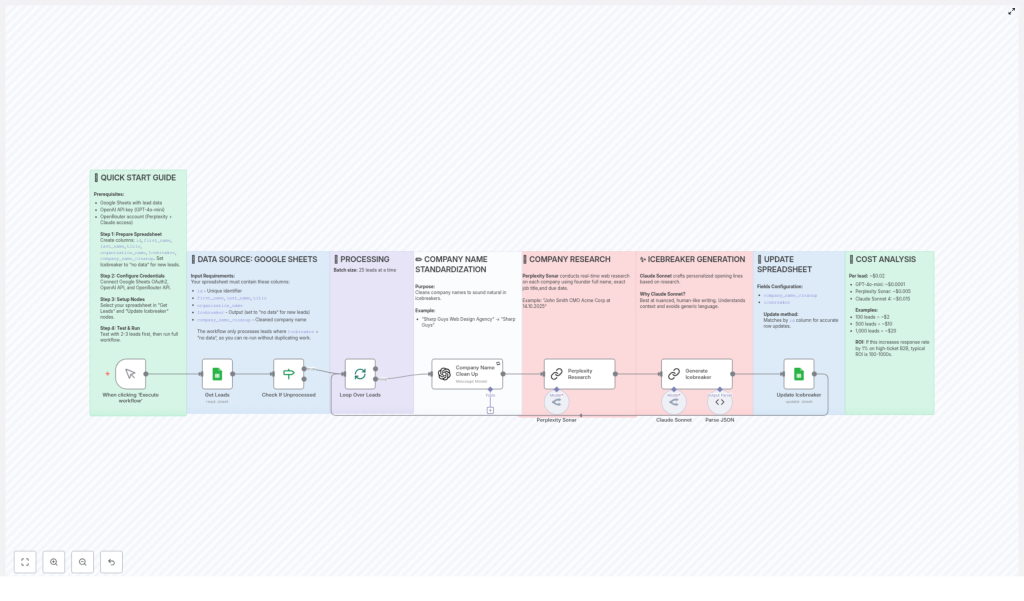
This n8n template automatically turns raw lead data in Google Sheets into short, personalized cold email icebreakers using AI. It researches each company in real time, cleans up awkward company names, and then writes a casual, human-sounding opening line you can drop straight into your outreach.
The best part: it does this in batches, at scale, for just a couple of cents per lead.
When You’ll Want To Use This Template
This workflow is a great fit if you:
- Run cold email campaigns and want higher reply rates without hiring an army of SDRs
- Work with B2B or high-ticket offers where even a small bump in responses really moves the needle
- Already store leads in Google Sheets and want to plug in automation instead of manual research
- Like the idea of AI helping you, but still want the output to sound like a real human
In short, if you’re doing any kind of outbound and you care about personalization at scale, this workflow makes your life a lot easier.
How The Workflow Flows (High-Level Overview)
Here is the big picture of what the n8n template does, start to finish:
- Pulls a batch of leads from a Google Sheet that still need icebreakers
- Cleans and standardizes company names so they sound natural in conversation
- Uses the Perplexity Sonar AI model to research each company in real time
- Feeds that research into Claude Sonnet to write a one-line, casual icebreaker
- Writes the icebreaker and cleaned company name back into your Google Sheet
- Repeats for the next batch of leads
Everything runs in batch mode, with 25 leads processed per execution, so it is built to scale as your list grows.
Step 1 – Get Your Google Sheet Ready
Before you hit run in n8n, you’ll want your data source in good shape. The template expects a specific structure in Google Sheets so it knows exactly where to read and write information.
Create (or adapt) a Google Sheet with these columns:
id– a unique identifier for each leadfirst_namelast_nametitle– your lead’s job titleorganization_name– the raw company nameIcebreaker– set this tono datafor new leadscompany_name_cleanup– this will store the polished company name
The workflow only processes rows where Icebreaker is set to no data. That means you can safely re-run the workflow without accidentally generating multiple icebreakers for the same person.
Before you start, make sure you have:
- Google Sheets (OAuth2) credentials connected in n8n
- OpenAI API credentials
- OpenRouter API credentials (for accessing models like Perplexity Sonar and Claude Sonnet)
Step 2 – Pulling Leads From Google Sheets
Once your sheet is set up, the workflow uses Google Sheets as the main data source. It looks for all rows where the Icebreaker column still says no data and selects them for processing.
To keep things predictable and scalable, the batch size is fixed at 25 leads per run. That gives you a nice balance between speed and control, and you can trigger the workflow as often as you like.
Step 3 – Cleaning Up Company Names So They Sound Human
Raw company names can sound clunky in a sentence. You probably don’t want to say, “I’ve been following Sharp Guys Web Design Agency for a while now” in a casual opener, right?
This workflow automatically standardizes company names into something more natural. For example:
Sharp Guys Web Design AgencybecomesSharp Guys
The cleaned version goes into the company_name_cleanup field. That way, when the AI writes your icebreaker, it sounds like something you’d actually say in conversation, not like a scraped database entry.
Step 4 – Real-Time Company Research With Perplexity Sonar
Now comes the part that makes the icebreakers feel specific instead of generic.
The workflow uses the Perplexity Sonar model to research each company on the web in real time. It passes along helpful context like:
- The founder’s full name
- The lead’s job title
- The current date
This gives the AI enough background to pull in relevant, up-to-date details about what the company is doing. Those details then become the raw material for a more meaningful icebreaker, instead of the usual “Love what you’re doing at [Company]!” fluff.
Step 5 – Writing the Icebreaker With Claude Sonnet
Once the research is ready and the company name is cleaned up, the workflow hands everything off to Claude Sonnet.
This model is instructed to generate one-line icebreakers that:
- Use a casual, low-fluff tone, like a relaxed bar conversation
- Avoid hype, exaggeration, and cheesy sales clichés
- Stay specific to the company and role, using the research from Perplexity Sonar
The result is a short, punchy opener that feels like you actually looked them up, even though the workflow did all the heavy lifting behind the scenes.
Step 6 – Writing Everything Back to Your Spreadsheet
After generating the icebreaker and the cleaned company name, the workflow updates your original Google Sheet.
It uses the unique id column to match each result back to the correct row, then:
- Fills in the
Icebreakercolumn with the generated line - Updates
company_name_cleanupwith the standardized company name
Because the workflow only selects rows where Icebreaker was no data, you avoid overwriting anything you have already reviewed or edited.
What It Costs To Run (And Why It’s Worth It)
One of the nice things about this setup is that it is surprisingly affordable, especially for B2B campaigns where each booked call is valuable.
Approximate Cost Per Lead
- Rough cost per lead: $0.02
Model Cost Breakdown
- GPT-4o-mini: about $0.0001 per lead
- Perplexity Sonar: about $0.005 per lead
- Claude Sonnet 4: about $0.015 per lead
Scaling Examples
- 100 leads: around $2
- 1,000 leads: around $20
For high-ticket B2B offers, even a 1% bump in response rate can easily deliver a 100x to 1000x return on that spend. You are essentially buying time, personalization, and better first impressions for a few cents per contact.
Why This n8n Workflow Makes Your Life Easier
So why go through the trouble of setting this up instead of just blasting generic templates?
- Personalization at scale – You get tailored icebreakers for hundreds or thousands of leads without doing manual research or writing each one by hand.
- Human-like tone – Claude Sonnet is guided to write in a casual, conversational style that feels natural, not like a stiff AI-generated line.
- Data-driven outreach – Real-time research from Perplexity Sonar means your openers reference real, current information about the company.
- Familiar tools – Everything runs off Google Sheets, so you can manage, filter, and review your leads in a tool you already know.
The end result is simple: better first lines, less grunt work, and more time to focus on actual conversations with the people who reply.
Getting Started With the Template
Once your sheet and API credentials are ready, you can plug in the template and start experimenting with your first batch.
To avoid interruptions, double-check that:
- Your Google Sheets OAuth2 connection is active and has access to the correct spreadsheet
- Your OpenAI and OpenRouter API keys are valid and have enough quota
- The column names in your sheet match exactly what the workflow expects
From there, you can tweak, review the first outputs, and then scale up as you get comfortable with the results.
Ready To Upgrade Your Cold Email Icebreakers?
If you are tired of sending the same generic opener over and over, this n8n workflow gives you a smarter way to do outreach. You keep control over your messaging, but offload the heavy lifting of research and writing to AI.
Set it up once, keep your Google Sheet clean and up to date, and let the workflow quietly generate personalized icebreakers in the background.
For a more detailed look at the setup, check out the workflow diagrams in n8n and make sure your API credentials are configured correctly before running it at scale.
