


How to Build an AI-Powered Newsletter Agent with n8n
Producing a high-quality AI newsletter at scale requires more than a single prompt. You need a robust pipeline for content ingestion, intelligent story selection, structured copy generation, and controlled human review. This guide describes a production-ready n8n architecture that uses S3, LangChain-style LLM prompts, and Slack to build an automated newsletter agent. The workflow selects top stories, generates structured sections, crafts optimized subject lines, and outputs a final email-ready markdown file.
Use Case: Why Automate Your Newsletter Workflow?
For teams publishing frequent AI or technology newsletters, manual workflows quickly become a bottleneck. Editors spend time collecting links, pasting content into documents, enforcing style rules, and iterating on subject lines. An AI-powered newsletter agent built on n8n centralizes these tasks into a single, repeatable workflow that:
- Reduces time to produce each edition by automating ingestion and drafting
- Maintains a consistent editorial voice and formatting across issues
- Scales output without adding proportional editorial headcount
- Keeps humans in control via structured review and approval steps
The result is a reliable, auditable pipeline that fits naturally into an automation-first stack.
Solution Overview: High-Level Architecture
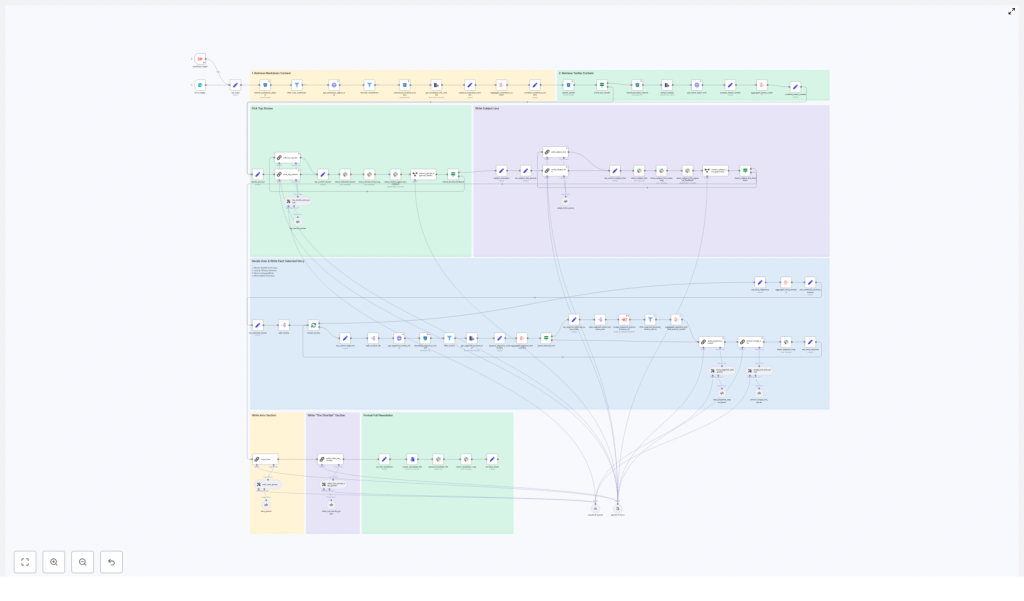
The n8n workflow is organized into a series of stages that mirror a typical editorial process, but with automation at each step:
- Trigger and ingestion – start the workflow for a given date and pull candidate content from S3
- Filtering and preparation – normalize markdown and tweet content, attach metadata, and remove duplicates
- AI-driven story selection – use an LLM with a structured prompt to select the top stories
- Segment generation – generate Axios-style sections for each selected story
- Intro, shortlist, and subject line – produce the opening, secondary stories, and optimized subject lines
- Image extraction and asset bundling – collect and deduplicate image URLs for editorial selection
- Human-in-the-loop review – manage approvals and targeted revisions via Slack
- Final output – assemble a single markdown newsletter file and supporting assets
Core Components and Workflow Design
1. Triggering the Workflow and Ingesting Content
The workflow starts with a date-based form trigger. An editor (or an upstream system) submits the publication date and can optionally attach the previous newsletter edition for context. This date parameter is then used to query an S3 bucket for candidate content:
- Markdown files representing curated articles, notes, or summaries
- Tweet-based content stored as objects with a matching prefix
Each matching S3 object is downloaded and passed into the processing pipeline. At this stage, the workflow focuses on collection only, without making editorial decisions.
2. Filtering, Normalization, and Canonical Content Items
Once the raw files are available in n8n, a set of processing nodes prepares the corpus for LLM consumption:
- Relevance filtering to keep only valid markdown sources and discard noise or unsupported file types
- Exclusion of previously published items to avoid repetition across issues
- Parsing and normalization to build a canonical representation of each content piece
Each canonical item typically includes:
- A stable identifier that maps directly to the S3 object
- Metadata such as authors,
external-source-urls, andimage-urls - The raw text body in a consistent format suitable for prompting
Aggregation nodes then merge these canonical items into a single source corpus for the date, ready for AI-based selection.
3. AI-Based Story Selection with Structured Prompts
To select the most relevant content, the workflow uses an LLM node configured with a LangChain-style prompt. The model receives the aggregated corpus and is instructed to identify the best stories for the edition based on:
- Relevance to the newsletter’s focus (for example AI developments)
- Potential impact on readers
- Overall interest and novelty
The LLM returns a structured JSON payload that includes:
top_selected_stories– four items, with the first designated as the lead story- Chain-of-thought style reasoning for internal review and audit
This structured output is sent to a Slack channel so editors can review the selected stories and the reasoning behind them before any long-form content is generated.
4. Segment Generation for Each Selected Story
After the selection is approved or adjusted, the workflow splits the top_selected_stories array into individual items and processes each story independently. For every selected story, n8n performs the following sequence:
- Fetch source content by identifier from S3, ensuring a direct mapping back to the original object
- Aggregate external-source URLs linked to that story for accurate referencing
- Invoke a dedicated LLM prompt to generate a structured, Axios-like newsletter segment
The segment prompt is designed to produce a consistent format:
- The Recap – a concise summary of the story
- Unpacked – three bullet points that explain implications or details
- Bottom line – a closing takeaway for readers
Validation nodes then check each segment against strict constraints, including:
- Exact bullet counts
- Markdown syntax and headings
- Limits on the number of links and adherence to allowed sources
This discipline ensures the newsletter output remains consistent and email-ready, even as content varies from issue to issue.
5. Generating the Intro, Shortlist, and Subject Line
With the main segments finalized, the workflow focuses on the framing elements that drive engagement and readability.
Newsletter intro and secondary stories
A separate LLM prompt generates the opening section of the newsletter. The prompt instructs the model to produce:
- A greeting tailored to the newsletter’s audience
- Two short paragraphs that set context for the edition
- A transition phrase, including the line
In today’s AI recap: - A four-item bulleted list that previews the key stories
Another prompt is responsible for the “Other Top AI Stories” shortlist. This section surfaces additional items that did not make the main segments but are still valuable to readers.
Subject line optimization and pre-header text
A dedicated LLM node then analyzes the lead story and the overall edition to produce:
- A primary subject line optimized for opens
- A complementary pre-header that reinforces the main hook
- Several alternative subject lines (typically 5 to 8) for A/B testing and experimentation
These variations enable marketing teams to test performance without manually drafting multiple options.
6. Image Extraction and Asset Bundling
Visual assets are handled by a dedicated image-extraction step. This node scans:
- The generated content
- Referenced external sources
It collects direct image URLs, focusing on common formats such as jpg, png, webp, and svg. The workflow then:
- De-duplicates image URLs to avoid redundancy
- Packages the set of candidate images into an image bundle
This bundle is attached to the Slack review message so editors can quickly choose a hero image and any supporting visuals for the edition.
7. Human Review, Feedback, and Targeted Re-runs
Human-in-the-loop control is central to the design. Once the AI steps complete, the workflow posts a comprehensive summary to a Slack channel, including:
- The selected stories and their identifiers
- Subject line options and pre-header text
- Chain-of-thought reasoning for transparency
- The image URL bundle
Slack nodes implement a straightforward Approve / Add Feedback flow. If editors approve, the pipeline proceeds to final assembly. If they request changes, the workflow routes the relevant JSON back into specific nodes for re-processing. For example, you can:
- Regenerate only the subject line and pre-header
- Adjust story selection without re-running the entire pipeline
This targeted re-run strategy preserves efficiency and keeps iteration focused on the components that need refinement.
Final Deliverables: What the Workflow Produces
When the pipeline completes successfully, you receive a coherent set of assets ready for distribution and further automation.
- A single markdown file with the complete newsletter:
- Intro section
- Four main story segments
- “Other Top AI Stories” shortlist
- The primary subject line, pre-header, and 5 to 8 alternative subject lines
- Chain-of-thought reasoning and content identifiers posted to Slack for auditability
- An image URL bundle for hero and supporting images
- Optionally, an uploaded markdown file in Slack plus a permalink to the newsletter draft
Implementation Best Practices and Tuning Tips
Modular, Constrained Prompt Design
For reliability and maintainability, separate prompts by function rather than using a single monolithic prompt. In practice this means:
- One prompt for story selection
- One prompt for segment writing
- One prompt for intro and shortlist
- One prompt for subject line and pre-header generation
Each prompt should enforce a strict output schema. Examples include:
- JSON arrays of fixed length for selected stories
- Exact markdown structure for segments and headings
- Explicit limits on bullets, links, and character counts
These constraints make downstream parsing predictable and reduce the need for manual cleanup.
Use Stable Identifiers as the Source of Truth
Every content object in S3 should have a stable identifier. Treat this identifier as the single source of truth across the workflow:
- Include identifiers in the selection JSON produced by the LLM
- Use them for all fetch operations back to S3
- Reference them in Slack messages and audit logs
This approach simplifies debugging, backtracking, and compliance checks, since each generated segment can be traced to its original source material.
Link and Image URL Validation
To maintain quality and avoid broken assets, enforce strict rules on external links and images:
- Allow only URLs that appear in the original source materials
- Avoid guessing or constructing deep links that were not provided
- Validate that image URLs end with standard extensions such as
.jpg,.png,.webp, or.svg - Deduplicate image URLs before presenting them to editors
Graceful Error Handling
In a production environment, transient failures are inevitable. Configure n8n to handle them gracefully:
- Use node-level error handling with “continue on error” for non-critical tasks such as external scraping
- Log failures and surface them in the Slack review so editors know where manual intervention is required
- Design branches that allow the workflow to complete with partial automation instead of failing the entire run
Security and Compliance Considerations
While the workflow deals primarily with content, security and compliance still matter, especially in enterprise environments.
- Store API keys and S3 credentials in n8n credential objects, not in plain-text nodes
- Avoid including sensitive PII in content objects or prompts
- Restrict the Slack review channel and use scoped app tokens with minimal permissions
- When publishing externally, ensure:
- Linked sources are licensed for public reuse
- Quoted material is properly attributed
Getting Started: Adapting the Template to Your Stack
To implement this pattern with your own content, start with a clear data model and then iterate on prompts and constraints.
- Define your S3 schema:
- Decide on identifiers,
external-source-urls, andimage-urlsfields - Standardize markdown structure for ingested content
- Decide on identifiers,
- Create modular LLM prompts for selection, segment writing, intros, and subject lines, each with explicit schemas.
- Clone the example n8n workflow template, plug in your credentials and model endpoints, and adjust node configurations to match your S3 layout.
- Populate S3 with test data for a single date and run the pipeline end-to-end to validate behavior.
- Connect Slack, specify the review channel, and invite stakeholders to test the approval and feedback loop.
Try it now: Use a sample n8n workflow as a starting point, run it against a small S3 dataset, and refine prompts and validation rules based on editorial feedback. Incrementally tighten constraints until the output requires minimal manual editing.
