


AI Web Developer Agent with n8n: Template Guide
Imagine handing off a website redesign to an AI that actually does the heavy lifting for you – from analyzing the existing site, to drafting a solid PRD, to pushing everything into Lovable.dev for implementation. That is exactly what this n8n template, The Recap AI – Web Developer Agent, is built to do.
If you run website projects, manage client redesigns, or build sites programmatically, this workflow lets you combine AI planning with browser automation so you can ship faster, with less copy-paste work and fewer errors.
What this n8n template actually does
At a high level, this template turns a messy, manual process into a clean, repeatable pipeline:
- It scrapes and analyzes an existing website so you have real, grounded content to work from.
- It creates a structured Product Requirements Document (PRD) based on that scraped data.
- It opens Lovable.dev in a browser session and uses that PRD to create or edit a website.
All of this is coordinated by an AI Web Developer agent that uses memory, planning, and browser tools to move from one step to the next without you constantly stepping in. It also follows a strict anti-hallucination protocol so the AI does not just invent content that was never on the site.
When to use this AI Web Developer workflow
You will get the most value from this n8n template if you:
- Do end-to-end website redesigns and need to analyze an existing site before rebuilding it.
- Want rapid prototyping, where you turn current content into a PRD and push it into a builder quickly.
- Run an agency or internal web team and need a consistent, auditable process from discovery to deployment.
Instead of manually copying text from pages, pasting into docs, rewriting specs, and then rebuilding by hand in Lovable.dev, this automation keeps everything in sync and traceable.
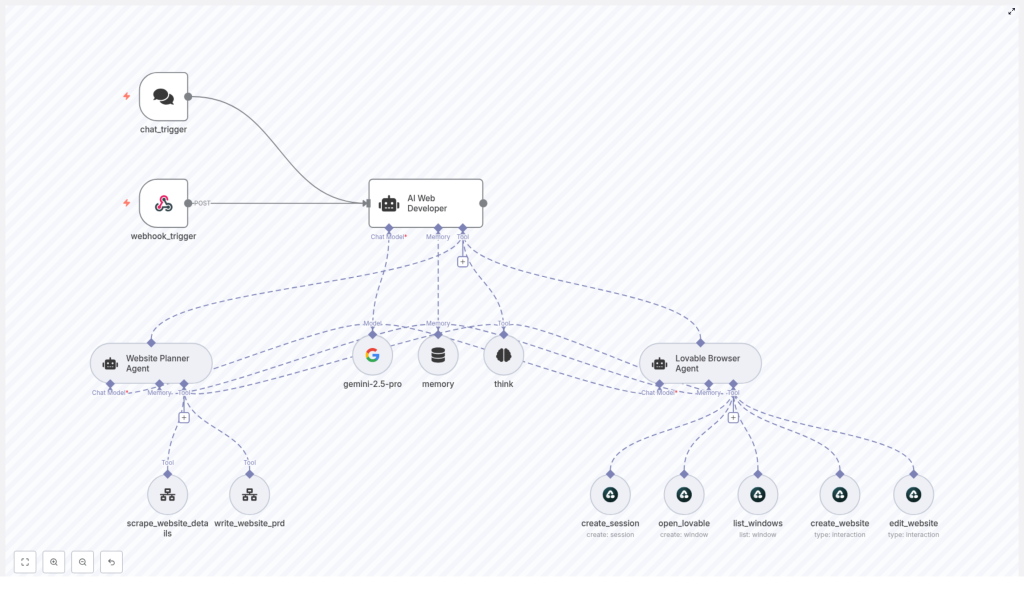
How the architecture is set up in n8n
Under the hood, this is an agent orchestration flow in n8n. Think of it as a small team of AI agents and tools, each with a specific job, all managed by one lead developer agent.
Main components
- AI Web Developer (orchestrator) – The “project manager” that routes requests, calls tools, and decides what happens next.
- Website Planner Agent – Handles
scrape_website_detailsto pull content and structure. – Generates a structured scraped summary. – Useswrite_website_prdto create a detailed PRD. - Lovable Browser Agent – Uses Airtop browser tools to work with Lovable.dev:
create_sessionto open a browser session and storeSession_IDopen_lovableto open Lovable.dev and captureWindow_IDlist_windowsto inspect the current window statecreate_websiteto paste the full PRD into the builderedit_websiteto apply specific user-requested edits
- Support tools – A memory buffer that stores state like Session_ID, Window_ID, scraped summaries, and PRDs. – A planning think tool that the orchestrator uses before taking action. – An LLM node (configured with
gemini-2.5-proin the template) to power the agents.
These pieces work together so that once a user sends a URL, the agents can scrape, plan, and implement with minimal back-and-forth.
How a typical run works (step-by-step example)
Let’s walk through a common scenario: you want to redesign an existing website and launch the new version with Lovable.dev.
- You send the URL You either hit the
webhook_triggerfrom an external system (like a form or GitHub action) or start viachat_triggerinside your chat interface. Both nodes are there to receive incoming user requests. - The AI Web Developer analyzes what to do The orchestrator calls the think tool first. It checks:
- What the user wants (redesign, edit, new build, etc.)
- What is already in memory (existing scrape, existing PRD, active browser session)
- Which sub-agent should run next (Website Planner Agent or Lovable Browser Agent)
- The Website Planner Agent scrapes the site It runs
scrape_website_detailson the URL and pulls:- Site content and copy
- Navigation structure
- Design details like layout hints, sections, and key components
- Technical notes where available
From this, it creates a mandatory SCRAPED WEBSITE ANALYSIS summary that includes company info, navigation, design elements, and other relevant notes.
- The agent writes a PRD from the scrape Using
write_website_prd, the Website Planner Agent turns that summary into a structured Product Requirements Document.
Key details:- The scraped summary must be created first.
- The agent must include that summary verbatim in the PRD input.
- The PRD contains direct quotes and exact snippets from the scraped content.
This is the anti-hallucination safeguard at work, so the PRD stays anchored to real data.
- You review and approve the PRD Once you are happy with the PRD, the orchestrator knows it can move on to implementation.
- The Lovable Browser Agent builds or edits the site The AI Web Developer hands off to the Lovable Browser Agent, which:
- Looks in memory for an existing
Session_IDandWindow_ID. - If none exist, runs
create_sessionandopen_lovableto start a fresh session and project window. - Uses
create_websiteto paste the
- Looks in memory for an existing
After the initial implementation, the template keeps Session_ID and Window_ID in memory. That means you can send new edit instructions later, and the workflow uses edit_website to apply changes without spinning up a new browser session each time.
Diving deeper into each part of the workflow
Entry points: chat_trigger & webhook_trigger
There are two ways into this automation:
chat_trigger– Ideal for conversational flows where a user types something like “Redesign this site: https://example.com”.webhook_trigger– Perfect for external systems like forms, GitHub workflows, or other automation tools that can POST a URL and requirements to n8n.
Once a request lands in either of these nodes, everything else is handled by the orchestrator and agents.
AI Web Developer: the orchestrator brain
This is the central agent that makes decisions. It always:
- Calls the think tool first to plan its next steps.
- Checks memory to see what data already exists (scrapes, PRDs, sessions).
- Decides whether it is time to:
- Scrape the website
- Generate or update a PRD
- Trigger the Lovable Browser Agent for implementation
This planning step is important. It keeps the flow from skipping prerequisites or trying to build a site before a PRD is ready.
Website Planner Agent: scraping and PRD creation
This agent is responsible for all the “thinking” about the website itself.
- Scraping with
scrape_website_detailsIt extracts:- Full site content where possible
- Menu and navigation structure
- Design and layout notes
- Technical or structural hints
- Creating the scraped summary It must generate a clearly labeled SCRAPED WEBSITE ANALYSIS that captures all key observations.
- Writing the PRD with
write_website_prdThe PRD:- Is based directly on the scraped summary.
- Includes exact quotes and references from the original content.
- Serves as the blueprint for the Lovable.dev build.
Anti-hallucination rule: the agent must not write a PRD until the scraped summary exists, and that summary must be passed into the PRD creation step as-is. This is how the template keeps the AI grounded in real website data.
Lovable Browser Agent: from PRD to live build
This is where Airtop’s browser automation tools come in. The Lovable Browser Agent interacts with Lovable.dev like a very disciplined human operator.
create_session– Starts a new browser session and saves theSession_IDin memory.open_lovable– Opens Lovable.dev, launches or focuses the project window, and storesWindow_ID.list_windows– Checks which windows are active and what state they are in.create_website– Pastes the entire PRD into the Lovable builder’s main text area. – The agent should not submit until the full PRD is in place.edit_website– Applies very specific changes based on user feedback, using the user’s instructions verbatim.
By storing Session_ID and Window_ID in memory, the agent can come back later and continue editing the same project, which is ideal for iterative feedback cycles.
How to structure PRDs so Lovable.dev loves them
The better your PRD, the smoother the Lovable.dev build. When you or the agent create PRDs, aim for:
- Page-by-page content with headings, sections, and clear copy for each page.
- Primary CTAs for each key page (buttons, forms, etc.).
- Imagery guidance such as types of photos, illustrations, or icons.
- Design direction like color palette hints and typography preferences.
- SEO meta copy including titles and descriptions for important pages.
The template is already designed to push a full PRD into Lovable.dev via the create_website tool, so having this structure in place really helps.
Best practices to keep your automation reliable
1. Always scrape first
Make sure the Website Planner Agent:
- Runs
scrape_website_detailsbefore any PRD work. - Stores the scraped summary in memory.
- Uses that summary as required input for
write_website_prd.
This is your main defense against hallucinated content.
2. Keep PRDs and scraped summaries separate
Store both artifacts independently in memory. That way you can:
- Compare what was scraped vs what the PRD says.
- Audit how decisions were made.
- Show clients a clear trace from “this is what we found” to “this is what we’ll build.”
3. Use the think tool for multi-step planning
Let the AI Web Developer use the think tool to:
- Check if prerequisites are met (scrape done, PRD ready, session active).
- Plan multi-step operations like scrape → PRD → implementation.
- Avoid skipping straight to Lovable.dev before the groundwork is in place.
4. Manage browser sessions carefully
For smoother runs:
- Prefer session reuse instead of creating a new session every time.
- Always check memory for
Session_IDandWindow_IDbefore callingcreate_session. - Use
list_windowsto confirm that the window is still active and valid.
5. Handle missing data explicitly
- If the scrape cannot find something important, like business hours or pricing, the agent should:
- Note that the data is missing.
- Ask the user for clarification instead of guessing.
- Whenever you reference existing content, include direct quotes from the scraped pages.
Troubleshooting common issues
Scraped content is missing or incomplete
If scrape_website_details does not capture enough of the site:
- Re-run the scrape with updated headers or with JS-enabled rendering if needed.
- Document which pages or sections came back incomplete.
- Ask the user to confirm or provide missing details before finalizing the PRD.
Browser session or window problems
Sometimes the Airtop session expires or the Lovable window disappears. When that happens:
- Create a new session using
create_session. - Open Lovable.dev again with
open_lovableand store the newSession_IDandWindow_ID. - Let the user know what happened and then retry the
create_websiteoredit_websiteoperation.
PRD does not match what the user expected
If the user is not happy with the PRD:
- Ask for specific corrections and updated requirements.
- Revise the PRD accordingly.
- Use the fact that both the PRD and the scraped summary are stored to show a side-by-side comparison and verify changes.
Why this template makes your life easier
Instead of juggling tabs, copying content into docs, and manually rebuilding pages in Lovable.dev, this n8n template gives you a repeatable pipeline:
scrape → summarize → write PRD → implement in Lovable.dev
It is especially useful if you:
- Need consistent, documented workflows across multiple projects.
- Want to reduce errors and hallucinations in AI-generated specs.
- Care about traceability from original site to final build.
