


Auto-Document n8n Workflows with AI
Turn your n8n workflows into clear, SEO-friendly documentation in minutes. This lightweight n8n template uses a simple form trigger and OpenAI to help you document faster, share knowledge easily, and free up time for higher-impact work.
The real problem: documentation that never keeps up
If you build automations, you already know the pattern. Workflows evolve, new steps get added, logic changes, and suddenly your documentation is out of date again. You promise yourself you will update it later, but new priorities appear, and the gap keeps growing.
That gap has a cost. Teammates struggle to understand what a workflow does, handoffs slow down, and you become the bottleneck for every question. Over time, your automation ecosystem becomes harder to trust and harder to scale.
This n8n template is designed to break that cycle. Instead of treating documentation as a chore, you can turn it into a simple, automated step in your process. One small workflow can unlock more clarity, more collaboration, and more time for the work that really moves your product or business forward.
From manual work to an automation mindset
Automation is not just about saving clicks. It is about creating space for focus, creativity, and growth. When you automate documentation, you are doing more than generating text. You are:
- Making your workflows discoverable and searchable
- Reducing onboarding time for new team members
- Lowering the risk of knowledge being locked in one person’s head
- Building a foundation for a more scalable, resilient automation stack
Think of this template as a starting point for a new habit. Each time you update a workflow, you can trigger fresh, consistent documentation in seconds. Over time, your entire n8n environment becomes easier to understand, easier to share, and easier to improve.
Who this n8n template is perfect for
This workflow is intentionally simple, yet powerful enough to support many roles and teams:
- n8n users managing multiple workflows who want quick, consistent documentation without writing everything by hand
- Developers and automation engineers who need reliable, structured docs for complex flows
- Customer-facing or operations teams that hand off automations to other departments and want clear explanations ready to share
- Technical writers who want a first draft generated automatically so they can focus on refinement, not starting from scratch
High-impact use cases for this AI documentation workflow
Once in place, this template can quietly support many moments in your automation lifecycle:
- Handoffs and releases – Automatically create documentation when you ship or transfer a workflow to another team
- Changelogs and internal wikis – Generate short summaries to paste into release notes, internal docs, or knowledge bases
- Onboarding – Provide new teammates with readable explanations of critical workflows so they ramp up faster
- Stakeholder updates – Produce email-ready descriptions of automations for non-technical stakeholders
Each of these use cases removes a little friction. Together, they create a more transparent, collaborative automation culture.
What this n8n workflow template actually does
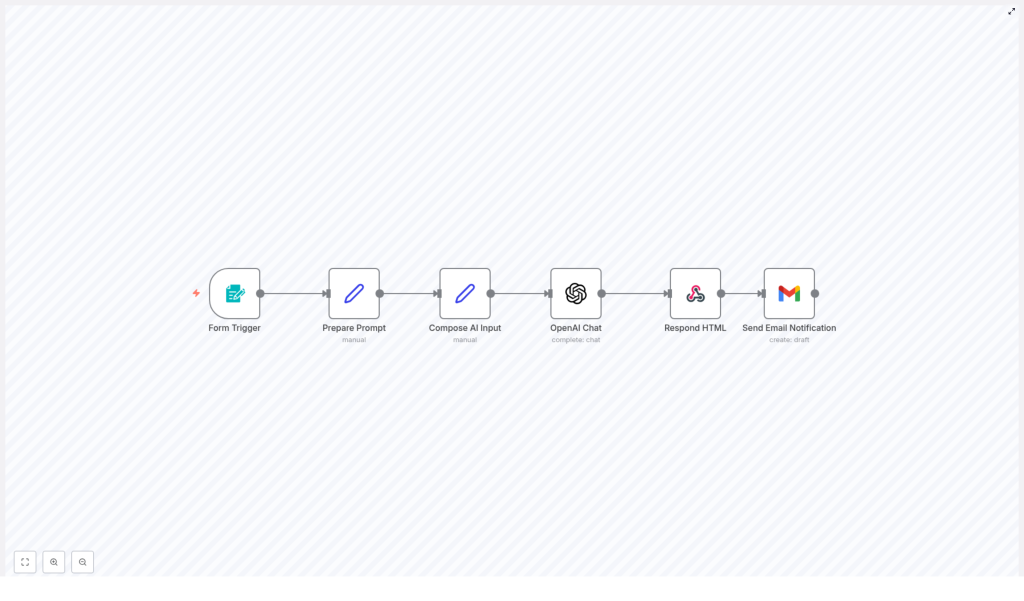
At its core, this template takes in a workflow JSON and returns clean, structured documentation in minutes. Here is the journey your data goes through:
- You submit a form with a workflow title and the workflow JSON.
- The template prepares a focused prompt that tells OpenAI how to write the documentation.
- It combines your inputs and the prompt into a single payload for the AI model.
- OpenAI (GPT-4 chat) generates concise documentation in plain text or markdown.
- The workflow returns an HTML response so you see the result immediately in your browser.
- Finally, it sends an email notification with the generated documentation to a configured recipient.
The entire flow is designed to be fast, repeatable, and easy to extend. You can start with the default behavior, then gradually customize it as your needs grow.
Inside the template: node-by-node walkthrough
The template is built from six main nodes, each playing a specific role in your documentation pipeline.
1. Form Trigger
Purpose: Collect the workflow title and JSON from the user.
- Trigger type: Form
- Inputs: Workflow Title (required), Workflow JSON (required)
- When to use: Whenever you want to generate documentation for any n8n workflow JSON
This simple form is your gateway. It turns any workflow export into something that can be documented in seconds.
2. Prepare Prompt (Set)
Purpose: Build the instruction text that guides the AI.
This node stores a concise, carefully written prompt that tells OpenAI how to structure the documentation, what to focus on, and how brief to be. By keeping the instructions clear and compact, you get more consistent, high-quality output.
3. Compose AI Input (Set)
Purpose: Combine everything the AI needs into one payload.
Here, the workflow merges the form inputs (title and JSON) with the prepared prompt. The result is the exact text the OpenAI Chat model receives. This step ensures the AI has full context about the workflow and the format you expect.
4. OpenAI Chat
Purpose: Generate the documentation using GPT-4 chat.
- Model: GPT-4 chat (configured directly in the template)
- Output: Concise documentation in plain text or markdown
This is where the transformation happens. Your raw workflow JSON becomes a clear explanation that teammates and stakeholders can actually read and understand.
5. Respond HTML
Purpose: Show the generated documentation instantly in the browser.
This node wraps the AI output in minimal HTML with simple styles for readability. The person who submitted the form sees the documentation immediately, which makes testing and iteration fast and rewarding.
6. Send Email Notification
Purpose: Deliver the documentation automatically to your inbox or a shared mailbox.
The template uses a Gmail node in draft mode by default, but you can switch to any email provider. This makes it easy to notify stakeholders, archive docs, or route them into an existing communication flow.
Step-by-step setup: get value in minutes
You do not need a complex configuration to start benefiting from this template. Follow these steps:
- Import the template into your n8n instance.
- Open the workflow and configure your credentials:
- OpenAI API key
- Your email provider credentials (for example, Gmail or another email node)
- Update the recipient email address in the Send Email Notification node.
- Trigger a test by submitting a sample workflow JSON through the form.
- Once you are happy with the output, share the form URL with your team or embed it inside an internal tool or portal.
Within a single session, you can go from “no automated docs” to “every workflow has a clear explanation on demand.”
How the AI documentation is structured
The template prompt encourages the model to return a compact, practical document. A typical output includes:
- A short title and one-line summary
- A quick note on who the workflow is for and its primary use case
- A brief “how it works” section, often as a step list
- Setup instructions and basic customization tips
This structure is ideal for internal wikis, changelogs, onboarding docs, or email summaries. You get just enough detail to be useful, without overwhelming the reader.
Customize the template to fit your style
Once the basic flow is running, you can adapt it to match your team’s voice, tools, and documentation standards. Here are some practical ideas:
- Adjust the prompt in “Prepare Prompt”. Change tone (formal, conversational, technical) or desired length (very brief vs. more detailed).
- Tune the OpenAI model settings. Switch models or tweak temperature and max tokens to control creativity, consistency, and length.
- Save docs to your knowledge base. Add nodes to send the generated documentation to Google Drive, Notion, Confluence, an S3 bucket, or another storage system.
- Create code snippets or wiki pages automatically. Append a step that creates a GitHub or GitLab snippet, or directly updates a wiki page.
- Brand the HTML output. Modify the wrapper in Respond HTML to include your logo, colors, or additional elements like links to related workflows or diagrams.
Each small tweak makes the workflow more aligned with your processes and more valuable to your team.
Best practices to get consistently strong results
Guidelines for better documentation output
- Provide clean, valid workflow JSON. Remove large binary blobs or unrelated metadata where possible.
- Test with several different workflows to see how the prompt behaves, then refine it to fit your preferred structure.
- Keep the prompt concise but explicit about the sections and style you want. The template already favors brevity, which usually improves clarity.
Troubleshooting common issues
- Incomplete or cut-off output: Increase the model’s max tokens or break very large workflows into smaller sections.
- Email not sending: Double-check your email node credentials. If issues persist, consider switching to SMTP or an API-based email service.
- Form submission errors: Verify webhook permissions and confirm that the form trigger path is configured correctly.
Security and privacy considerations
Since this template sends workflow JSON to an external API (OpenAI), it is important to think about what data you include. Before submitting a workflow JSON:
- Remove credentials, API keys, and private tokens.
- Strip out any sensitive metadata that is not required for documentation.
If you need to work with sensitive data, consider using a self-hosted model or restricting access to the form so only trusted users can submit workflows.
Your next step toward a more automated workflow life
This n8n template turns a tedious, often delayed task into a quick, reliable automation. It is a small workflow with an outsized impact: consistent, searchable documentation for your n8n automations without the constant manual effort.
More importantly, it can be a mindset shift. Once you experience how easy it is to automate documentation, you may start to see other repetitive tasks that are ready to be automated too. This is how a single template becomes a stepping stone toward a more focused, high-leverage way of working.
Try it now: Import the template into your n8n instance, add your OpenAI credentials, and submit a workflow JSON through the form trigger. When you are ready to go deeper, connect storage or wiki nodes so every generated document is archived automatically.
