


Automate AI Company Enrichment for HubSpot Contacts
Overview
Maintaining accurate, up-to-date company information for every contact in HubSpot is critical for effective segmentation, reporting, and personalized outreach. Performing this enrichment manually is not only time-consuming, it also introduces inconsistencies and human error.
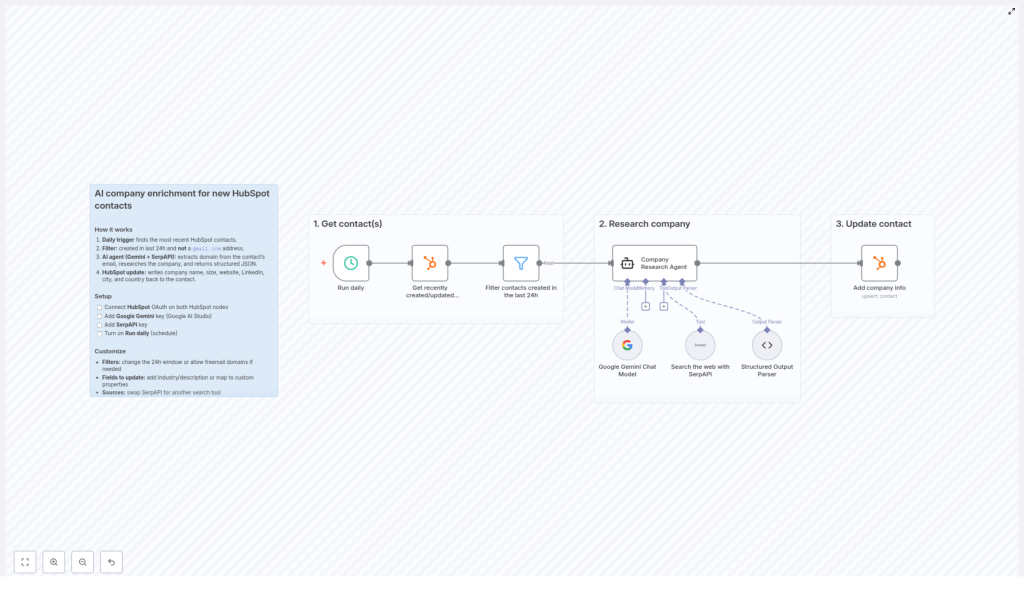
This article presents a production-ready n8n workflow template that automates company enrichment for newly created HubSpot contacts. The workflow combines HubSpot, Google Gemini, and SerpAPI to research company data from a contact’s email domain, then writes structured enrichment data directly back into HubSpot.
Use Case and Core Concept
The workflow is designed for organizations that capture leads through forms, signups, or imports into HubSpot and want to automatically enrich each business contact with reliable company information. By leveraging AI and web search, the workflow can:
- Identify the company behind a contact’s email domain.
- Retrieve key firmographic data such as company name, size, website, and industry.
- Store this information directly in HubSpot contact properties for downstream use.
The result is an automated enrichment pipeline that runs on a schedule, processes only fresh contacts, and filters out low value or non-business email domains when required.
High-Level Workflow Architecture
The n8n workflow follows a clear, modular structure that aligns with automation best practices:
- Trigger and scheduling – A daily trigger initiates the enrichment process.
- Data retrieval from HubSpot – The workflow fetches recently created or updated contacts via the HubSpot API.
- Filtering and qualification – Contacts are filtered by creation time and email domain to focus on relevant business leads.
- AI-based company research – Google Gemini and SerpAPI are combined to research the domain and extract structured company metadata.
- Writeback to HubSpot – Enriched attributes are mapped back to HubSpot contact properties and updated automatically.
Key Components and Nodes
1. Daily Trigger
The workflow uses a scheduler as the entry point:
- Trigger type: Time-based, configured to run once per day.
- Purpose: Ensures the workflow processes only the most recent contacts at a predictable cadence, which improves performance and avoids reprocessing the same records.
2. HubSpot Contact Retrieval
After the trigger fires, the workflow calls the HubSpot API via the HubSpot node to pull recent contacts:
- It retrieves contacts that were created or updated within a specific time window.
- The time window is configured to align with the daily schedule, typically the last 24 hours.
Access is granted through OAuth2, which provides secure, revocable access to your HubSpot account without embedding credentials in the workflow.
3. Filtering and Qualification Logic
To maintain data quality and avoid unnecessary API calls, the workflow applies a set of filters to the retrieved contacts:
- Time-based filter: Only contacts created within the last 24 hours are included by default. This can be adjusted if your process requires a different interval.
- Freemail exclusion: Contacts with email addresses from free email domains such as
gmail.comare excluded to focus on business contacts where company enrichment is more meaningful.
These filters are implemented using n8n’s expression and conditional logic capabilities, which allows you to adapt the criteria to your own lead management strategy.
4. AI Company Research Agent
For each qualified contact, the workflow extracts the domain from the contact’s email address and passes it to an AI-powered research agent built from two key integrations:
- Google Gemini – Provides advanced natural language and reasoning capabilities. Gemini interprets and synthesizes information from search results to produce coherent, structured company profiles.
- SerpAPI – Performs real-time web searches based on the email domain and related queries, returning up-to-date information from public web sources.
The AI agent combines these tools to generate a structured dataset, typically including:
- Company name
- Industry
- Headquarters city
- Headquarters country
- Estimated employee count or company size
- Official website URL
- Company LinkedIn URL
- Short company description or summary
This approach ensures that enrichment is both context-aware and based on current information available online.
5. HubSpot Contact Update
Once the AI agent returns the enrichment payload, the workflow maps these values back into HubSpot:
- Standard fields such as company name, website, city, country, and company size are updated directly.
- Social and context fields such as LinkedIn URL and company description are written into the corresponding properties, which can be default or custom fields in HubSpot.
The HubSpot node handles the update operation for each contact, ensuring that your CRM always reflects the latest company context without manual intervention.
Configuration and Setup
To deploy this workflow template in n8n, complete the following configuration steps:
- HubSpot connection:
- Configure OAuth2 authentication on the HubSpot nodes.
- Grant the required scopes for reading and updating contact records.
- Google Gemini API key:
- Obtain an API key via Google AI Studio.
- Add the key as credentials in n8n so the Gemini node or HTTP requests can access the model for natural language processing.
- SerpAPI key:
- Create a SerpAPI account and generate an API key.
- Configure this key in n8n to enable real-time web search queries from within the workflow.
- Schedule configuration:
- Set the trigger node to run on a daily schedule.
- Align the time window filter in the HubSpot query with the schedule interval to avoid duplicates.
Customization and Extension Options
Adjusting Filters and Scope
- Time window: Modify the default 24-hour filter if you need more frequent or less frequent processing. For example, an hourly schedule with a 1-hour window can support near real-time enrichment.
- Freemail handling: If your business regularly works with freelancers, consultants, or small businesses using free email providers, you may choose to include domains like
gmail.comin the enrichment process.
Expanding Enrichment Fields
- Additional firmographics: Extend the AI prompt and mapping logic to capture industry, revenue range, or other attributes relevant to your scoring and routing models.
- Custom HubSpot properties: Create custom fields in HubSpot, such as “AI Company Description” or “AI Industry Category”, and map the AI output to these properties for fine-grained segmentation.
Alternative Data and Search Providers
- Search tooling: While this template uses SerpAPI, you can substitute it with another search or data provider that better matches your budget or data requirements.
- Data enrichment APIs: You can augment or replace the AI research with dedicated B2B enrichment APIs if you already have contracts with third-party data vendors.
Benefits of AI-Driven Company Enrichment
Implementing this AI-powered enrichment workflow in your HubSpot environment delivers several strategic advantages:
- Higher data accuracy: AI agents combine multiple sources and current web information, which reduces outdated or inconsistent company records.
- Operational efficiency: Manual research and data entry are automated, allowing sales and marketing teams to focus on engagement, qualification, and closing deals.
- Scalable enrichment: The scheduled workflow processes new contacts continuously, without adding headcount or manual overhead as lead volume grows.
- Stronger CRM foundation: Enriched company context in HubSpot supports better segmentation, more accurate reporting, and highly targeted campaigns.
Next Steps
To implement this automated company enrichment workflow in your own stack, start by connecting your HubSpot account and configuring your Google Gemini and SerpAPI credentials in n8n. Then tailor the filters, schedule, and field mappings to align with your lead management and data governance policies.
By integrating AI-driven enrichment directly into your HubSpot pipeline, you can significantly improve data quality, streamline marketing and sales operations, and build a more intelligent, context-aware CRM.
