


Automate AI Newsletters with an n8n Newsletter Agent
Introduction: From raw feeds to production-grade AI newsletters
Producing a high-quality AI-focused newsletter at scale requires more than a curated reading list. It demands a robust automation pipeline that can ingest diverse sources, eliminate duplicates, prioritize key stories, generate structured copy, and deliver a publication-ready output that still respects editorial standards.
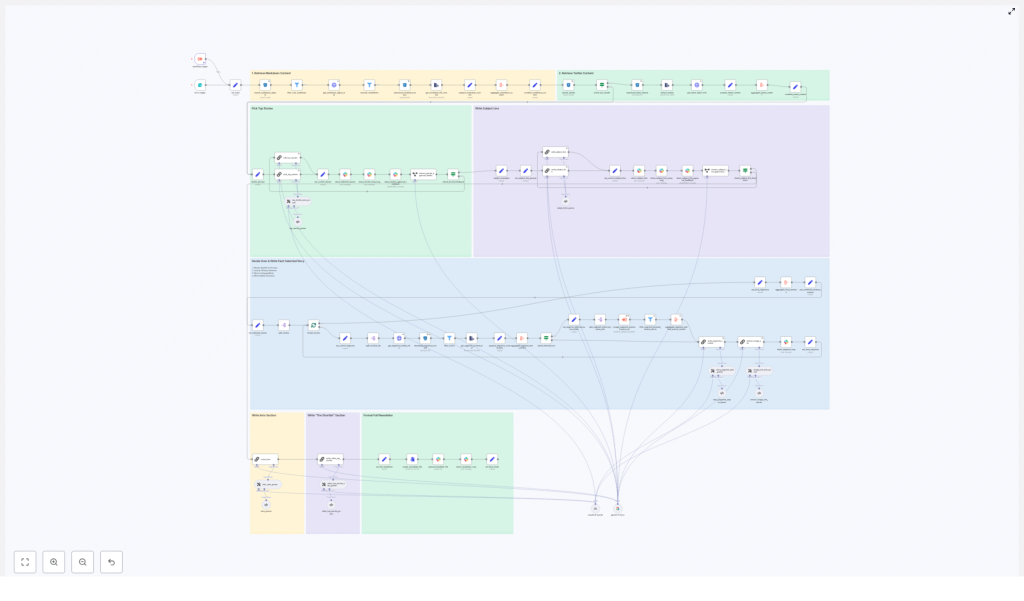
This n8n workflow template acts as a newsletter agent that orchestrates this entire process. It pulls markdown and Twitter content from object storage, consolidates and scores candidate stories, leverages LLM-based nodes (LangChain-compatible models such as Gemini or Claude) for editorial reasoning and copywriting, enriches stories with images and sources, enables human approvals via Slack, and finally exports a complete markdown newsletter file.
Why automate an AI newsletter with n8n?
For automation professionals and content teams, a workflow-driven approach provides several tangible benefits:
- Scalable content operations: Increase newsletter frequency or expand coverage without proportionally increasing editorial workload.
- Consistent standards: Enforce formatting, attribution, and link policies through reusable templates and schema validation.
- Reduced manual overhead: Offload research, drafting, and version control to a reliable, auditable automation pipeline.
- Configurable editorial control: Introduce or adjust approval gates for editors, legal teams, or subject-matter experts with minimal rework.
High-level architecture of the newsletter agent
The n8n template is structured as a sequence of modular stages, each with a clear responsibility. At a high level, the workflow performs:
- Input ingestion and hygiene checks for markdown and tweet data.
- Aggregation of all candidate content into a single analyzable corpus.
- Story selection and editorial reasoning via LLM nodes.
- Per-story copy generation with strict formatting rules.
- Image extraction, validation, and deduplication.
- Generation of newsletter meta content (intro, subject line, preheader).
- Human-in-the-loop approvals through Slack.
- Final markdown assembly and export for distribution.
The following sections describe each stage, the key n8n nodes involved, and recommended best practices for running this in production.
Stage 1: Input ingestion and hygiene
The pipeline begins by collecting raw materials from an object store such as S3 or Cloudflare R2. The goal at this stage is to retrieve only relevant files and ensure they are valid inputs for downstream processing.
Key nodes and responsibilities
- search_markdown_objects / search_tweets: Query object storage by date prefix or similar criteria to identify the files associated with a specific publication window.
- filter_only_markdown: Enforce file-type hygiene by passing forward only markdown files intended for newsletter content.
- get_markdown_file_content / extract_tweets: Load file bodies and metadata, transforming them into structured items for later aggregation.
This strict control over input scope and types is essential. By constraining the ingest to a defined time range and valid formats, the workflow avoids reusing outdated stories and minimizes the risk of duplicate coverage across editions.
Stage 2: Aggregating candidate content
Once the raw files and tweet exports are loaded, the workflow consolidates them into a single text corpus that can be efficiently analyzed by LLM nodes.
Transformation and aggregation nodes
- prepare_markdown_content: Normalizes and cleans markdown text, removing irrelevant artifacts and preserving key metadata.
- aggregate_markdown_content: Combines individual markdown items into a unified body of content for evaluation.
- combine_tweet_content: Merges tweet-based content into the same candidate pool, ensuring cross-channel coverage.
The result of this stage is a consolidated, structured representation of all potential stories that can be passed to the selection logic.
Stage 3: Story selection and editorial reasoning
The core editorial intelligence of the workflow is implemented through an LLM-driven selection node. This step is responsible for deciding which stories appear in the newsletter and in what order.
pick_top_stories: LLM-based ranking and justification
- Selects and ranks the top four stories, designating the first as the lead item.
- Generates a structured explanation of the selection rationale, effectively a chain-of-thought that editors can review.
- Outputs identifiers, metadata, and external-source URLs to maintain full traceability back to the original content.
This structured reasoning is highly valuable internally. It provides an auditable trail for why specific stories were chosen or rejected, which is particularly important in editorial, legal, or compliance-heavy environments.
Stage 4: Per-story content generation
After the top stories are identified, the workflow iterates through them to create newsletter-ready copy for each one.
Iteration and content resolution
- split_stories / iterate_stories: Loop through the selected items, resolving identifiers to full text, external links, and any associated media.
LLM-driven “Axios-style” segments
For each story, a dedicated LLM node produces a structured section with a consistent, newsletter-friendly format:
- A bolded top-line recap that summarizes the story.
- An “Unpacked” section with bulleted details, using markdown hyphen bullets (
-) for consistent rendering. - A concise “Bottom line” consisting of two sentences that contextualize the story.
The prompts for this node enforce strict editorial rules, including:
- Limited use of bold formatting to avoid visual clutter.
- Constraints on the number of links per bullet.
- A requirement that the model only summarize or rephrase provided content, without inventing new facts or external context.
These constraints significantly reduce hallucination risk and help ensure that the generated copy remains faithful to the original sources.
Stage 5: Image extraction, validation, and deduplication
Visual consistency is critical for modern newsletters. The workflow therefore includes dedicated steps to identify and validate images that can accompany the selected stories.
extract_image_urls and validation logic
- extract_image_urls: Parses the aggregated content and referenced external pages to discover direct image URLs.
- Filters URLs by file extension, typically allowing
.jpg,.png,.webp, and.svg. - Deduplicates image URLs to avoid redundant or repeated assets.
By validating file types and ensuring uniqueness, the workflow prevents broken images and generic or irrelevant thumbnails from being included in the final newsletter.
Stage 6: Intro, subject line, and meta content generation
Beyond story segments, a successful newsletter requires a compelling introduction and high-performing email metadata.
Specialized LLM prompts for meta content
- write_intro: Produces an opening section that frames the edition, highlights key themes, and aligns with your publication’s voice.
- write_subject_line: Generates subject lines and preheaders following strict rules about length, clarity, and tone, with the objective of maximizing open rates while maintaining brand consistency.
These prompts are highly configurable and should be versioned carefully to maintain predictable behavior across editions.
Stage 7: Human-in-the-loop approvals via Slack
Even in a heavily automated pipeline, editorial oversight remains essential. This template integrates Slack to provide a streamlined approval experience.
Approval and feedback nodes
- share_stories_approval_feedback: Sends selected stories and the associated chain-of-thought reasoning to editors in Slack, allowing them to approve or request revisions.
- share_subject_line_approval_feedback: Presents subject line options and preheaders for quick review and selection.
Approved content proceeds to final assembly. If editors request changes, the workflow routes those items back to targeted edit nodes, enabling controlled iteration without manual rework across the entire pipeline.
Stage 8: Final assembly and newsletter export
Once all sections and meta content have been approved, the workflow compiles the complete newsletter.
Markdown composition and distribution
- set_full_newsletter_content: Assembles the intro, story segments, images, and closing elements into a single markdown document.
- create_newsletter_file: Writes the final markdown file to storage, with optional subsequent steps to upload it to Slack or other systems for distribution and archiving.
The result is a production-ready markdown file that can be consumed by your email service provider or further transformed into HTML if required by your stack.
Best practices for running this workflow in production
To ensure reliability and maintain editorial quality, consider the following operational guidelines:
- Enforce source windows: Configure the ingestion nodes to pull content only for the target publication date or defined time range. This prevents repeated coverage and keeps each edition focused.
- Preserve identifiers and URLs: Maintain original content identifiers and external-source links in the workflow payload. This simplifies auditability, debugging, and any downstream automations that rely on these references.
- Version prompts and schemas: Treat LLM prompts as code. Version them, document changes, and avoid ad hoc edits. Several nodes depend on stable output formats and schemas for downstream parsing.
- Minimize hallucinations: Restrict LLM nodes to summarization and rewriting of the provided materials. Do not allow them to fetch or infer additional facts unless you explicitly supply validated external sources.
- Implement monitoring and alerting: Track errors such as missing URLs, parsing failures, or schema mismatches. Configure notifications so editors can intervene before a newsletter is finalized.
- Optimize the approval UX: Design Slack messages to present clear context, concise story summaries, and simple actions such as “approve” or “request edit” to minimize friction for editors.
Common pitfalls and how to mitigate them
When adapting this template, teams often encounter a few recurring issues. Address them early to avoid production incidents.
- Broken links: Ensure that all URLs originate from the validated source set and, where possible, add a verification step before embedding them in the final newsletter content.
- Exposing chain-of-thought: The reasoning generated for internal review should not be published. Keep chain-of-thought outputs restricted to internal channels such as Slack or internal dashboards.
- Over-automation: While routine tasks should be automated, retain human review for critical elements such as the lead story selection and subject line approval.
- Formatting drift: Use explicit templates and schema validation for each section. Validate markdown structure to avoid malformed bullets, headings, or bolding that could break rendering in email clients.
Customizing the newsletter agent for your organization
The template is designed to be adaptable. To align it with your brand, audience, and technical stack, focus on a few key levers.
- Prompt templates: Adjust or replace the LLM prompts to reflect your preferred tone, whether highly technical, marketing-oriented, or more conversational.
- Selection logic: Modify the scoring rules in the selection node or change the number of stories included per edition to match your editorial strategy.
- Output format: If your email platform requires HTML, extend the final assembly step to render HTML instead of markdown, or introduce personalization tokens such as subscriber first name.
- Model endpoints: Swap or augment LLM nodes to use providers such as Gemini, Claude, or any LangChain-compatible model, based on your latency, cost, and quality requirements.
Conclusion and next steps
This n8n-based newsletter agent provides a structured, repeatable pipeline that transforms raw markdown files and tweet exports into a polished AI newsletter with robust human oversight. It is particularly well suited to AI-focused publications, where strict source verification, provenance tracking, and editorial accountability are non-negotiable.
By combining deterministic automation with targeted human approvals, the workflow allows teams to scale content production while maintaining high standards of accuracy, consistency, and brand alignment.
Call to action: If you would like to go further, I can: (1) walk through the workflow step-by-step and annotate each node, (2) create a starter prompt set tuned to your brand voice, or (3) produce a migration checklist to adapt this template to your data stores and preferred LLM provider. Let me know which option you want to start with.
