


Introduction
For teams that rely on timely information, manually scanning news sources is inefficient and difficult to scale. By combining n8n, AI summarization, and Slack, you can build a fully automated news intelligence pipeline that delivers concise, high-signal updates directly where your team collaborates.
This article presents an n8n workflow template that automatically collects news articles from Hacker News based on defined keywords, generates AI-powered summaries in Japanese, and publishes the results to a specified Slack channel. The focus is on a robust, production-ready approach that automation professionals can adapt and extend to their own environments.
Solution Architecture
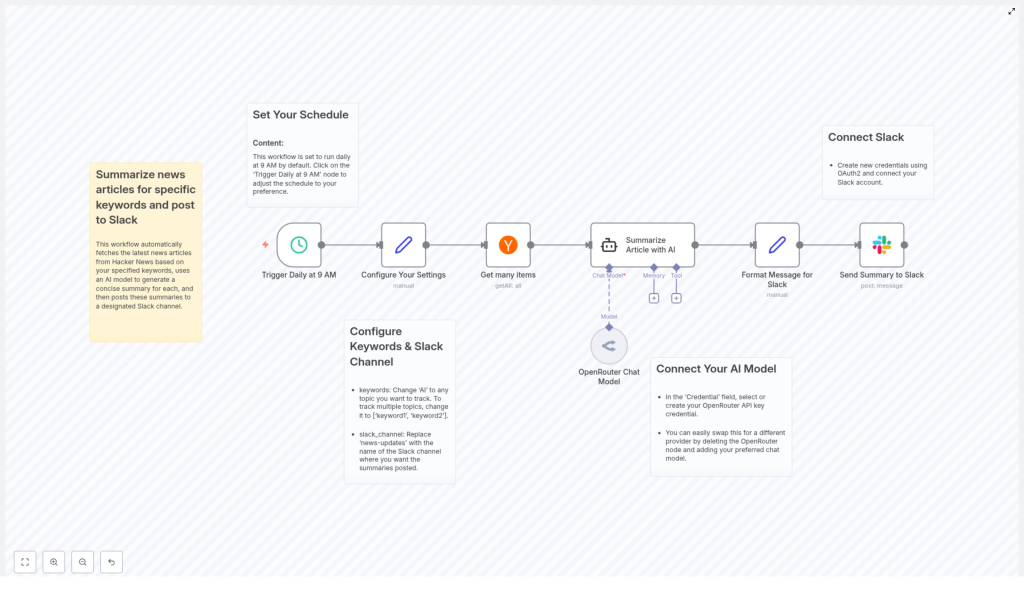
The workflow orchestrates several core components to deliver an end-to-end automated news summarization and distribution process:
- Time-based trigger that runs the workflow at a fixed schedule (default 9:00 AM daily)
- Configuration node that centralizes keyword and Slack channel settings
- Hacker News integration to fetch multiple articles that match the configured keywords
- AI summarization using an OpenRouter Chat Model node to generate concise Japanese bullet points
- Slack message formatting with Markdown for readability and structure
- Slack delivery using OAuth2 for secure posting into the target channel
By chaining these elements in n8n, the workflow provides a repeatable, low-maintenance solution for AI-powered news monitoring.
Key Use Case
The primary use case is automated monitoring of technical and industry topics that are frequently discussed on Hacker News. Typical scenarios include:
- Tracking developments related to AI, infrastructure, or security
- Providing daily digests for product, engineering, or leadership teams
- Consolidating relevant updates into one Slack channel to support decision-making
Summaries are generated in Japanese and structured as bullet points, which is particularly useful for teams that need quick, scannable updates without reading full articles.
Core Workflow Components
1. Time-Based Trigger: Daily Execution
The workflow starts with a scheduled trigger that runs every day at 9:00 AM by default. In n8n, this is implemented using a time-based trigger node (referred to as Trigger Daily at 9 AM in the template).
Best practice: Align the trigger time with your team’s working hours and reporting cadence. For example, you might schedule an early-morning digest before standups or a summary at the end of the day.
You can customize the execution time and frequency directly in the trigger node to support different time zones or multiple runs per day.
2. Central Configuration: Keywords and Slack Channel
To keep the workflow maintainable, configuration is centralized in a single node named Configure Your Settings. This node defines two key parameters:
- Keywords to track
Specify one or more keywords that the workflow will use to filter Hacker News content. For a single keyword, you might use a value such as'AI'. For multiple topics, configure a JSON array, for example:[ 'AI', 'machine learning', 'LLM' ]
- Slack channel
Set the name of the Slack channel where summaries should be posted, such as#news-digestor#ai-updates.
Best practice: Treat this configuration node as the single source of truth. When requirements change, such as adding new topics or posting to a different channel, you only need to modify this node.
3. Article Retrieval: Hacker News Integration
The Get many items node is responsible for querying Hacker News and returning a set of articles that match the configured keywords. The node:
- Searches for recent posts that contain any of the specified keywords
- Limits the number of results for each run, for example to 3 items, to avoid overwhelming users with information
- Prepares a list of article metadata that will be passed to the AI summarization step
Best practice: Start with a small limit on the number of items, then increase gradually if your team can handle more volume. This keeps the digest focused on the most relevant content.
4. AI Summarization: OpenRouter Chat Model
The core of the workflow is the AI summarization step, implemented using an OpenRouter Chat Model node. For each article, the node:
- Consumes article data from the Hacker News node
- Uses an AI language model to analyze the content
- Produces a concise summary in Japanese, structured as bullet points
- Maintains a clear, neutral tone suitable for professional audiences
Best practice: Carefully define your prompt in the OpenRouter node to enforce structure, language, and tone. For example, instruct the model to:
- Output only bullet-point summaries
- Use Japanese for all text
- Focus on key insights instead of minor details
If needed, you can later replace this node with a different AI provider while keeping the rest of the workflow unchanged.
5. Slack Message Formatting
Once the summaries are generated, an intermediate node formats the output into a Slack-ready message. This step ensures that the information is easy to scan and visually consistent. The formatting logic typically includes:
- Applying Markdown to highlight article titles in bold
- Structuring summaries as bullet lists for quick reading
- Including links back to the original Hacker News posts
By standardizing the layout, your team quickly learns how to interpret the digest at a glance.
6. Delivery to Slack with OAuth2
The final step uses a Slack node configured with OAuth2 authentication to post the formatted message into the selected channel. This ensures secure, authorized access to your Slack workspace and allows the workflow to post as a specific app or bot user.
Best practice: Use dedicated Slack credentials for automation workflows and restrict permissions to only what is required, typically posting messages to specific channels.
Step-by-Step Implementation Summary
- Define the schedule in the time-based trigger node so the workflow runs at the desired time, such as 9:00 AM each day.
- Configure keywords and the Slack channel in the Configure Your Settings node, using a JSON array for multiple keywords.
- Set up the Hacker News retrieval via the Get many items node, including a sensible limit on the number of articles.
- Connect the OpenRouter Chat Model node and refine the prompt to generate Japanese bullet-point summaries with a neutral tone.
- Implement message formatting using Markdown so titles, bullet points, and links are presented clearly within Slack.
- Configure the Slack node with OAuth2 and point it to the configured Slack channel to post the final digest.
Customization and Extension Options
The template is intentionally flexible so you can adapt it to different teams and environments.
- Adjusting keywords
Modify the keywords field in the configuration node to track new technologies, competitors, or industry topics relevant to your organization. - Changing the schedule
Edit the trigger node to run the workflow multiple times per day, only on weekdays, or at custom times that match your operating hours. - Switching AI providers
Replace the OpenRouter Chat Model node with another AI integration if your organization standardizes on a different provider, while preserving the same input-output structure. - Targeting different Slack workspaces or channels
Update OAuth2 credentials and channel configuration to post summaries to other workspaces, teams, or topic-specific channels.
Benefits for Automation-Driven Teams
- Operational efficiency – Eliminate manual news tracking and provide consistent, automated updates every morning.
- Improved situational awareness – Keep distributed teams aligned on key developments related to AI and other tracked topics.
- High information density – Use AI to condense complex or technical articles into accessible Japanese bullet points that can be consumed in seconds.
- Scalable knowledge sharing – As your interests grow, simply add new keywords or channels without redesigning the workflow.
Getting Started
Deploying this workflow in n8n gives your organization a reliable, AI-powered news summarization system that integrates seamlessly with Slack. Configure your keywords, connect your Slack workspace, and let the automation handle daily monitoring and summarization.
If you are ready to automate your news updates, start with the template, adapt it to your environment, and provide your team with focused, AI-driven summaries every day.
