


Automate Birthday Reminders from Google Contacts to Slack with n8n
On a rainy Tuesday morning, Mia, a people-ops manager at a fast-growing startup, opened Slack to a familiar ping:
“Did we forget Jordan’s birthday yesterday?”
Her heart sank. Again.
Between onboarding new hires, planning all-hands meetings, and juggling HR tools, Mia had no bandwidth left to manually track birthdays. She had them all neatly stored in Google Contacts, but that did not help when no one remembered to check. The team prided itself on a warm culture, yet important dates kept slipping through the cracks.
That afternoon, while looking for a better way to automate small HR tasks, Mia discovered an n8n workflow template that promised exactly what she needed: a simple, secure way to read birthdays from Google Contacts every morning and send a friendly reminder straight into a Slack channel.
She decided to give it one serious try.
The problem: birthdays slipping through the cracks
Mia’s challenge was not unique. Manual birthday tracking was:
- Error-prone, since people forgot to check the calendar
- Time-consuming, especially as the team grew
- Scattered across spreadsheets, notes, and shared docs
Yet the impact of missing birthdays was real. Colleagues felt overlooked, and the team’s culture took a subtle hit each time a special day went unnoticed.
Mia already had the data in one place: Google Contacts. Her team already lived in Slack. What she lacked was a reliable bridge between the two. That is where n8n came in.
Discovering the n8n birthday reminder workflow
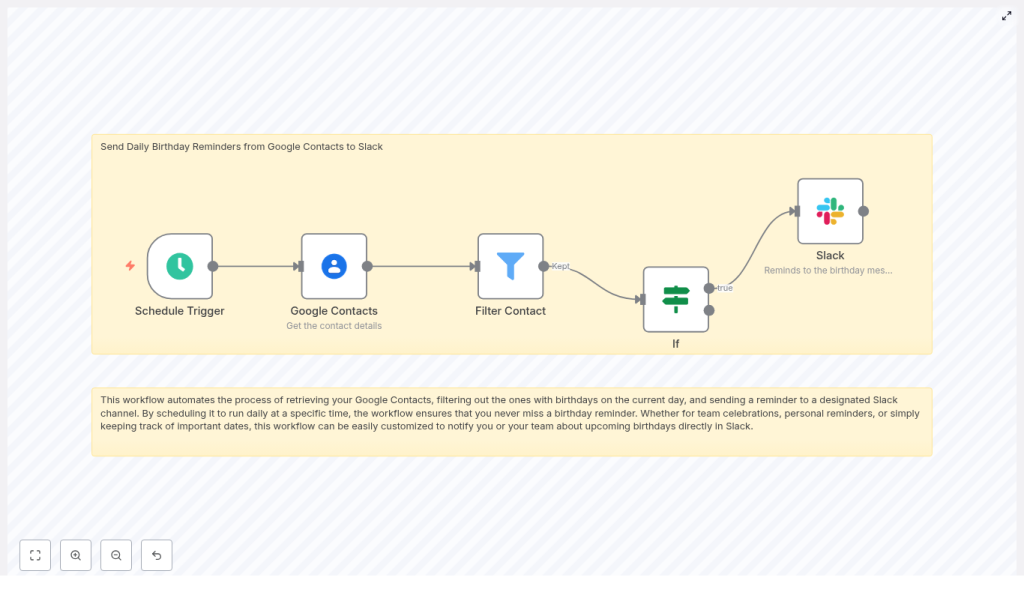
As Mia explored the n8n template, she realized it was not some heavyweight enterprise system. It was a lean workflow made of just a few nodes, each doing one clear job, chained together into a daily routine:
- Schedule Trigger to run every morning
- Google Contacts to fetch people and their birthdays
- Filter Contact to remove entries without birthday data
- If to check which birthdays match today
- Slack to post a birthday reminder in a channel
The idea was simple: every day at a set time, n8n would wake up, pull contacts from Google, keep only those with birthdays, compare those dates to today, and then ping a Slack channel with a friendly message.
If it worked, Mia would never have to manually track birthdays again.
Rising action: Mia builds the workflow
Mia opened n8n and imported the template. The structure was already there, but she wanted to understand each step and adapt it to her team.
1. Setting the daily rhythm with Schedule Trigger
First, she dragged in the Schedule Trigger node and configured it to run once a day at 08:00, just before the team’s usual morning check-in.
She made sure to set the timezone to match her company’s location so that “today” in the workflow would always match “today” for the team. No one wanted a birthday message arriving at midnight or a day late.
2. Connecting to Google Contacts
Next, Mia added the Google Contacts node and set the operation to getAll. This way, the workflow could scan the full list of people without her needing to manually pick contacts one by one.
She configured the node to request the key fields she cared about:
namesfor display namesemailAddressesto identify people and personalize messagesbirthdaysto know when to send remindersnicknamesfor a more informal tone in Slack
To avoid missing anyone, she enabled returnAll so the node would process the entire contacts list.
The only missing piece was authentication. Mia created Google OAuth credentials with the scope:
https://www.googleapis.com/auth/contacts.readonlyShe saved them securely in n8n credentials, making sure consent and token refresh were set up so the integration would not silently expire. Now, n8n could safely read contacts without needing her intervention.
3. Filtering out contacts without birthdays
When Mia first ran the workflow in test mode, she saw that many contacts did not have birthday data at all, such as vendors or generic addresses.
So she added a Filter node. Its job was simple but important: keep only those contacts where the birthdays field was not empty. That way, n8n would not waste time processing irrelevant entries or risk posting blank messages to Slack.
This one step made the workflow cleaner and easier to reason about.
4. Matching birthdays to today’s date
The real turning point in Mia’s setup was the logic that decided whether a contact’s birthday was “today.”
In Google Contacts, birthdays are typically returned as an object that includes day and month, and sometimes the year. To compare that to the current date, Mia needed to transform each birthday into a simple string she could match against today.
Inside a Set or Function node, she used an expression similar to this pseudocode:
<!-- Example JavaScript expression inside a Set/Function node -->
const b = $json.birthdays; // depends on returned structure
// build month-day string for comparison, e.g. "04-15"
const month = String(b.month).padStart(2,'0');
const day = String(b.day).padStart(2,'0');
return month + '-' + day;
She then computed today’s date in the same MM-DD format in a prior node and stored it, for example as {{ $json.today }}. The If node compared each contact’s formatted birthday string to this “today” string.
If they matched, the contact passed through the “true” branch. Everyone else was ignored for that day.
5. Sending the birthday shoutout to Slack
With the logic in place, Mia turned to the final step: posting the reminder.
She added the Slack node and connected it using a Slack OAuth credential with the scopes her bot needed, such as:
chat:writechannels:readorgroups:read, depending on the channel type
She picked a dedicated channel, #birthdays, and used its channel ID in the node configuration. Then she crafted a friendly message template using the contact’s name:
Today is {{ $json.name }}'s birthday! 🎉 Don't forget to wish them a happy birthday.
For future iterations she planned to use Slack Blocks for richer layouts with GIF prompts and emojis, but for now, a simple, clear message was enough.
Before going live, she made sure the Slack app was installed in the workspace and invited into the #birthdays channel so the bot could actually post there.
Authentication, permissions, and staying secure
As someone responsible for people’s data, Mia was careful about security and privacy from the start.
Google credentials
- She used OAuth credentials with at least
contacts.readonly. - Stored them in n8n’s credentials system, not in plain text.
- Ensured token refresh was enabled so the workflow would not silently fail.
Slack app configuration
- She created a Slack app and installed it into her workspace.
- Assigned bot token scopes like
chat:writeandchannels:read. - Added the OAuth token to n8n credentials.
- Invited the bot to the private channels where it needed to post.
She also limited access to the n8n instance itself, using environment secrets and restricting who could view or edit workflow credentials. Birthdays are personal data, so she kept scopes minimal and masked any sensitive fields when sharing the workflow with colleagues.
The turning point: testing the workflow
With everything wired up, Mia felt a mix of excitement and anxiety. Would the workflow actually catch birthdays correctly?
She ran a simple test:
- Created a test contact in Google Contacts with today’s birthday.
- Triggered the workflow manually in n8n.
- Watched Slack.
A second later, a message appeared in #birthdays:
“Today is Test User’s birthday! 🎉 Don’t forget to wish them a happy birthday.”
It worked. The date formatting, the filters, the authentication, all of it clicked into place.
For the first time in months, Mia felt confident that no one on her team would be forgotten on their birthday.
Leveling up: customizations Mia added later
Once the basic flow was running smoothly, Mia started thinking about how to make the experience even better for her colleagues and for herself.
Multiple reminders for extra visibility
Some managers liked a heads up before the actual day. So Mia extended the workflow to send:
- One reminder on the day itself
- Another reminder 3 days before the birthday
To do this, she computed both today’s date and a future date (today + 3 days) in MM-DD format, then compared each contact’s birthday against both values. If either matched, n8n sent an appropriate Slack message.
Personalized Slack messages
Using the nickname and emailAddresses fields from Google Contacts, Mia tailored the copy to feel more human:
For example:
“It’s Alex (alex@example.com)’s birthday today – send them a GIF!”
This small touch made the shoutouts feel more personal and less like a generic bot announcement.
Grouping birthdays into a single digest
On some days, multiple teammates shared the same birthday. Instead of flooding the channel with separate messages, Mia adjusted the workflow to group all matches into an array and format a single digest message.
The result looked more like:
“Today we are celebrating: Alex, Jordan, and Priya! 🎉 Say happy birthday in the team channel.”
Behind the scenes, n8n collected all contacts with a matching date, then built a combined Slack block before posting.
Troubles along the way (and how she fixed them)
Not everything went smoothly on the first try. A few issues popped up as Mia tested with real data.
- Birthday not detected
Some contacts stored birthdays with a full date including year, others had only month and day. Mia adjusted her parsing logic to handle both formats so the workflow would always extract the correct month and day. - Missing permissions
When messages stopped appearing, she checked OAuth scopes and token validity. Re-authorizing the Google and Slack connections usually solved it. - Slack message not posted
A few private channels did not receive posts until she explicitly invited the bot into those channels and confirmed it had the right scopes. - Timezone mismatch
At one point, birthdays appeared a day early for a colleague in another region. She verified that the Schedule Trigger timezone and her date calculations were using the same timezone to avoid off-by-one errors.
Real-world use cases Mia inspired
After the workflow proved itself, other teams across the company started copying it and adapting it to their needs. The same n8n birthday reminder pattern worked well for:
- HR teams sending company-wide birthday shoutouts in a general channel
- Small businesses acknowledging customer birthdays for better relationships
- Individuals using n8n for personal reminders about family and friends
Each team tweaked the Slack messages, channels, and timing, but the backbone remained the same: Google Contacts as the source of truth, n8n as the automation engine, and Slack as the place where people actually see and act on the reminder.
The resolution: a small workflow with a big cultural impact
Weeks later, Mia noticed something subtle in her Slack workspace. The #birthdays channel was alive with GIFs, inside jokes, and warm messages. No one had to remember to check a calendar. The reminders were there every morning, quietly powered by n8n.
The workflow was:
- Reliable, because it ran daily on a schedule
- Secure, thanks to proper OAuth scopes and credential storage
- Flexible, with options for pre-reminders, personalization, and grouped digests
Most importantly, it helped the team consistently recognize important dates without adding more manual work to anyone’s plate.
Try the same n8n workflow template for your team
If you want to recreate Mia’s success, you do not need to build everything from scratch. The n8n template already includes the core logic:
- Daily Schedule Trigger
- Google Contacts integration
- Filtering and date matching
- Slack notifications
All you have to do is plug in your own Google and Slack credentials, adjust the message copy, and set the schedule that fits your team.
Ready to try it? Import the template into n8n, connect your Google Contacts and Slack accounts, and enable the workflow. If you want help fine-tuning date formats, grouping multiple birthdays, or customizing Slack Blocks, subscribe to our newsletter or reach out for a step-by-step walkthrough.
Call-to-action: Import this workflow into n8n now and start sending automated birthday reminders to Slack. Stay in the loop by subscribing for more n8n automation tutorials and integrations.
