


Automate Bitwarden Group & Member Management with n8n
From Manual Chaos to Confident Control
If you have ever spent too long adding people to Bitwarden groups, double checking who has access to what, or worrying that you might have missed a user, you are not alone. Manual group and member management can quietly drain your time and energy, especially as your team or client base grows.
The good news is that this is exactly the kind of repetitive, rules-based work that automation handles beautifully. With the right workflow in n8n, you can turn a tedious checklist into a reliable system that runs for you in the background, every time, without fail.
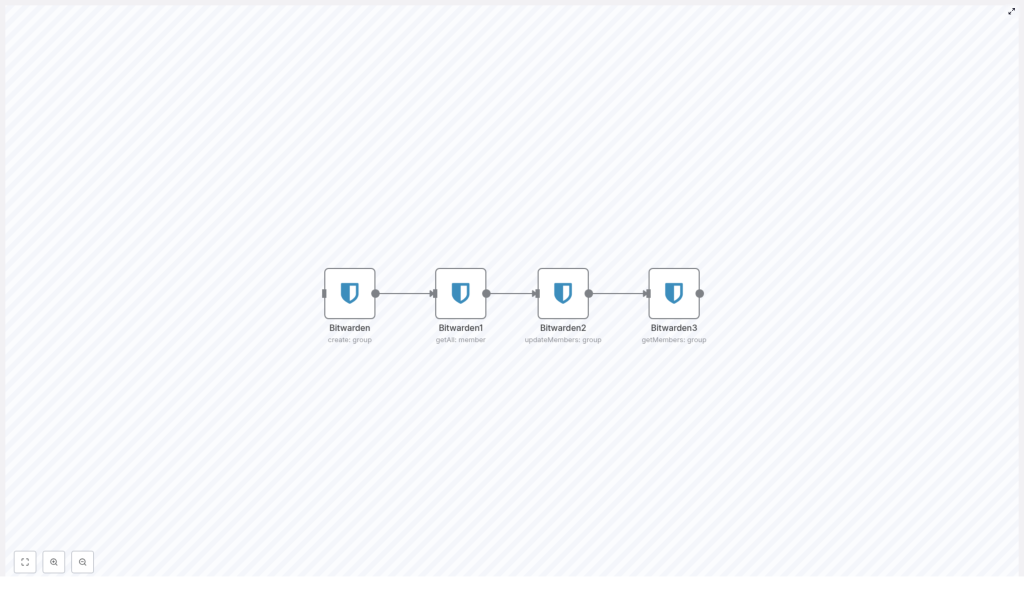
This Bitwarden + n8n workflow template shows you how to do just that. It automatically creates a group, fetches all members, assigns them to the group, and then verifies that everything is set up correctly. What used to be a manual routine becomes a repeatable, auditable process that supports your security standards and frees you to focus on higher-value work.
Shifting Your Mindset: Automation as a Growth Tool
Before we look at the concrete steps, it is worth pausing for a mindset shift. Automation is not only about saving a few minutes here and there. It is about building systems that support your growth, protect your time, and reduce the mental load of remembering every small task.
By automating Bitwarden group and member management with n8n, you are:
- Protecting your organization with consistent, repeatable security processes
- Creating more space for strategic work instead of reactive admin tasks
- Building a foundation that you can extend with more advanced automations later
Think of this workflow template as a starting point. Once you experience how it feels to have one piece of your access management handled automatically, it becomes easier and more exciting to automate the next piece, and the next.
What This n8n Workflow for Bitwarden Actually Does
This template walks through a complete mini lifecycle for Bitwarden group management. In a single automated flow, n8n will:
- Create a Bitwarden group so you have a dedicated place to manage access
- Fetch all members from your Bitwarden instance in one step
- Update group members by assigning all fetched users to the new group
- Verify group membership to confirm that everyone was added correctly
The workflow uses Bitwarden nodes in n8n with specific operations and parameters, so you get a clear, reliable process that you can run again and again or integrate into larger automations.
Step-by-Step: Your Journey Through the Workflow
Let us walk through each part of the workflow as if you were following the path of a new automated process coming to life. Each node plays a specific role, and together they form a simple but powerful system.
1. Create the Bitwarden Group
Everything starts with a group. The first node in this n8n workflow uses the group resource with the create operation to set up a new Bitwarden group. This is the anchor for everything that follows, because the group ID that is generated here is used later when you assign members.
In practical terms, this node:
- Calls the Bitwarden API via n8n
- Creates a new group with your chosen configuration
- Outputs the group ID that downstream nodes will reference dynamically
With this in place, you are no longer manually creating groups and copying IDs. n8n takes care of it for you, every time the workflow runs.
2. Retrieve All Bitwarden Members
Next, the workflow gathers everyone who should be considered for membership. The second node uses the member resource with the getAll operation to fetch every member from your Bitwarden instance.
The key configuration detail here is the returnAll parameter, which is set to true. This ensures that:
- You do not miss any users due to pagination or limits
- The workflow has a complete, current list of all available members
- You can trust that your group assignments are comprehensive
Instead of manually exporting lists or cross checking user records, you let the API and n8n handle it in one clean step.
3. Update Group Members Automatically
Now the real power of automation shows up. The third node takes the group you created and the members you fetched, and brings them together. It updates the members of the group by assigning all fetched users to that group.
Technically, this node:
- Uses the group ID from the first node’s output
- Uses the member IDs from the second node’s list
- Performs an update so that all those members are now part of the newly created group
Because the IDs are passed dynamically between nodes, you do not have to handle any copy and paste or manual mapping. The workflow connects the dots for you, which reduces the risk of human error and makes the process far more scalable.
4. Confirm Group Membership for Peace of Mind
No automation is complete without validation. The final node in this workflow verifies that everything worked as expected. It fetches the current members of the group so you can confirm that your update succeeded.
This step:
- Calls Bitwarden again to retrieve the group’s member list
- Provides a clear checkpoint for auditing and logging
- Gives you a reliable place to plug in further automation, such as notifications or reports
With this final confirmation in place, the workflow does not just act blindly. It checks its own work, which is exactly what you want in a security-related process.
Why Automating Bitwarden Group Management Matters
It is easy to underestimate how much time small security tasks consume. Adding one user here, updating one group there, and suddenly you have spent an hour on something that could have been handled in seconds.
By automating Bitwarden group and member management with n8n, you:
- Save time by replacing repetitive manual steps with a single workflow run
- Reduce errors that come from copying IDs or forgetting to add someone
- Improve consistency so your security policies are applied in the same way every time
- Gain visibility with clear, auditable steps and verification built into the process
Over time, this consistency builds trust in your systems. Your team knows that group assignments are handled correctly, and you know that you are not relying on memory or last minute fixes to keep access secure.
Using This Template as a Stepping Stone
This workflow template is intentionally focused and simple, which makes it a perfect starting point for your broader automation journey with n8n. Once you have it running, you can start asking new questions:
- What if new users triggered this workflow automatically when they are created?
- What if you synced specific groups based on roles, departments, or tags?
- What if you added notifications in Slack or email whenever a group is updated?
n8n gives you the flexibility to experiment. You can clone this template, adjust nodes, add conditions, or connect additional apps. Each improvement builds on the same core idea: let your tools handle the routine work, so you can focus on decisions and strategy.
Get Started: Put Your Bitwarden Management on Autopilot
You do not need to overhaul your entire infrastructure to feel the benefits of automation. Starting with a focused workflow like this one is often the most sustainable approach. It is small enough to implement quickly, yet impactful enough to change how you experience your day-to-day work.
Here is a simple way to move forward:
- Open n8n and import this Bitwarden group management workflow template
- Connect your Bitwarden credentials in the relevant nodes
- Review the operations and parameters so you understand each step
- Run the workflow, verify the results, and then schedule or trigger it as needed
As you gain confidence, start experimenting. Adjust which members are assigned, connect other tools, or extend the verification step with logging and alerts. Each iteration brings you closer to a fully automated, focused workflow that supports your business and your peace of mind.
Take the Next Step in Your Automation Journey
If you are ready to streamline Bitwarden user and group management, this n8n workflow template is an excellent place to begin. Use it to build a more secure, more efficient foundation for your organization, and let it inspire further automation across your stack.
Keep exploring, keep refining, and let automation become a partner in your growth, not just a technical add-on.
For more detailed guides, workflow ideas, and support as you expand your automation toolkit, subscribe to our blog and stay updated with the latest n8n workflows and templates.
