


Automate Blog Comments to Discord with n8n
Picture this: you publish a new blog post, go grab a coffee, and by the time you are back there are fifteen new comments. Some are brilliant, some are spicy, and some are just “first!”. Now imagine manually reading, summarizing, logging, and sharing the best ones with your Discord community every single day. Forever.
If that sounds like a recurring side quest you did not sign up for, this is where n8n comes in to save your sanity. In this guide, we will walk through an n8n workflow template that automatically turns blog comments into searchable context, runs them through a RAG (retrieval-augmented generation) agent, stores everything neatly in Supabase, logs outputs to Google Sheets, and optionally sends the interesting stuff to Discord (or Slack) so your team and community never miss a thing.
All the brain work stays, the repetitive clicking goes away.
What this n8n workflow actually does
This template is built to solve three very real problems that show up once your blog grows beyond “my mom and two friends” traffic:
- Capture everything automatically – Every comment is ingested, split, embedded, and stored in a Supabase vector store so you can search and reuse it later.
- Use RAG to respond intelligently – A RAG agent uses embeddings and historical context to create summaries, suggested replies, or moderation hints that are actually relevant.
- Send the important bits where people live – Highlights and action items can be sent to Discord or Slack, while all outputs are logged to Google Sheets for tracking and audit.
In other words, you get a tireless assistant that reads every comment, remembers them, and helps you respond in a smart way, without you living inside your CMS all day.
Under the hood: key n8n building blocks
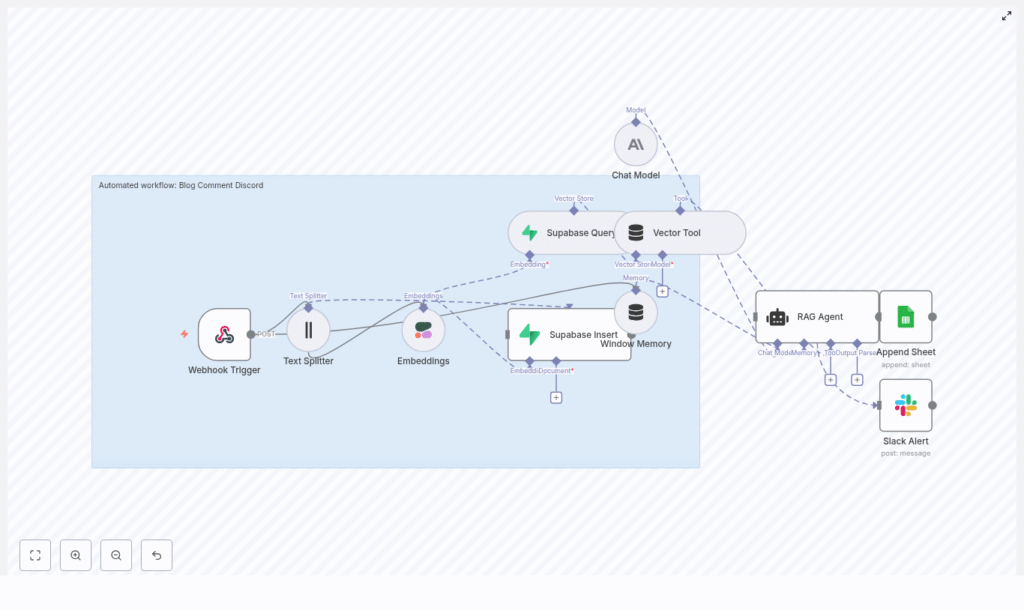
Here is the cast of characters in this automation, all wired together inside n8n:
- Webhook Trigger – Receives incoming blog comment payloads via HTTP POST.
- Text Splitter – Chops long comments into smaller, embedding-friendly chunks.
- Embeddings (Cohere) – Uses the embed-english-v3.0 model to turn text chunks into vectors.
- Supabase Insert / Query – Stores vectors and metadata, and later retrieves similar comments for context.
- Vector Tool – Packages retrieved vectors so the RAG agent can easily access contextual information.
- Window Memory – Keeps recent conversation context available for the agent.
- Chat Model (Anthropic) – Generates summaries, replies, or moderation recommendations.
- RAG Agent – Orchestrates the retrieval + generation steps and sends final output to Google Sheets.
- Slack Alert – Sends a message if any node errors out so failures do not silently pile up.
Optionally, you can add a Discord node or HTTP Request node to post approved highlights straight into a Discord channel via webhook.
How the workflow runs, step by step
Let us walk through what actually happens when a new comment shows up, from “someone typed words” to “Discord and Google Sheets are updated.”
1. Receive the comment via webhook
The workflow starts with a Webhook Trigger node. This exposes an HTTP POST endpoint in n8n. Your blog or CMS should be configured to send comment data to this endpoint whenever a new comment is created.
Example payload:
{  "post_id": "123",  "comment_id": "c456",  "author": "Jane Doe",  "content": "Thanks for the article! I think the performance section could use benchmarks.",  "timestamp": "2025-08-31T12:34:56Z"
}
So instead of you refreshing the comments page on loop, your blog just pings n8n directly.
2. Split and embed the text
Next, the comment text goes to a Text Splitter node. This is where long comments get sliced into smaller chunks so the embedding model can handle them efficiently.
In the template, the recommended settings are:
- Chunk size – 400 characters
- Overlap – 40 characters
This keeps enough overlap to preserve context between chunks without exploding your storage or embedding costs.
Each chunk is then passed to Cohere’s embed-english-v3.0 model. The node generates a vector for each chunk, which is essentially a numerical representation of the meaning of that text. These vectors are what make similarity search and RAG magic possible later on.
3. Store embeddings in Supabase
Once you have vectors, the workflow uses a Supabase Insert node to store them in a Supabase table or index, for example blog_comment_discord.
Along with each vector, the following metadata is stored:
post_idcomment_idauthoror anonymized IDtimestamp
This metadata makes it possible to filter, search, and trace comments later, which is extremely helpful when you need to answer questions like “what were people saying on this post last month?” or “which comment did this summary come from?”
4. Retrieve context for RAG
When the workflow needs to generate a response, summary, or moderation suggestion, it uses a Supabase Query node to look up similar vectors. This retrieves the most relevant historical comments based on semantic similarity.
The results are then wrapped by a Vector Tool node. This gives the RAG agent a clean interface to fetch contextual snippets and ground its responses in real past comments, instead of hallucinating or guessing.
5. RAG agent and Chat Model (Anthropic)
Now the fun part. The RAG Agent pulls together:
- The current comment
- The retrieved context from Supabase via the Vector Tool
- A system prompt that tells it what kind of output to produce
It then calls a Chat Model node using Anthropic. The model generates the final output, which could be:
- A short summary of the comment
- A suggested reply for you or your team
- A moderation recommendation or policy-based decision
You can customize the agent prompt to match your tone and use case. For example, here is a solid starting point:
System: You are an assistant that summarizes blog comments. Use retrieved context only to ground your answers. Produce a 1-2 sentence summary and a recommended short reply for the author.Change the instructions to be more friendly, strict, or concise depending on your community style.
6. Log to Google Sheets and notify your team
Once the RAG agent has done its job, the workflow sends the final output to a Google Sheets Append node. This writes a new row in a “Log” sheet so you have a complete history of processed comments and generated responses.
Meanwhile, if anything fails along the way (API hiccups, schema issues, etc.), the onError path triggers a Slack Alert node that posts into a channel such as #alerts. That way you find out quickly when automation is unhappy instead of discovering missing data a week later.
On top of that, you can plug in a Discord node or HTTP Request node to post selected summaries, highlights, or suggested replies straight into a Discord channel via webhook. This is great for surfacing the best comments to your community or to a private moderation channel for review.
Posting to Discord: quick example
To send a summary to Discord after human review or automatic approval, add either:
- A Discord node configured with your webhook URL, or
- An HTTP Request node pointing at the Discord webhook URL
A minimal JSON payload for a Discord webhook looks like this:
{  "content": "New highlighted comment on Post 123: \"Great article - consider adding benchmarks.\" - Suggested reply: Thanks! We'll add benchmarks in an update."
}
You can dynamically fill in the post ID, comment text, and suggested reply from previous nodes so Discord always gets fresh, contextual messages.
Configuration tips and best practices
Once you have the template running, a bit of tuning goes a long way to make it feel tailored to your blog and community.
Chunking strategy
The default chunk size of 400 characters with a 40-character overlap works well for many setups, but you can tweak it based on typical comment length:
- Short comments – You can reduce chunk size or even skip aggressive splitting.
- Long, essay-style comments – Keep overlap to preserve context across chunks, but be mindful that more overlap means more storage and more embeddings.
Choosing an embedding model
The template uses Cohere’s embed-english-v3.0 model, which is a strong general-purpose option for English text. If your comments are in a specific domain or language, you might consider another model that better fits your content.
Keep an eye on:
- Cost – More comments and more chunks mean more embeddings.
- Latency – If you want near real-time responses, model speed matters.
Metadata and indexing strategy
Good metadata makes your life easier later. When storing vectors in Supabase, make sure you include:
post_idto group comments by articlecomment_idto uniquely identify each commentauthoror an anonymized identifiertimestampfor chronological analysis
It is also smart to namespace your vector index per environment or project, for example:
blog_comment_discord_devblog_comment_discord_prod
This avoids collisions when you are testing changes and keeps production data nice and clean.
RAG prompt engineering
The system prompt you give the RAG agent has a huge impact on the quality and tone of its output. Use clear instructions and be explicit about length, style, and constraints.
For example:
System: You are an assistant that summarizes blog comments. Use retrieved context only to ground your answers. Produce a 1-2 sentence summary and a recommended short reply for the author.From here, you can iterate. Want more playful replies, stricter moderation, or bullet-point summaries? Update the prompt and test with a few sample comments until it feels right.
Security essentials
Automation is great, leaking API keys is not. A few simple habits keep this workflow safe:
- Store all API keys (Cohere, Supabase, Anthropic, Google Sheets, Discord, Slack) as n8n credentials or environment variables, not hardcoded in JSON or shared repos.
- If your webhook is publicly accessible, validate payloads. Use signatures or a shared secret to prevent spam or malicious requests from triggering your workflow.
Monitoring and durability
To keep things reliable over time:
- Use the onError path and Slack Alert node so your team is notified whenever something breaks.
- Implement retries for transient issues like network timeouts or temporary API failures.
- Track processed
comment_idvalues in your datastore so that if a webhook is retried, you do not accidentally process the same comment multiple times.
That way, your automation behaves more like a dependable teammate and less like a moody script.
Ideas to extend the workflow
Once the basics are in place, you can start layering on extra capabilities without rewriting everything from scratch.
- Moderation queue in Discord – Auto-post suggested replies into a private Discord channel where moderators can approve or tweak them before they go public.
- Sentiment analysis – Tag comments as positive, neutral, or negative and route them to different channels or sheets for follow-up.
- Daily digests – Aggregate summaries of comments and send a daily recap to your team or community.
- Role-based workflows – Use different n8n credentials or logic paths so some users can trigger automated posting, while others can only view suggestions.
Think of the current template as a foundation. You can stack features on top as your needs evolve.
Testing checklist before going live
Before you trust this workflow with your real community, run through this quick checklist:
- Send a test POST to the webhook with a realistic comment payload.
- Check that the Text Splitter chunks the comment in a way that still preserves meaning.
- Verify that embeddings are generated and stored in Supabase with the correct metadata.
- Run a full flow and confirm the RAG output looks reasonable, and that it is logged to Google Sheets correctly.
- Trigger a deliberate error (for example, by breaking a credential in a test environment) and confirm the Slack notification fires.
Once all of that checks out, you are ready to let automation handle the boring parts while you focus on writing more great content.
Conclusion: let automation babysit your comments
This n8n-based RAG workflow gives you a scalable way to handle blog comments without living in your moderation panel. With Supabase storing vectorized context, Cohere generating embeddings, Anthropic handling generation, and Google Sheets logging everything, you end up with a robust system that:
- Makes comments searchable and reusable
- Produces context-aware summaries and replies
- Surfaces highlights to Discord or Slack automatically
Instead of manually copy-pasting comments into spreadsheets and chat apps, you get a smooth pipeline that runs in the background.
Next steps: import the template into n8n, plug in your credentials (Cohere, Supabase, Anthropic, Google Sheets, Slack/Discord), and run a few test comments. Tweak chunk sizes, prompts, and notification rules until the workflow feels like a helpful assistant instead of a noisy robot.
Call to action: Try the n8n template today, throw a handful of real comments at it, and start piping the best ones into your Discord channel. If you want a tailored setup or need help adapting it to your stack, reach out for a customization walkthrough.
