


Automate Blog Content Creation with GPT-4, Perplexity & WordPress
Publishing great blog content on a regular basis is tough, right? Brainstorming topics, doing research, drafting, editing, formatting for WordPress, then telling everyone it is live – it all adds up.
The good news is that you can automate a huge chunk of this workflow without sacrificing quality. By combining GPT-4, Perplexity, n8n, and WordPress, you can build a content engine that handles research, writing, publishing, and notifications for you.
In this guide, we will walk through an n8n workflow template that does exactly that. You will see how Perplexity handles research, GPT-4 turns that into SEO-friendly blog posts, n8n glues everything together, and Slack, Gmail, and Notion keep your team in the loop.
Why bother automating blog content at all?
If you are publishing regularly, you have probably felt the strain of keeping up. Automation helps you:
- Publish more often without burning out your team.
- Keep a consistent structure, tone, and SEO approach across posts.
- Pull in up-to-date research so your content does not feel stale.
- Push posts straight to WordPress with the right metadata and formatting.
- Automatically notify your team and log everything for future audits.
In other words, you still control the strategy and voice, but the repetitive parts – research, drafting, formatting, and notifications – run on autopilot.
What this n8n workflow template actually does
Let us zoom out for a second. At a high level, the template takes a topic or question and turns it into a published WordPress article, then pings your team and logs the details.
Here is the journey, end to end:
- You submit a topic, target keywords, and desired length.
- Perplexity runs live research and returns a summary with citations.
- n8n cleans and structures that research for GPT-4.
- GPT-4 writes an SEO-optimized article with headings, meta description, and HTML.
- The post is sent to WordPress as a draft or published post.
- Slack, Gmail, and Notion updates keep everyone informed and create an audit trail.
The beauty of using n8n is that you can customize each step, add checks, and keep a human in the loop wherever you want.
The main building blocks of the workflow
Perplexity for research
Perplexity is your research assistant. It pulls together search-aware summaries with links to sources so you are not guessing whether the information is current or credible.
In this workflow, Perplexity is used to:
- Gather fresh facts, stats, and examples for your topic.
- Provide citations you can link to in your article.
- Reduce the chance of hallucinations in your final content.
Automating this step means every post starts from a solid, up-to-date research base instead of random guesses.
GPT-4 for drafting and SEO optimization
Once Perplexity has done the research, GPT-4 steps in as your SEO content writer.
With the right prompt, GPT-4 can:
- Turn research into a structured blog post with H1, H2, and H3 headings.
- Generate a compelling meta description.
- Write in HTML or Markdown so it is ready for WordPress.
- Include target keywords naturally, not in a spammy way.
The key is to give GPT-4 clear instructions in your n8n node: tone, length, keywords, internal linking ideas, and any calls to action you want at the end.
Example prompt snippet:
"You are an SEO content writer. Using the research below, write a 1,200-word blog post with H1, H2s, and H3s, include the keywords: 'automate blog content', 'GPT-4', 'Perplexity', and 'WordPress'. Add a 140-character meta description and a closing CTA."
n8n as the automation backbone
n8n is where everything comes together. Think of it as the conductor for your content pipeline.
In this template, n8n is responsible for:
- Triggering the workflow from a form or chat submission.
- Sending the topic to Perplexity and capturing the response.
- Formatting the research into a clean structure for GPT-4.
- Calling GPT-4 and receiving the finished article and meta fields.
- Pushing the result to WordPress.
- Sending notifications and logging records in Notion.
You can also add conditional logic, retries, and error handling so the workflow is stable enough to run in the background without babysitting.
WordPress for publishing
Once GPT-4 has created the article, the WordPress node in n8n handles the publishing side.
It can:
- Create a new post with the generated title and HTML body.
- Set categories, tags, and SEO metadata.
- Attach or select a featured image based on the topic.
- Save as a draft for review or publish immediately.
This is where you decide how hands-off you want to be. Many teams start with drafts, then move to auto-publish once they trust the pipeline.
Slack, Gmail, and Notion for notifications and logging
After a post is created, the workflow does not just stop. It also keeps your team informed and your records tidy.
The template uses:
- Slack to ping an editorial or marketing channel when a new post is ready or published.
- Gmail to email stakeholders who prefer updates in their inbox.
- Notion to log each article with title, summary, URL, and status for future reference and audits.
This gives you visibility across the whole process and a history you can always come back to.
How the step-by-step n8n workflow runs
Let us walk through the actual flow as it appears in n8n, from the first trigger to the final notification.
Step 1 – Capture a topic or question
The workflow starts with a simple input, often from a form or chat interface. You provide:
- The main topic or question.
- Target keywords you want to rank for.
- Preferred length or depth of the article.
n8n uses this information as the query sent to Perplexity.
Step 2 – Run automated research with Perplexity
Next, n8n calls the Perplexity API using that topic and context. Perplexity returns:
- A summarized overview of the topic.
- Key points and arguments.
- Citations and links to authoritative sources.
- Relevant statistics or data where available.
All of this is captured as structured data inside n8n so it can be reused in later steps.
Step 3 – Clean and format the research output
Perplexity’s response is useful, but you usually do not want to feed it to GPT-4 as-is. The workflow includes a formatter node that:
- Extracts bullet points and key ideas.
- Pulls out the list of sources and citations.
- Normalizes any suggested keywords or subtopics.
This gives GPT-4 a neat, structured context so it can write with better attribution and clarity.
Step 4 – Generate SEO content with GPT-4
Now GPT-4 takes over. Using the formatted research and your instructions, it creates:
- An H1 blog title.
- A logical H2 and H3 outline.
- The full body content in HTML or Markdown.
- A short, optimized meta description.
You can also include instructions for:
- Reading level and tone of voice.
- Specific keywords to include.
- Internal linking suggestions.
- A closing call to action.
If you want a human in the loop, you can configure the workflow so the content lands in WordPress as a draft first, then your editor reviews and publishes.
Step 5 – Publish (or draft) in WordPress
Once GPT-4 returns the content, the WordPress node pushes it to your site. In this step you can:
- Map the GPT-4 title to the WordPress post title.
- Insert the HTML into the main content field.
- Set tags, categories, and SEO meta fields.
- Attach a featured image, either generated or chosen from your media library.
- Choose whether to set the post status as
draftorpublish.
Step 6 – Notify your team and log the article
After WordPress confirms the post creation, the final part of the workflow kicks in:
- Slack notification to share the title and URL in your chosen channel.
- Gmail email to relevant stakeholders with a brief summary and link.
- Notion entry that stores the title, summary, URL, and status for tracking and audits.
This makes your content pipeline transparent and keeps everyone aligned without manual updates.
SEO and editorial best practices for automated content
Automation is powerful, but it does not replace a solid content strategy. To keep your automated posts ranking well and aligned with your brand, keep these practices in mind:
- Always include citations and link out to the authoritative sources Perplexity provides.
- Use human review for sensitive topics like legal, medical, or compliance-heavy content.
- Focus on natural language and user intent rather than stuffing keywords.
- Include internal links to your evergreen or cornerstone content to strengthen your site structure.
- Add a clear meta description and use structured data (schema.org) when appropriate.
Monitoring performance and keeping quality high
Once your workflow is running, you will want to keep an eye on how the content performs and tweak as you go.
Some useful KPIs to track:
- Organic search traffic to automated posts.
- Bounce rate and time on page.
- Click-through rate from search results (influenced by titles and meta descriptions).
You can also:
- Run A/B tests on headlines and CTAs to see what resonates.
- Adjust your GPT-4 prompts based on what performs best.
- Add an automated QA step in n8n that checks for minimum word count, presence of key phrases, and a meta description before publishing.
Common pitfalls to watch out for
Like any automation, there are a few traps you will want to avoid. Here are some of the big ones and how to handle them:
- Stale research: For time-sensitive topics, configure Perplexity to pull fresh results or schedule periodic rechecks and content updates.
- Over-automation: Keep a human editor in the loop for brand voice, sensitive themes, or high-impact content.
- Plagiarism risk: Rely on Perplexity’s citations and prompt GPT-4 to paraphrase, synthesize, and add original commentary instead of copying.
- Broken workflows: Add retry logic and error handlers in n8n, and send failure alerts to Slack or email so you can fix issues quickly.
Inside the example n8n flow: key nodes
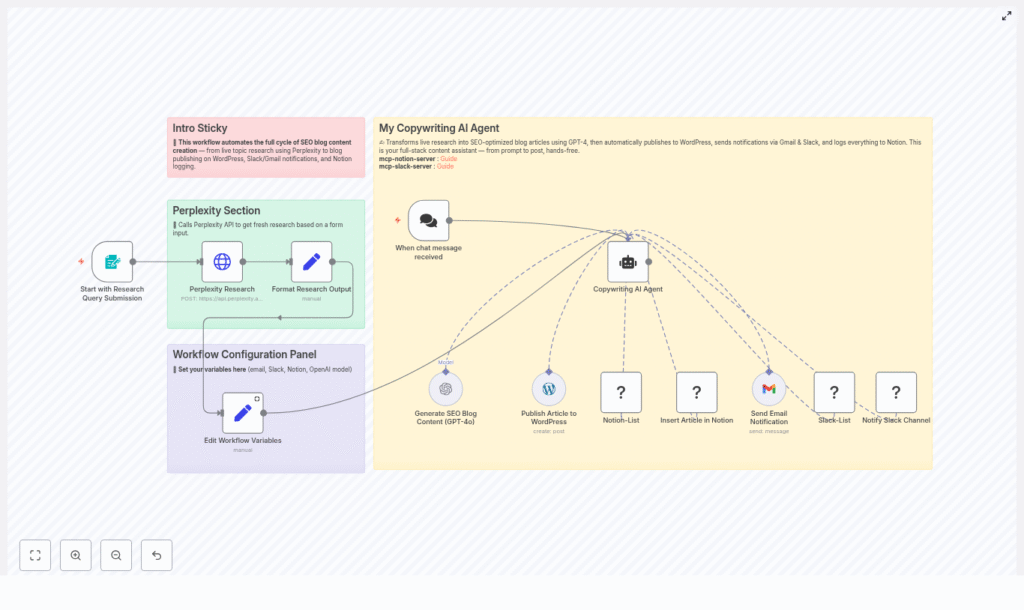
The template shown in the visual diagram maps neatly to the steps we have covered. Some of the most important nodes are:
- Form trigger: Collects the initial topic or question, plus any extra parameters like keywords or length.
- Perplexity node: Calls the Perplexity API and returns research summaries and citations.
- Formatter node: Cleans and structures the research so GPT-4 gets a clear, well-organized context.
- GPT-4 node: Generates the full SEO-optimized article, including headings and meta description.
- WordPress node: Creates or updates the post with the right content and metadata.
- Gmail, Slack, and Notion nodes: Handle notifications and logging once the article is created.
Scaling your automated content production
Once you have the basic workflow running smoothly, you can start thinking about scale. Here are a few ideas:
- Create reusable prompt templates and content briefs so every article follows a consistent tone and structure.
- Use metadata-driven publishing, like categories, tags, and featured images, to keep your content library organized.
- Automate internal link insertion to your cornerstone or cluster content for stronger SEO.
- Batch your work: queue multiple topics or research queries, then have GPT-4 generate drafts on a schedule for steady publishing.
Bringing it all together
When you connect Perplexity’s research, GPT-4’s writing capabilities, n8n’s orchestration, and WordPress publishing, you end up with a powerful, repeatable system to automate blog content creation.
The payoff is clear:
- Higher publishing velocity without extra headcount.
- More consistent SEO signals across your posts.
- Less manual copy-pasting and status chasing, thanks to Slack, Gmail, and Notion integrations.
If you are just getting started, you do not need to automate everything on day one. Begin with research and draft generation, then gradually plug in WordPress publishing and notifications. Over time, you can add QA checks and human review points until you hit the right balance between speed and control.
Call to action: Want a ready-made n8n workflow to do all this for you? Use the template to get your first automated article live in under 24 hours, or book a walkthrough with our automation team if you would like a guided setup. Get the template & schedule a demo.
Keywords: automate blog content, GPT-4, Perplexity, WordPress, n8n workflow, AI content automation, SEO.
