


Automate Certificate Requests: Venafi + Slack + n8n
Every security or operations team eventually hits the same wall: certificate requests pile up, approvals get stuck in tickets and chats, and urgent deployments stall while someone waits for a CSR. It is repetitive, stressful work that pulls your team away from higher-value projects.
What if that entire journey – from Slack request to issued certificate – could run almost on its own, with clear guardrails, security checks, and a friendly experience for engineers?
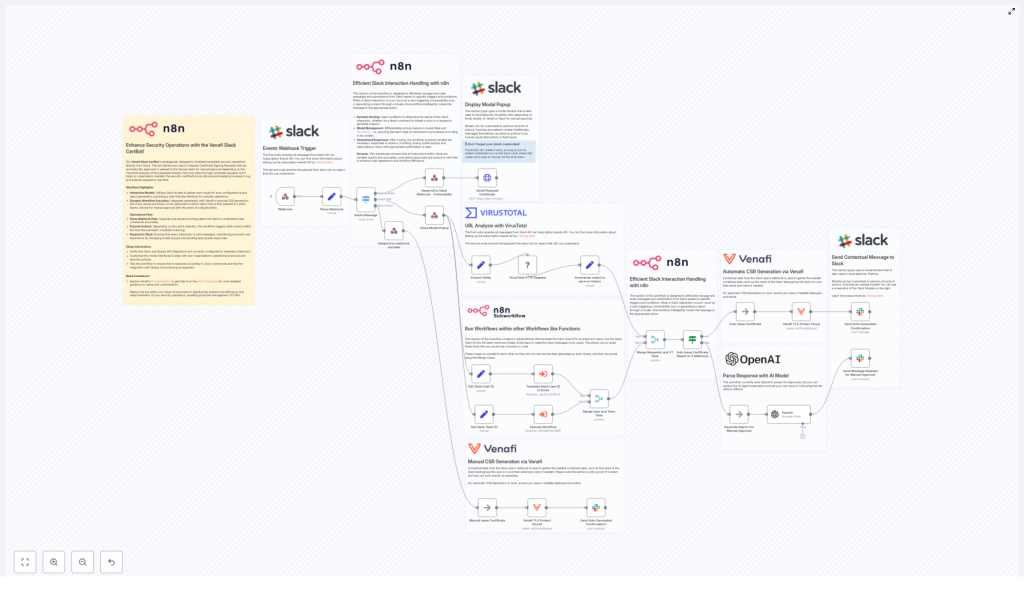
This article walks you through an n8n workflow template that does exactly that. It turns simple Slack requests into fully analyzed, risk-aware Certificate Signing Requests (CSRs) using VirusTotal and OpenAI, and then uses Venafi TLS Protect Cloud for automated, enterprise-grade issuance.
Think of it as a first big step toward a more automated, focused way of working. You set the rules once, then let the workflow handle the busywork while you focus on strategy, architecture, and growth.
From manual bottlenecks to automated momentum
Manual CSR generation and approval may feel “safe” because it is familiar, but it comes at a cost:
- Slow, inconsistent approvals that delay releases
- Human error in copy-paste steps and manual checks
- Scattered audit trails across tickets, emails, and chats
By moving certificate requests into an automated n8n workflow, you create a repeatable, transparent process that supports your entire organization. The benefits compound over time:
- Faster CSR issuance with clearly defined approval paths
- Built-in risk checks using VirusTotal and AI analysis
- Centralized visibility and a simple Slack-based experience for requesters
- Reliable integration with Venafi for secure, enterprise-ready issuance
This is not just about saving a few minutes per request. It is about reclaiming hours each week, reducing firefighting, and giving your team a foundation they can build on as automation becomes a core part of how you work.
Shifting your mindset: automation as a partner
Adopting automation is not about replacing people. It is about partnering with tools that handle the repetitive steps so your team can focus on judgment, creativity, and long-term security strategy.
In this workflow, n8n orchestrates several powerful services:
- Slack (Events API and modals) to collect user requests and provide real-time feedback
- n8n Webhook to receive events from Slack and turn them into structured data
- VirusTotal API to analyze requested domains for malicious indicators
- OpenAI to summarize VirusTotal results and suggest a clear risk rating
- Venafi TLS Protect Cloud to generate CSRs and issue certificates when approved
- Subworkflows to enrich Slack user and team information for better context and auditing
Each component does one thing well. n8n ties them together into a single, understandable flow that your team can inspect, extend, and trust.
The journey: from Slack request to issued certificate
Let us walk through the workflow the same way your users will experience it, step by step. As you read, imagine where you can tweak the logic, add checks, or connect additional tools. This template is a starting point, not a limit.
1. A simple Slack modal starts the process
The journey begins in Slack, where engineers already spend much of their day. Instead of opening tickets or emailing security, they open a Slack modal dedicated to certificate requests.
The modal captures three fields:
- Domain name
- Requested validity period
- Optional note for context or special requirements
Once submitted, Slack sends the payload to an n8n Webhook. The webhook node immediately parses the incoming data into a clean JSON object that the rest of the workflow can easily work with.
2. Smart routing keeps the UX smooth
After receiving the Slack event, the workflow uses a Switch node (router) to decide what needs to happen next. Depending on the event type, it can:
- Open the request modal
- Process a new submission
- Handle interactive elements such as buttons or block actions
n8n responds to Slack quickly so the modal closes smoothly and the user gets instant confirmation that their request is in progress. This small detail makes automation feel responsive and trustworthy.
3. Enriching the request with human context
With the modal closed, the workflow extracts the key fields: domain, requested validity, and any notes. At the same time, it runs parallel subworkflows to add context:
- Convert the Slack user ID into an email address
- Resolve the Slack team ID into a human-readable team name and avatar
These details are merged back into the main flow so that every subsequent message, approval request, and audit record is easy to understand. This is where automation starts to feel personal rather than mechanical.
4. VirusTotal domain analysis for built-in security checks
Before a certificate is ever issued, the workflow checks the requested domain using the VirusTotal domain lookup API. It retrieves key indicators such as:
- Last-analysis stats
- Reputation values
To keep things efficient and cost-effective, the workflow stores only the essential verdicts, including:
- malicious
- suspicious
- undetected
- harmless
- timeout
- overall reputation
This compact snapshot is enough for downstream AI analysis and auditing, while saving tokens and processing overhead.
5. AI-powered summarization and risk assessment
Next, an OpenAI node receives the summarized VirusTotal output. Instead of asking your analysts to interpret raw numbers for every request, the AI standardizes the assessment and assigns a risk category:
- Low – no significant flags, safe to auto-issue
- Medium – minor concerns, recommend manual review
- High – multiple engines flag malicious activity, block or require deep manual review
The AI returns a concise explanation and suggested next steps. This keeps decisions consistent across different analysts and shifts, and dramatically reduces the cognitive load for each request.
6. Automated issuance or human approval, based on risk
At this point, the workflow has everything it needs to choose the right path. Using the AI risk rating and the VirusTotal malicious count, n8n branches into one of two flows:
- Auto-issue path
If the number of malicious engines is zero and OpenAI rates the domain as Low risk, n8n calls the Venafi TLS Protect Cloud node. Venafi generates a CSR and issues a certificate automatically, according to your configured template and policies. - Manual approval path
If the risk is Medium or High, the workflow crafts a rich Slack message for an approver channel. This message includes:- The AI analysis and risk rating
- Key VirusTotal metrics
- Requester identity and team information
Security reviewers can then inspect the context and use a button to approve issuance when appropriate.
This is where automation and human judgment work together. Low-risk, routine requests glide through the system, while higher-risk cases get the attention they deserve.
7. Clear Slack notifications and complete audit trails
Once a certificate is issued, the workflow closes the loop with the requester. n8n sends a detailed Slack block message back to the channel, including:
- Certificate issuance details
- Validity dates
- A link to the Venafi CSR or certificate record
- Options to trigger revocation if needed
In the background, every step is logged inside the workflow for auditability:
- Initial request
- VirusTotal analysis
- AI assessment
- Decision path (auto-issue or manual)
- Issuance and revocation actions
The result is a trail that compliance teams can review, without forcing your engineers to manually document every decision.
Implementation tips to set yourself up for success
As you adapt this n8n template to your environment, a few practical choices will help you scale confidently:
- Validate user inputs in the Slack modal using regex for FQDNs, allowed TLDs, and wildcard rules
- Use scoped API keys and secrets for Venafi, VirusTotal, and OpenAI, and store them securely in n8n credentials
- Rate-limit VirusTotal calls and cache results for domains that are requested frequently, to avoid quota issues
- Define clear SLAs and escalation paths for manual approvals so urgent deployments do not get stuck
- Log every decision, including user, timestamp, and analysis summary, to support audits and incident reviews
These practices turn your workflow from a helpful script into a reliable service that your entire organization can depend on.
Security and compliance: building trust into automation
Automated certificate issuance is powerful, so it is important to align it with your security policies from day one. As you roll out this workflow, consider:
- Defining which teams, domains, or environments are allowed to use auto-issuance
- Restricting Venafi templates and issuance privileges to reduce blast radius
- Keeping AI analysis explainable by storing the prompt, input snapshot, and output together
- Implementing monitoring and alerts for unusual issuance patterns, such as spikes or repeated rejections
By treating automation as part of your formal security program, you build confidence with stakeholders and regulators while still moving faster.
Testing and rolling out your n8n certificate workflow
To make your transition smooth, treat rollout as a journey with clear stages. A simple checklist can help:
- Deploy the workflow to a staging Venafi environment and run end-to-end test requests
- Simulate malicious or suspicious domains in VirusTotal to confirm the manual approval path behaves correctly
- Verify Slack notifications, buttons, and modal lifecycle across both desktop and mobile clients
- Run a tabletop review with security, ops, and application teams to agree on thresholds, templates, and escalation rules
Once you trust the behavior, you can gradually expand usage from a small pilot group to more teams and environments.
Extending the workflow as your automation practice grows
One of the biggest advantages of using n8n is that your automation can evolve with your needs. This template is a solid foundation, and you can grow it over time. Some ideas:
- Integrate with a CMDB to map domains to owners and automatically approve requests for known assets
- Send issuance events to your SIEM or ticketing systems such as Jira or ServiceNow for change management
- Incorporate additional threat intelligence sources or sandboxing tools for deeper domain analysis
- Add certificate monitoring and automated renewal workflows triggered by Venafi or certificate expiration events
Each improvement makes your environment more resilient and your team more focused on strategic work rather than repetitive tasks.
Bringing it all together
This n8n workflow template offers a practical, secure pattern for automating certificate requests using Slack as the interface, VirusTotal and OpenAI for risk context, and Venafi for trusted issuance. It reduces friction for engineers, preserves strong security oversight, and gives you a clear, auditable process that can grow with your organization.
Most importantly, it demonstrates what becomes possible when you let automation handle the routine steps. You free your team to focus on architecture, threat modeling, and long-term improvements instead of chasing individual CSRs.
Ready to take the next step? Load the workflow template into your n8n instance, connect your Slack, VirusTotal, OpenAI, and Venafi credentials, and run staged tests. Start small, learn from each iteration, and keep refining the flow until it fits your organization perfectly.
If you want help adapting the template, reach out to your internal automation champions, contact our team, or join the n8n community to learn from others who are on the same journey.
Learn more about n8n | Venafi Docs | VirusTotal
This article describes a reference architecture and implementation guidance. Always validate this approach against your organization’s security policies and compliance requirements before enabling automated issuance in production.
