


Automate Customs Tariff Number Research with API & Google Sheets
Why bother automating customs tariff numbers?
If you deal with international shipments, you already know how painful customs tariff number research can be. Manually checking codes for every single item is slow, repetitive, and honestly, pretty easy to mess up. One wrong number and you might be looking at delays, extra questions from customs, or even fines.
This n8n workflow template steps in as your quiet assistant in the background. It uses a dedicated customs tariff API to suggest the right codes for your products and connects directly to Google Sheets so you can work from a simple list instead of jumping between tools. Whether you need a quick answer for one product or want to process a whole spreadsheet of items, this workflow has you covered.
What this n8n workflow actually does
At a high level, the template helps you:
- Look up a customs tariff number for a single item via a chat-style interface
- Run bulk customs tariff research for many items stored in a Google Sheet
- Get an automatic email when your bulk processing is finished
So you can keep working on other tasks while n8n does the heavy lifting in the background.
When should you use this template?
This workflow is a great fit if you:
- Regularly ship products across borders and need tariff numbers for customs declarations
- Manage item lists in Google Sheets and want to enrich them with customs tariff codes
- Are part of a logistics, compliance, or operations team that wants fewer manual lookups
- Need both one-off lookups and large batch processing in a single, flexible setup
In short, if you ever find yourself thinking, “There has to be a faster way to get these customs codes,” this template is for you.
How the workflow is structured
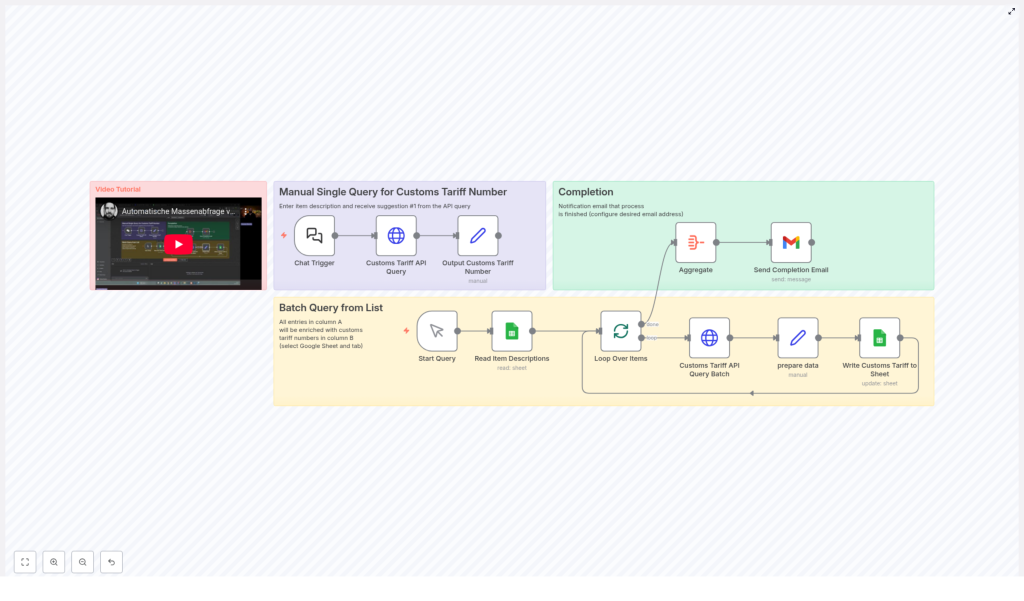
The template is organized into three main parts that work together:
- Manual Single Query – look up a single item via chat input
- Batch Query from Google Sheets – process a whole list of items
- Completion Notification – get an email when the batch is done
You can use each part independently depending on what you need at the moment.
1. Quick single-item lookup via chat
Let’s start with the most interactive part. Imagine you just need a customs tariff number for one product. Instead of opening a browser, searching for a website, and manually navigating through categories, you simply type a description into a chat interface in n8n.
The workflow takes that description and sends it to the Customs Tariff API, which returns a list of suggested tariff codes. The workflow then grabs the first suggestion and presents it as the result.
Key nodes for the single query
- Chat Trigger – This node starts the workflow when you enter an item description. Think of it as your “Ask a question” entry point.
- Customs Tariff API Query – Here the item description you typed is sent to the Customs Tariff API, which responds with suggested codes.
- Output Customs Tariff Number – The workflow extracts the first suggested tariff code from the API response and outputs it for you.
It is perfect for those moments when you just want to quickly check one product without touching your spreadsheet.
2. Bulk customs tariff lookup from Google Sheets
Now for the real time saver. If you have a whole list of items, doing them one by one would be painful. This part of the workflow takes a Google Sheet and runs tariff number suggestions for every item in it.
Here is how it works in practice:
- You manually start the workflow when you are ready to process a batch.
- n8n reads all item descriptions from the first column of a specific Google Sheet.
- For each item, the workflow calls the same Customs Tariff API to get suggestions.
- It extracts the key details, such as the tariff code, description, and confidence score.
- It writes the resulting tariff numbers back into the sheet so your data stays in one place.
Key nodes for batch processing
- Start Query – A manual trigger node that starts the batch processing when you are ready. No need to wait for a schedule if you want to control the timing.
- Read Item Descriptions – Connects to your chosen Google Sheet and reads the item names or descriptions from the first column.
- Loop Over Items – Iterates over each row so every item gets its own API request and result.
- Customs Tariff API Query Batch – Sends each item description to the Customs Tariff API to get suggested tariff numbers.
- Prepare Data – Cleans up and structures the response, pulling out the most relevant tariff code, the description, and the confidence score.
- Write Customs Tariff to Sheet – Updates your Google Sheet with the returned tariff codes and related info, so you can immediately see the results next to each item.
The result is a Google Sheet that starts with just item descriptions and ends up enriched with customs tariff numbers and useful metadata, all without you manually searching for anything.
3. Automatic completion email so you stay in the loop
Batch jobs can take a bit of time, especially if your item list is long. Instead of constantly checking n8n or refreshing your sheet, this workflow sends you an email when everything is done.
Once all items are processed, the workflow aggregates the results and triggers an email notification. You get a clear signal that the job has finished, and you can jump back into your sheet to review the codes.
Key nodes for notifications
- Aggregate – Collects the data from the batch process so the workflow knows when all items have been handled.
- Send Completion Email – Sends a summary email to the address you configure, letting you know the batch has completed.
This is especially handy if you kick off a larger batch, go do something else, and just wait for the email to tell you your sheet is ready.
Why this workflow makes your life easier
Let’s break down the main benefits in simple terms:
- Automation – Most of the repetitive work is handled for you. No more copy-paste between websites and spreadsheets.
- Accuracy – The workflow uses a dedicated Customs Tariff API for suggestions, which helps reduce human error and keeps your classifications more consistent.
- Seamless Google Sheets integration – You keep working in a tool you already know, and n8n works behind the scenes to enrich your data.
- Notifications built in – Email alerts mean you do not need to babysit the process. Start a batch, walk away, and come back when it is done.
- Scalability – It works just as well for a single urgent lookup as for hundreds of items in a list.
How to set it up and start using it
Getting started is mostly about connecting your accounts and pointing the workflow at the right sheet. Here is the basic setup flow:
- Connect Google Sheets
Configure your Google Sheets credentials in n8n with the required access rights so the workflow can read and write to your spreadsheet. - Connect Gmail for notifications
Link your Gmail account in n8n so the workflow can send completion emails to your chosen address. - Run single queries via chat
When you want a quick lookup, use the chat trigger in the workflow, type your item description, and let the workflow return a suggested customs tariff number. - Prepare your batch sheet
Create or open a Google Sheet and put all your item descriptions in the first column. This is what the workflow will read from. - Start the batch job
Use the manual trigger for batch processing in n8n. The workflow will read the sheet, query the API for each item, update the sheet with tariff numbers, and then notify you by email when everything is complete.
Who benefits most from this template?
This workflow is especially useful for:
- Businesses handling frequent international shipments
- Logistics and warehouse teams preparing customs documents
- Compliance officers who need consistent, auditable tariff classifications
- Anyone maintaining product or item lists in Google Sheets and needing customs codes
By automating tariff research, you free up time and mental energy to focus on planning, customer communication, and higher value work.
Ready to streamline your customs tariff research?
If you are tired of searching for tariff numbers one by one, this n8n template gives you a practical, low-friction way to automate the process. You get the reliability of an API, the familiarity of Google Sheets, and the flexibility of n8n to adapt the workflow as your needs grow.
Set it up once, and you will keep saving time every time you add new products or update your item lists.
Automate your customs tariff number research today, reduce errors, and keep your import and export processes running smoothly.
