


Automate a Daily Email Digest and Slack Summary With n8n
From Inbox Overload to Clarity Every Morning
Your inbox should be a source of clarity, not a source of stress. Yet for many professionals, dozens or even hundreds of emails arrive every day, scattering attention and hiding what really matters. Important messages get buried, follow-ups are forgotten, and you start each morning trying to catch up instead of moving forward.
It does not have to be that way. With a simple n8n workflow template, you can turn yesterday’s inbox chaos into a focused daily briefing that lands in Slack at the start of your day. No more manual sorting, no more scanning through threads, just a clear, AI-powered summary of what deserves your attention.
This article walks you through that journey: from the problem of email overload, to a new mindset about automation, and finally to a practical, ready-to-use daily email digest workflow in n8n that connects Gmail, AI analysis, and Slack.
Shifting Your Mindset: Automation as a Growth Tool
Automation is not just about saving clicks. It is about creating space for deeper work, strategic thinking, and growth. When repetitive tasks are handled automatically, you gain back mental energy and time that you can invest in your priorities.
This daily email digest template is a small but powerful example. It:
- Transforms a noisy inbox into a structured, digestible summary
- Helps you and your team see what is urgent at a glance
- Builds a habit of reviewing key information in a focused way
Think of this workflow as a first stepping stone. Once you experience how it feels to have your email recap arrive in Slack every morning, you will start seeing other opportunities to automate and improve your workday with n8n.
What This n8n Workflow Does For You
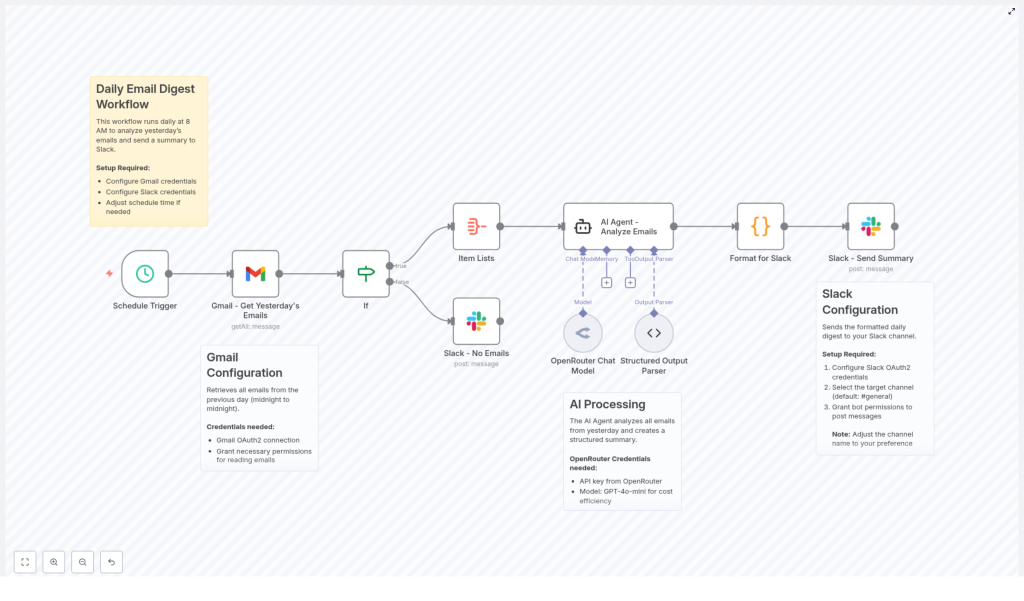
The template creates a daily email digest that summarizes the previous day’s Gmail activity and posts it straight to a Slack channel. Here is the high-level flow:
- Every morning at 8 AM, a Schedule Trigger starts the workflow.
- n8n uses the Gmail node to fetch all emails from the previous day.
- If emails are found, they are combined and passed to an AI agent powered by the OpenRouter Chat Model with the GPT-4o-mini model.
- The AI analyzes and summarizes the emails, highlighting key messages, urgent items, and action points.
- A code node formats this summary for Slack markdown.
- The formatted digest is posted to a selected Slack channel, such as
#general. - If there are no emails, the workflow sends a simple Slack message saying there is nothing to report.
The result is a clean, focused daily briefing that helps you start your day with intention instead of inbox anxiety.
Inside the Workflow: Components That Power Your Daily Digest
1. Schedule Trigger – Your Consistent Morning Ritual
The journey begins with a Schedule Trigger node in n8n. It is configured to run every day at 8 AM, so your summary always reflects the previous day’s emails.
Once this is set, you no longer need to remember to run anything manually. Your n8n instance reliably prepares your briefing while you sleep, so you can start each morning with a clear view of what happened yesterday.
2. Gmail Integration – Gathering Yesterday’s Emails
Next, the workflow connects to your inbox using the Gmail – Get Yesterday’s Emails node. With OAuth2 credentials that grant read access to your mailbox, n8n pulls in all the messages that arrived during the previous calendar day.
The Gmail node is configured to:
- Retrieve emails received after the start of the previous day (00:00)
- Retrieve emails received before the start of the current day (00:00)
- Fetch all emails that match this time window
This gives the AI agent a complete picture of your email activity for that period, which is essential for a reliable and meaningful digest.
3. Conditional Check – Handling Quiet Days Gracefully
Not every day is packed with messages, and that is a good thing. To keep your Slack channel honest and clutter free, the workflow includes an If node that checks whether any emails were actually found.
- If emails exist, the workflow continues to the AI analysis step.
- If no emails exist, a Slack message is sent to let you know there were no emails to report.
This small detail keeps your team in the loop without wasting anyone’s time. Even on quiet days, you get a clear signal instead of wondering if the automation failed.
4. AI Agent for Email Analysis – Turning Noise Into Insight
The most transformative part of this workflow is the AI-powered analysis.
Using the OpenRouter Chat Model with the GPT-4o-mini model, the AI agent receives the aggregated email content and produces a structured summary. It is guided to extract information such as:
- Total number of emails received
- Urgent or important emails that require attention
- Key messages grouped by sender or topic
- Action items that need follow-up
- Main themes or topics discussed across the emails
An output parser then organizes these insights in a clear format. Instead of scrolling through chains of messages, you get a concise overview that highlights what matters most, so you can respond with confidence and speed.
5. Formatting and Slack Posting – Delivering a Clear Daily Briefing
Once the AI has done its work, a Code node takes the structured summary and formats it for Slack markdown. This step turns raw data into a readable, visually friendly message.
The formatted digest typically includes:
- Total emails analyzed
- Urgent items that may need immediate attention
- Action items you or your team should follow up on
- A general summary of key conversations and topics
Finally, the Slack – Send Summary node posts this message to your chosen Slack channel, such as #general. To enable this, you configure Slack OAuth2 credentials with bot permissions to post messages.
The result is a neat, daily snapshot of your inbox, delivered where your team already communicates. You can quickly review, delegate, or discuss items without leaving Slack.
Why This Workflow Matters: Benefits You Will Feel
Automating your daily email digest with n8n is not just a technical trick. It can genuinely change how you experience your workday.
- Time-saving: Skip the tedious scanning of yesterday’s inbox. Let the workflow summarize everything so you can focus on decisions and actions.
- Improved focus: See urgent and actionable emails immediately, instead of getting lost in low priority messages.
- Team transparency: Share highlights in Slack so your team stays aligned on what is happening, without forwarding threads or writing manual recaps.
- Customizable foundation: Adjust the schedule, Slack channel, AI prompts, or filters to match your specific workflow and priorities.
As you experience these benefits, you will likely spot other areas where n8n can help you reclaim time and build more resilient systems around your communication habits.
What You Need To Get Started
Setting up this n8n email digest template is straightforward. You will need:
- An n8n instance up and running
- Gmail OAuth2 credentials with permission to read emails
- An OpenRouter API key and access to the GPT-4o-mini model
- Slack OAuth2 credentials with bot permissions to post messages in your chosen channel
Once you have these in place, you can import the template into n8n, connect your credentials, and set the schedule. After that, the workflow can run automatically, turning your inbox into a daily source of clarity instead of noise.
Your Next Step: Start With This Template, Then Build Further
This daily email digest is a practical, real world example of how a small amount of automation can create meaningful change in your day. It is a starting point, not a limit.
After you set it up, consider experimenting:
- Refine the AI prompt to match your role or industry
- Change the Slack channel to share summaries with specific teams
- Add filters to focus on certain senders, labels, or topics
- Extend the workflow with follow up actions, such as creating tasks from action items
Each improvement moves you closer to a workflow that truly supports how you want to work, not the other way around.
Try the Template and Transform Your Mornings
Set up this daily email digest workflow in n8n and experience how it feels to start the day with clarity, not clutter. Use it as a foundation, customize it, and let it inspire you to automate more of the repetitive work that holds you back.
Once you have it running, share your experience, ideas, or customizations with others. Your version of this workflow might be exactly what someone else needs to take their next step into automation.
