


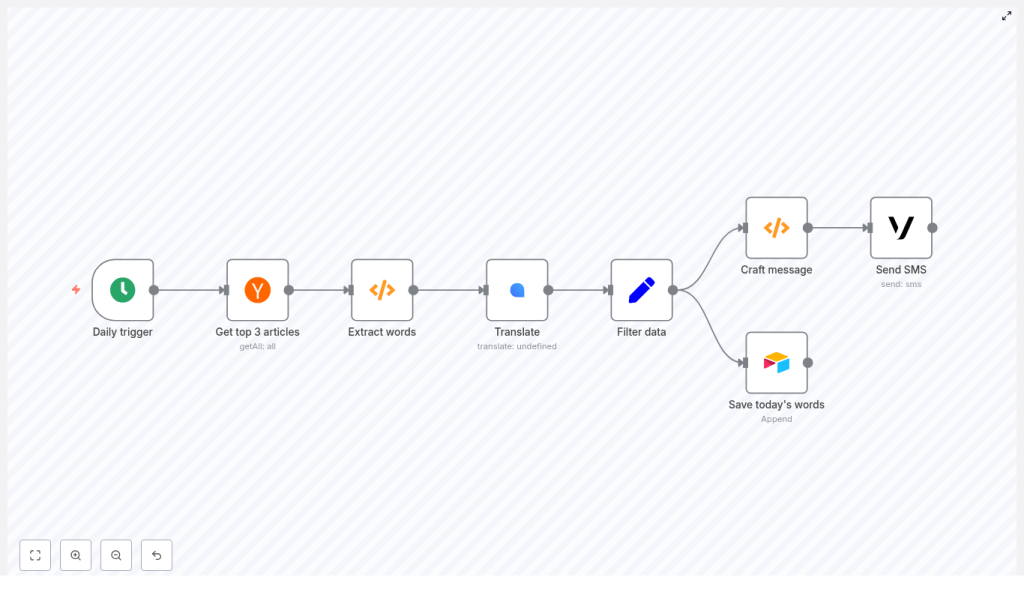
Looking to integrate language learning seamlessly into your daily routine using automation? This guide walks through a production-ready n8n workflow template that automatically retrieves top Hacker News headlines, extracts unique vocabulary, translates each term into German, stores the results in Airtable, and delivers a concise SMS summary via Vonage every morning – without any manual effort.
Use case: automated micro-learning for professionals
Consistent, low-friction exposure to new vocabulary is one of the most effective ways to build language skills over time. For busy professionals, manual curation is rarely sustainable. By orchestrating this flow in n8n, you create a reliable pipeline that:
- Surfaces fresh, context-rich vocabulary from real-world tech headlines
- Standardizes and deduplicates the extracted words
- Automatically translates and persists them to a structured datastore
- Delivers a short, actionable list to your phone every morning
The result is a lightweight, automated language-learning routine that fits naturally into your existing workflow.
Solution architecture overview
The n8n workflow is built from a series of interoperable nodes, each focused on a single responsibility. At a high level, the pipeline consists of:
- Cron – triggers the workflow daily at a fixed time (08:00)
- Hacker News – fetches the top 3 front-page stories
- Function (Extract words) – tokenizes titles, cleans and deduplicates vocabulary
- LingvaNex – translates words into German
- Set – normalizes output fields for downstream systems
- Airtable – appends vocabulary pairs for long-term review
- Function (Craft message) – formats a compact SMS summary
- Vonage – sends the final message to your phone
This modular design makes it straightforward to swap services (for example, a different translation API or notification channel) while preserving the core logic.
Detailed workflow: from trigger to SMS
1. Scheduling the workflow with Cron
Start with a Cron node configured to run once per day at 08:00. This schedule creates a predictable learning cadence and ensures your SMS arrives at the same time each morning.
- Mode: Every Day
- Time: 08:00 (adjust to your preference and timezone)
2. Ingesting content from Hacker News
Next, add the Hacker News node to pull the input data for your vocabulary set. Configure it to fetch the top three front-page articles.
- Operation: Get Top Stories
- Limit: 3
Using current headlines from a technology-focused source ensures that the extracted terms are contemporary and contextually relevant, which is valuable for professionals working in tech and related fields.
3. Extracting and normalizing vocabulary
The first Function node performs text processing on the article titles. It:
- Splits titles into tokens
- Removes punctuation and numbers
- Converts tokens to lowercase
- Filters out common stopwords
- Deduplicates the resulting list of words
- Applies a cap on the number of terms for cost control
Use the following code in the Function node to implement this logic:
const stopwords = new Set([  "the","a","an","and","or","of","to","in","on","for","with",  "is","are","was","were","by","from","that","this","it"
]);

const words = [];

for (let i = 0; i < items.length; i++) {  const title = items[i].json.title || '';  const tokens = title.split(/\s+/);  for (let t of tokens) {  // Remove punctuation and numbers, convert to lower-case  const cleaned = t.replace(/[^\p{L}']/gu, '').toLowerCase().trim();  if (!cleaned) continue;  if (stopwords.has(cleaned)) continue; // optional stopword filtering  words.push(cleaned);  }
}

const uniqueWords = [...new Set(words)];

// Limit to a reasonable number (e.g. 25) to avoid API overuse
const limited = uniqueWords.slice(0, 25);

const newItems = limited.map(w => ({ json: { word: w } }));
return newItems;
Implementation notes for automation engineers:
- Unicode-aware regex: The pattern
\p{L}ensures that alphabetic characters from multiple languages are preserved, not just ASCII. - Noise reduction: Lowercasing and stopword removal significantly improve the quality of the vocabulary list.
- Cost management: The
slice(0, 25)limit keeps translation API usage and latency under control.
4. Translating vocabulary with LingvaNex
Each item leaving the extraction node contains a single field word. Feed these items into a LingvaNex (or equivalent translation provider) node to obtain the German translations.
Key configuration points:
- Source text:
{{$node["Extract words"].json["word"]}} - Target language:
de_DE(German)
If the translation node offers batch translation, enable it to process multiple words per request. This approach reduces the number of API calls and helps mitigate rate limits. If batching is not available, consider throttling or chunking requests to avoid provider-side throttling.
5. Normalizing translation output with Set
Once translations are returned, use a Set node to standardize the structure of your data. This ensures consistent fields for Airtable and the SMS formatter.
Example mappings:
- English word =
{{$node["Translate"].json["source"]}} - Translated word =
{{$node["Translate"].json["result"]}}
By normalizing the payload at this stage, you decouple downstream nodes from any changes in the translation provider’s response format.
6. Persisting vocabulary in Airtable
Use an Airtable node configured in append mode to store each word pair. This creates a structured dataset that can later be fed into flashcard tools, spaced repetition systems, or analytics dashboards.
Recommended fields per record:
- Date of ingestion
- English word
- Translated word (German)
- Source headline (optional, for context)
- Article URL (optional, for deeper reading)
- Status / error flag (optional, for failed translations)
Over time, this Airtable base becomes a lightweight corpus and a practical source for building additional learning tools.
7. Crafting an SMS-friendly summary
Before sending the notification, a second Function node aggregates the top N word pairs into a compact, SMS-ready string. This keeps the message readable and within standard SMS length limits.
Use the following code in the Function node:
const number_of_words = 5; // choose how many to send
const pairs = [];

for (let i = 0; i < Math.min(items.length, number_of_words); i++) {  pairs.push(  items[i].json['English word'] + ' : ' + items[i].json['Translated word']  );
}

const words_of_the_day = pairs.join(', ');

return [{ json: { words_of_the_day } }];
Adjust number_of_words based on your preferred message length and SMS cost constraints.
8. Delivering the daily SMS via Vonage
Finally, connect a Vonage node to send the prepared content to your mobile number. Keep the body concise to avoid multipart messages and unexpected billing.
Example message configuration:
=Good morning, here are your words for today
{{$node["Craft message"].json["words_of_the_day"]}}
This yields messages similar to:
Good morning, here are your words for today innovation : Innovation, startup : Start-up, scale : skalieren, protocol : Protokoll, latency : Latenz
Security, reliability and operational best practices
Credential management
Handle all secrets through n8n’s credential management system:
- Store API keys for LingvaNex, Vonage and Airtable as credentials.
- Do not embed credentials in Function node code or hard-code them in parameters.
- Restrict access to workflows and credentials based on least privilege principles.
Error handling and resilience
To operate this workflow reliably in a production context:
- Enable retries on nodes that interact with rate-limited external APIs.
- Add an error branch or separate workflow to log failures to Airtable, Slack or another monitoring endpoint.
- Mark failed translations with an error flag but still persist the original English word for traceability.
Edge case considerations
Improve robustness by accounting for irregular input:
- Skip titles that are empty or contain primarily numbers and symbols.
- Optionally filter out proper nouns if they are not useful for your learning goals.
- Handle translation failures gracefully by recording the issue instead of dropping the item silently.
Cost control, privacy and rate limits
When automating language workflows at scale, cost and compliance must be considered:
- Translation costs: Limit the maximum number of words per day and leverage batch translation where available.
- SMS costs: Keep messages short and restrict the number of daily recipients or environments (for example, separate test and production numbers).
- Privacy: Avoid sending personal or sensitive content to third-party translation APIs. Review the privacy policies of LingvaNex, Vonage and any other external services before transmitting user-related data.
Advanced extensions and enhancements
Once the core workflow is stable, there are several ways to extend it for more advanced learning scenarios:
- Pronunciation and audio: Integrate a text-to-speech service and store audio URLs in Airtable for listening practice.
- Spaced repetition: Generate review schedules (for example, after 1, 3 and 7 days) and trigger follow-up notifications using additional Cron nodes or Airtable views.
- Alternative channels: Replace or augment SMS with Telegram, email, push notifications or a custom mobile app.
- Language detection: Automatically bypass words that are already in German to avoid redundant translations.
- NLP preprocessing: Apply lemmatization or stemming so that learners focus on base forms rather than inflected variants.
Testing and validation checklist
Before enabling the daily schedule, validate the workflow end to end:
- Run the workflow manually and confirm that the Hacker News node returns valid titles.
- Inspect the output of the Extract words Function node to verify tokenization, cleaning and deduplication.
- Execute a single translation request and confirm that the source and result fields map correctly.
- Check Airtable to ensure that new rows are appended with the expected fields, values and date formats.
- Send a test SMS to your device and verify readability, length and character encoding.
Putting it into practice
This n8n template provides a practical, extensible blueprint for automated daily vocabulary learning. The workflow is intentionally modular so you can:
- Swap translation providers without rewriting core logic
- Change the notification channel from SMS to chat or email
- Integrate more advanced NLP or analytics over time
To get started, import the template into your n8n instance, configure credentials for LingvaNex, Vonage and Airtable, and run the workflow once in manual mode to validate the full pipeline.
Next steps: Import the workflow, execute a test run, and decide which target language you want to support next. The same architecture can be easily adapted for Spanish, French, Japanese or any other language supported by your translation provider.
