


Automate Daily Podcast Summaries with n8n, Whisper & OpenAI
Imagine starting your day already briefed on the most important podcast episodes in your favorite genre, without spending hours listening. This guide shows you how to turn that vision into reality with a ready-made n8n workflow that finds top podcasts, trims the audio, transcribes it with Whisper, summarizes it with OpenAI, and sends you a clean daily digest by email.
This is more than a technical walkthrough. Think of it as a small but powerful step toward a more focused, automated workday, where routine information gathering runs in the background and you stay free to do your best thinking.
The problem: too many great podcasts, not enough time
Podcasts are packed with insights, trends, and expert opinions, but they come with a cost: time. A single episode can run for an hour or more. Multiply that by several shows and you quickly hit a wall. You either fall behind or sacrifice deep work to keep up.
Automation offers another path. Instead of choosing between “listen to everything” and “miss out,” you can capture the essence of top episodes in minutes. With the right workflow, you can:
- Stay on top of your industry or interests without constant listening
- Turn long-form audio into short, scannable summaries
- Free up time for strategy, creativity, and execution
This is where n8n, Taddy, Whisper, and OpenAI come together to transform how you consume audio content.
Shifting your mindset: from manual catching up to automated insight
Before we dive into nodes and APIs, it helps to adopt a different mindset. Instead of seeing podcasts as something you must personally monitor in real time, start to treat them as a data source that can be processed, summarized, and delivered to you in the format you prefer.
With n8n, you are not just building a one-off automation. You are building a system that:
- Runs reliably on a schedule, even while you sleep
- Surfaces only what matters, instead of flooding you with noise
- Can be extended, customized, and improved as your needs grow
The workflow below is a practical template, but it is also a starting point. Once it is running, you can iterate, tweak prompts, change genres, store summaries, and integrate them into your broader knowledge stack. Each improvement compounds your time savings and clarity.
The workflow at a glance: your daily podcast digest engine
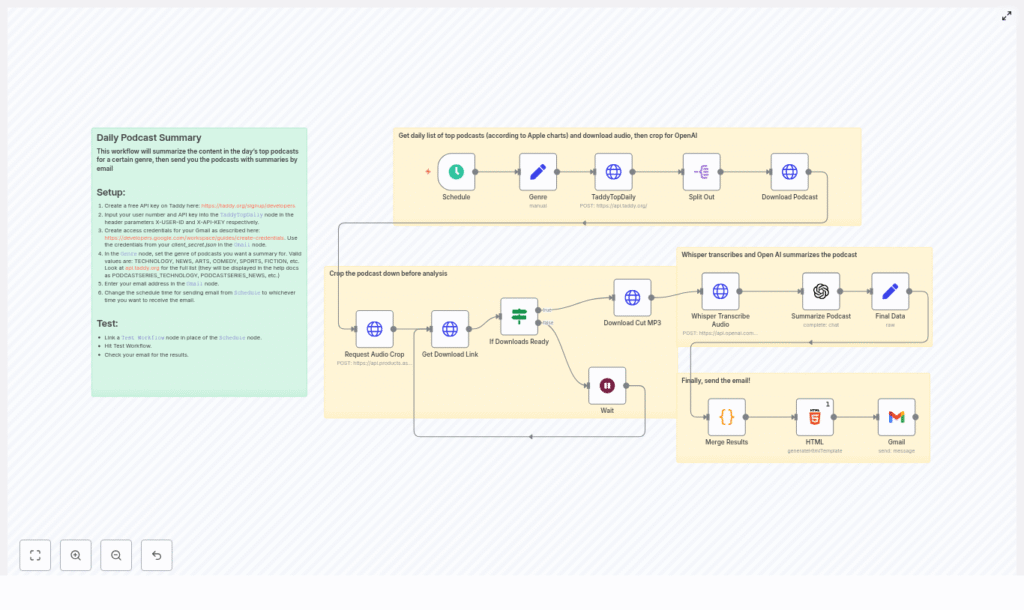
Here is what the n8n workflow accomplishes from end to end:
- Runs automatically at a time you choose (for example, every morning at 08:00)
- Uses the Taddy API to fetch the top podcast episodes for a selected genre
- Downloads each episode and requests a cropped audio segment to keep things fast and cost effective
- Polls the audio cutter until the trimmed file is ready, then downloads it
- Sends the cropped audio to OpenAI Whisper for transcription
- Passes the transcript to an OpenAI chat model for a concise 3-4 paragraph summary
- Combines all summaries into an HTML table and emails the digest to you via Gmail
Once configured, this becomes your personal “podcast research assistant” that quietly works in the background and delivers insights on autopilot.
Step-by-step journey through the n8n workflow
1. Schedule your daily digest
The journey starts with timing. Using the Schedule Trigger node in n8n, you decide when your digest should arrive. Set it to run daily at a specific hour, for example 08:00, so your summaries are ready when you start your day.
2. Choose your podcast genre
Next, you define your focus. A Set node called Genre holds a static value like TECHNOLOGY, NEWS, ARTS, COMEDY, SPORTS, or FICTION. This value becomes the filter that tells Taddy which genre charts to pull.
By being intentional about your genre, you turn an overwhelming content universe into a curated stream aligned with your goals.
3. Fetch top podcasts from Taddy (TaddyTopDaily)
With timing and genre set, the workflow reaches out to Taddy. An HTTP Request node called TaddyTopDaily calls the Taddy API to retrieve the top podcast episodes for your chosen category.
To authenticate, you add your X-USER-ID and X-API-KEY headers, which you can obtain by creating a free developer key at taddy.org. Once configured, this node becomes your automated “chart watcher.”
4. Split episodes into individual items
The Taddy response includes multiple episodes. A Split Out node breaks this response into separate items so each episode can travel through the rest of the workflow independently. This parallel processing is what allows the workflow to scale as you handle multiple shows at once.
5. Download each podcast episode
For every episode, a Download Podcast node retrieves the audio file using the URL returned by Taddy. That file is then prepared for cropping, which is key for controlling cost and speed in the next steps.
6. Request an audio crop (Aspose audio cutter)
Instead of sending an entire episode to Whisper, you can focus on the most representative segment. A Request Audio Crop node posts the downloaded audio to an audio cutter API (such as Aspose) with your chosen start and end times.
By cropping, you:
- Reduce transcription length and OpenAI costs
- Speed up the entire pipeline
- Target the “core” of the conversation, for example from
00:08:00-00:24:00
You can later adjust this window or even switch to full-episode transcription if your use case demands it.
7. Wait for the processed audio and check readiness
After requesting the crop, the workflow needs to know when the processed file is ready. A combination of Get Download Link and If Downloads Ready logic polls the cutter API.
If the file is not available yet, the flow can move to a Wait node, pause for a configured interval, and then re-check. This pattern ensures you do not overload the API and that the automation behaves gracefully even when processing takes longer.
8. Download the cropped MP3
Once the audio cutter reports success, a Download Cut MP3 node fetches the trimmed file. This is the audio that will be transcribed by Whisper, keeping your workflow efficient and focused on the most valuable part of each episode.
9. Transcribe with OpenAI Whisper
Now the audio turns into text. A Whisper Transcribe Audio node (configured via an HTTP Request) sends the cropped file to the OpenAI /v1/audio/transcriptions endpoint.
The request uses multipart/form-data and specifies model=whisper-1 along with the audio file. Whisper handles the heavy lifting, turning spoken content into a transcript that you can later search, summarize, and reuse.
10. Summarize the podcast with an OpenAI chat model
With a transcript in hand, the workflow moves into synthesis. A Summarize Podcast node uses an OpenAI chat model such as gpt-4o-mini to create a clear, focused summary.
The prompt is designed to request a concise 3-4 paragraph overview that starts with phrases like “This episode focuses on…” and highlights only the key points, not every minor detail. You can tune this prompt or adjust parameters like maxTokens to control length and style.
11. Merge results and build the HTML digest
Once each episode has a summary, the workflow collects everything. A Code node gathers fields such as podcast name, episode title, audio URL, and the generated summary, then merges them into a single list.
An HTML node then formats this list into a neat HTML table. This step turns raw data into a digest that is easy to scan, compare, and revisit directly from your inbox.
12. Email the digest with Gmail
The final step is delivery. A Gmail node sends the generated HTML as the message body. You configure Gmail OAuth2 credentials in n8n, then map the HTML output into the message content field.
The result: a daily email that gives you a curated overview of the top episodes in your chosen genre, ready whenever you are.
Setup checklist: get everything connected
To bring this workflow to life, walk through these setup steps:
- Create a free developer key at Taddy: https://taddy.org/signup/developers. Add your
X-USER-IDandX-API-KEYvalues to the TaddyTopDaily HTTP Request node headers. - Create OpenAI API credentials and add them to the Whisper transcription and OpenAI chat nodes in n8n. Whisper uses the
/v1/audio/transcriptionsendpoint withmodel=whisper-1. - Set up Gmail OAuth2 credentials, download your
client_secret.json, and upload it into n8n credentials as described in the Google Workspace documentation. - In the Genre node, choose a valid genre value such as
TECHNOLOGY,NEWS,ARTS,COMEDY,SPORTS, orFICTION. Taddy uses enums likePODCASTSERIES_TECHNOLOGYin their docs, so make sure your choice aligns with their allowed values. - Adjust the crop start and end times in the Request Audio Crop node to capture a representative excerpt, for example
00:08:00-00:24:00, or change it to cover the full episode if that better fits your use case.
Troubleshooting and practical tips
Improving transcription accuracy
Whisper is robust, but its output still depends on audio quality. For best results:
- Use segments with clear speech and minimal background noise
- Avoid sections with heavy music or overlapping voices when possible
- Consider speaker diarization strategies if you need to distinguish between multiple speakers
Managing costs wisely
Both audio transcription and chat completions in OpenAI incur usage-based costs. Cropping episodes is an effective way to reduce total minutes processed, which directly lowers cost and improves speed.
Monitor your usage in the OpenAI dashboard and adjust:
- Crop duration
- Summary length (via prompt or
maxTokens) - Schedule frequency (for example, weekdays only instead of every day)
Handling rate limits and polling
Audio processing services can sometimes take longer than expected. To keep your workflow resilient:
- Use a Wait node with backoff polling intervals, such as 30-60 seconds
- Implement conditional checks to detect when the audio is ready
- Add retry or skip logic for failed downloads, so one problematic episode does not block the entire digest
Keeping credentials secure
Security is a crucial part of any automation. In n8n:
- Store API keys and OAuth credentials in the built-in credentials store
- Avoid hard-coding secrets directly into nodes
- Do not share workflow JSON exports with keys or tokens included
Best practices and powerful customizations
Once your base workflow is running, you can evolve it into a more advanced podcast intelligence system. Here are some ideas:
- Control summary length and style: Adjust the OpenAI prompt or
maxTokensto get shorter bullet-style recaps or more narrative overviews. - Prioritize high-value episodes: Use advanced split or filter logic to keep only episodes with top rankings or specific metadata.
- Handle multiple languages: Add language detection and route episodes to Whisper with the appropriate language parameter for multilingual content.
- Archive for long-term value: Save transcripts and summaries to a database, Google Drive, or another storage system so you can search and reference them later.
Each small tweak makes your automation more aligned with how you work and learn.
Inspiring use cases for this n8n podcast template
This workflow can support different roles and goals:
- Busy professionals who want a daily inbox briefing on key episodes without losing hours to listening
- Newsletter curators who aggregate spoken-word content and want a steady stream of summarized material to feature
- Product teams and researchers tracking industry podcasts for competitor moves, emerging trends, and customer insights
As you experiment, you will likely find new ways to adapt the template, such as feeding summaries into internal dashboards, knowledge bases, or Slack channels.
From template to your own automation system
You do not need to build everything from scratch. You can start by importing the existing n8n workflow JSON or using the prebuilt template, then simply connect your credentials and test.
Recommended next steps:
- Import the workflow into n8n or use the template link below
- Connect Taddy, OpenAI, and Gmail credentials
- Test with a single genre and a Test Workflow run before enabling the schedule
- Refine prompts, crop times, and genres as you see what works best
Take the next step: automate your listening and reclaim your focus
This workflow is a practical example of what is possible when you combine n8n, Whisper, OpenAI, and a clear intention to save time. It turns long-form audio into actionable insight and gives you back hours each week.
If you are ready to move from manual catching up to automated summaries:
- Import the workflow into n8n
- Add your Taddy, OpenAI, and Gmail credentials
- Schedule your first daily digest and let it run
From there, treat this template as a foundation. Experiment with different genres, longer or shorter summaries, additional storage, or integrations with your existing tools. Each iteration will bring you closer to a personalized, automated research assistant that works exactly the way you do.
If you would like help tailoring the workflow to your needs, think about your preferred genre and cadence, then adapt the template accordingly. This is your chance to design an automation that supports your growth, reduces friction, and keeps you informed without burning you out.
