


Automate Daily Weather Updates via Telegram with n8n
Overview
This reference guide documents an n8n workflow template that automates daily weather notifications using the
OpenWeatherMap API and Telegram. The workflow supports both scheduled updates
(for example, every morning at 8:00 AM) and on-demand requests submitted through a form. It is designed for users
who are already familiar with n8n concepts such as triggers, nodes, credentials, and data mapping.
The automation retrieves current weather data for a specified city and country, transforms the raw API response into
a human-readable summary, converts sunrise and sunset timestamps to IST (Asia/Kolkata), and finally sends the
formatted report to a Telegram chat via a bot.
Workflow Architecture
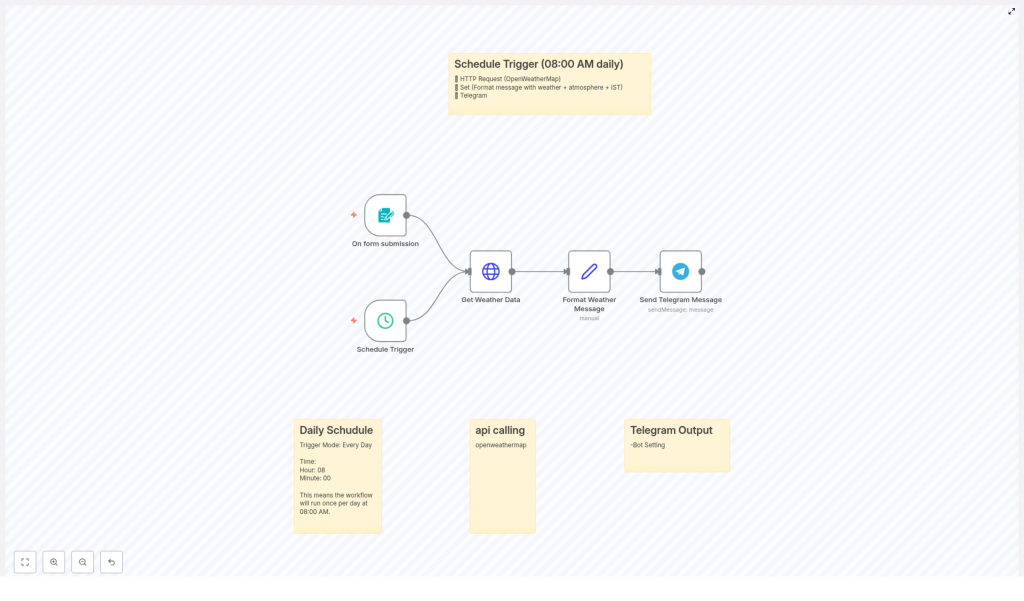
At a high level, the workflow consists of the following components:
- Schedule Trigger – Executes automatically at a fixed time (for example 8:00 AM) to send daily weather updates.
- Form Trigger – Accepts on-demand requests where users specify
cityandcountryparameters. - HTTP Request Node – Calls the OpenWeatherMap
/data/2.5/weatherendpoint to fetch current conditions. - Set Node – Extracts and formats key fields from the API response, including time conversion to IST.
- Telegram Node – Sends the final formatted message to a chosen Telegram chat using the Telegram Bot API.
Both trigger paths (scheduled and form-based) converge into the same data retrieval and messaging logic, which keeps
the configuration consistent and easier to maintain.
Data Flow
- Trigger
- Either a scheduled execution at 8:00 AM or a form submission initializes the workflow.
- The trigger provides or resolves the
cityandcountryvalues.
- HTTP Request to OpenWeatherMap
- The workflow builds the API URL using the city and country from the trigger and an API key stored in credentials or variables.
- The HTTP Request node fetches the current weather data in metric units.
- Data Transformation
- The Set node reads the JSON response and extracts temperature, humidity, wind speed, pressure, description, and sunrise/sunset.
- UNIX timestamps for sunrise and sunset are converted to the IST timezone.
- A formatted multi-line text message is constructed for Telegram.
- Telegram Delivery
- The Telegram node uses bot credentials and a target chat ID to send the message to your Telegram client.
Node-by-Node Breakdown
1. Schedule Trigger Node
The Schedule Trigger node is responsible for the recurring, automated weather update. Typical configuration:
- Mode: Every Day
- Time: 08:00 (8:00 AM local server time)
The schedule trigger does not inherently provide city and country values, so these are usually:
- Hard-coded in a downstream node (for example, a Set node before the HTTP Request), or
- Configured via environment variables or default parameters that the HTTP Request node uses.
2. Form Trigger Node
The Form Trigger node enables on-demand weather checks. A user submits a form specifying:
- city – The target city (for example,
Mumbai). - country – The two-letter country code (for example,
IN).
These values are then passed as input fields into the workflow. The HTTP Request node later uses these fields to build
the query string. This path is typically configured in parallel with the schedule trigger so that both triggers can
reuse the same HTTP and formatting logic.
3. HTTP Request Node – OpenWeatherMap API
The HTTP Request node calls the OpenWeatherMap Current Weather Data endpoint. The base URL pattern is:
https://api.openweathermap.org/data/2.5/weather?q={city},{country}&APPID=your_api_key&units=metric
Key configuration aspects:
- HTTP Method: GET
- URL: Uses expressions to inject
cityandcountryfrom the trigger input. - API Key:
- Replace
your_api_keywith a valid OpenWeatherMap API key. - For security, store the key in n8n credentials or environment variables, then reference it in the URL or query parameters.
- Replace
- Units:
metricfor temperature in Celsius and wind speed in m/s.
The response is a JSON object that includes:
weather[0].description– Textual description (for example,clear sky).main.temp– Temperature in Celsius.main.humidity– Humidity percentage.wind.speed– Wind speed in meters per second.main.pressure– Atmospheric pressure in hPa.sys.sunriseandsys.sunset– UNIX timestamps (UTC).
HTTP Error Handling (Conceptual)
If the city or country is invalid, the OpenWeatherMap API can return error codes such as:
- 404 – City not found.
- 401 – Invalid or missing API key.
The basic template focuses on the successful path. In a production environment you can add:
- Additional nodes after the HTTP Request to check
statusCodeand handle errors. - Alternative Telegram messages that inform the user of invalid input or configuration issues.
4. Set Node – Data Extraction and Formatting
The Set node processes the raw OpenWeatherMap response and builds a user-friendly message. It typically:
- Extracts:
- Weather condition from
weather[0].description. - Temperature from
main.temp. - Humidity from
main.humidity. - Wind speed from
wind.speed. - Pressure from
main.pressure. - Sunrise and sunset from
sys.sunriseandsys.sunset.
- Weather condition from
- Converts sunrise and sunset from UNIX timestamps to human-readable IST time.
- Builds a multi-line string that will be sent to Telegram.
The formatted message typically follows a structure similar to:
📅 Tuesday, 27 June 2024
🌤 Weather in Mumbai, IN:
Condition: Clear sky
Temperature: 30°C
💧 Humidity: 65%
🌬 Wind Speed: 5 m/s
🔼 Pressure: 1015 hPa
🌅 Sunrise: 06:10 AM
🌇 Sunset: 07:30 PM
Within n8n, this is usually achieved with expressions in the Set node that:
- Reference the date to generate the header line with the current day and date.
- Access the
cityandcountryvalues that were originally supplied. - Format numbers and timestamps for readability.
Timezone Conversion to IST
OpenWeatherMap returns sunrise and sunset in UTC as UNIX timestamps. The workflow:
- Converts these timestamps to the
Asia/Kolkatatimezone (IST). - Formats them in a 12-hour clock representation, for example
06:10 AM.
The exact conversion logic is implemented via n8n expressions or JavaScript-like functions in the Set node, using the
timestamp fields from the HTTP response as input.
5. Telegram Node – Message Delivery
The final step uses the Telegram node, which integrates with the Telegram Bot API to send the prepared
message to a specific chat.
- Bot Token: Generated by
@BotFatherin Telegram and stored as n8n credentials. - Chat ID: The numeric identifier of the target chat or channel where you want to receive updates.
- Message Text: Mapped from the formatted field created by the Set node.
Once configured, every run of the workflow results in a new message in your Telegram chat. You can receive these
notifications on mobile, desktop, or web, depending on where you are logged in.
Configuration Notes
OpenWeatherMap API Key
- Sign up at OpenWeatherMap API to obtain a free API key.
- Insert this key into the API URL in the HTTP Request node by replacing
your_api_key. - For better security, store the key in n8n credentials or environment variables instead of hard-coding it.
Telegram Bot and Chat ID
- Create a bot using
@BotFatherin Telegram and obtain the bot token. - Add the bot to the target chat or channel if required.
- Retrieve your chat ID (for example, using a helper bot or by logging updates) and configure it in the Telegram node.
Trigger Behavior
- Scheduled updates:
- Ensure the Schedule Trigger is set to your preferred time, such as 8:00 AM.
- Define default city and country values used when no user input is present.
- On-demand requests:
- Confirm that the Form Trigger exposes
cityandcountryfields. - Validate user input where possible to reduce API errors.
- Confirm that the Form Trigger exposes
Advanced Customization Ideas
The base workflow is intentionally simple but can be extended in multiple ways while keeping the same core structure.
- Additional weather parameters Include more fields available from OpenWeatherMap, such as:
- Feels-like temperature (
main.feels_like). - Cloudiness (
clouds.all). - Visibility (
visibility).
- Feels-like temperature (
- Different trigger times Modify the Schedule Trigger to send updates multiple times per day or at different times for different locations.
- Multiple recipients or groups Configure multiple Telegram nodes or dynamic chat IDs if you want to send the same weather update to several channels.
- Input validation and error messages Add conditional logic after the HTTP Request to send an alternative Telegram message when the API returns an error.
Practical Usage
Once this n8n workflow is configured, you receive:
- A daily, scheduled snapshot of the current weather at a fixed time.
- Instant on-demand weather reports whenever a user submits the form with a city and country.
This combination of timed and on-demand triggers makes the automation flexible enough for everyday personal use or
for internal team notifications.
Get the Template
You can import and adapt this n8n workflow template directly:
Conclusion
By connecting n8n, OpenWeatherMap, and Telegram, you can automate daily weather updates with minimal manual effort.
The workflow combines a Schedule Trigger for predictable daily notifications with a Form Trigger for ad-hoc queries,
then uses an HTTP Request node, a Set node, and a Telegram node to fetch, format, and deliver the data. Once deployed,
you always have up-to-date weather information available directly in your Telegram chat.
