


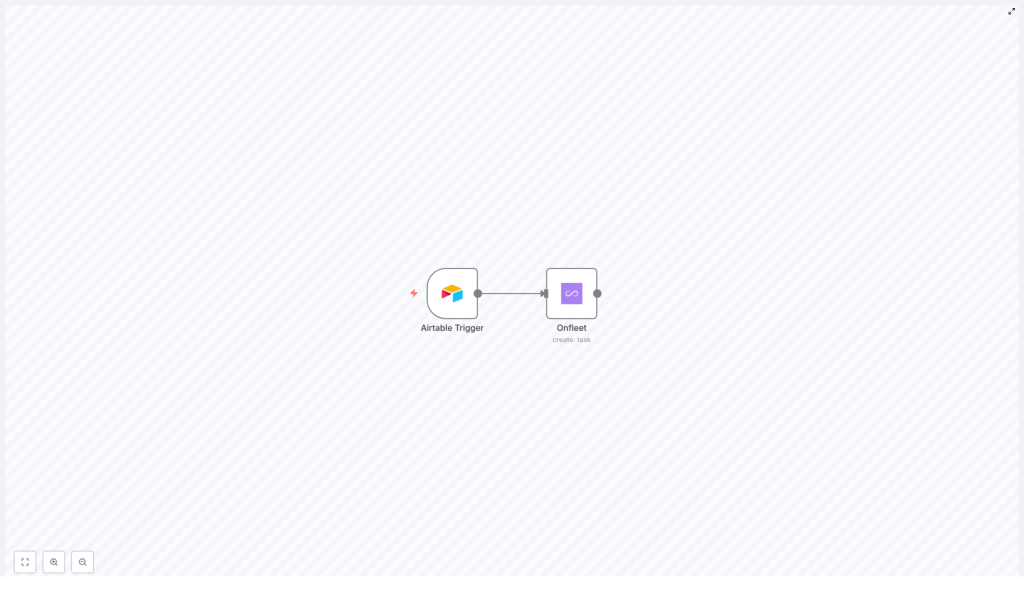
Automate Delivery Tasks from Airtable to Onfleet
Overview
For operations and logistics teams, manually creating delivery tasks from spreadsheet-style data is a recurring source of delays and inconsistencies. By connecting Airtable as a structured data source with Onfleet as the delivery management platform, you can implement a reliable, repeatable automation that eliminates manual task entry and keeps dispatch workflows synchronized.
This article explains how to use an n8n workflow template to automatically create Onfleet delivery tasks from Airtable records. It covers the core use case, the role of each node, configuration best practices, and how to deploy the automation in a production environment.
Use Case: From Structured Data to Live Delivery Tasks
Many teams maintain order, customer, or delivery data in Airtable. At the same time, Onfleet is used as the operational backbone for dispatching and tracking those deliveries. Bridging the two systems with n8n ensures that whenever key delivery details are added or updated in Airtable, corresponding tasks are generated in Onfleet with no human intervention.
In this workflow:
- Airtable acts as the source of truth for delivery data.
- n8n monitors Airtable for new or updated records that are ready to be dispatched.
- Onfleet receives fully populated tasks that include destination, recipient, notes, and time windows.
Key Components in the n8n Workflow
Airtable Trigger Node
The Airtable Trigger node is responsible for detecting changes in your Airtable base. It polls your data at a defined interval and emits new items into the workflow when the configured conditions are met.
In this template, the Airtable Trigger is configured to:
- Poll every 10 minutes for new or updated records.
- Watch for changes specifically in the
Address_Line1field. - Use Airtable API credentials stored securely in n8n to access the selected base and table.
By targeting Address_Line1 as the monitored field, the workflow focuses on records where delivery-relevant address information has been added or modified, which is typically a reliable indicator that a new task should be created or updated downstream.
Onfleet Node
The Onfleet node consumes the data coming from Airtable and uses Onfleet’s task creation API to create delivery tasks. The node configuration maps Airtable fields to Onfleet task attributes to ensure each task is complete and operationally usable without manual editing.
The workflow template maps the following key properties:
- Destination Address
Constructed from multiple Airtable fields:Address_Line1City/TownState/ProvinceCountryPostal_Code
These fields are combined into a full address string that Onfleet can use to geocode the destination.
- Notes
Additional task instructions are taken from theTask_Detailsfields. When these are stored as array elements in Airtable, the node aggregates them into a concise notes field that is visible to drivers and dispatchers. - Recipient Details
Recipient information is mapped from:Recipient_NameRecipient_NotesRecipient_Phone, formatted with a+1country code prefix
Normalizing the phone number format improves deliverability and consistency across tasks.
- Timing and Service Window
The workflow uses:completeAftercompleteBefore
to define the time window in which the task should be completed. These values are passed directly to Onfleet, enabling time-based routing and SLA compliance.
How the Workflow Operates End-to-End
- Airtable polling
Every 10 minutes, the Airtable Trigger checks the configured base and table for records whereAddress_Line1has been added or changed since the last run. - Record retrieval
Matching records are emitted into the workflow, each containing all relevant fields such as address components, recipient information, task details, and timing fields. - Data mapping and transformation
The Onfleet node receives the Airtable data and composes the required payload:- Concatenates address fields into a single destination string.
- Aggregates
Task_Detailsinto a readable notes field. - Formats the recipient phone number with the
+1prefix. - Assigns
completeAfterandcompleteBeforeas the task’s time window.
- Task creation in Onfleet
Using your Onfleet API key, the node calls the Onfleet task creation API and creates a new delivery task for each qualifying Airtable record.
Implementation Guide
1. Prepare Your Airtable Base
Ensure that the Airtable base and table you plan to use contain at least the following fields:
Address_Line1City/TownState/ProvinceCountryPostal_CodeTask_DetailsRecipient_NameRecipient_NotesRecipient_PhonecompleteAftercompleteBefore
Consistent field naming and data types are important for stable automation. Where possible, standardize formats for dates, times, and phone numbers to reduce edge cases.
2. Configure the Airtable Trigger Node in n8n
- Open the n8n workflow template and locate the Airtable Trigger node.
- Authenticate using your Airtable API credentials stored in n8n credentials.
- Select the correct base and table.
- Set the polling interval to 10 minutes or adjust as needed for your operational cadence.
- Specify
Address_Line1as the field to monitor for new or updated records.
3. Set Up the Onfleet Node
- Add or configure the Onfleet node with your Onfleet API key, stored in n8n credentials.
- Choose the operation to create a task.
- Map Airtable fields to Onfleet task properties:
- Destination address from the address-related fields.
- Notes from
Task_Details. - Recipient name, notes, and phone from the corresponding Airtable fields, including the
+1prefix for the phone number. - Time window using
completeAfterandcompleteBefore.
4. Test and Validate
- Create or update a record in Airtable with all required fields populated.
- Allow the Airtable Trigger to run or execute the workflow manually for testing.
- Verify that a new task appears in Onfleet with the correct address, recipient details, notes, and time window.
- Iterate on field mappings or formatting as needed based on test results.
Automation Best Practices and Benefits
Operational Benefits
- Time savings
Removing manual task creation frees dispatchers and coordinators to focus on exception handling and customer communication instead of repetitive data entry. - Improved accuracy
Directly pulling data from Airtable into Onfleet reduces the risk of transcription errors, missing fields, and inconsistent addresses. - Scalability
As order volumes grow, the workflow can be scaled by adjusting the polling interval or extending the schema with additional task fields, without increasing headcount.
Implementation Best Practices
- Use n8n credentials for Airtable and Onfleet to avoid hardcoding sensitive information.
- Standardize address and phone formats in Airtable to minimize failed geocoding or communication issues.
- Start with a staging or test base and Onfleet sandbox (if available) before moving to production data.
- Monitor workflow executions in n8n to quickly identify and resolve mapping or data quality issues.
Get Started with the Template
If you are aiming to streamline your delivery operations and remove manual steps between Airtable and Onfleet, this n8n workflow template provides a robust starting point. With a few configuration steps and careful field mapping, you can move from static records to live, trackable delivery tasks in minutes.
