


Automate Delivery Updates with n8n, Onfleet, and Twilio WhatsApp
Reliable, real-time delivery communication is now a core expectation in logistics and last-mile operations. Customers want immediate visibility into where their order is and when it will arrive. For operations and automation teams, this is an ideal use case for event-driven workflows built on n8n, leveraging Onfleet for delivery task management and Twilio for WhatsApp messaging.
This n8n workflow template connects Onfleet and Twilio WhatsApp so that every time a new delivery task is created in Onfleet, the customer automatically receives a WhatsApp message with a personalized tracking URL. The result is a scalable, low-maintenance notification system that improves transparency and customer satisfaction.
Use Case Overview
The workflow is designed for logistics providers, e-commerce operations, and delivery teams that need to:
- Send instant delivery notifications when a task is created in Onfleet
- Provide a direct tracking URL so customers can monitor driver location
- Use a high-engagement channel, such as WhatsApp, instead of or alongside SMS
- Standardize communication while keeping messages personalized
In this automation, Onfleet acts as the event source, Twilio handles WhatsApp delivery, and n8n orchestrates the data flow and message composition.
Workflow Architecture in n8n
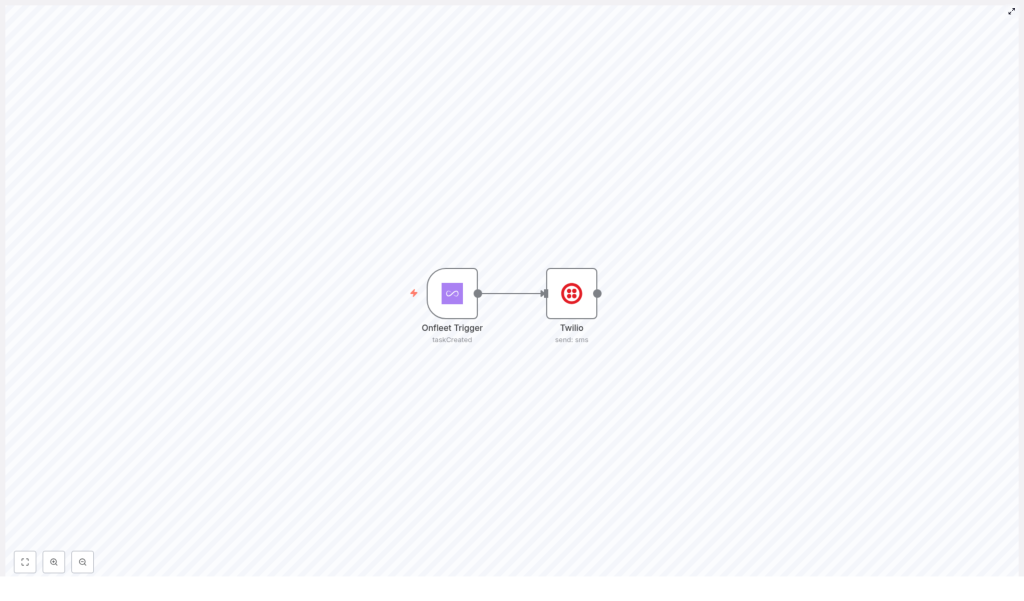
The template is intentionally simple and production-ready, built around two core components:
- Onfleet Trigger node – Listens for new delivery tasks
- Twilio node (WhatsApp) – Sends a WhatsApp message with the tracking URL
n8n manages the data mapping between these systems so that when a taskCreated event occurs in Onfleet, the workflow immediately assembles and dispatches a WhatsApp notification.
1. Onfleet Trigger Node Configuration
The workflow begins with the Onfleet Trigger node. This node continuously listens for events from your Onfleet account and initiates the automation when a relevant event occurs.
Key aspects of the configuration:
- Event type: Set to
taskCreatedso the workflow runs whenever a new delivery task is created in the Onfleet dashboard or via API. - Payload extraction: The node exposes the full event payload, including metadata about the task and a critical field: the
trackingURL.
The trackingURL is the central piece of data used later in the workflow. It provides the real-time link that customers will use to follow their driver’s location and delivery status.
2. Twilio WhatsApp Node Configuration
Once the Onfleet event is received, the workflow passes the payload to the Twilio node configured for WhatsApp messaging. This node uses the Onfleet data to dynamically construct the outbound message.
The message body is templated and includes the tracking link from the trigger payload. A typical configuration for the Twilio node message field looks like this:
{  "message": "Your delivery is on the way, please visit {{$json["body"]["data"]["task"]["trackingURL"]}} to track your driver's location.",  "toWhatsapp": true
}
Important implementation details:
- Dynamic data mapping: The expression
{{$json["body"]["data"]["task"]["trackingURL"]}}references the tracking URL from the Onfleet event JSON. n8n resolves this at runtime for each task. - Channel selection: The
toWhatsappflag is set totrueto ensure the message is sent via WhatsApp rather than standard SMS. - Personalization: You can extend the message template to include customer names, ETAs, or task notes if those fields are available in your Onfleet payload.
Best Practices for Automation and Message Design
To make this workflow robust and user-friendly, consider the following best practices:
- Validate required fields: Ensure the Onfleet task contains a valid recipient phone number that is compatible with WhatsApp and that the
trackingURLis present. - Standardize templates: Maintain consistent message templates within n8n for different event types (task created, out for delivery, completed) to provide a predictable customer experience.
- Observe rate limits: Monitor Twilio and Onfleet API limits and adjust workflow concurrency in n8n if you operate at large scale.
- Error handling: In production environments, add error branches or additional nodes in n8n to log failed sends or retry transient errors.
Why Use WhatsApp for Delivery Notifications
For many regions, WhatsApp is the primary communication channel for end customers, which makes it an effective medium for operational updates.
- High engagement – WhatsApp typically outperforms SMS in both open and response rates, which leads to fewer missed deliveries and less support overhead.
- Rich media capabilities – Beyond text, you can send images, links, and structured content to provide clearer instructions or branded communication.
- Global coverage – With widespread international adoption, WhatsApp is especially suitable for cross-border or multi-region delivery operations.
Prerequisites and Setup Steps
Before importing and running the n8n template, ensure the following prerequisites are in place:
- Onfleet account and API key
– Create or access your Onfleet account.
– Generate an API key with appropriate permissions to read tasks and receive webhook events. - Twilio account with WhatsApp enabled
– Set up a Twilio account.
– Configure a WhatsApp-enabled number or sandbox and activate the WhatsApp messaging service. - n8n environment
– Deploy n8n (self-hosted or cloud) and configure credentials for both Onfleet and Twilio.
– Import the Onfleet-to-Twilio WhatsApp workflow template. - End-to-end testing
– Create a sample delivery task in Onfleet.
– Confirm that the Onfleet Trigger node fires and that Twilio successfully delivers the WhatsApp message with the correct tracking URL.
– Validate message formatting, localization, and phone number formats for your target markets.
Operational Impact
Once implemented, this n8n workflow reduces manual communication effort and ensures every new delivery task triggers a consistent, timely notification. Customers gain immediate access to live tracking, which increases trust and reduces inbound inquiries such as “Where is my order?” or “What time will my package arrive?”
From an operations perspective, this pattern can be extended to additional events, such as task completion or failed delivery attempts, using the same integration pattern between Onfleet, Twilio, and n8n.
Next Steps
By integrating Onfleet triggers with Twilio WhatsApp through n8n, you establish a scalable, automated communication layer for your delivery operations. This template provides a practical starting point that can be customized to match your messaging policies, branding, and workflow complexity.
Ready to elevate your delivery communication strategy? Deploy the Onfleet to Twilio WhatsApp n8n workflow template, adapt the message content to your use case, and start sending automated, real-time tracking updates directly to your customers’ preferred messaging app.
