


Automate DingTalk Notifications for Azure DevOps Pull Requests with n8n
Overview
For high-performing engineering teams, timely pull request (PR) reviews are essential to maintaining flow, quality, and predictable delivery. This workflow template for n8n connects Azure DevOps with DingTalk and uses a MySQL mapping table to route notifications to the correct people automatically.
Whenever a new PR is created in Azure DevOps, the workflow listens to the event, enriches it with user mapping data from MySQL, builds a structured DingTalk message with precise @mentions, and posts it into the appropriate DingTalk group via a robot webhook.
Use Case and Motivation
Why integrate Azure DevOps PRs with DingTalk?
Azure DevOps already offers built-in notifications, but in many organizations, especially in Asian markets, DingTalk is the primary collaboration hub. Relying solely on email or native Azure DevOps alerts often leads to:
- Slow review turnaround times
- Missed or overlooked PRs in busy inboxes
- Fragmented communication across tools
By pushing PR notifications directly into DingTalk, you:
- Ensure reviewers see PRs where they already work and communicate
- Reduce manual messaging about code reviews
- Increase transparency on who is responsible for each review
- Standardize and centralize PR-related discussions in a single channel
Architecture at a Glance
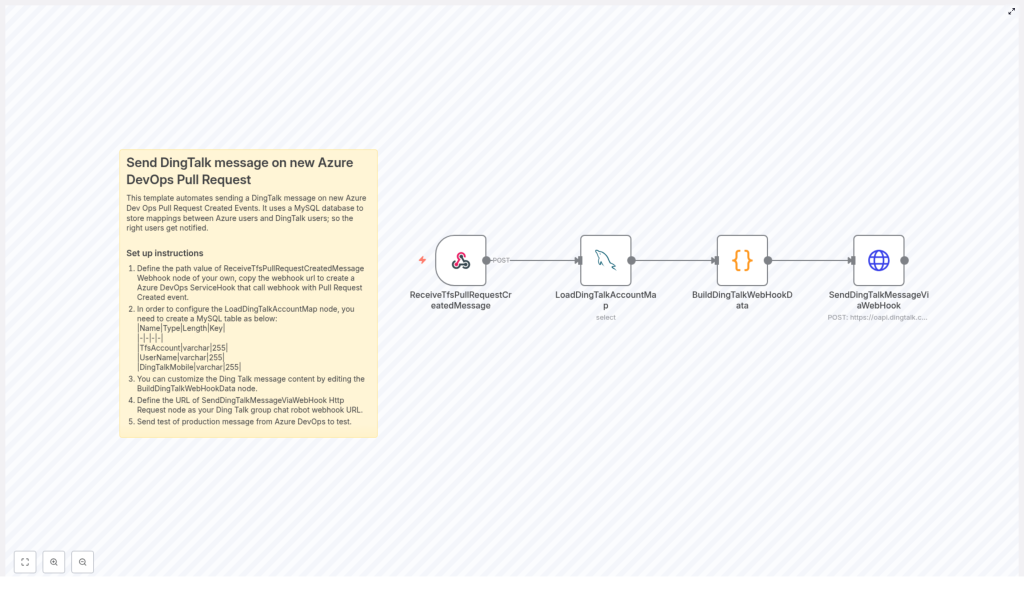
The automation is built as an n8n workflow with four key nodes:
- ReceiveTfsPullRequestCreatedMessage – Webhook trigger for Azure DevOps PR creation events
- LoadDingTalkAccountMap – MySQL query node to load the Azure DevOps to DingTalk user mapping
- BuildDingTalkWebHookData – Code node that transforms the Azure DevOps payload into a DingTalk-ready message
- SendDingTalkMessageViaWebHook – HTTP Request node that posts the message to a DingTalk group via robot webhook
Data Model and User Mapping
A critical part of this integration is correctly mapping Azure DevOps accounts to DingTalk identities. This is handled through a simple MySQL table that the workflow queries at runtime.
MySQL mapping table structure
Create a table similar to the following schema:
| Name  | Type  | Length | Key |
|----------------|---------|--------|-----|
| TfsAccount  | varchar | 255  |  |
| UserName  | varchar | 255  |  |
| DingTalkMobile | varchar | 255  |  |
This table stores:
- TfsAccount – Azure DevOps account identifier (for example the username or unique account name)
- UserName – Human readable name that you want to display in notifications
- DingTalkMobile – DingTalk mobile number used for
@mentionsin DingTalk messages
The LoadDingTalkAccountMap node will query this table so that the workflow can translate Azure DevOps user information into DingTalk-specific contact data when building the notification.
Key Workflow Components in n8n
1. Webhook trigger for Azure DevOps PR events
The ReceiveTfsPullRequestCreatedMessage node serves as the entry point for the workflow. It listens for Pull Request Created events from Azure DevOps via a service hook.
Configuration steps:
- Assign a unique path to the node, for example
pr-notify-template. - Copy the generated webhook URL from n8n.
- In Azure DevOps, create or update a Service Hook for pull requests and configure it to send Created events to this webhook URL.
Once configured, every time a new PR is opened in the specified Azure DevOps repository or project, Azure DevOps will send a JSON payload to this n8n webhook node.
2. Loading the DingTalk account mapping from MySQL
The LoadDingTalkAccountMap node runs immediately after the webhook trigger and queries the MySQL database for user mappings. This ensures that by the time the message is constructed, all necessary mapping data is already available in the workflow context.
Best practices:
- Use a read-only MySQL user for this node, with permissions limited to the mapping table.
- Ensure that all relevant Azure DevOps accounts for PR creators and reviewers are present in the mapping table to avoid missing mentions.
- Consider adding basic validation logic or fallbacks in the subsequent code node if mappings are incomplete.
3. Building the DingTalk webhook payload
The BuildDingTalkWebHookData node is a JavaScript code node that performs the core transformation logic. It:
- Reads the Azure DevOps event payload received from
ReceiveTfsPullRequestCreatedMessage. - Extracts key entities such as:
- PR creator
- Assigned reviewers
- Matches these Azure DevOps users to DingTalk contacts using the MySQL mapping data loaded by
LoadDingTalkAccountMap. - Builds a Markdown-formatted message body suitable for DingTalk robot webhooks.
- Generates the list of mobile numbers to mention in DingTalk, or sets a flag to mention everyone.
Handling team reviewers and @all mentions
The node contains specific logic for team reviewers. If a reviewer entry represents a team (for example the display name contains the string “团队”), the code:
- Sets an
isAtAllflag totrue. - Instructs DingTalk to mention all members of the group instead of individual users.
This allows you to support both individual and team review patterns without manual intervention.
Customizing the message format
You can modify the JavaScript in BuildDingTalkWebHookData to:
- Change the Markdown layout or styling of the PR notification.
- Include additional metadata from the Azure DevOps payload, such as:
- Repository name
- Target branch
- Work item links
- Adjust how user names are displayed, for example by using the
UserNamecolumn from the MySQL table instead of the Azure DevOps display name.
4. Sending the message to DingTalk
The final step is handled by the SendDingTalkMessageViaWebHook node, which is an HTTP Request node configured to call the DingTalk robot webhook API.
Configuration details:
- Set the request URL to your DingTalk group chat robot webhook URL.
- Use the JSON payload generated by BuildDingTalkWebHookData as the body of the request.
- Ensure that the request method and headers match DingTalk robot webhook requirements (typically
POSTwithapplication/json).
The message is sent as Markdown, and the mobile numbers or isAtAll flag control how DingTalk renders @mentions in the group chat.
End-to-End Setup Guide
- Create the MySQL user mapping table
Implement the table schema shown earlier and populate it with rows mapping each Azure DevOps account to the corresponding DingTalk mobile number and display name. This mapping is essential for accurate reviewer mentions. - Configure the webhook listener in n8n
In theReceiveTfsPullRequestCreatedMessagenode, set a unique path such aspr-notify-template. Use the resulting webhook URL in Azure DevOps Service Hooks to send Pull Request Created events to this path. - Connect n8n to MySQL
In theLoadDingTalkAccountMapnode, configure your MySQL credentials and query the mapping table. This provides the data required to translate Azure DevOps users into DingTalk contacts. - Customize the DingTalk message construction
Open theBuildDingTalkWebHookDatacode node and tailor the JavaScript to your organization’s messaging style. The node:- Replaces Azure DevOps display names with the
UserNamevalues from MySQL, if desired. - Builds a Markdown message including PR details and reviewers.
- Compiles the list of users to mention, or sets
isAtAllwhen a team reviewer is detected.
- Replaces Azure DevOps display names with the
- Configure the DingTalk robot webhook
In theSendDingTalkMessageViaWebHooknode, paste the DingTalk group robot webhook URL into the URL field. Ensure the node sends the JSON structure expected by DingTalk, including the message text andatconfiguration. - Validate the full workflow
Create a test pull request in your Azure DevOps repository. Confirm that:- The n8n workflow is triggered by the webhook.
- The MySQL mapping is correctly applied.
- The DingTalk group receives a message with the expected content and
@mentions.
Technical Behavior of the Message Builder
The BuildDingTalkWebHookData node encapsulates the critical business logic for this integration. At a high level, the JavaScript in this node:
- Parses the Azure DevOps PR event payload to identify:
- PR creator
- Assigned reviewers, including individual users and teams
- Performs lookups against the MySQL data loaded earlier to:
- Map Azure DevOps usernames to DingTalk mobile numbers
- Retrieve preferred display names from the
UserNamecolumn
- Detects team reviewers whose names contain
“团队”and sets anisAtAllflag to indicate that everyone in the DingTalk group should be mentioned. - Constructs a DingTalk robot payload in Markdown format, including:
- Key PR details (for example title, link, creator)
- Formatted list of reviewers
- Appropriate
@mentionsusing DingTalk mobile numbers or theisAtAllflag
Benefits for Engineering and DevOps Teams
- Immediate visibility – PR notifications appear directly in the team’s primary DingTalk channels.
- Reduced manual coordination – No need for developers to ping reviewers manually after opening a PR.
- Consistent reviewer targeting – Automated mapping ensures the right individuals or teams are always notified.
- Flexible customization – The message structure and content are fully adjustable in the code node.
- Improved review throughput – Faster awareness often translates into quicker reviews and shorter cycle times.
Getting Started
To implement this pattern in your environment, set up the MySQL mapping table, configure the Azure DevOps service hook, and connect your DingTalk group robot webhook in n8n. With these components in place, you can operationalize PR notifications in a way that aligns with how your teams already communicate.
If you require deeper customization or want to extend this workflow to other Azure DevOps events, you can build on the same architecture and pattern used in this template.
