


Automate E-commerce Post-Purchase Support with Zendesk & Twilio
Why Post-Purchase Automation Matters
If you run an online store, you already know the sale doesn’t end at checkout. The real relationship with your customer starts after they buy. That is where post-purchase support comes in, and it can make or break whether someone buys from you again.
The problem is, responding to every single reply manually takes time, especially when your campaigns scale. That is where a smart automation workflow using Emelia, Zendesk, Twilio, and n8n steps in. It listens for customer replies, turns them into support tickets, and pings your team instantly so nothing slips through the cracks.
Let us walk through what this template does, when you should use it, and how it makes your life a lot easier.
What This n8n Workflow Template Actually Does
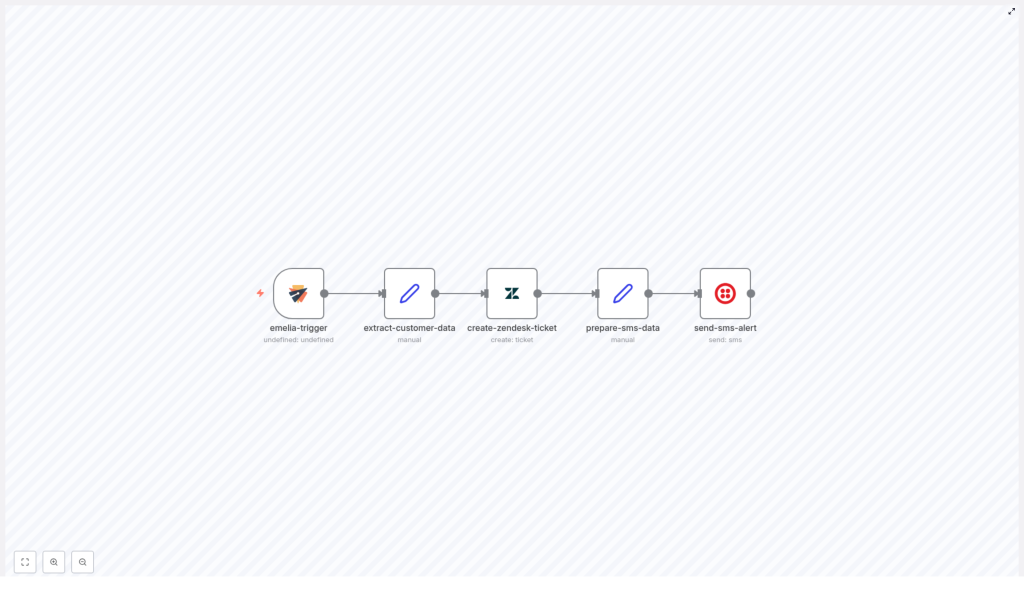
This automated post-purchase support workflow is built to take over the repetitive stuff you should not be doing by hand. In simple terms, it:
- Listens for customer replies to your post-purchase campaigns in Emelia
- Pulls out key customer and order details from the reply
- Creates a fully detailed support ticket in Zendesk
- Prepares a short, actionable summary for your team
- Sends an urgent SMS alert via Twilio with a direct ticket link
The result is a support process that feels fast and personal for your customers, without you having to watch your inbox 24/7.
When To Use This Automation
This workflow is perfect if you:
- Run post-purchase email campaigns with Emelia and get replies like “I have a question about my order”
- Use Zendesk to manage support conversations
- Rely on Twilio to send SMS alerts to your team
- Want to make sure urgent customer messages get seen and handled quickly
If your support team is juggling multiple tools or missing messages because they are buried in email threads, this automation will feel like a breath of fresh air.
How the Workflow Works, Step by Step
Let us break down the main pieces of the template so you can see exactly what is going on behind the scenes.
Step 1 – Trigger on Customer Reply via Emelia
Everything starts the moment a customer replies to your post-purchase campaign in Emelia.
The workflow uses the emelia-trigger node, which is configured to listen for “replied” events from a specific campaign. As soon as Emelia detects that reply, n8n kicks the workflow into action automatically. No inbox refreshing, no manual copy-paste.
Step 2 – Extract Customer and Order Data
Once the trigger fires, the workflow needs context. Who is the customer? What did they buy? What are they asking?
That is where the extract-customer-data node comes in. It pulls out all the important information, such as:
- Customer full name
- Email address
- Company name (if available)
- Reply content
- Order ID
- Purchase date
- Product name
All of this is turned into structured data that can be passed cleanly into Zendesk. Your support team does not have to guess what the customer is talking about or dig through emails to find the order.
Step 3 – Create a Zendesk Support Ticket
Next, the workflow creates a proper support ticket in Zendesk using the create-zendesk-ticket node.
The ticket is not just a blank shell. It includes a detailed description that bundles together:
- Customer details, like name and email
- Order metadata, including order ID, purchase date, and product
- The original reply text from the customer
This gives your support agents everything they need to respond quickly and professionally. No extra digging, no switching between tools to piece the story together.
Step 4 – Prepare SMS Notification Data
Now that the ticket exists, the workflow gets ready to alert your team.
The prepare-sms-data node gathers and formats the most relevant details for a short, actionable SMS, such as:
- Zendesk ticket ID
- Ticket URL
- Customer name
- Order ID
This step is all about turning a full support ticket into a quick snapshot that makes sense in a text message.
Step 5 – Send SMS Alert via Twilio
Finally, it is time to nudge your team.
Using the send-sms-alert node connected to Twilio, the workflow sends an urgent SMS to your support team. The message highlights that a new post-purchase reply has come in, includes the ticket link, and signals that it needs prompt attention.
Your team gets an instant heads-up, even if they are away from their desk, which is especially helpful for high-priority customers or time-sensitive issues.
Why This Workflow Makes Your Life Easier
So what do you actually gain from putting this in place? Quite a lot.
- Speed: Manual ticket creation is gone. Replies turn into tickets automatically, which cuts response times significantly.
- Accuracy: Customer and order details are extracted and passed along directly, which reduces typos and missing information.
- Proactivity: SMS alerts make sure urgent messages are noticed quickly, even outside the inbox.
- Scalability: As your store grows, this workflow handles more replies without you needing to grow the team at the same pace.
In short, you get a smoother process for your team and a faster, more reliable experience for your customers.
Implementing This Automation in Your Stack
This template is a great fit for e-commerce businesses that want to keep their customer service sharp without drowning in manual work. By connecting:
- Emelia for post-purchase campaign replies
- Zendesk for structured ticket management
- Twilio for instant SMS notifications
- n8n as the no-code automation layer tying it all together
you end up with a seamless, proactive support system that runs quietly in the background.
Once set up, your team gets real-time visibility into customer replies, and you can respond faster, keep customers happier, and protect your brand reputation without adding more tools or complexity.
Wrapping Up
Automating your post-purchase support with this n8n workflow is a simple way to boost both customer satisfaction and internal efficiency. Your customers feel heard quickly, your team spends less time on repetitive tasks, and your support operations become more consistent and reliable.
Instead of worrying about missed emails or delayed responses, you can focus on improving your products and growing your business, knowing that your support process is under control.
Ready To Try It Out?
If you are ready to upgrade your post-purchase experience, this template is a great place to start. Connect Emelia, Zendesk, and Twilio through n8n, plug this workflow into your e-commerce setup, and let automation handle the heavy lifting.
You can work with your platform consultant to get everything connected or explore n8n integrations yourself and customize the flow as needed.
