


Automate Expense Tracking from Emails to Google Sheets
From Inbox Chaos to Clear Financial Overview
Your inbox is probably full of receipts, invoices, and payment confirmations. Each one represents money spent, yet tracking them often turns into a stressful, manual task. You open an email, download the attachment, copy amounts, dates, and descriptions into a spreadsheet, and repeat this over and over.
It is easy to postpone this work, and even easier to make mistakes when you finally sit down to do it. The result: scattered information, delayed reporting, and a constant feeling that your finances are never quite up to date.
Now imagine a different reality. Every time a receipt lands in your inbox, it is automatically read, understood, and added to a clean Google Sheet. No more copy-paste, no more digging through emails, no more late-night reconciliation sessions. Just a living ledger that quietly updates itself in the background while you focus on work that actually grows your business.
This is exactly what this n8n workflow template helps you achieve. With n8n, Mindee Receipt API, and Google Sheets, you can turn a tedious chore into a reliable automated system that supports smarter decisions and long-term growth.
Adopting an Automation Mindset
Automation is not just about saving a few minutes. It is about reclaiming mental space, reducing friction, and building systems that work for you around the clock. When you automate something as routine as expense tracking, you free up capacity for planning, strategy, and creativity.
This workflow template is a practical starting point. You do not need to be a developer to use it, and you do not have to automate everything at once. Think of it as your first building block toward a more streamlined, focused way of working. Once you experience what it feels like to have expenses handled automatically, you will start seeing other areas you can optimize too.
The Tools Behind the Transformation
To bring this automation to life, the workflow connects three powerful tools:
- n8n – The automation platform that orchestrates the entire workflow and connects all services.
- IMAP Email – Used to watch your inbox for new messages and pull in relevant emails and attachments.
- Mindee Receipt API – An OCR and document parsing service that reads receipts and extracts key expense details.
- Google Sheets – Your always-available, cloud-based expense ledger that stores and organizes the extracted data.
Each part plays a specific role, and n8n ties them together into a clear, repeatable process that runs whenever a new receipt email arrives.
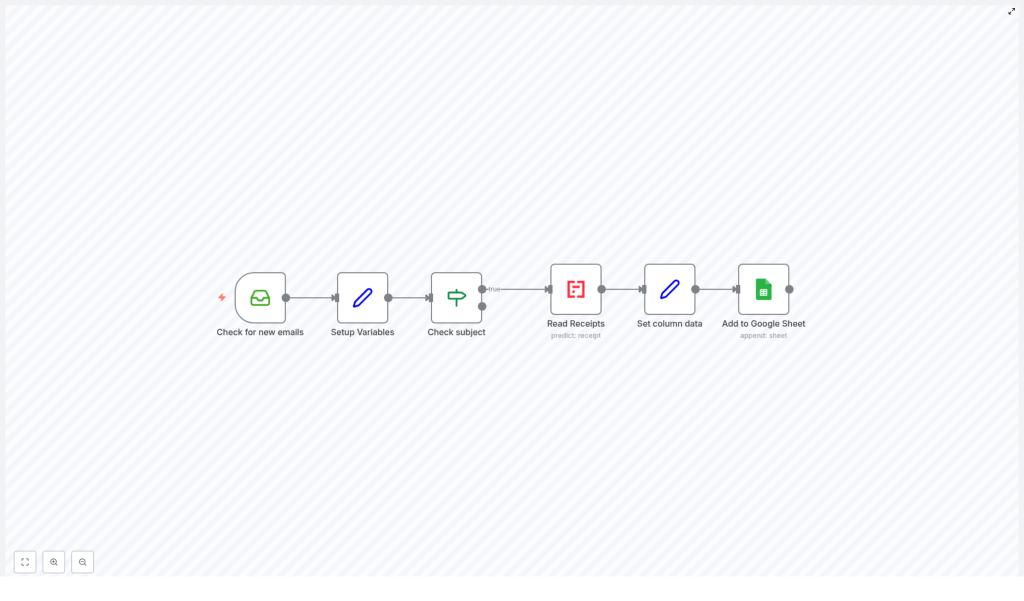
How the n8n Expense Workflow Actually Works
Let us walk through what happens step by step, so you can see how your messy inbox turns into structured financial data.
1. Watching Your Inbox for New Expense Emails
The journey starts in your email inbox. The workflow uses IMAP to monitor incoming messages. Whenever a new email appears, n8n pulls in the message details, including:
- Subject line
- Metadata
- Attachments (such as receipt PDFs or images)
This gives the workflow everything it needs to decide whether an email is relevant for expense tracking.
2. Defining Smart Filters With Subject Patterns
Not every email in your inbox is an expense, so the workflow sets up a helpful filter. It defines a variable called subjectPatterns that contains keywords such as "expenses" and "reciept". The misspelling is intentional so that common typos are also captured.
These patterns are used as a regular expression to identify which emails are likely related to expenses or receipts. This is where you start teaching your automation how to think about your inbox.
3. Passing Only Relevant Emails Forward
Next, the workflow checks each email subject against the subjectPatterns regular expression. If the subject line matches one of the patterns, the email is treated as an expense-related message and moves forward in the process.
Emails that do not match are ignored for this workflow, which keeps your automation focused and efficient.
4. Extracting Receipt Data With Mindee Receipt API
For emails that include receipt attachments, the workflow calls the Mindee Receipt API. This is where the magic of OCR and document parsing comes into play.
Mindee reads the attached receipt image or PDF and extracts key financial details, such as:
- Date of the transaction
- Category of the expense
- Currency used
- Total amount paid
Instead of you squinting at a receipt and typing numbers into a spreadsheet, the API does this work automatically, consistently, and at scale.
5. Structuring the Data for Google Sheets
Once Mindee has extracted the information, n8n prepares it for your spreadsheet. The workflow maps the parsed fields into a clear structure with columns such as:
- Date
- Description (parsed from the email subject)
- Category
- Currency
- Amount
This step is about turning raw data into something that is easy to scan, filter, and analyze. Your Google Sheet becomes a simple, reliable overview of your expenses, line by line.
6. Appending a New Row to Google Sheets
Finally, the workflow appends the structured data as a new row in your chosen Google Sheet. Each time an expense email is processed, your ledger grows automatically, no manual input required.
Over time, this creates a complete, continuously updated record of your expenses, directly sourced from your inbox.
Why This Workflow Is a Game Changer
Automating expense tracking is more than a convenience. It can reshape the way you relate to your finances and your time.
- Save hours of manual work No more copying values from emails into spreadsheets. The workflow does it for you, every single time.
- Improve accuracy Automated extraction reduces the risk of typos, missed entries, and inconsistent formatting.
- Scale without extra effort Whether you receive a handful of receipts or dozens per day, the workflow handles them at the same pace.
- Stay cloud-first and connected Email, OCR, and Google Sheets all work together through n8n, so your data is available wherever you are.
Most importantly, this system frees you from repetitive admin work so you can focus on clients, strategy, and growth.
Making the Template Your Own
This workflow template is ready to use, but it is also meant to be customized. As your processes evolve, your automation can evolve with them.
Adjusting Email Subject Filters
You can modify the subjectPatterns variable to better match the way your vendors, tools, or team label expense emails. Add or change keywords to capture different subjects, such as "invoice", "payment receipt", or your company-specific terms.
Connecting Your Own Google Sheet
The workflow uses a Google Sheets integration that you can point to any spreadsheet you own. To adapt it:
- Update the Google Sheet ID to target your own document.
- Make sure the connected Google account has permission to access and edit that sheet.
- Confirm the column order so that the data maps correctly to Date, Description, Category, Currency, and Amount.
With OAuth2 access properly configured, the workflow can safely write new rows whenever it processes an email.
Adding Extra Data Processing Steps
If you want to go further, you can extend the workflow by:
- Including more fields from the Mindee Receipt API, such as vendor name or tax amount.
- Triggering notifications when expenses above a certain amount are detected.
- Splitting expenses into different sheets based on category or team.
This template is a solid foundation, and n8n makes it easy to experiment, iterate, and refine your automation as your needs grow.
Take the Next Step Toward a More Automated Workflow
Every powerful automation journey starts with one simple, useful workflow. By turning your email receipts into structured rows in Google Sheets, you are not just saving time. You are building a habit of designing systems that support you, instead of relying on constant manual effort.
Once this is in place, you will see new opportunities to connect tools, automate reports, and remove friction from your daily operations. This template is your invitation to start that journey.
Ready to automate your expense tracking, reduce busywork, and focus on what really matters? Start with this n8n workflow template and transform your email receipts into organized, actionable data.
