


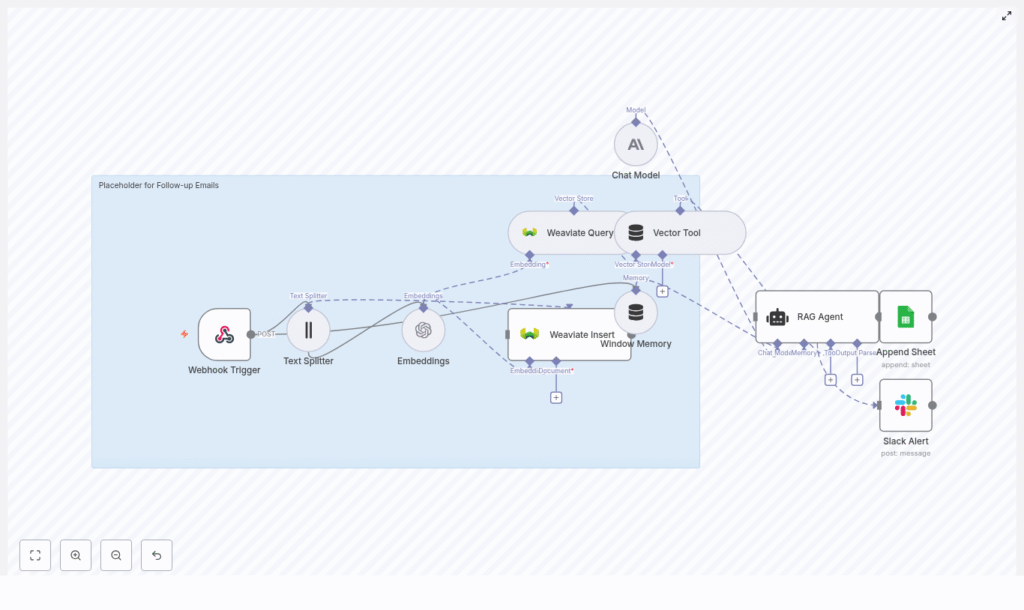
Automate Follow-up Emails with n8n & Weaviate
Consistent, high quality follow-up is central to effective sales, onboarding, and customer success. Doing this manually does not scale, is difficult to standardize, and is prone to delays or errors. This article presents a production-ready n8n workflow template that automates follow-up emails using embeddings, Weaviate as a vector database, and a Retrieval-Augmented Generation (RAG) agent.
You will see how the workflow is structured, how each n8n node is configured, and how to integrate external services such as OpenAI, Anthropic, Google Sheets, and Slack. The goal is to help automation professionals deploy a robust, auditable follow-up system that is both context-aware and scalable.
Why automate follow-ups with n8n, embeddings, and Weaviate
By combining n8n with semantic search and a vector database, you can move from generic follow-ups to context-rich, personalized outreach that is generated automatically. The core advantages of this approach are:
- Context retention – Previous emails, meeting notes, and CRM data are stored as embeddings and can be retrieved later to inform new messages.
- Relevant personalization at scale – Vector search in Weaviate identifies the most relevant historical context for each recipient, which feeds into the RAG agent.
- Reliable orchestration – n8n coordinates triggers, transformations, and external API calls in a transparent and maintainable way.
- End-to-end auditability – Activity is logged to Google Sheets, and Slack alerts notify the team about failures or issues.
This architecture is suitable for teams that handle large volumes of follow-ups and require consistent, traceable communication flows integrated with their existing tooling.
High-level workflow architecture
The n8n workflow follows a clear sequence from inbound request to generated email and logging:
- Webhook Trigger – Accepts incoming follow-up requests.
- Text Splitter – Chunks long context into manageable segments.
- Embeddings (OpenAI) – Creates vector representations of each chunk.
- Weaviate Insert – Stores embeddings and metadata in a vector index.
- Weaviate Query + Vector Tool – Retrieves relevant context for a new follow-up.
- Window Memory + Chat Model (Anthropic) – RAG agent generates the personalized follow-up email.
- Append Sheet (Google Sheets) – Logs the generated email and status.
- Slack Alert (onError) – Sends alerts on failures for rapid troubleshooting.
The remainder of this guide walks through these components in a logical sequence, with configuration guidance and best practices for each step.
Triggering the workflow: Webhook design
1. Webhook Trigger configuration
The entry point is an n8n Webhook node configured to accept HTTP POST requests, for example at:
POST /follow-up-emails
The webhook expects a JSON payload containing at least the following fields:
{  "recipient_email": "jane@example.com",  "name": "Jane",  "company": "Acme Inc",  "context": "Previous meeting notes, product interests, timeline",  "last_contacted": "2025-08-20"
}
Additional fields (such as internal IDs or CRM references) can be added as needed. To secure this endpoint, use one or more of the following:
- Query parameters with API keys.
- HMAC signatures validated in n8n.
- n8n’s built-in authentication options.
Securing the webhook is essential when integrating with external CRMs or public forms.
Preparing context: chunking and embeddings
2. Text Splitter for context chunking
Before generating embeddings, the workflow splits the incoming context into smaller pieces. This improves retrieval quality and keeps embedding costs predictable. The Text Splitter node is configured with:
chunkSize: 400chunkOverlap: 40
A 400-character chunk size with 40-character overlap is a practical baseline. It preserves local context across chunks while avoiding excessively large vectors. You can tune these parameters based on the type of content you process:
- Long narrative emails can tolerate larger chunk sizes.
- Short, structured notes may benefit from smaller chunks.
3. Generating embeddings with OpenAI
After splitting, each chunk is sent to an Embeddings node. The template uses OpenAI’s text-embedding-3-small model, which is cost-effective for high-volume use cases. Any compatible embedding provider can be substituted, as long as the output is compatible with Weaviate.
Key considerations:
- Store the OpenAI API key in n8n’s credential manager, not in plain text.
- Batch embedding requests when possible to reduce overhead and control costs.
- Monitor usage to ensure the chosen model aligns with your budget and latency requirements.
Persisting and retrieving context with Weaviate
4. Storing embeddings in Weaviate
The next step is to persist the embeddings in Weaviate. The workflow uses a dedicated index, for example:
follow-up_emails
For each chunk, the Weaviate Insert node stores:
- The embedding vector.
- The original text content.
- Metadata such as:
recipient_idor email.source(CRM, meeting notes, call summary, etc.).timestamp.- Optional tags or categories.
Rich metadata enables filtered queries, avoids noisy matches, and supports later analysis. As your index grows, this structure becomes critical for maintaining retrieval quality.
5. Querying Weaviate and exposing a Vector Tool
When a new follow-up is requested, the workflow generates an embedding for the new context and queries Weaviate for the most similar stored chunks. The Weaviate Query node typically retrieves the top-k results (for example, the top 5 or 10), which are then passed into a Vector Tool node.
The Vector Tool node exposes these retrieved chunks as tools or context items for the RAG agent. This pattern ensures that the language model does not rely solely on its internal knowledge but instead grounds its output in your specific historical data.
Key configuration points:
- Set an appropriate top-k value to balance context richness with token usage.
- Use metadata filters (for example, by
recipient_idorcompany) to avoid cross-recipient leakage of context. - Regularly review query performance and refine metadata schema as needed.
Generating the follow-up: RAG agent and memory
6. Window Memory, Chat Model, and RAG orchestration
The core of the email generation is a RAG agent backed by a chat model. In this template, Anthropic is used as the Chat Model, but the pattern applies to other LLM providers as well.
The RAG pipeline in n8n typically includes:
- Window Memory – Maintains short-term conversational state, which is useful if you extend the workflow to multi-turn interactions or iterative refinement.
- Chat Model (Anthropic) – Receives:
- A system instruction.
- The retrieved context from Weaviate (via the Vector Tool).
- A user prompt with recipient details and desired tone.
An example system prompt used in the workflow is:
System: You are an assistant for follow-up emails. Use the retrieved context to personalize the message. Keep it concise, clear, and action-oriented.
The user prompt then includes elements such as the recipient name, company, high-level context, and a clear call to action. This separation of system and user instructions helps ensure consistent behavior in production.
Prompt design for RAG-based follow-ups
Prompt structure has a direct impact on the quality and consistency of generated emails. A recommended pattern is:
- Short, explicit system instruction that defines the role and constraints.
- Bullet-pointed context extracted from Weaviate.
- Recipient-specific metadata such as:
- Name and company.
- Last contacted date.
- Desired tone and objective (for example, book a demo, confirm next steps).
System: You are an assistant for follow-up emails.
Context: • Follow-up note 1  • Meeting highlight: interested in feature X
Recipient: Jane from Acme Inc, last contacted 5 days ago
Tone: Friendly, professional
Goal: Ask for next steps and offer a short demo

Compose a 3-4 sentence follow-up with a clear call-to-action.
Keeping prompts structured and consistent simplifies debugging, improves reproducibility, and makes it easier to iterate on the workflow as requirements evolve.
Logging, monitoring, and error handling
7. Logging to Google Sheets
For visibility and non-technical review, the workflow logs each generated follow-up to a Google Sheet using the Append Sheet node. A sheet named Log can store:
- Recipient email and name.
- Generated email content.
- Timestamp.
- Status (for example, success, failed, retried).
- Relevant metadata such as the source of the request.
This provides an accessible audit trail for sales, customer success, and operations teams, and supports quality review without requiring direct access to n8n or Weaviate.
8. Slack alerts on workflow errors
To ensure operational reliability, configure an onError branch from critical nodes (particularly the RAG agent and external API calls) to a Slack node. The Slack node should send a message to an appropriate team channel that includes:
- A short description of the error.
- The n8n execution URL for the failed run.
- Key identifiers such as recipient email or request ID.
This pattern enables fast incident response and helps teams diagnose issues before they affect a large number of follow-ups.
Configuration best practices
To make this workflow robust and cost-effective in production, consider the following guidelines:
- Security – Protect the webhook with HMAC validation, API keys, or n8n authentication. Avoid exposing unauthenticated endpoints to public traffic.
- Embedding strategy – Adjust chunk size and overlap based on content type. Test retrieval quality with real data before scaling.
- Index design – Add metadata fields in Weaviate such as
recipient_id,source, and tags. Use these fields for filtered queries to reduce noise. - Cost control – Batch embedding requests, limit top-k retrieval results, and monitor token usage in the chat model. Align your configuration with expected volume and budget.
- Monitoring – Combine Slack alerts with the Google Sheets log to track volume, failures, and content quality over time.
- Testing – Use tools like Postman to simulate webhook payloads. Validate that the retrieved context is relevant and that the generated emails match your brand tone before going live.
Scaling and reliability considerations
As the number of follow-up requests and stored interactions grows, plan for scale at both the infrastructure and workflow levels:
- Vector database scaling – Use autoscaled Weaviate hosting or a managed vector database to handle larger indexes and higher query throughput.
- Rate limiting and retries – Implement rate limiting and retry strategies in n8n for external APIs such as OpenAI, Anthropic, and Slack to avoid transient failures.
- Index maintenance – Periodically re-index or remove stale follow-up records that are no longer relevant. This can improve retrieval quality and control storage costs.
Example webhook request for testing
To validate your setup, you can issue a test request to the webhook endpoint after configuring the workflow:
POST https://your-n8n.example/webhook/follow-up-emails
Content-Type: application/json

{  "recipient_email": "jane@example.com",  "name": "Jane",  "company": "Acme Inc",  "context": "Spoke about timeline; she loved feature X and asked about integration options.",  "last_contacted": "2025-08-20"
}
Inspect the resulting n8n execution, verify that embeddings are stored in Weaviate, confirm that the generated email is logged to Google Sheets, and check that no Slack alerts are triggered for successful runs.
From template to production
This n8n and Weaviate pattern provides a resilient, context-aware follow-up automation framework that scales with your customer interactions and knowledge base. It helps teams deliver timely, relevant outreach without adding manual workload or sacrificing auditability.
To deploy this in your environment:
- Clone the n8n workflow template.
- Configure credentials for OpenAI, Anthropic (or your chosen LLM), Weaviate, Google Sheets, and Slack.
- Adapt metadata fields and prompts to your CRM schema and brand voice.
- Run test webhooks with representative data and iterate on configuration.
Call-to-action: Clone the template, connect your API keys, and run a set of test webhooks today. Once validated, integrate the webhook with your CRM or form system and subscribe for more n8n automation patterns and best practices.
