


Automate GDPR Data Deletion with Slack and n8n
From Manual Requests to Confident Automation
GDPR data deletion requests can feel like a constant interruption. A message arrives, someone has to check it, route it to the right tools, confirm the deletion, then document everything for audits. It is repetitive, high stakes, and easy to get wrong when you are juggling other priorities.
Yet this is also a powerful opportunity. Every repetitive compliance task is a signal that something can be automated, streamlined, and transformed. With the right workflow, you can turn a stressful obligation into a smooth, reliable system that protects your users and frees up your time.
This is where n8n, Slack, and a focused automation mindset come together. In this article, you will walk through a ready-to-use n8n workflow template that lets your team trigger GDPR data deletion directly from Slack, automatically validate the request, run deletion across multiple platforms, and log everything in Airtable for full transparency.
Think of this template as a starting point, not a limit. It is a practical example of what is possible when you decide to automate more of your work and reclaim your focus for higher value tasks.
Shifting Your Mindset: From One-Off Tasks to Scalable Systems
Before diving into the technical steps, it helps to reframe how you think about processes like GDPR data deletion:
- You do not just want to handle the next request, you want a repeatable system.
- You do not want your team to memorize steps, you want automation to enforce them.
- You do not want to worry about what you might have missed, you want clear logs and proof.
n8n gives you the building blocks to create that kind of system. Slack becomes your friendly front door, Airtable your audit trail, and this workflow template the connective tissue that keeps everything running smoothly.
Once you see how this GDPR deletion flow works, you can reuse the same pattern for other internal operations, from account cleanups to subscription changes. This is not just a single automation, it is a stepping stone to a more automated, focused way of working.
The Big Picture: How the n8n GDPR Deletion Template Works
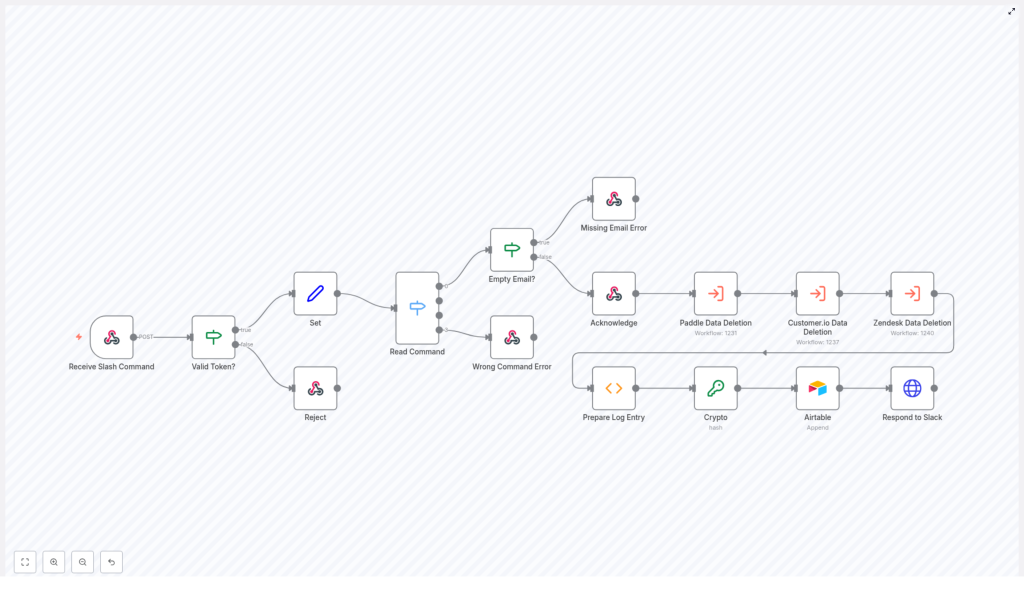
At a high level, this n8n workflow does four important things whenever someone uses a Slack slash command:
- Receives and validates the request from Slack so only trusted calls are processed.
- Parses and checks the command and email address to ensure the input is valid.
- Executes GDPR data deletion across multiple platforms in a controlled sequence.
- Logs and reports the result back to Slack and to Airtable for auditing.
Everything is orchestrated by n8n, using nodes for Slack, Airtable, and internal logic. You gain a simple, human friendly trigger in Slack, backed by a robust, automated backbone that quietly does the heavy lifting.
Step-by-Step Journey Through the Workflow
Let us walk through the core steps of the template, so you can understand how it works and imagine how you might extend it for your own stack.
1. Receiving and Authenticating the Slack Command
Your journey begins when someone in your team types a Slack slash command. That message is the spark that triggers the whole automation.
- Receive Slash Command (Webhook node)
This node listens for incoming POST requests from Slack. It is configured as a webhook endpoint that Slack calls whenever the slash command is used. This is how your n8n workflow gets the data that was typed in Slack. - Valid Token? (validation node)
Once the command arrives, the workflow checks the security token that Slack sends with the request. The Valid Token? node compares it against a predefined value that you configure in n8n. Only if the token matches does the workflow continue. - Reject (error handling node)
If the token is invalid, the Reject node stops the process and rejects the request. This protects your deletion workflows from unauthorized or spoofed calls and reinforces a security-first mindset in your automations.
2. Parsing the Command and Email Address
Once the request is authenticated, the workflow needs to understand what the user actually wants to do.
The Set node takes the raw text from the Slack command and splits it into two key pieces:
- The operation keyword, which is expected to be “delete” for this workflow.
- The email address of the user whose data should be deleted.
This simple parsing step is powerful. It turns an unstructured text message into structured data that n8n can reliably work with and validate.
3. Validating the Operation Command
Now that the operation keyword and email are extracted, the workflow checks if the command itself is valid.
- Read Command (Switch node)
The Read Command switch node looks at the operation keyword and confirms that it matches the expected value, typically “delete”. This ensures that only supported commands are processed. - Wrong Command Error (response node)
If the command is not recognized, the Wrong Command Error node sends a clear, friendly response back to Slack. This message explains that the command is not valid and helps guide the user toward the correct usage.
This kind of validation not only prevents mistakes, it also makes your automation feel more supportive and user friendly.
4. Ensuring the Email Address Is Present
Next, the workflow confirms that an email address was provided. After all, GDPR data deletion without a target user would not make sense.
- Empty Email? (condition node)
The Empty Email? node checks whether the email field is present and not empty. - Missing Email Error (response node)
If the email is missing, the Missing Email Error node responds in Slack with a helpful message that explains how to use the command correctly, including the need to provide an email address.
By catching this early, your workflow avoids wasted processing time and keeps expectations clear for your team.
5. Acknowledging the Request and Continuing in the Background
Once the token, command, and email all pass validation, the workflow is ready to move forward with the actual deletion process.
The Acknowledge node sends an immediate response back to Slack, letting the user know that their GDPR deletion request has been received and is being processed.
This is an important user experience detail. Instead of waiting in silence, your colleagues see quick confirmation and can move on with their work while n8n quietly continues the rest of the steps in the background.
6. Executing GDPR Data Deletion Across Platforms
With a valid request in hand, the workflow now executes the real heart of the automation: deleting user data across multiple tools.
The template triggers three separate data deletion workflows in series:
- Paddle Data Deletion
Handles removal of user data from the Paddle platform. This might include customer records, billing information, or other Paddle specific data associated with the email. - Customer.io Data Deletion
Manages deletion of user information stored in Customer.io, such as profiles, events, or communication history that must be removed for GDPR compliance. - Zendesk Data Deletion
Processes the deletion of user data from Zendesk, including tickets, contact records, or related support data tied to the user.
Running these workflows in series gives you predictable, traceable execution. It also makes the system highly extensible. As your stack grows, you can add more deletion workflows for other platforms that hold user data, following the same pattern.
7. Preparing and Logging the Deletion Result
Automation is not complete without visibility. After all deletion workflows have run, the template prepares a detailed log entry so you can track what happened.
- Prepare Log Entry (aggregation node)
This node collects the success status from each individual deletion workflow, compiles them into a summary, and adds a timestamp. The result is a clear, structured record of the entire process for that request. - Crypto (SHA256 hash)
Before logging, the Crypto node computes a SHA256 hash of the email address. This adds an extra layer of anonymization for the stored log, while still allowing you to correlate entries if needed through the hash value. - Airtable (logging node)
Finally, the Airtable node appends the log entry to an Airtable base. This creates a central, searchable audit trail that you can reference for internal reviews, compliance checks, or external audits.
With this in place, you are no longer hunting through scattered messages or manual notes. Your GDPR deletion history is organized, timestamped, and easy to share with stakeholders.
8. Sending a Completion Update Back to Slack
The last step closes the loop with the person who initiated the request.
The Respond to Slack node sends a follow-up message to Slack once the GDPR data deletion process is complete. This message includes:
- The overall status of the deletion process.
- Relevant details about the outcome.
- A link to the Airtable log entry, so you or your team can review the full record if needed.
This final notification builds trust and transparency. Your colleagues see not only that the request was accepted, but that it was completed, documented, and handled with care.
Why This n8n Workflow Template Matters
This GDPR deletion template is more than a technical convenience. It embodies a set of best practices that support both compliance and growth.
- Security
Token validation ensures that only authorized Slack commands can trigger data deletion. This protects sensitive operations and reinforces good security hygiene in your automation stack. - User-Friendly Experience
Clear responses for missing emails or incorrect commands mean fewer frustrations and support questions. People can learn how to use the slash command directly from the feedback they receive. - Compliance and Transparency
Automated GDPR data deletion with audit logging in Airtable gives you confidence that requests are handled consistently and that you have proof of action when you need it. - Extensibility and Growth
The workflow is designed to be extended. You can plug in additional deletion workflows for other tools, adapt the command format, or enrich the Airtable logs as your processes mature.
Most importantly, it shows how one well designed automation can remove friction from your day, reduce risk, and free you to focus on more strategic work.
Using This Template as a Launchpad for More Automation
Once you have this GDPR deletion flow running, you will likely spot other areas where a Slack command plus n8n could simplify your operations:
- Triggering account cleanups across multiple systems.
- Starting onboarding or offboarding workflows from a single command.
- Logging key operational events to Airtable or other databases for reporting.
Each automation you build strengthens your internal systems and helps your team rely less on memory and manual checklists. Over time, you move from reactive firefighting to proactive, scalable processes.
Use this template as a reference, experiment with variations, and keep iterating. The more you build, the more natural automation will feel in your day-to-day work.
Take the Next Step: Implement and Customize the Template
By connecting Slack, n8n, Airtable, and your data platforms, you can transform a complex GDPR data deletion process into a streamlined, reliable workflow. You gain:
- Fast, consistent responses to data deletion requests.
- Reduced manual workload for your team.
- Stronger compliance and clearer documentation.
If you are ready to bring this into your own environment, start by importing the template, wiring it to your Slack workspace, and configuring your Paddle, Customer.io, Zendesk, and Airtable connections. From there, keep refining and expanding it as your needs grow.
If you want help implementing this n8n workflow or tailoring it to your unique stack, you can reach out for expert guidance and explore more automation templates that build on the same principles.
