


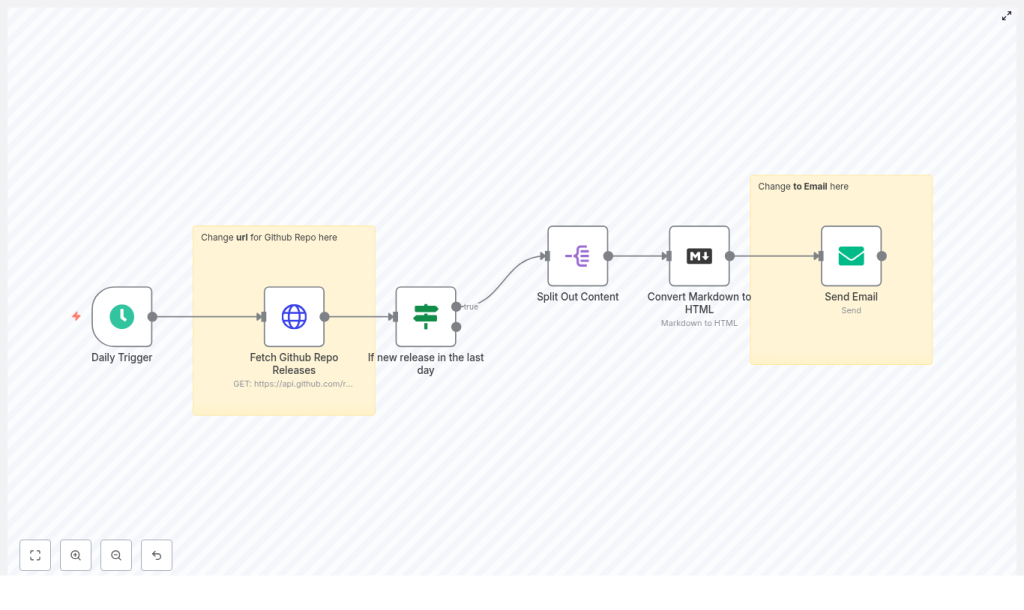
Automate GitHub Release Emails with n8n
Keeping internal teams, customers, or stakeholders informed about new GitHub releases is essential, but doing it manually does not scale. This reference guide describes a production-ready n8n workflow template that checks a GitHub repository on a schedule, evaluates whether a new release has been published, converts the release notes from Markdown to HTML, and delivers a formatted email via SMTP.
The goal is a minimal, reliable automation that integrates directly with the GitHub Releases API and your existing email infrastructure. This guide focuses on technical configuration, node behavior, data flow, and how to adapt the template for advanced use cases.
1. Workflow Overview
The workflow is designed to run unattended on a fixed schedule. At a high level it:
- Triggers on a daily schedule (or any custom interval).
- Calls the GitHub Releases API to fetch the latest release for a repository.
- Checks whether the latest release was published within a configurable time window.
- Extracts the release notes from the response payload.
- Converts the Markdown release notes to HTML.
- Sends an HTML email via SMTP with the formatted release notes and metadata.
This pattern is easy to extend to Slack, Microsoft Teams, or other notification channels, since all relevant data is already normalized inside the workflow.
2. Architecture & Data Flow
The template is composed of the following n8n nodes:
- Schedule Trigger – starts the workflow on a defined interval.
- HTTP Request (Fetch GitHub Repo Releases) – retrieves the latest release from the GitHub API.
- If (If new release in the last day) – evaluates whether the release is recent enough to notify about.
- Split Out (Split Out Content) – isolates the
bodyfield that contains release notes in Markdown. - Markdown (Convert Markdown to HTML) – transforms Markdown release notes into HTML.
- Email Send (Send Email) – sends an HTML email using SMTP credentials configured in n8n.
Data flows linearly from the trigger through each node. The HTTP node outputs the GitHub release JSON, the If node filters based on published_at, and only when the condition passes do subsequent nodes execute to process and send the email.
3. Use Cases & Benefits
Automating GitHub release notifications with n8n provides:
- Consistent checks – scheduled execution ensures no release is missed.
- Readable emails – Markdown release notes are converted to HTML with preserved formatting.
- Flexible targeting – send to teams, mailing lists, or specific stakeholders.
- Multi-channel extension – reuse the same data to notify Slack, Teams, or internal tools.
This is particularly useful for SaaS release announcements, internal changelog distribution, or informing customers of SDK or API updates.
4. Node-by-Node Breakdown
4.1 Schedule Trigger Node
Purpose: Initiate the workflow on a periodic schedule.
Configuration:
- Trigger type:
Time(Schedule Trigger). - Mode:
Every Day(or a custom cron expression). - Time / Interval: Set the exact time of day or repeat interval that fits your process.
The Schedule Trigger node does not require credentials. It simply emits an item that starts the rest of the workflow. Adjust the frequency based on how quickly you need to surface new releases.
4.2 HTTP Request Node – Fetch GitHub Repo Releases
Purpose: Retrieve the latest release for a given GitHub repository.
HTTP configuration:
- HTTP Method:
GET - URL:
https://api.github.com/repos/OWNER/REPO/releases/latest - Response Format:
JSON
Replace OWNER and REPO with the appropriate repository identifiers, for example:
https://api.github.com/repos/n8n-io/n8n/releases/latestAuthentication & headers:
- To avoid GitHub rate limits and to access private repositories, configure a GitHub Personal Access Token (PAT) and set an
Authorizationheader:Authorization: token <YOUR_TOKEN> - In n8n, store the token using the Credentials system and reference it in the node so it is not hardcoded in parameters.
Key response fields used later:
published_at– ISO timestamp used to determine if the release is new.body– Markdown release notes that will be converted to HTML.tag_name– version tag, used in the email subject or body.html_url– link to the release page on GitHub.
The node should output a single JSON item representing the latest release. If the repository has no releases, GitHub returns an error; in that case, use n8n’s built-in error handling or manual test runs to verify behavior.
4.3 If Node – Check for New Release in Last Day
Purpose: Only continue the workflow if the latest release is recent (for example, within the last 24 hours).
The If node compares the published_at timestamp from the GitHub response to the current time minus a defined offset. The template uses a date comparison based on n8n expressions.
Conceptual expression:
= $json.published_at.toDateTime() is after DateTime.utc().minus(1, 'days')Example n8n expression style:
={{ $json.published_at.toDateTime() }} >?={{ DateTime.utc().minus(1, 'days') }}Exact syntax can vary slightly depending on your n8n version and the date comparison operator available. The important points are:
$json.published_atis parsed as a date-time.- It is compared against
DateTime.utc().minus(1, 'days')or another offset you choose. - If the condition is true, the execution continues along the “true” branch to process and send the email.
- If false, the workflow exits without sending a notification.
Edge cases:
- If
published_atis missing or malformed, the expression may fail. Use n8n’s error handling or additional checks if you expect inconsistent data. - Adjust the offset (for example,
minus(6, 'hours')orminus(7, 'days')) to match your notification window.
4.4 Split Out Content Node
Purpose: Isolate the release notes stored in the body field so they can be processed independently.
The template uses a Split Out node (or equivalent logic) with configuration similar to:
- Field to split out:
body
Practically, this means the node focuses on the body property from the JSON object returned by GitHub. If you prefer, you can achieve a similar effect with a Set node or a Function node that copies $json.body to a dedicated field.
After this step, downstream nodes can safely reference $json.body as the Markdown content that needs to be converted.
4.5 Markdown Node – Convert Markdown to HTML
Purpose: Convert Markdown-formatted release notes into HTML suitable for email clients.
Configuration:
- Mode:
markdownToHtml - Input field:
$json.body(Markdown release notes). - Output field: for example
html(the generated HTML string).
The Markdown node parses headings, lists, links, and other Markdown constructs and produces valid HTML. This HTML will be used as the body of the email, preserving the structure of your GitHub release notes.
Notes:
- Ensure the input field exists; if
bodyis empty, the output HTML will also be empty. - If you want to add a wrapper template (header, footer, company branding), you can do so in a subsequent Set or Function node that concatenates additional HTML around
$json.html.
4.6 Email Send Node – SMTP Delivery
Purpose: Deliver the HTML release notes via email to the configured recipients.
Key configuration parameters:
- To: One or more recipients, for example:
team@example.com - Subject: Can be static or dynamic. Example using the release tag:
=New release: {{$json.tag_name}} - HTML: Set this to the HTML output from the Markdown node, for example:
{{$json.html}} - SMTP credentials: Configure via n8n’s Credentials system (host, port, username, password, TLS/SSL options).
The Email Send node uses your SMTP server (for example, a corporate mail server or a transactional email provider) to send the message. Make sure the “From” address is properly configured and allowed by your SMTP provider.
5. Expression & Template Examples
Below are some useful expressions you can embed in node parameters to enrich the email output.
- Dynamic email subject with tag name:
=New release: {{$json.tag_name}} - Link to the GitHub release page in the email body:
<a href="{{$json.html_url}}">View release</a> - Format the published date for display:
{{$json.published_at.toDate('YYYY-MM-DD HH:mm')}}
These expressions can be used in the Email Send node, a Set node, or any other node that supports n8n expressions.
6. Configuration Notes & Best Practices
6.1 GitHub API & Rate Limits
- Always configure an Authorization header with a Personal Access Token to avoid anonymous rate limits:
Authorization: token <YOUR_TOKEN> - Use the n8n Credentials system to securely store your token instead of hardcoding it.
- For private repositories, a token with appropriate scopes is required.
6.2 SMTP & Email Delivery
- Store SMTP credentials in n8n Credentials, not directly in node fields.
- Verify that the “From” address is authorized on your SMTP server to reduce the risk of spam filtering.
- Consider sending to a mailing list address rather than many individual recipients to simplify management.
6.3 Security Considerations
- Do not include sensitive information in release notes if those notes are emailed broadly.
- If release notes may contain secrets or internal URLs, consider redacting or sanitizing them in a Function or Set node before sending.
- Restrict access to the n8n instance and credentials to trusted administrators only.
7. Enhancements & Advanced Customization
The core template is intentionally minimal, but it can be extended in several directions:
- Authentication via GitHub App or advanced tokens: Use a GitHub App or scoped PAT to access private repositories and improve rate limit allowances.
- Alternative channels: Instead of, or in addition to, email, forward the release data to:
- Slack (via Slack node or webhook).
- Microsoft Teams (via webhook or Teams connector).
- Other internal systems that consume webhooks or APIs.
- Release assets: Read asset URLs from the releases payload and:
- Include links to assets in the email body.
- Optionally attach files, depending on your email provider and size constraints.
- Multiple releases handling: If you want to process more than the latest release:
- Call
/repos/OWNER/REPO/releasesinstead of/releases/latest. - Iterate over the returned array of releases using n8n’s built-in looping mechanisms.
- Apply the date filter per release, then send separate or aggregated notifications.
- Call
- Rich HTML templating: Wrap the Markdown-generated HTML with:
- A custom header (logo, title, intro text).
- A footer (unsubscribe link, company info, CTA buttons).
8. Troubleshooting
If the workflow does not behave as expected, verify the following:
- HTTP 403 from GitHub:
- Check that the Authorization header is present and valid.
- Ensure the token has the required scopes for the repository.
- Missing or unexpected fields:
- Inspect the raw JSON response in the HTTP Request node.
- Confirm that fields like
published_at,body,tag_name, andhtml_urlexist and match your expressions.
- Broken or unstyled HTML email:
- Use a Debug or similar node to inspect the
htmlfield output from the Markdown node. - Copy the HTML into an email client or browser to preview and adjust styling if needed.
- Use a Debug or similar node to inspect the
- No email sent:
- Check the If node condition. If the release is older than the defined window, the workflow will exit without sending.
- Run the workflow manually with a known recent release to validate the flow.
9. Deployment Workflow
To get this automation running with your own repository:
- Import the n8n template from the provided link.
- Open the HTTP Request node and update the URL to your repository:
https://api.github.com/repos/OWNER/REPO/releases/latest - Configure GitHub authentication using a Personal Access Token and set the Authorization header.
- Configure SMTP credentials in n8n Credentials, then link them to the Email Send node.
- Adjust the If
