

Automate Google Sheets to Postgres with n8n & LLM
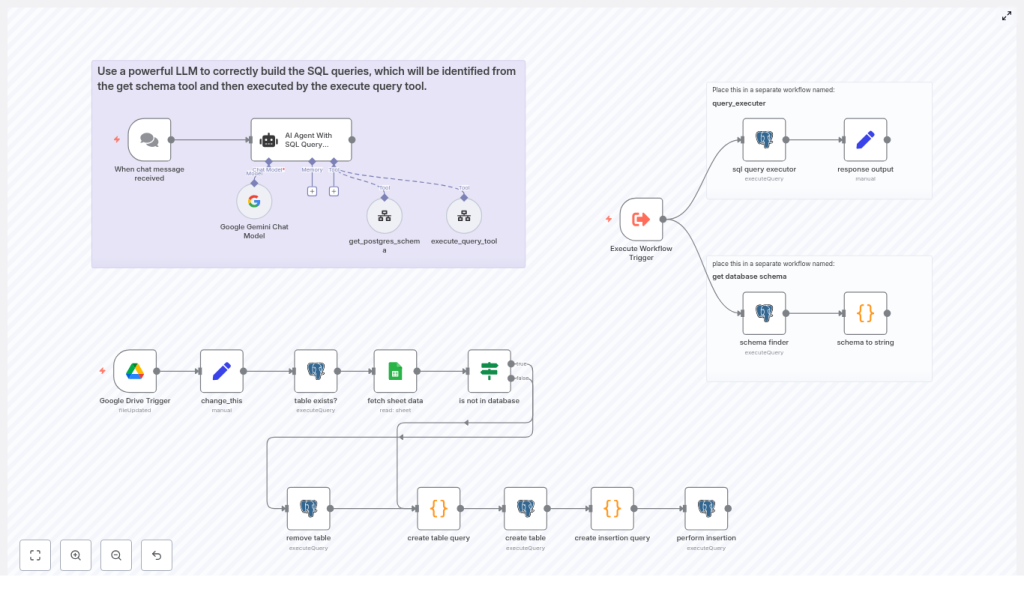
Moving structured data from Google Sheets into PostgreSQL is a frequent requirement for analytics, reporting, and machine learning pipelines. This guide documents a production-ready n8n workflow template that:
- Automatically ingests a Google Sheet into Postgres
- Infers table schemas and creates tables dynamically
- Normalizes currency, percentage, date, and boolean values
- Uses an LLM-based SQL agent to generate safe, schema-aware queries
- Exposes helper workflows for schema discovery and query execution
The template is named SHEETS RAG in n8n and is designed for users who already understand n8n nodes, credentials, and workflow composition.
1. Workflow Overview
The automation is split into three cooperating flows to keep responsibilities clear and security boundaries tight:
- Sheet ingestion workflow Listens to Google Drive changes, reads a configured sheet, infers a schema, creates a Postgres table, and inserts rows.
- Schema and execution helper workflows Provide reusable endpoints for:
- Retrieving a text representation of the Postgres schema
- Executing arbitrary SQL queries with controlled permissions
- LLM SQL agent workflow Uses an AI agent to translate natural language questions into safe PostgreSQL queries, leveraging the helper workflows as tools.
This separation makes it easier to audit database access, adjust permissions, and evolve the ingestion logic without touching the query assistant.
2. Architecture and Data Flow
2.1 High-level data path
- Trigger: A Google Drive Trigger node detects a change in a specific spreadsheet file.
- Configuration: A Set node (named
change_this) provides runtime configuration such as the spreadsheet URL and sheet name. - Table existence check: A Postgres node checks whether a target table (for example,
ai_table_{{sheet_name}}) already exists. - Data fetch: A Google Sheets node streams row data from the configured sheet.
- Schema inference: A Code node builds a dynamic list of columns, infers types, and generates a
CREATE TABLEstatement with a UUID primary key. - Insert statement generation: Another Code node constructs a parameterized
INSERTstatement and normalizes values. - Execution: A Postgres node executes the create and insert queries. An optional Postgres node can
DROP TABLEbefore recreation.
2.2 LLM agent integration
The LLM workflow uses an AI Agent With SQL Query Prompt node configured as a database query assistant. It interacts with two helper workflows:
- get database schema: Returns a textual representation of the current Postgres schema.
- query_executer: Executes SQL statements passed in and returns the result set.
The agent calls these helpers as tools to discover schema, build syntactically valid SQL, and then execute selected queries, with safeguards against destructive operations.
3. Node-by-Node Breakdown (Sheet Ingestion)
3.1 Google Drive Trigger
Node type: Google Drive Trigger
Role: Entry point for the ingestion workflow.
Behavior:
- Watches a specific Google Sheets file in Google Drive.
- Starts the workflow when the file is updated, for example when new rows are added or existing content is modified.
Configuration notes:
- Use the appropriate Google credentials in n8n with read access to the file.
- Scope the trigger to a single file to avoid accidental ingestion from unrelated spreadsheets.
3.2 Configuration node: change_this (Set)
Node type: Set
Role: Central configuration for the workflow.
Key fields:
sheet_url: Full URL to the Google Sheet.sheet_name: Name of the tab to ingest, for exampleproduct_list.
This node keeps environment-specific details in one place so you can clone the template and adapt it to other sheets without editing code nodes.
3.3 Table existence check: table exists? (Postgres)
Node type: Postgres
Role: Determine whether the target table already exists in the database.
Typical table naming convention: ai_table_{{sheet_name}}
Behavior:
- Runs a query against Postgres system catalogs or information schema to check for an existing table with the derived name.
- Downstream nodes can branch on this result to:
- Create a new table if it does not exist.
- Optionally drop and recreate the table if the schema has changed.
- Skip table creation when the schema is already correct.
3.4 Data retrieval: fetch sheet data (Google Sheets)
Node type: Google Sheets
Role: Read row data from the configured sheet.
Behavior:
- Streams rows from the specified tab inside the Google Sheet.
- Exposes each row as an object where keys correspond to column headers and values are the cell contents.
- Feeds these row objects into the schema inference and normalization logic in subsequent nodes.
Configuration notes:
- Make sure the first row of the sheet contains header labels that can be used as column names.
- Use the same Google credentials as the trigger or a dedicated service account.
3.5 Schema inference: create table query (Code)
Node type: Code (JavaScript)
Role: Generate a CREATE TABLE statement and normalized column definitions.
Main responsibilities:
- Iterate over all row objects to collect a complete set of column names.
- Inspect cell values to infer data types, including:
- Currency values with leading symbols
- Common date patterns such as
MM/DD/YYYY - Numeric and boolean-like strings
- Normalize column names, for example:
- Append currency codes to currency columns, such as
price_usd. - Apply safe naming conventions suitable for Postgres identifiers.
- Append currency codes to currency columns, such as
- Construct a
CREATE TABLESQL statement that:- Includes a UUID primary key, typically named
ai_table_identifier. - Defines column types based on inferred types, such as
DECIMAL(15,2)orTIMESTAMP.
- Includes a UUID primary key, typically named
Output:
- A complete
CREATE TABLEstatement for use by a Postgres node. - Metadata describing inferred columns and types, which the insertion logic can reuse.
3.6 Insert statement generation: create insertion query (Code)
Node type: Code (JavaScript)
Role: Prepare a parameterized INSERT statement and normalize all values before database insertion.
Transformations implemented:
- Currency values:
- Strip leading currency symbols such as
$,₹,€,£. - Remove thousands separators (commas, spaces) before casting to numeric.
- Map symbols to ISO codes (for example,
USD,INR,EUR,GBP) and align with the normalized column names likeprice_usd.
- Strip leading currency symbols such as
- Percentages:
- Convert strings such as
"12%"to0.12as a numeric value.
- Convert strings such as
- Timestamps and dates:
- Parse
MM/DD/YYYYformatted strings. - Convert them to ISO-compatible timestamp strings suitable for Postgres
TIMESTAMPcolumns.
- Parse
- Empty strings:
- Convert empty string values to
NULLso they are treated as missing data, not zero-length text.
- Convert empty string values to
- Numeric fields:
- Strip commas and validate that the remaining characters are numeric before casting.
- Boolean values:
- Detect string values such as
"true"and"false"and convert them to actual boolean types where appropriate.
- Detect string values such as
Output:
- A parameterized
INSERTSQL statement with placeholders. - An aligned array of parameter values for each row.
This design ensures that the subsequent Postgres node can use parameterized queries, which is critical for both safety and reliability.
3.7 Execution: create table & perform insertion (Postgres)
Node type: Postgres
Role: Execute the generated SQL statements.
Behavior:
- Runs the
CREATE TABLEstatement produced by the schema inference node, if table creation is required. - Executes the parameterized
INSERTstatement with the parameters array from the insertion query node. - Relies on parameter binding to avoid SQL injection and to handle special characters safely.
Credentials:
- Use a Postgres credential in n8n with permissions to:
- Create tables in the target schema.
- Insert data into the generated tables.
- (Optionally) drop tables if you enable that behavior.
3.8 Optional cleanup: remove table (Postgres)
Node type: Postgres
Role: Conditionally drop the target table before recreating it.
Behavior:
- Executes a
DROP TABLEstatement on the target table when explicitly enabled. - Useful when the sheet structure changes and you prefer a fresh table over schema migration.
Usage precautions:
- Use this only when you are comfortable losing existing data in the table.
- In production, consider gating this behind explicit checks, environment flags, or manual approvals.
4. LLM Agent and Helper Workflows
4.1 Helper workflow: get database schema
Role: Provide schema discovery as a reusable service.
Behavior:
- Runs a schema discovery query against Postgres (schema finder).
- Converts the result into a concise, human-readable string (schema to string).
- Returns this string to callers, primarily the LLM agent.
This representation enables the LLM to understand which tables and columns are available before constructing any SQL.
4.2 Helper workflow: query_executer
Role: Execute arbitrary SQL statements with controlled scope.
Behavior:
- Accepts a SQL statement as input.
- Executes the SQL in Postgres and returns the query results.
- Acts as a dedicated endpoint where you can:
- Add logging of all executed queries and responses.
- Implement auditing or access control rules.
- Introduce rate limiting or environment-specific restrictions.
4.3 LLM node: AI Agent With SQL Query Prompt
Role: Natural language to SQL translation with safety constraints.
Configuration highlights:
- Configured as a database query assistant.
- System message instructs the model to:
- Call the
get_postgres_schematool to retrieve the current schema. - Generate Postgres-compatible SQL that respects the discovered schema.
- Use functions like
LOWER(...)for case-insensitive comparisons when appropriate. - Apply simple numeric validation and guarded casts to reduce runtime errors.
- Return the generated SQL and request explicit user confirmation before executing destructive operations such as
DROPorDELETE.
- Call the
Execution of the final query is delegated to the query_executer workflow, which gives you a clear control point for monitoring and hardening.
5. Type Detection and Normalization Logic
Correct type inference is critical for reliable ingestion. The Code nodes implement pragmatic heuristics that work well for heterogeneous business data.
5.1 Currency detection
- Detects leading symbols such as
$,₹,€,£. - Maps these symbols to ISO currency codes:
$→USD₹→INR€→EUR£→GBP
- Defines currency columns as
DECIMAL(15,2)in the generated schema.

