

Automate HR Onboarding with n8n & Bitwarden
Onboarding a new employee is a highly repeatable workflow, which makes it an ideal candidate for automation. This reference guide describes a production-ready n8n workflow template that provisions Bitwarden access for new hires, organizes them into department-based groups, verifies membership, and sends a Slack notification to IT. The goal is to provide a clear, technical breakdown of how the workflow operates, how data flows between nodes, and how to configure it securely in a real environment.
1. Workflow overview
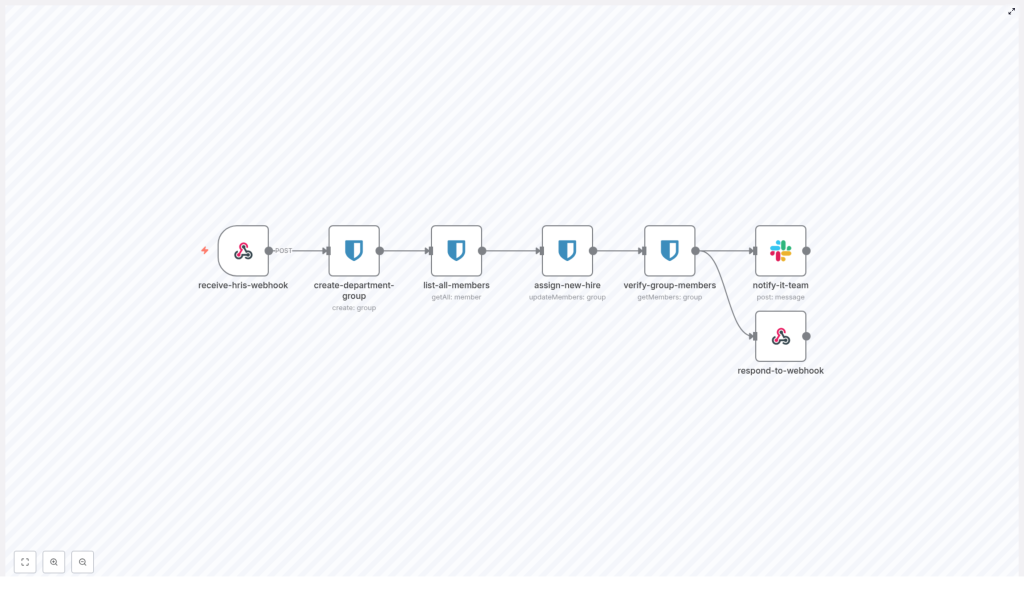
This n8n workflow is triggered by an HRIS webhook and orchestrates a sequence of Bitwarden and Slack operations. At a high level, the workflow:
- Accepts a POST request from your HRIS or onboarding system.
- Creates or prepares a Bitwarden group associated with the employee’s department.
- Retrieves Bitwarden organization members and identifies the new hire’s account.
- Assigns the new hire to the appropriate Bitwarden group.
- Verifies that the assignment was successful by querying group members.
- Sends a structured Slack notification to the IT channel.
- Returns a JSON response back to the HRIS caller with the result.
Core automation tools involved:
- n8n – orchestration and workflow engine.
- Bitwarden – password manager and group management via API.
- Slack – IT team notification channel.
- HRIS – upstream system that triggers the onboarding via webhook.
2. Architecture and data flow
The workflow is designed as a linear, event-driven process initiated by an HTTP webhook. Below is the logical sequence of nodes and how data moves between them:
- receive-hris-webhook (Webhook)
Receives the HRIS POST payload and exposes all employee fields as$jsondata to downstream nodes. - create-department-group (Bitwarden: create group)
Uses values from the incoming payload to create a Bitwarden group associated with the employee’s department. - list-all-members (Bitwarden: getAll members)
Queries the full list of Bitwarden organization members. This is used to locate the new hire’s Bitwarden member record, typically by email. - assign-new-hire (Bitwarden: updateMembers)
Adds the new hire’s Bitwarden member ID to the department group created earlier. - verify-group-members (Bitwarden: getMembers)
Fetches the group membership list and confirms that the new hire is now part of the group, and counts total members. - notify-it-team (Slack: post message)
Posts a formatted Slack message to the IT channel summarizing the onboarding and Bitwarden group status. - respond-to-webhook (Webhook response or HTTP Response)
Sends a JSON response back to the HRIS, including key identifiers and a status indicator.
Each node consumes the output of the previous node via n8n’s standard $json context and node references (for example, $node["create-department-group"].json["id"] for the group ID). This keeps the workflow deterministic and traceable.
3. Input contract: expected HRIS webhook payload
The workflow assumes that your HRIS or onboarding platform sends a JSON payload with basic employee metadata. At minimum, the following fields are expected and referenced by expressions in the template:
{  "employee_name": "Jane Doe",  "email": "jane.doe@example.com",  "employee_id": "E12345",  "department": "Engineering",  "start_date": "2025-11-01",  "manager_name": "John Manager",  "slack_channel_it": "#it-onboarding"
}
Important notes:
- email is typically used to match the Bitwarden member record.
- department is used as the Bitwarden group name.
- employee_id is used as an external identifier for traceability.
- slack_channel_it can be used to parameterize the Slack notification target channel.
If your HRIS uses different field names, you can adjust the expressions in the downstream nodes accordingly.
4. Node-by-node technical breakdown
4.1 Webhook entry point: receive-hris-webhook
Node type: Webhook
Purpose: Entry point that accepts the HRIS POST request.
Configuration guidelines:
- HTTP Method:
POST. - Path: A unique, non-guessable path segment (for example,
/hris/onboardingplus a random suffix). - Protocol: HTTPS only. Terminate TLS at your n8n host or reverse proxy.
Security considerations:
- Validate authenticity of the webhook using:
- An HMAC signature header, if your HRIS supports it.
- A shared secret header that must match a known value in n8n.
- Enable IP allowlisting or firewall rules where possible to restrict which systems can call this endpoint.
The payload is accessible in subsequent nodes via $json, for example $json.employee_name or $json.department.
4.2 Bitwarden group creation: create-department-group
Node type: Bitwarden – Create Group
Purpose: Create a Bitwarden group that represents the employee’s department.
The workflow uses expressions to populate the Bitwarden group fields from the webhook payload:
name: ={{ $json.body.department }}
additionalFields.externalId: ={{ $json.body.employee_id }}
Depending on how your HRIS payload is structured in n8n, you may reference $json.department directly (for example, if the payload is not nested under body). Adjust the expression as needed.
Behavior and recommendations:
- If a department already exists as a Bitwarden group, creating another group with the same name can result in duplicates.
- To avoid duplicates, introduce a preliminary step that:
- Looks up existing groups by name or external ID.
- Reuses the existing group ID if found.
This template assumes straightforward group creation but can be extended to implement idempotent behavior.
4.3 Member enumeration: list-all-members
Node type: Bitwarden – Get All Members
Purpose: Retrieve all Bitwarden organization members to locate the new hire’s member record.
Typical usage pattern:
- Call the Bitwarden API to return the full member list.
- Filter the result set by
emailto find the corresponding member for the new hire.
Implementation detail:
- Filtering can be done either:
- Inside the Bitwarden node if supported by query parameters, or
- With an additional n8n node (for example, an IF node or a Function node) that iterates over the returned list and matches
member.email === $json.email.
If no member is found, you must decide how to handle this (see error handling).
4.4 Group assignment: assign-new-hire
Node type: Bitwarden – Update Members
Purpose: Add the new hire’s Bitwarden member ID to the department group.
The node uses references to previous outputs:
groupId: ={{ $node["create-department-group"].json["id"] }}
memberIds: ={{ $json["id"] }}
Where:
$node["create-department-group"].json["id"]is the Bitwarden group ID created earlier.$json["id"]is the Bitwarden member ID obtained from the member enumeration step.
Operational notes:
- This call updates group membership by adding the given member ID to the group.
- If the member does not exist yet in Bitwarden, the operation will fail and should be handled by your error strategy.
Recommendation:
- If the user is not yet a Bitwarden member, invoke Bitwarden’s invitation or member creation endpoint first, then retry the membership update.
4.5 Membership verification: verify-group-members
Node type: Bitwarden – Get Members (for a group)
Purpose: Confirm that the new hire has been successfully added to the department group and retrieve the current member list.
Key behaviors:
- The node queries Bitwarden for all members associated with the specified group ID.
- The response can be used to:
- Verify that the new hire’s member ID or email is present.
- Determine the current member count for the department.
The member count is typically used to enrich the Slack notification and the webhook response payload.
4.6 IT notification: notify-it-team
Node type: Slack – Post Message
Purpose: Notify IT that Bitwarden onboarding is complete and provide a quick summary.
The node posts a formatted message to a specified Slack channel. A sample message template used in the workflow is:
🎉 New Employee Onboarding Complete!

*Employee:* {{ employee_name }}
*Department:* {{ department }}
*Email:* {{ email }}
*Start Date:* {{ start_date }}

✅ Bitwarden group created and access provisioned
✅ Total members in {{ department }}: {{ members_count }}

*Hiring Manager:* {{ manager_name }}
Typical configuration aspects:
- Channel: Use
$json.slack_channel_itfrom the webhook payload or hard-code a channel such as#it-onboarding. - Text: Use n8n expressions to inject values from:
- The HRIS payload (for example, employee_name, department, email).
- The verification node (for example, members_count).
Ensure that the Slack credentials in n8n have permission to post to the selected channel.
4.7 Webhook response: respond-to-webhook
Node type: Webhook Response or HTTP Response
Purpose: Return a JSON payload to the HRIS caller with the final status and key identifiers.
Typical response content:
- A high-level status (for example,
successorerror). - The Bitwarden group ID created or used.
- The final member count in the group.
- Any error message or diagnostic information if something failed.
Use this node if your HRIS expects synchronous feedback. If the HRIS operates asynchronously, you can still log the result or call a follow-up API endpoint.
5. Security and configuration best practices
When using n8n to manage Bitwarden onboarding, treat the workflow as a privileged automation component. Recommended practices include:
- Secure credential storage
- Store Bitwarden API tokens and Slack tokens in n8n’s credentials manager, not in node parameters or plain JSON.
- Prefer short-lived or scoped API tokens if Bitwarden supports them, and rotate credentials regularly.
- Webhook validation
- Verify each incoming request using an HMAC signature or shared secret header.
- Reject requests that fail signature verification or originate from unexpected sources.
- Least privilege
- Grant the Bitwarden API token only the scopes required for group and member management, not full administrative access.
- Auditability
- Enable audit logging in Bitwarden to track group creation and membership changes.
- Use n8n’s execution logs to correlate HRIS events with Bitwarden operations.
- Robust API handling
- Implement retries and exponential backoff on Bitwarden calls where appropriate, especially for transient network errors.
- Monitor for Bitwarden API rate limiting and adjust the onboarding throughput if needed.
- Input validation
- Sanitize all HRIS fields before using them in API calls or Slack messages.
- Validate email format, department names, and IDs to prevent malformed requests and accidental injection.
6. Error handling and edge cases
The template targets the happy path, but real-world HR onboarding will encounter exceptions. Below are common failure scenarios and recommended handling strategies.
6.1 User not found in Bitwarden
Scenario: The HRIS sends a new hire’s email, but list-all-members does not return a matching Bitwarden member.
Recommended handling:
- Branch the workflow:
- If member exists, proceed to
assign-new-hire. - If member does not exist, trigger a separate invitation or member-creation flow using Bitwarden’s API.
- If member exists, proceed to
- Notify IT via Slack that the user was invited or needs manual review.
6.2 Group already exists
Scenario: A department group is already present in Bitwarden and the workflow tries to create another group with the same name.
Recommended handling:
- Insert a “get group by name” step before creation:
- If a group is found, skip creation and reuse the existing group ID.
- If not found, proceed with group creation.
6.3 Partial failures
Scenario: The group is successfully created, but the member assignment or verification fails.
Recommended handling:
- Capture the error output from the failing node.
- Send a Slack alert to IT with:
- The employee details.
- The group ID.
- A clear description of the failure (for example, “member assignment failed”).
- Optionally persist the error details in a log system or ticketing tool for follow-up.
6.4 Rate limiting and throughput
Scenario: Bulk onboarding or batch HRIS events cause Bitwarden API rate limits to be hit.
Recommended handling:
- Monitor Bitwarden’s API responses for rate limit signals.
- Implement throttling or queuing inside n8n, for example:
- Use a Wait node or rate-limiting pattern.
- Batch onboarding events to spread them over time.
7. Testing and validation workflow
Before using the template in production, validate each part of

