


Automate ISS Position Alerts with n8n Workflow
Why automate ISS tracking in the first place?
If you like space, data, or just clever automations, keeping an eye on the International Space Station (ISS) is surprisingly fun. But doing it manually, refreshing a website or running a script every few minutes, gets old fast.
That is where this n8n workflow template comes in. It automatically:
- Grabs the ISS current position from a public API
- Formats the data into a clean JSON payload
- Sends it to an AWS SQS queue
- Notifies your team in Slack that new ISS data is available
So instead of asking “Where is the ISS right now?” every few minutes, you can let n8n quietly handle it in the background and push updates wherever you need them.
What this n8n ISS workflow actually does
At a high level, this workflow keeps a steady stream of ISS position data flowing through your stack. Every minute, it:
- Triggers automatically on a schedule
- Calls a public API to get the ISS current position
- Extracts key fields like latitude, longitude, timestamp, and name
- Publishes that data to an AWS SQS queue
- Sends a Slack alert to let your team know new data has been sent
It is a simple chain of five nodes, but together they give you a neat, production-ready automation that plugs into both AWS and Slack.
When should you use this ISS position template?
This workflow is great if you:
- Are building a dashboard or internal tool that visualizes satellite or ISS data
- Want to teach automation, APIs, or event-driven systems in a classroom or workshop
- Need a real-time-ish data stream to test your AWS SQS consumers
- Just enjoy space-related side projects and want automated ISS alerts
Because it uses standard pieces like HTTP APIs, AWS SQS, and Slack, you can also treat it as a learning template for building other n8n automations that follow the same pattern.
Workflow overview: the 5-node setup
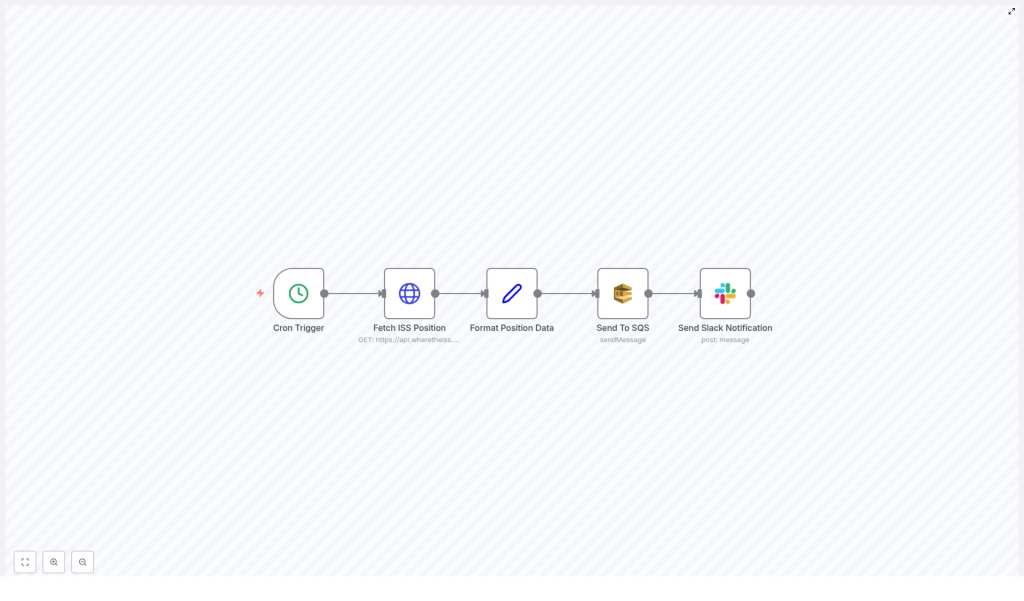
The workflow is built from five key n8n nodes connected in sequence:
- Cron Trigger – kicks off the workflow every minute
- Fetch ISS Position – calls the public ISS position API
- Format Position Data – cleans up and restructures the response
- Send To SQS – pushes the formatted JSON into an AWS SQS queue
- Send Slack Notification – posts a message to a Slack channel
Let us walk through each piece so you know exactly what is happening and where you can tweak it.
Step-by-step breakdown of the n8n ISS workflow
1. Cron Trigger – keeping your data fresh
Everything starts with the Cron Trigger node. It is configured to run every minute, which means:
- You always fetch near real-time ISS position data
- You do not have to think about manually starting the workflow
- Your downstream systems get a steady, predictable stream of messages
If every minute feels too frequent for your use case, you can easily adjust the schedule in the Cron node settings. For example, you might set it to every 5 or 10 minutes if you want fewer updates.
2. Fetch ISS Position – calling the public API
Next up is the node that actually talks to the ISS API. This node sends a request to:
https://api.wheretheiss.at/v1/satellites/25544/positionsThe workflow uses the current timestamp so that each call returns the most recent position of the ISS. The API responds with data that includes things like latitude, longitude, timestamp, and the object name.
In n8n, this is typically done with an HTTP Request node configured to hit that endpoint and pass along the current time. The result is a raw response that we will clean up in the next step.
3. Format Position Data – preparing clean JSON
The API response contains more fields than you might need. To keep things tidy and easy to consume, the workflow uses a Set node to extract just the important bits:
- latitude
- longitude
- timestamp
- name
This node restructures the response into a simplified JSON object. That makes it perfect for queuing, logging, or feeding into other automations. By the time the data leaves this node, it is clean, compact, and ready for AWS SQS or any other service you might want to plug in later.
4. Send To SQS – handing data off to AWS
Once the data is nicely formatted, the workflow sends it to an AWS Simple Queue Service (SQS) queue. This is where the automation becomes really powerful.
By pushing ISS position updates into SQS, you can:
- Trigger downstream processing, like storing records in a database
- Feed analytics pipelines or visualization tools
- Integrate with any microservice that consumes messages from SQS
The node is configured with your AWS SQS credentials and the queue you want to use. From there, every run of the workflow adds a new message to that queue, which your other systems can handle at their own pace.
5. Send Slack Notification – keeping the team in the loop
To round things off, the final node sends a Slack message whenever new ISS data is successfully queued.
This node posts to a designated channel, for example #alerts, and includes details like:
- The ISS name
- The timestamp associated with the position data
That way your team knows the automation is running, data is being sent to SQS, and everything is working as expected. You can also customize the Slack message to include the coordinates if you want to make it more informative or fun.
Why this n8n ISS workflow makes life easier
So what are the real benefits of setting this up instead of doing everything manually?
- Efficiency – No more copy-pasting from API responses or refreshing websites. n8n handles the entire flow from fetching data to sending notifications.
- Integration – You tie together a public API, AWS SQS, and Slack in a single, visual workflow. It is a great pattern you can reuse for other automations.
- Real-time style updates – With a Cron schedule of every minute, your systems and your team get timely ISS position data without any extra effort.
- Scalability – SQS is built for scaling. As you add more consumers or more processing steps, the queue can handle the load without changing this workflow.
In short, you get a lightweight, real-time ISS tracking pipeline that fits neatly into modern, event-driven architectures.
How to start using this ISS automation template in n8n
Ready to try it out in your own n8n instance? Here is the basic setup flow:
- Open your n8n instance and import the workflow template.
- Configure your AWS SQS credentials in n8n and select the queue you want to use.
- Set up your Slack credentials or bot token and choose the channel where alerts should be posted, such as
#alerts. - Review the Cron Trigger schedule and adjust the frequency if needed.
- Activate the workflow and watch the messages start flowing.
From there, you can customize it as much as you like, for example by changing the message format, adding logging, or sending the data to additional services.
Want to tweak or extend the workflow?
If you are curious about more automation ideas, you can build on this template by:
- Storing ISS positions in a database for historical tracking
- Visualizing the ISS path on a map in a dashboard
- Triggering alerts only when the ISS is above a certain region
If you get stuck or want to share what you have built, the n8n community is a great place to ask questions and swap ideas.
Try the ISS position workflow template
Give this workflow a spin in your own setup and see how easy it is to automate ISS position tracking with n8n, AWS SQS, and Slack working together.
Have questions or want to customize the template further? Drop a comment or connect with the n8n community to explore even more automation possibilities.
