


Automate Lead Generation & Enrichment with n8n: A Friendly, End-to-End Guide
Imagine kicking off a whole lead generation pipeline from a quick Telegram message, then coming back later to a neatly scored, enriched, and campaign-ready list of prospects. That is exactly what this n8n workflow template does for you.
If you run B2B outreach, outbound sales, or SDR operations, this template ties together Telegram, Apify (Apollo scraper), Perplexity and other LLMs, Google Sheets, and Smartlead – all orchestrated inside n8n – so you can move from “who should we contact?” to “we are ready to hit send” with minimal manual work.
What this n8n lead gen template actually does
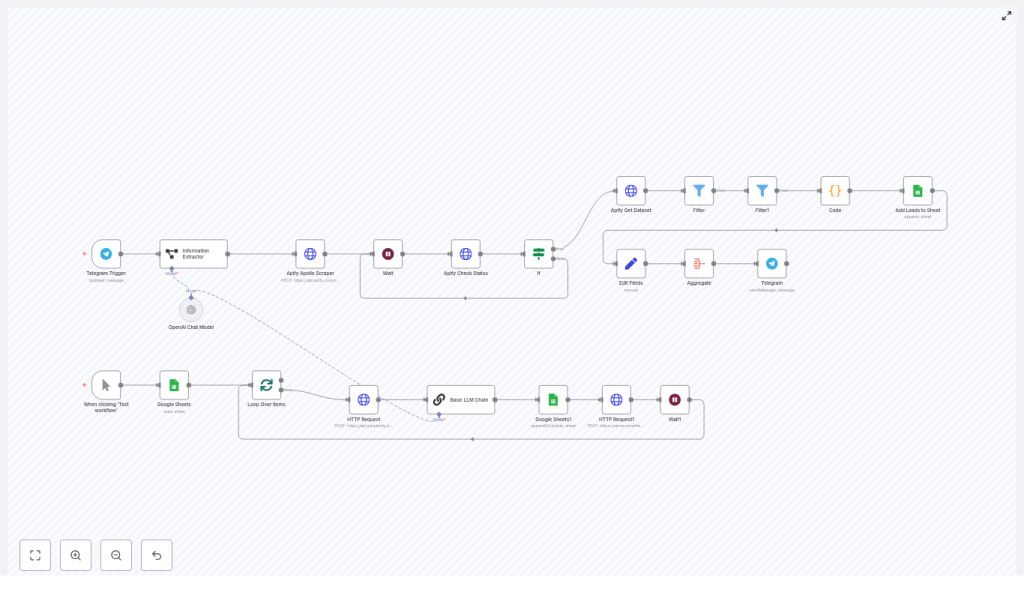
This “Lead Gen and Enrichment” template is an end-to-end automation that:
- Scrapes leads from Apollo (via Apify) based on simple inputs like industry and location.
- Filters and scores those leads so you can focus on the ones that really matter.
- Enriches each contact with quick research and a personalized icebreaker using LLMs.
- Stores everything neatly in Google Sheets for tracking and collaboration.
- Pushes the final list into Smartlead (or a similar tool) so they are ready for a cold outreach sequence.
- Notifies you on Telegram when the job is done, including how many leads were found.
In other words, it turns a casual Telegram message into a fully prepared cold outreach list.
Why bother automating lead generation and enrichment?
Doing all of this by hand gets old fast. Manual prospecting is:
- Slow and repetitive.
- Easy to mess up with copy-paste errors.
- Hard to scale beyond a handful of SDRs and spreadsheets.
With an automated n8n workflow, you can instead:
- Collect large volumes of prospect data quickly, including emails, job titles, and company info.
- Enrich profiles with firmographic data and personalized insights so your outreach does not feel generic.
- Score and prioritize leads so your SDRs spend time on higher-value prospects.
- Push qualified leads consistently into your outreach tool or CRM without manual imports.
If your team is stuck in spreadsheet hell, this template is designed to pull you out of it.
Core building blocks inside the template
Here is a quick tour of the main components the workflow stitches together:
- Telegram Trigger – Starts the workflow when you send a message containing industry and location.
- Information Extractor (LLM node) – Parses that message and pulls out structured values like
company_typeandlocation. - Apify Apollo Scraper – Calls an Apify act that scrapes Apollo (or a similar dataset) for people matching your filters.
- Wait & Apify Check Status – Polls Apify until the scraping run is done, then fetches the dataset.
- Filtering and Lead Scoring (Code node) – Removes entries without emails and assigns a lead score based on seniority, company size, LinkedIn and website presence.
- Google Sheets – Appends the qualified, scored leads to a spreadsheet.
- Perplexity + LLM Chain – Generates short prospect insights and a 200-character icebreaker for personalization.
- Smartlead HTTP Request – Sends the enriched leads and icebreakers into a Smartlead campaign via API.
- Telegram Notification – Sends a summary back to your Telegram chat with the final counts and key details.
Now let’s walk through how it all flows together in practice.
How the n8n workflow runs, step by step
1. Start everything with a Telegram message
You begin inside Telegram. You send a message like:
“Find SaaS companies in Berlin with marketing leaders”
The Telegram Trigger node receives this message and passes the text straight into the next step, the Information Extractor. No forms, no UI, just a quick chat message.
2. Extract structured search parameters with an LLM
The Information Extractor node uses an LLM to turn your free-form text into clean, structured fields. It pulls out three key attributes:
company_type– for example, “SaaS”, “agency”, “ecommerce”.location– URL-encoded so it works nicely with Apify / Apollo filters.Location_Proper– a human-readable version of the location for summaries and logs.
These values are then used to build the request payload for Apify.
3. Launch the Apify Apollo scraper
Next, the Apify Apollo Scraper node kicks off an Apify act. It sends a JSON body to Apify that includes filters such as:
personTitles– for example, “Head of Marketing”, “VP Sales”.location– based on the LLM-extracted and URL-encoded location.- Organization keywords related to your
company_type.
Your Apify API key and act ID are configured in the node credentials, so the workflow can securely launch the scraping task.
4. Wait for the scrape to finish, then pull the dataset
Scraping takes time, so the template uses a small loop to handle this gracefully:
- A Wait node pauses the workflow for a bit.
- An Apify Check Status node checks whether the run has finished successfully.
This repeats until the Apify run status is “succeeded”. Once it is done, the workflow calls Apify Get Dataset to retrieve all the scraped records.
5. Filter, score, and write leads to Google Sheets
Now the raw data comes in and the template starts cleaning it up:
- Entries without emails are filtered out so you are not wasting time on unusable contacts.
- A Code node calculates a Lead Score for each contact. The score can factor in:
- Title seniority.
- Company employee count.
- Presence of a LinkedIn profile.
- Presence of a company website.
- Scores are capped at 100 to keep them consistent and easy to compare.
Once the scoring is done, qualified rows are appended to your Google Sheets spreadsheet. This sheet becomes your central record for all enriched leads and is also used for downstream steps.
6. Enrich leads with personalized insights and icebreakers
After the basic data is stored, the template loops through those rows and upgrades them with personalization:
- Each lead is sent to Perplexity or another LLM to gather quick research and context.
- An LLM Chain node then distills that research into a short, roughly 200-character icebreaker.
This icebreaker is designed to be used directly in your cold outreach, for example as the first line of an email. You get scalable personalization without writing every opener by hand.
7. Push everything into Smartlead for outreach
Once leads are enriched and scored, the workflow is ready to seed your campaign. A Smartlead HTTP Request node:
- POSTs the leads into a Smartlead campaign via API.
- Includes the generated icebreaker as a custom field so your templates can reference it.
From there, Smartlead (or your chosen outbound tool) can enroll those contacts into a cold email sequence with personalization already baked in.
8. Get a friendly summary back in Telegram
To close the loop, a Telegram Notification node sends a message back to the original chat. It typically includes:
- How many leads were scraped and qualified.
- The industry or company type.
- The target location.
You get a quick status update without needing to log into n8n or Apify to check on things.
What you need before using the template
Before you hit “execute workflow”, make sure you have this checklist covered:
- n8n instance – Cloud or self-hosted, with enough runtime allowed for long-running workflows.
- Telegram Bot token and chat ID – So the workflow can receive triggers and send notifications.
- Apify account – With a valid act ID for the Apollo scraper and your API key set in the node credentials.
- LLM credentials – OpenAI or another LLM provider for information extraction, plus Perplexity or your chosen insight API key for enrichment.
- Google Sheets OAuth credentials – To append and update your lead spreadsheet securely.
- Smartlead (or similar) API key – For importing leads into your outbound campaign tool.
Best practices to get the most from this automation
Keep an eye on costs and rate limits
APIs like Apify, Perplexity, and LLM providers can get pricey if you go all-in on huge batches from day one. A safer approach is to:
- Start with smaller batches, for example 100-300 records.
- Gradually increase volume once you are happy with the quality.
- Use exponential backoff and respect API rate limits to avoid throttling or errors.
Focus on quality, not just volume
It is tempting to pull as many leads as possible, but your team will thank you for relevance instead. Some ideas:
- Add stricter filters early, like requiring work emails or specific seniority levels.
- Use lead scoring thresholds to auto-tag or route top-tier leads.
- Experiment with filters until your reply rates and meeting rates look healthy.
Make personalization work for you
The LLM-generated insights and icebreakers are powerful, but they are not magic. To get the best results:
- Manually review a sample of outputs before scaling to large lists.
- A/B test different tones and styles of icebreakers.
- Track reply rates and iterate on the prompts feeding your LLM nodes.
Stay on top of deduplication and data hygiene
Nothing kills a campaign faster than sending multiple emails to the same person. To avoid that:
- Deduplicate by email before adding rows to Google Sheets or pushing into Smartlead.
- Consider using hashes or a shared blocklist across campaigns.
- Regularly clean outdated or bounced contacts from your sheet and tools.
Common issues and how to fix them
- No dataset returned from Apify
Check the Apify run logs, verify theactId, and make sure your search parameters are valid and correctly URL-encoded. - Too many empty emails
Adjust your Apify configuration to prioritize work or personal emails, and refine thepersonTitlesfilter to target roles more likely to have contact data. - 401 / unauthorized errors
Re-check API keys and token scopes for Apify, Google, Perplexity, Smartlead, and any LLM provider you are using. Expired or incorrect credentials are usually the culprit. - Workflow timeouts in n8n
Use the Wait + Check Status pattern (already built into the template), increase your n8n workflow timeout if needed, or break the process into smaller chained workflows.
Security and compliance considerations
Since this workflow handles personal contact data, it is important to stay compliant:
- Follow relevant regulations like GDPR and CCPA in your region.
- Store API keys and tokens securely using n8n credentials, not in plain text.
- Avoid logging sensitive data fields in n8n where possible.
- Provide an opt-out mechanism and honor unsubscribe or suppression lists in your outreach tool.
Ideas for extending and customizing the template
The template is meant to be a strong starting point, not a rigid system. You can easily adapt it to your stack:
- Swap the data source – Replace the Apify Apollo Scraper with LinkedIn Sales Navigator, ZoomInfo, Clearbit, or another provider by modifying the HTTP request nodes.
- Change the outbound tool – Instead of Smartlead, connect HubSpot, Outreach, Lemlist, or your CRM by updating the API endpoint and request body.
- Add deeper enrichment – Pull in technographics, funding rounds, or recent news via extra API calls to further refine your lead scoring.
- Use different triggers – Start the workflow from a web form, Zapier, Notion, or other tools instead of Telegram if that fits your process better.
Sample lead scoring logic and how to improve it
Inside the JavaScript Code node, the template uses a straightforward scoring approach. It is a great baseline, but you can enhance it by including factors like:
- Industry fit and how closely it matches your ICP.
- Recent funding or company growth signals.
- Engagement signals such as LinkedIn activity or content sharing.
- Manual override flags from SDRs for hot or disqualified leads.
Over time, you can tune the weights in that scoring logic to better reflect what a “high-intent” lead looks like for your team.
Putting it all together
This n8n template gives you a complete, practical pipeline for B2B lead generation, enrichment, scoring, and campaign seeding. It cuts down manual work, keeps your data organized, and lets you scale personalization without burning out your team.
Want to try it in your own environment?
- Import the template into your n8n instance.
- Plug in your API keys and credentials.
- Run a small test batch to validate lead quality, scoring, and personalization.
If you would like help tailoring the workflow to your stack, adding deduplication logic, or syncing to your CRM, you can always book a quick implementation session and get hands-on guidance.
Spin up this template in n8n today and unlock scalable, personalized B2B outreach with far less manual effort.
