


Automate Monthly Event Newsletters with n8n
Overview: From Manual Compilation to Fully Automated Event Newsletters
Compiling a monthly event newsletter looks straightforward until you break down the actual work involved. Every cycle you often need to:
- Open the same event website for a specific location
- Navigate through multiple paginated listings
- Manually copy dates, artists, venues, and links
- Rebuild a readable email layout from scratch
For anyone managing a recurring newsletter, this quickly becomes repetitive and error prone.
The n8n workflow template described here eliminates that manual overhead. Once configured, it runs on a monthly schedule, scrapes an events site for a chosen location, consolidates all event data, generates a structured HTML email, and delivers it via Gmail. You configure it once and let n8n handle the operational routine.
Primary Use Cases for This n8n Workflow
This automation template is particularly valuable if you:
- Operate a community, venue, or fan newsletter that regularly promotes upcoming events
- Track events in a specific city, region, or venue and want a consistent monthly summary
- Spend time every month collecting and formatting event data manually
- Need a reusable foundation that you can adapt to different event sources or email layouts
In short, it is designed for anyone who wants predictable, high quality event roundups without recurring manual work.
What the n8n Event Newsletter Template Automates
At a high level, this n8n workflow:
- Runs on a configurable monthly schedule
- Scrapes an events website based on a specified location URL
- Handles pagination across multiple event pages
- Extracts structured data such as date, main artist, support acts, location, and event link
- Generates a HTML email with a clean, tabular layout of all events
- Sends the compiled newsletter via Gmail to a defined recipient
Once active, the workflow runs autonomously each month and delivers a complete, up to date event overview.
Architecture and Key Components of the Workflow
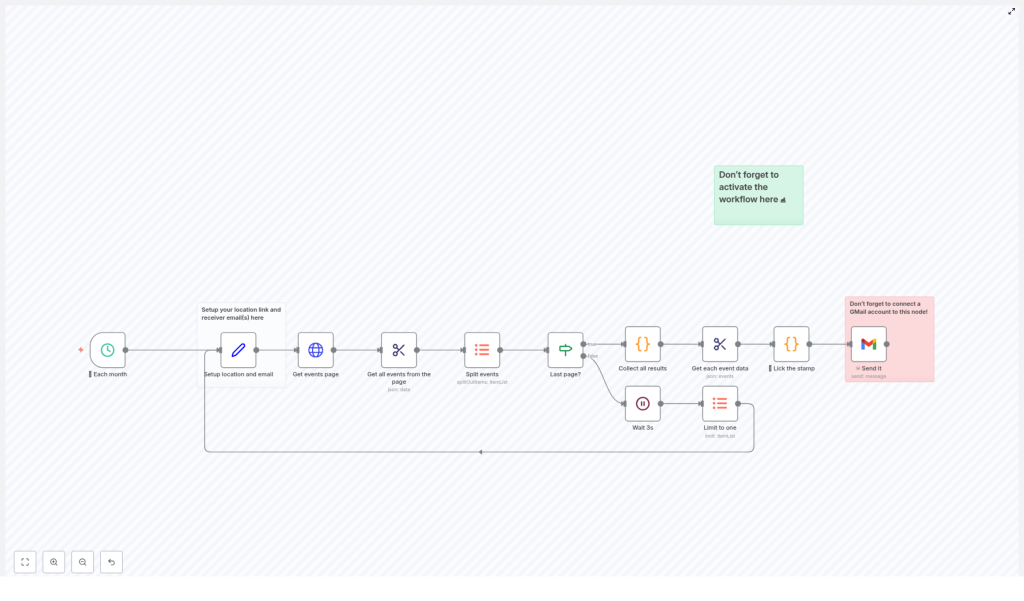
The workflow is built around a clear sequence of nodes that handle scheduling, configuration, scraping, transformation, and email delivery. Below is a breakdown of the main components and how they interact.
1. Monthly Schedule Trigger
The automation begins with a schedule-based trigger configured to run once per month. This replaces the need for manual reminders or calendar tasks. When the trigger fires, n8n initiates the entire pipeline to collect and distribute the latest event data.
2. Configuration: Location URL and Recipient
Early in the workflow, a configuration step defines two critical parameters:
- Location URL – the base URL of the events page to scrape for your chosen city, region, or venue
- Recipient email address – the inbox that should receive the generated newsletter
This separation of configuration from logic follows automation best practices. It allows you to repoint the workflow to a different event source or update recipients without modifying the core scraping or email logic.
3. Paginated Fetch of Event Pages
Most event platforms display results across multiple pages rather than a single long listing. The workflow accounts for this by implementing pagination logic:
- Starts from the initial page of events for the configured location
- Requests the current page and inspects the number of events returned
- Tracks the page index and proceeds to the next page when necessary
The automation continues requesting subsequent pages until it detects that it has reached the end of the listing. It uses a simple rule to determine the final page: when a page returns fewer than 50 events, the workflow assumes there are no further pages to load.
4. Intelligent Pagination Control and Rate Limiting
To avoid overloading the target site and to ensure that no events are skipped, the workflow applies a basic but effective control strategy:
- If a page returns exactly 50 events, the workflow assumes additional pages are available
- Before requesting the next page, it waits approximately 3 seconds
This short delay serves as a simple rate limiting mechanism. It helps maintain stability, reduces the likelihood of throttling, and keeps the scraping behavior respectful toward the source system.
5. Parsing and Structuring Event Data
Once a page is retrieved, the workflow parses the HTML response and identifies individual event entries. For each event, it extracts a consistent set of attributes, including:
- Date of the event
- Main artist
- Supporting act where available
- Location or venue
- Event link so readers can access detailed information
This transformation step converts raw HTML into structured, machine readable data. That structured data is then ready to be aggregated and formatted for email distribution.
6. Consolidation of Events Across All Pages
After iterating through all relevant pages, the workflow merges the individual page results into a single consolidated dataset. Instead of handling fragmented lists per page, you end up with one unified collection of events for the entire period.
This consolidated list is used as the single source of truth for generating the HTML newsletter and for calculating the total number of events for the subject line.
7. HTML Email Generation with Custom JavaScript
With the final event list ready, the workflow moves into presentation. Using custom JavaScript within n8n, it programmatically builds a HTML table that displays each event in a clear and scannable format. Typical columns include:
- Date
- Main artist
- Support acts if present
- Location
This table based layout is chosen for compatibility with common email clients and for readability. Recipients can quickly review the list, compare dates, and identify the events that are most relevant to them.
8. Email Delivery via Gmail Integration
The final step is handled by n8n’s Gmail integration. The workflow:
- Injects the generated HTML table into the email body
- Builds a subject line that includes the total count of events found for that month
- Sends the message to the configured recipient using your authenticated Gmail account
From the recipient’s perspective, this looks like a standard, well formatted newsletter. From your perspective, it is a fully automated output that requires no monthly intervention once configured.
Configuration and Setup Considerations
Before activating the workflow in production, ensure the following configuration steps are completed.
Connect Gmail to the Email Node
The workflow relies on Gmail for outbound email. In your n8n instance:
- Authenticate a Gmail account that will be used as the sender
- Associate that credential with the email node in the workflow
Without this integration, the final email delivery step will not execute.
Update the Events Location URL
In the configuration node, replace the placeholder location URL with the actual events listing you want to monitor. This can be a city level page, a venue specific calendar, or any compatible event index that follows the expected structure.
Set the Recipient Email Address
Specify the email address that should receive the monthly newsletter. This might be:
- Your personal inbox, for monitoring or curation
- A shared team address for internal visibility
- A mailing list that distributes the newsletter to a broader audience
Activate the Workflow
After validating your configuration, activate the workflow in n8n. If the workflow is not active, the monthly trigger will not fire and no emails will be sent. For testing purposes, you may temporarily adjust the schedule to run more frequently, then revert to a monthly cadence once validated.
Operational Benefits and Automation Best Practices
Implementing this n8n event newsletter workflow delivers several tangible advantages.
Consistent Time Savings
All recurring low value tasks such as copying event details, reformatting content, and building emails are handled automatically. Your time can be redirected to higher impact work like content strategy, audience growth, or partnership development.
Reliable and Predictable Communication
Because the workflow is schedule driven, your audience receives updates on a consistent cadence, regardless of your personal workload. This improves reliability and helps maintain engagement with your community or customer base.
Flexible Customization
The template is designed as a starting point. You can:
- Adapt the scraping logic to different event sources
- Extend the HTML template with branding, additional columns, or calls to action
- Integrate further downstream actions, such as logging events to a database or CRM
- Change recipients or add conditional routing without redesigning the core workflow
Getting Started with the n8n Event Newsletter Template
If you have been postponing regular event updates because of the manual effort involved, this template provides a practical way to automate the entire process.
To implement it:
- Load the template into your n8n environment
- Configure the location URL and recipient email address
- Connect your Gmail account to the email node
- Activate the workflow on a monthly schedule
Once these steps are complete, your monthly event newsletter will run on autopilot, delivering structured and current event information with minimal ongoing maintenance.
If you find this approach useful, consider sharing it with colleagues or other automation professionals who manage event communications, and explore additional n8n templates to further streamline your operations.
