


Automate Monthly ProfitWell Reports to Mattermost with n8n
Imagine starting each month with your key SaaS metrics already waiting in your team’s Mattermost channel. No manual exports, no screenshots, no “Hey, do we have the latest MRR numbers?” messages.
That is exactly what this n8n workflow template does for you. It pulls core financial metrics from ProfitWell and automatically posts a nicely formatted report to Mattermost on a schedule you choose. In this guide, we will walk through how it works, when to use it, and how to set it up step by step.
What this n8n workflow actually does
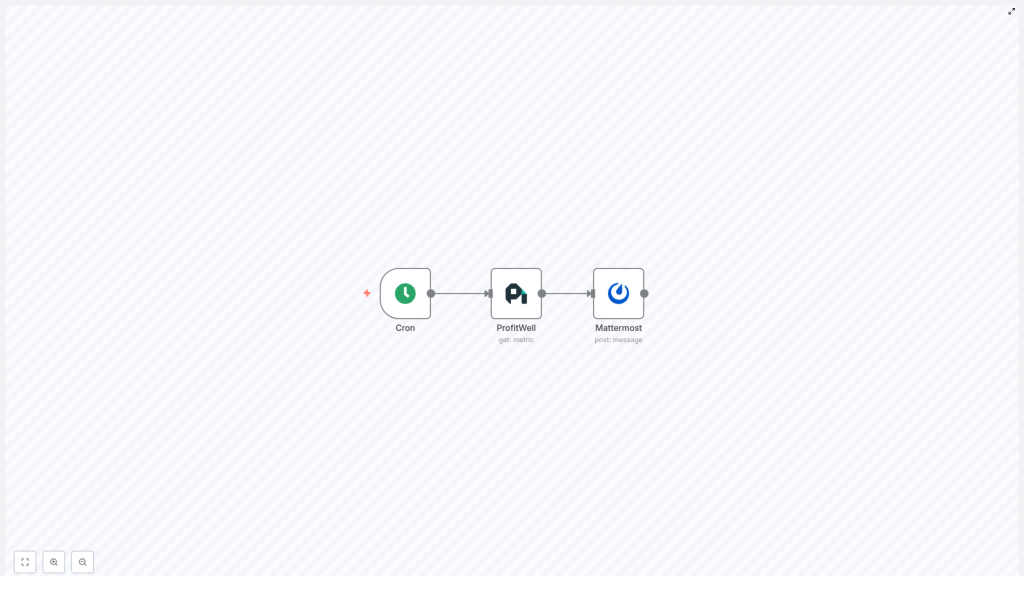
At its core, this workflow is a simple but powerful three-step automation:
- Cron node – decides when the workflow runs, for example once a month at 09:00.
- ProfitWell node – grabs your key SaaS financial metrics from ProfitWell.
- Mattermost node – posts those metrics into a Mattermost channel in a clean, readable format.
Once it is set up, you can basically forget about it. Every month your team gets a fresh snapshot of how the business is doing, right where you already talk about work.
Why automate ProfitWell reports to Mattermost?
If you are still pulling ProfitWell reports manually, you know the drill: log in, grab the numbers, format them, paste into Mattermost, hope you did not miss anything. It works, but it is slow and easy to mess up.
Automating this with n8n solves a lot of those headaches:
- Consistent monthly updates – reports arrive on time, every time, without anyone having to remember.
- Instant visibility for the whole team – active customers, MRR, churn, and growth are shared in a channel everyone can see.
- Flexible formatting and timing – you can tweak the message style and schedule as your needs change.
- Reliable, auditable automation – everything runs on a schedule, so you know exactly when and how data is posted.
In short, you spend less time “doing reporting” and more time actually reacting to the numbers.
What you need before you start
Before you import or build the template, make sure you have a few basics ready:
- An n8n instance (n8n Cloud or self-hosted).
- Your ProfitWell API key / credentials.
- A Mattermost account and:
- either a channel with an incoming webhook token
- or a bot account with API credentials
- Basic familiarity with n8n nodes and expressions so you can adjust message templates if needed.
When this workflow is a great fit
This template is especially handy if:
- Leadership or product teams want a quick monthly health check in Mattermost.
- You keep forgetting to share updated metrics or want to reduce manual work.
- You are already using ProfitWell as your source of truth for SaaS metrics.
- You want a simple starting point that you can later expand with alerts, charts, or extra logic.
If that sounds like you, let us walk through how to set it up.
Step-by-step: building the workflow in n8n
1. Schedule the workflow with a Cron node
First, add a Cron node. This is what controls when the report is sent.
In the template, the Cron node is configured to run monthly at 09:00. You can keep that or adjust it to match your reporting rhythm.
Key settings:
- Mode: Every Month
- Hour: 9 (or your preferred time)
- Timezone: set this to your team’s primary timezone so the report lands when people are actually online.
2. Pull your metrics with the ProfitWell node
Next, add the ProfitWell node and connect it after the Cron node. This is where n8n calls the ProfitWell API and fetches the numbers you care about.
In the node settings:
- Set the type to
monthlyso you get monthly metrics. - Configure any other metric options as needed.
- Under Credentials, select or create your
profitWellApicredentials using your ProfitWell API key.
Common metrics that teams usually pull include:
active_customersactive_trialing_customersnew_customersgrowth_raterecurring_revenue(often used as MRR/ARR)
If you ever need more data than a single call returns, you have two options:
- Call ProfitWell multiple times with different options.
- Use an API endpoint that returns a bundle of metrics in one response, if available.
Before moving on, it is worth running this node once manually so you can see the exact JSON output and confirm the field names.
3. Post the report with the Mattermost node
Finally, add the Mattermost node and connect it after the ProfitWell node. This is where you turn the raw metrics into a readable message.
In the Mattermost node:
- Set the operation to Post Message.
- Add your Mattermost API credentials (bot token or webhook).
- Set
channelIdto the ID of the channel where you want the report posted.
Now comes the fun part: building the message body using n8n expressions to pull values from the ProfitWell node output. Here is a sample message template you can use or adapt:
=**Monthly Financial Metrics**

- Active Customers: {{$node["ProfitWell"].json["active_customers"]}}
- Active Trialing: {{$node["ProfitWell"].json["active_trialing_customers"]}}
- New Customers: {{$node["ProfitWell"].json["new_customers"]}}
- Growth Rate: {{$node["ProfitWell"].json["growth_rate"]}}%
- Recurring Revenue (MRR): ${{$node["ProfitWell"].json["recurring_revenue"]}}

_Date: {{$now.toLocaleString()}}_
Mattermost supports Markdown, so you can:
- Use bold headings.
- Format lists for better readability.
- Add quotes, links, and other styling elements.
Feel free to tweak the wording so it matches your company’s tone. The key is to keep the expressions that pull values from the ProfitWell node.
Workflow JSON template (for quick import)
If you prefer to start from a ready-made structure, here is the JSON skeleton of the n8n workflow. You can import this into n8n and then just plug in your own credentials and channel ID.
{  "nodes": [  {  "name": "Cron",  "type": "n8n-nodes-base.cron",  "parameters": {  "triggerTimes": {  "item": [  {  "hour": 9,  "mode": "everyMonth"  }  ]  }  }  },  {  "name": "ProfitWell",  "type": "n8n-nodes-base.profitWell",  "parameters": {  "type": "monthly",  "options": {}  },  "credentials": {  "profitWellApi": "profitwell"  }  },  {  "name": "Mattermost",  "type": "n8n-nodes-base.mattermost",  "parameters": {  "message": "=Active Customers: {{$node[\"ProfitWell\"].json[\"active_customers\"]}}\nTrailing Customers: {{$node[\"ProfitWell\"].json[\"active_trialing_customers\"]}}\nNew Customers: {{$node[\"ProfitWell\"].json[\"new_customers\"]}}\nGrowth Rate: {{$node[\"ProfitWell\"].json[\"growth_rate\"]}}\nRecurring Revenue: {{$node[\"ProfitWell\"].json[\"recurring_revenue\"]}}",  "channelId": "YOUR_CHANNEL_ID"  },  "credentials": {  "mattermostApi": "mattermost"  }  }  ],  "connections": {  "Cron": {  "main": [  [  {  "node": "ProfitWell"  }  ]  ]  },  "ProfitWell": {  "main": [  [  {  "node": "Mattermost"  }  ]  ]  }  }
}
Once imported, just replace YOUR_CHANNEL_ID and select the right credentials in each node.
Make your reports more readable and engaging
You are not limited to plain text. If you want your Mattermost reports to pop a bit more, you can enhance them with formatting and attachments.
Ideas for richer formatting
- Use simple emoji indicators to show trends, for example 🔺 for growth and 🔻 for decline.
- Attach a chart image generated from a chart API and include the image URL in the message.
- Add a link back to the ProfitWell dashboard so people can dive deeper into the data.
These small touches can make your monthly report feel less like a data dump and more like a quick, visual summary.
Testing the workflow safely
Before you unleash this on your main channel, it is worth doing a quick round of testing.
- Test the ProfitWell node alone
Run it manually and inspect the JSON output. Confirm that fields likerecurring_revenueandgrowth_rateare present and named exactly as your expressions expect. - Temporarily speed up the Cron schedule
Change the Cron node to run every minute so you can quickly test end-to-end. Once you are happy, switch it back to a monthly schedule. - Use a private test channel
Point the Mattermost node at a private or test channel so you can experiment with formatting without spamming your main workspace.
Keeping it reliable: error handling tips
Automations are great until something fails silently. To avoid that, you can add a bit of resilience to this workflow.
- Validate responses with an IF node
For example, check thatrecurring_revenueexists before posting. If it does not, you can skip the post or trigger an alert. - Use retry logic
Configure n8n’s built-in retry settings or add a retry pattern for transient API failures. - Log results
Optionally, send a copy of the metrics to Google Sheets or a database so you have a simple history of what was posted. - Add an Error Trigger workflow
Use n8n’s Error Trigger to notify admins (for example, via email or another Mattermost channel) if this workflow fails.
Security best practices for ProfitWell and Mattermost
Since you are working with API keys and financial metrics, it is worth locking things down a bit.
- Store API keys in n8n credentials, never in plain text fields inside nodes.
- Use a dedicated Mattermost bot with only the permissions it needs to post messages.
- Rotate API keys regularly and, if you are self-hosting n8n, use environment variables for secrets.
Common issues and how to fix them quickly
Run into a problem? Here are a few common ones and what to check.
- 401 / authentication errors
Double-check your ProfitWell and Mattermost credentials. Make sure tokens are valid and have not expired. - Blank or “undefined” values in the message
Inspect the JSON output of the ProfitWell node and confirm that your expressions match the actual property names. - Rate limiting
If you add more ProfitWell-based workflows, stagger their schedules and consider caching results where it makes sense.
Want to go further? Advanced ideas
Once you have the basic monthly report running, you can build on it quite a bit.
- Add weekly summaries for more frequent, lightweight updates alongside the deeper monthly report.
- Customize by audience:
- High-level KPIs for an executive channel.
- More detailed metrics for product or growth teams.
- Trigger follow-up workflows when certain thresholds are hit, for example:
- Negative growth rate triggers an alert.
- MRR crossing a target milestone posts a celebration message.
Example of a polished final message
Here is another example of how your final Mattermost message might look once everything is wired up.
=**Monthly Financial Metrics - {{ $now.toLocaleDateString() }}**

- Active Customers: {{$node["ProfitWell"].json["active_customers"]}}
- Active Trialing: {{$node["ProfitWell"].json["active_trialing_customers"]}}
- New Customers: {{$node["ProfitWell"].json["new_customers"]}}
- Growth Rate: {{$node["ProfitWell"].json["growth_rate"]}}%
- Monthly Recurring Revenue: ${{$node["ProfitWell"].json["recurring_revenue"]}}

> View the full dashboard: https://app.profitwell.com
You can use this as a starting point and then adjust the text, add emojis, or rearrange the metrics to match what your team cares about most.
Wrapping up: from manual reports to hands-off automation
Automating ProfitWell reports to Mattermost with n8n is one of those small automations that quietly saves time every single month. You set it up once, and it keeps your team aligned on core financial metrics without any extra effort.
The basic recipe is simple:
- Cron node to schedule the workflow.
- ProfitWell node to fetch your monthly metrics.
- Mattermost node to share the results with your team.
From there, you can iterate: refine the formatting, add alerts, log data, or branch into different channels.
Ready to try it? Import the template into your n8n instance, plug in your ProfitWell and Mattermost credentials, and run the ProfitWell node manually to confirm the data mapping. Then trigger the full workflow once and check your test channel.
If you want a customized version with different metrics, charts, or multi-channel routing, feel free to adapt this template or build on top of it as your automation hub grows.

Setting this up for automated reporting is a huge time-saver. I also think it’s worth pointing out that this process could really help teams scale faster by eliminating bottlenecks in manual reporting.