


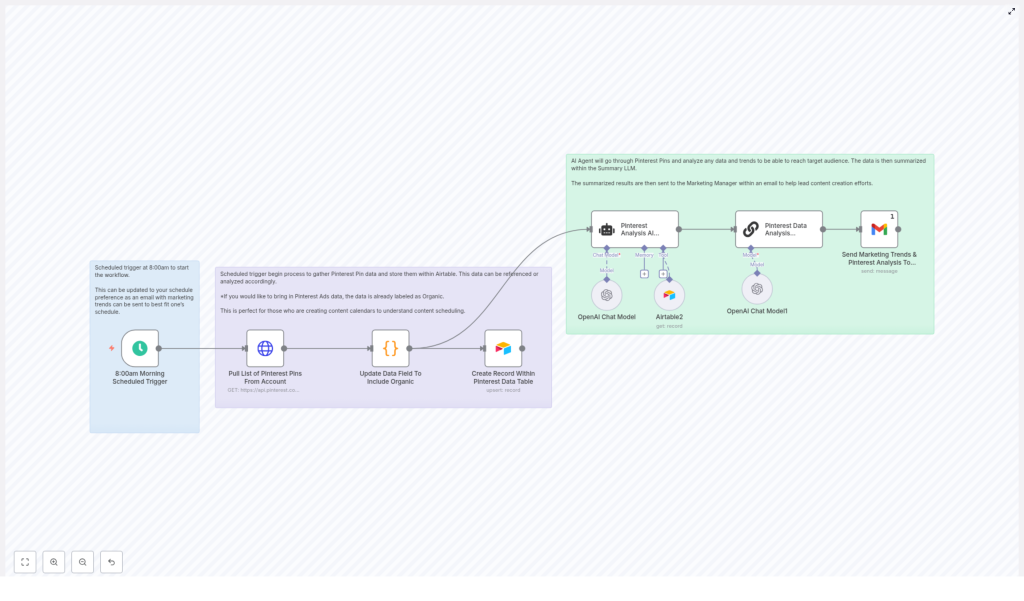
Automate Pinterest Analysis & AI-Powered Content Suggestions
Use the Pinterest API, n8n automation, Airtable storage, and an LLM to turn pin performance into actionable content ideas.
Why automate Pinterest analytics?
Manual tracking of Pinterest pins is slow and error-prone. Automating data collection and analysis with the Pinterest API and an AI agent saves time, uncovers trends faster, and provides targeted, AI-powered content suggestions that help your marketing team plan better-performing pins.
Overview of the workflow
The proven automation pattern covered in this post uses these components:
- Pinterest API: to pull a list of pins and metadata
- n8n: to schedule, orchestrate requests, transform data, and call AI models
- Airtable: to store structured pin records for historical analysis
- OpenAI (LLM): to analyze trends and output short, actionable pin ideas
- Email: to deliver summaries to your marketing manager automatically
Step-by-step: build the automation
1. Schedule the trigger
Start with a schedule trigger (for example, weekly at 8:00 AM). This keeps data fresh in Airtable and ensures your AI agent has up-to-date pins to analyze.
2. Pull pins using the Pinterest API
Use an HTTP GET request to the Pinterest API endpoint /v5/pins. Include an Authorization header (Bearer <token>). Handle pagination and rate limits — request only the fields you need to reduce payload size.
3. Normalize and tag the data
Transform the API response into a simplified record for Airtable. The template uses a small JavaScript node to map each pin into: id, created_at, title, description, link and a type field with the value “Organic”.
// Example transformation used in the workflow
const outputItems = [];
for (const item of $input.all()) {
  if (item.json.items && Array.isArray(item.json.items)) {
    for (const subItem of item.json.items) {
      outputItems.push({
        id: subItem.id || null,
        created_at: subItem.created_at || null,
        title: subItem.title || null,
        description: subItem.description || null,
        link: subItem.link || null,
        type: "Organic"
      });
    }
  }
}
return outputItems;
4. Upsert to Airtable
Upsert records by pin_id so duplicate pins aren’t created each run. Airtable becomes your single source of truth for historic performance and metadata.
5. AI analysis and content suggestions
Wire an AI agent to read the Airtable records. Provide a clear prompt asking the agent to:
- Identify trends (topics, descriptions, posting cadence)
- Recommend new pin ideas aimed at target audiences
- Return concise suggestions that your creative team can act on
6. Summarize and notify
Use a summarization LLM node to compress the AI agent output into a short email-ready summary and send it to your marketing manager. Include suggested titles, short descriptions, and recommended publishing times.
Key prompts and example output
Give the AI agent clear constraints and format instructions. Example prompt:
You are a data analysis expert. Analyze the latest pins table and provide 6 concise pin ideas (title, short caption, target audience, suggested image style).
Output: JSON list of ideas with 4 fields each.
Example AI output (shortened):
- Title: “5-Minute Morning Routine” — Caption: “Boost energy with a simple routine” — Audience: Busy parents — Image style: Flat-lay with step numbers
- Title: “Cozy Fall Outfit Ideas” — Caption: “Layer up in style” — Audience: Fashion lovers — Image style: Lifestyle candid photos
Best practices and tips
Authentication & rate limits
Use a secure server-side token for the Pinterest API. Respect Pinterest rate limits — implement exponential backoff, caching, and incremental syncs.
Data to track
Store metrics that help the AI find signals:
- Impressions, saves, clicks, and closeups
- Board and topic/category tags
- Creative attributes (text overlay, image style, aspect ratio)
- Posting time and day
Quality and bias control
Use guardrails: ask the LLM for multiple suggestions and a confidence score. Human-review the top ideas before publishing to avoid off-brand content.
Monitoring and alerts
Add logging and error notifications into the workflow. If the Pinterest API changes structure or your token expires, a monitored alert helps fix issues fast.
Scaling the system
As your account grows:
- Switch from weekly to daily updates for fast-moving accounts
- Archive older records into a data warehouse for long-term trend analysis
- Enrich data with Google Analytics or Ads performance to connect pins to conversions
Security and privacy
Never store long-lived API secrets in public repos. Use environment variables or n8n credentials. When emailing summaries, avoid including sensitive user data or personal identifiers.
Checklist before go-live
- Verify API access and permissions for the Pinterest account
- Test pagination and rate limit handling
- Confirm Airtable upsert keys and schema match your mapping
- Validate AI prompt and run a dry test with sample records
- Configure monitoring, retries, and email notifications
Wrap-up
Automating Pinterest analytics with n8n, Airtable, and an LLM transforms raw pin data into practical content ideas your team can execute quickly. This workflow reduces manual work, uncovers repeatable trends, and feeds creative calendars with higher-confidence concepts.
Ready to get started? Build this workflow in your n8n instance, connect your Pinterest account and Airtable base, then tune the prompts to your brand voice. If you’d like a starter template or a walkthrough, contact our team and we’ll help you deploy it.
Request a free setup call — or try the template yourself and iterate.
