


Automate Pinterest Analysis & AI-Powered Content Suggestions
Introduction
Scaling a high-performing Pinterest program requires more than visually appealing pins. To consistently drive results, teams need reliable performance data, automated collection pipelines, and structured, AI-assisted content ideation. This article outlines a production-ready n8n workflow template that automates Pinterest data collection, centralizes it in Airtable, and leverages OpenAI to generate targeted pin concepts that feed directly into your content planning process.
The workflow combines the Pinterest API, n8n as the orchestration layer, Airtable as a lightweight analytics and storage hub, and an OpenAI-powered agent for trend analysis and content suggestions. The result is a repeatable system that delivers a concise, weekly Pinterest insights report to your marketing leads.
Why Automate Pinterest Analysis?
Manual Pinterest reporting quickly becomes unsustainable as accounts grow. Copying data into spreadsheets, updating dashboards, and manually brainstorming new pin ideas introduces delays and errors. An automated workflow addresses these challenges by providing:
- Consistent, scheduled data collection directly from the Pinterest API
- Centralized storage in Airtable for filtering, enrichment, and analysis
- AI-driven insights that translate performance data into audience-relevant content ideas
- Faster decision-making for content calendars, campaigns, and creative direction
For automation professionals, this template illustrates how to combine n8n, third-party APIs, and LLMs into a cohesive analytics and ideation pipeline that runs on a fixed schedule with minimal maintenance.
Solution Architecture Overview
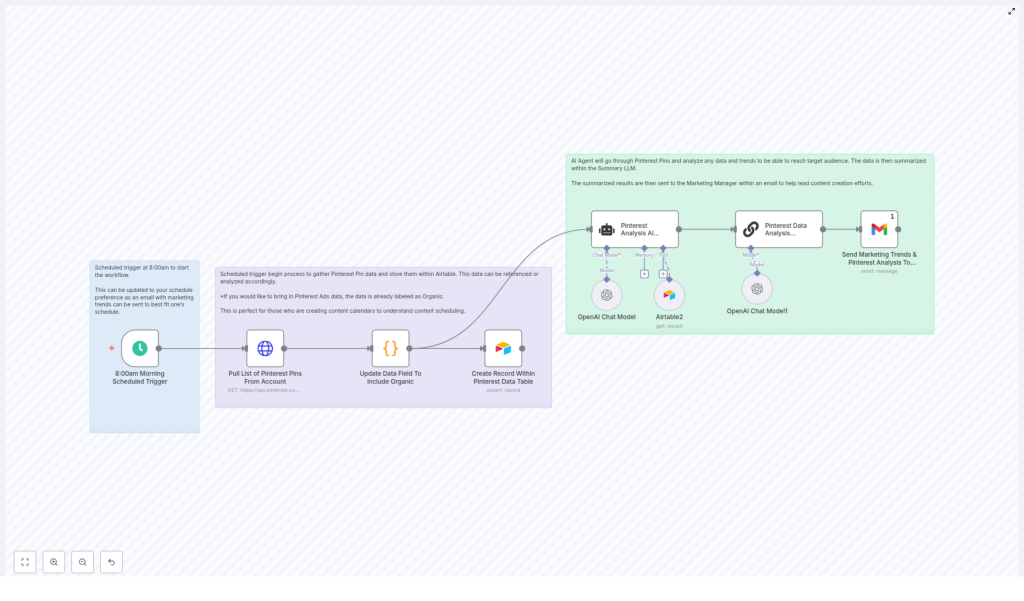
The n8n workflow is organized around a simple yet extensible architecture:
- n8n orchestrates the entire workflow, handles scheduling, and manages credentials.
- Pinterest API (HTTP Request node) retrieves a list of pins and associated metadata.
- Airtable stores normalized pin data and serves as the source of truth for analysis.
- OpenAI (LLM) acts as an AI analysis agent that detects trends and proposes new pin ideas.
- Email (Gmail) distributes the final summary and recommendations to stakeholders.
The core loop consists of: scheduled trigger → Pinterest data extraction → normalization and tagging → Airtable upsert → AI analysis → email delivery.
Workflow Implementation in n8n
1. Configure the Scheduled Trigger
Begin by setting up a Schedule Trigger node in n8n. Define the cadence that aligns with your planning cycles. Many teams prefer a weekly digest, for example every Monday at 08:00, so that marketing and content teams receive fresh insights before their planning meetings.
The schedule node will be the single entry point for the workflow and controls when the Pinterest data collection and AI analysis are executed.
2. Integrate with the Pinterest API
Next, use an HTTP Request node to connect to the Pinterest API. The workflow relies on the GET /v5/pins endpoint to retrieve pin data.
Key configuration details:
- Method: GET
- URL:
https://api.pinterest.com/v5/pins - Authentication: Pinterest access token included as a Bearer token
Set the Authorization header in the HTTP node:
Authorization: Bearer <YOUR_PINTEREST_ACCESS_TOKEN>Ensure that the access token is stored securely using n8n credentials or environment variables. Avoid hard-coding tokens in the workflow JSON or any shared repository.
The response from Pinterest will be in JSON format. Configure the node to return JSON so that subsequent nodes can parse fields such as id, title, description, link, and created_at.
3. Normalize and Enrich Pin Data
Raw API responses are rarely suitable for direct storage or analysis. Insert a transformation step using either a Function or Set node to standardize the structure of each pin object.
Typical normalization actions include:
- Mapping Pinterest fields to consistent internal keys (for example:
pin_id,title,description,link,created_at). - Adding a Type field with a value such as Organic to differentiate these records from future ad data.
- Ensuring dates are in a consistent format for downstream analysis.
This standardized schema simplifies Airtable mapping and enables future extensions, such as merging organic and paid performance data.
4. Persist Pins in Airtable
With normalized data prepared, connect an Airtable node to store or update records in a table, for example Pinterest_Organic_Data.
Key configuration steps:
- Select your Airtable base and table.
- Map n8n fields to Airtable columns such as:
pin_idtitledescriptionlinkcreated_attype
- Use an upsert strategy, matching on
pin_id, to prevent duplicates and keep the workflow idempotent.
Design your Airtable schema with future enrichment in mind. Reserve columns for performance metrics, engagement data, or campaign tags that you may want to add later from Pinterest Ads or analytics platforms.
5. Execute the AI Analysis Agent
Once the latest pin data is stored, the workflow hands off analysis to an AI agent powered by OpenAI. Typically, this involves:
- Reading the most recent records from Airtable (for example, pins created or updated within the last week).
- Passing those records into an OpenAI node configured as a text completion or chat-based LLM call.
The AI agent is instructed to perform two primary tasks:
- Identify trends and audience signals such as high-performing topics, formats, or calls-to-action.
- Generate concise pin suggestions that the creative team can directly convert into new assets.
An example prompt structure might look like this:
You are a data analysis expert. Review the recent Pinterest pin records provided.
1) Summarize key performance trends and audience behavior.
2) Propose 6 new pin ideas. For each idea, include:
- Title
- 1-line description
- Target audience
- Suggested visual style.

Focus on concise, actionable recommendations.
Keep the prompt focused and specify a clear output format so that downstream nodes can parse the AI response reliably.
6. Summarize Insights and Distribute via Email
After the OpenAI node returns its analysis, the workflow prepares a digest suitable for stakeholders. Depending on your needs, you can either:
- Use a Function or Set node to format the AI output into a structured text or HTML summary.
- Optionally apply an additional summarization step if the response is long, to ensure the email remains concise.
Finally, connect a Gmail (or generic Email) node to send the report to relevant recipients, such as the marketing manager or content lead. The email typically includes:
- A brief overview of key trends.
- The list of AI-generated pin ideas.
- Any notable anomalies or recommendations for testing.
Once configured, the entire cycle runs automatically at the schedule defined in the trigger node.
Designing the AI Agent Output
To maximize the usefulness of the AI-generated suggestions, define a clear, structured output that maps directly to your creative workflow. Each suggested pin should include:
- Proposed title for the pin.
- One-line description or caption that can be refined by copywriters.
- Reasoning for why the idea will resonate with the target audience, grounded in recent performance data.
- Recommended visual style or hook such as:
- Short carousel
- Step-by-step infographic
- Before/after comparison
- Static image with text overlay
Example short-form output:
1) Title: "5-Minute Morning Routine for Busy Parents"
Description: Quick visual checklist for stress-free mornings.
Audience: Parents aged 25-40.
Why: Morning routine content generated high saves and clicks last month.
Visual: 5-slide carousel with bold numbers and lifestyle photography.

2) Title: "Before & After: Tiny Kitchen Makeover"
Description: Compact transformation story highlighting small-space upgrades.
Audience: Renters and home decor enthusiasts.
Why: Transformation pins show strong engagement and share rates.
Visual: Split-screen before/after image with clear overlay text.

... (4 additional suggestions)
By constraining the format, you make it easier to parse, store, or even push these ideas into other systems such as project management tools or design pipelines.
Best Practices for a Robust Automation
- Credential management: Use n8n credentials and environment variables for Pinterest, Airtable, OpenAI, and email integrations. Avoid plain-text tokens in workflow exports.
- API rate limits: Respect Pinterest API limits. Implement pagination or incremental pulls, and cache results where appropriate to minimize redundant calls.
- Airtable schema design: Plan for future metrics by including fields for impressions, saves, clicks, CTR, or campaign tags so you can enrich records later.
- Prompt engineering: Keep prompts concise, specify the expected structure, and define clear boundaries. This improves consistency and reduces post-processing overhead.
- Testing and validation: Run the workflow on a small dataset or test account before enabling the full schedule. Validate that AI outputs are usable and aligned with brand guidelines.
Extending the Workflow
Once the core pipeline is stable, you can extend the automation to cover more advanced use cases:
- Ads performance integration: Pull data from the Pinterest Ads API and store it alongside organic records, using the
typefield to distinguish between organic and paid pins. - Cross-channel enrichment: Enrich Airtable with Google Analytics or on-site engagement metrics to move from vanity metrics to conversion-oriented analysis.
- Creative system integration: Use APIs such as Figma to automatically generate draft layouts or templates based on AI suggestions.
- A/B testing automation: Generate multiple caption variants, push them into your publishing stack, and write performance results back into Airtable for iterative learning.
These extensions turn a simple reporting workflow into a continuous optimization loop for your Pinterest strategy.
Security, Governance, and Reliability
For production-grade automation, treat this workflow as part of your broader data and marketing infrastructure:
- Access control: Restrict who can view or edit credentials within n8n. Use role-based permissions where available.
- Workflow governance: Align the automation cadence and email recipients with internal approval processes. Document the workflow and its dependencies.
- Error handling: Implement retry logic for HTTP nodes, log errors, and optionally send failure alerts so transient issues do not silently break the pipeline.
Pre-Launch Checklist
Before enabling the schedule in production, verify the following:
- Pinterest API access and token scopes are correctly configured.
- HTTP Request node handles pagination or result limits as needed.
- Airtable schema and field mappings are accurate and tested.
- The OpenAI prompt and expected output structure are validated with sample runs.
- Email node is configured with the correct sender, recipients, and subject lines.
- End-to-end test runs complete successfully without manual intervention.
Conclusion & Next Steps
By combining n8n, the Pinterest API, Airtable, and an OpenAI agent, you can transform raw pin data into actionable, AI-powered content recommendations with minimal manual effort. This workflow reduces reporting overhead, accelerates insight delivery, and enables your content team to produce data-backed pins that are better aligned with audience behavior.
If you want a copy of the n8n workflow template or support tailoring the AI prompts and Airtable schema to your brand, reach out to our team. We can help you deploy the automation, integrate it with your existing stack, and calibrate the AI agent to match your tone, visual identity, and strategic goals.
Ready to automate your Pinterest strategy? Contact us to get started with a customized workflow, deployment guidance, and expert onboarding.
