


Automate PRD Generation from Jira Epics with n8n
Every product team knows the feeling. Your Jira board is full of rich epics, but turning them into clear, polished Product Requirement Documents (PRDs) takes hours of focused work. It is important work, yet it often pulls you away from strategy, discovery, and building the next big thing.
This is where automation can become a real turning point. With n8n, OpenAI, Google Drive, and AWS S3 working together, you can transform raw Jira epics into structured PRDs automatically. The n8n workflow template in this guide is not just a technical shortcut, it is a practical stepping stone toward a more focused, automated way of working.
In this article, you will walk through the journey from problem to possibility, then into a concrete, ready-to-use n8n template. You will see exactly how the workflow is built, how each node works, and how you can adapt it, extend it, and make it your own.
From manual grind to meaningful work
Manually creating PRDs from Jira epics is repetitive and error prone. You copy details from Jira, reformat them in a document, try to keep a consistent structure across projects, and hope nothing gets missed. Over time, this drains energy and slows your team down.
Automating PRD creation changes the equation:
- You save hours per week that can be reinvested in discovery, user research, and strategy.
- You reduce human error, especially around missing details or inconsistent formatting.
- You create a repeatable, standardized way to turn epics into PRDs on demand.
Instead of staring at a blank page, you start with a complete, AI-generated draft in Google Docs, plus archived copies in AWS S3. Your role shifts from “document assembler” to “editor and decision maker.” That is the mindset shift this n8n template supports.
Adopting an automation-first mindset
Before diving into nodes and settings, it helps to view this workflow as the first of many automations you can build. n8n makes it possible to connect tools you already use, then orchestrate them in a way that reflects how your team actually works.
With this template you are:
- Letting Jira remain the source of truth for epics and issues.
- Using OpenAI as a writing assistant that turns structured data into narrative content.
- Relying on Google Drive and AWS S3 for collaboration and long-term storage.
As you implement it, you will likely see other opportunities to automate: review flows, notifications, versioning, and more. Think of this PRD workflow as a foundation you can build on, not a finished endpoint.
What this n8n template actually does
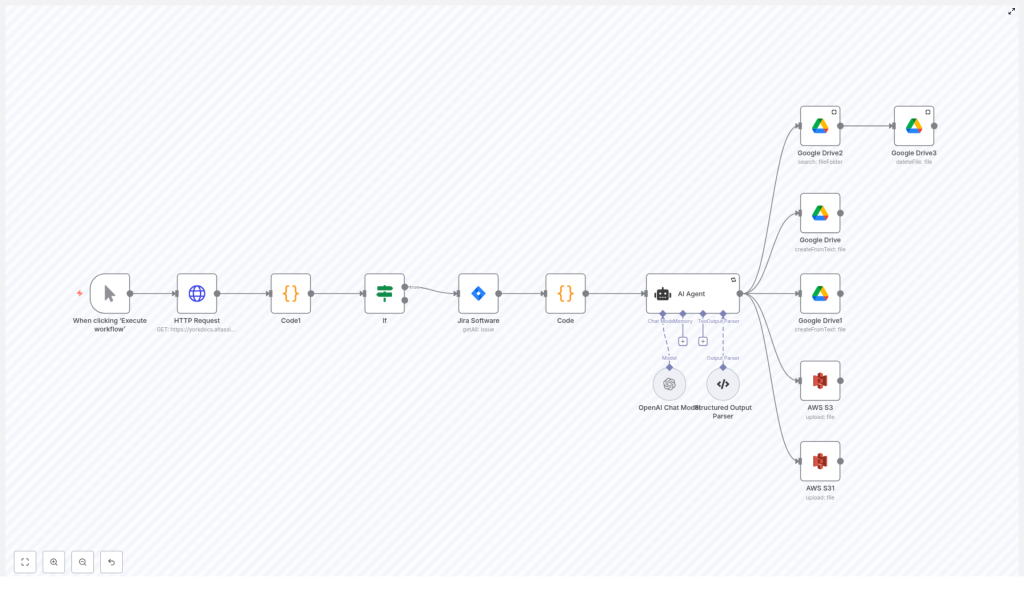
The provided n8n workflow template is a linear, easy-to-follow flow that starts with a manual trigger and ends with ready-to-edit PRDs. At a high level, here is what it accomplishes:
- Starts the workflow on demand with a Manual Trigger.
- Queries Jira for projects and filters them down to the ones you care about.
- Fetches epics for each selected project using Jira’s APIs.
- Aggregates epic data into a clean, structured format.
- Sends that data to an AI agent (OpenAI via LangChain) to generate PRD content.
- Creates a Google Doc for collaboration and stores plain text copies in AWS S3.
The result is a repeatable system: whenever you are ready for a fresh PRD draft, you execute the workflow and let n8n handle the heavy lifting.
Step-by-step journey through the workflow
1. Starting with intention: Manual Trigger
The Manual Trigger node is your starting point. It lets you run the workflow when you are ready to generate or refresh PRDs.
- Action: Click “Execute workflow” in n8n.
- Outcome: You stay in control of when drafts are generated, which is ideal while you are still experimenting and refining the process.
2. Gathering raw materials: Querying Jira projects
Next, the workflow reaches out to Jira to understand which projects exist and which ones you want to include.
- Node:
HTTP Request - Purpose: Call Jira’s
/project/searchendpoint to retrieve projects. - Key settings:
- Use Jira Cloud credentials configured in n8n.
- Enable pagination using
responseContainsNextURLwithnextPageandisLast, or adapt to Jira’sstartAtandtotalif necessary.
The Code1 (merge values) node then flattens batched project results so you have a single, clean list to work with:
- Node:
Code1 (merge values) - Purpose: Concatenate response arrays into one collection.
3. Focusing on what matters: Filtering projects
Not every Jira project needs a PRD at the same time. The workflow uses an If node to filter out projects that do not match your criteria.
- Node:
If - Purpose: Include only desired projects.
- Key settings:
- Set conditions based on project key or other fields that identify relevant projects.
This is where you start tailoring the automation to your reality. You can focus on specific product lines, environments, or teams simply by updating the filter logic.
4. Pulling in the real story: Fetching Jira epics
Once you know which projects matter, the workflow fetches all epics for each one.
- Node:
Jira Software - Purpose: Retrieve issues of type Epic for each project.
- Key settings:
- JQL example:
issuetype = EPIC and project = {{ $json.id }} - Make sure the fields you need are included, such as
summary,description, and any relevant custom fields.
- JQL example:
This step transforms your Jira data into the raw narrative ingredients that the AI will later shape into a PRD.
5. Structuring the data: Grouping epics by project
To make the AI’s job easier, the workflow groups epics by project and extracts only the necessary information.
- Node:
Code - Purpose:
- Group epics per project.
- Return one item per project with an
epicsarray that includes summary and description.
By structuring data clearly at this stage, you help ensure that the generated PRDs are coherent, organized, and easy to adapt to your team’s style.
6. Turning data into narrative: AI Agent with OpenAI
Now comes the transformational step. The aggregated epic data is sent to an AI agent that uses OpenAI to generate the PRD content.
- Node:
AI Agent (LangChain/OpenAI) - Purpose: Convert epics JSON into a structured PRD draft.
- Key settings:
- The prompt includes the epics JSON and clear instructions.
- A structured output parser is used so the AI returns machine-readable sections and content.
This is where your time savings really show up. Instead of manually synthesizing every epic, the AI gives you a starting point that you can refine, adjust, and align with your product vision.
7. Making it collaborative and permanent: Google Drive and S3
Finally, the workflow turns the AI output into shareable documents and long-term records.
- Nodes:
Google DriveandS3 - Purpose:
- Create a Google Doc from plain text for collaborative editing.
- Upload plain text copies to an AWS S3 bucket for archiving and version control.
- Key settings:
- Use the Google Drive
createFromTextnode to convert text into a Google Doc. - Specify the target folder in Google Drive and ensure the account has write permission.
- Set the S3 bucket, folder, and file naming convention (for example, include project key and timestamp).
- Use the Google Drive
At this point, your workflow has turned Jira epics into living documents your team can review, comment on, and evolve, while also storing a traceable record in S3.
Key configuration tips for a smooth setup
To get the most out of this n8n PRD template, pay attention to a few critical configuration details.
- Jira authentication:
- Use an API token or OAuth credentials configured in n8n.
- For higher volumes, OAuth or app links are often more resilient to rate limits.
- Pagination in Jira:
- The HTTP Request node uses
responseContainsNextURLwithnextPageandisLast. - Verify that your Jira responses include these fields or adjust to use
startAtandtotalpagination.
- The HTTP Request node uses
- JQL precision:
- Use accurate JQL such as
issuetype = Epic AND project = PROJECTKEY. - Include all fields you need in the request so the AI has enough context.
- Use accurate JQL such as
- OpenAI prompts:
- Keep prompts deterministic and explicit.
- Define an output schema via a structured output parser so results are consistent and easy to process.
- Google Drive conversion:
- Use the
createFromTextoperation to generate a Google Doc from plain text. - Make sure the connected account can write to the chosen folder.
- Use the
Security, compliance, and responsible automation
Automating PRD generation does not mean relaxing your security standards. You can design this workflow to respect privacy, compliance, and internal policies.
- Limit data sent to OpenAI:
- Avoid including sensitive personal information in prompts.
- If epics contain confidential details, consider redacting or obfuscating them before sending to the AI.
- Use least privilege for service accounts:
- Create dedicated service accounts for Google Drive and AWS S3.
- Grant only the permissions required for file creation and upload.
- Audit and encryption:
- Enable audit logging on Google Drive and S3 buckets.
- Ensure encryption at rest is enabled for all storage.
- Control your environment:
- Consider self-hosting n8n for more control over data flow and network access.
Troubleshooting and learning from failures
Every automation journey includes a bit of debugging. When something breaks, treat it as a chance to improve the workflow.
- Missing fields in Jira:
- If descriptions are null, verify that the
fieldsparameter includesdescriptionand any custom field IDs you need.
- If descriptions are null, verify that the
- Rate limits from Jira or OpenAI:
- If you see throttling, add retry logic or backoff strategies in the HTTP Request or OpenAI nodes.
- Structured Output Parser errors:
- If parsing fails, simplify the schema or loosen requirements temporarily to see what the model is returning.
- Iterate until the structure is reliable, then tighten again.
- Google Drive permission issues:
- If file creation fails, double check that the service account has write access to the target folder and that sharing settings are correct.
Extending the template as your workflow matures
Once the basic automation is working, you can start turning it into a richer, more powerful system that matches how your team operates.
- Scheduled runs:
- Use n8n’s scheduling to generate weekly PRD drafts for all active projects.
- Review and collaboration steps:
- After creating the Google Doc, add a Slack node that posts a message to a channel or user group with the document link and a review checklist.
- Versioning strategy:
- Store each generated PRD in S3 with a timestamp.
- Use S3 lifecycle rules to archive or clean up older versions automatically.
- Linking back to Jira:
- Update the relevant project or epic in Jira with a comment that includes the PRD link.
- This keeps traceability between requirements and documentation.
- Custom prompt templates:
- Create multiple prompt variants tailored to different product types, such as mobile apps, platform features, or internal tools.
Each of these extensions moves you closer to a fully integrated product documentation pipeline that runs with minimal manual effort.
Best practices for AI-generated PRDs
AI can accelerate your work, but it is most powerful when combined with human judgment. Treat PRD generation as a partnership between automation and your product expertise.
- Always review the drafts:
- Use generated PRDs as starting points. Product managers should validate assumptions, refine language, and ensure alignment with strategy.
- Standardize prompts and templates:
- Keep prompt wording and structure consistent across projects to maintain predictable output quality.
- Log generation metadata:
- Capture who triggered the workflow, when it ran, which prompt version and model were used.
- This makes it easier to trace issues and understand changes in output quality over time.
- Iterate based on feedback:
- Invite reviewers to share what worked and what did not in the generated PRDs.
- Adjust prompts and instructions to the model to continuously improve results.
Pre-production checklist for a confident launch
Before you rely on this workflow for critical documentation, walk through a quick checklist to ensure everything is ready.
- Confirm Jira
