


Automate Resume Screening & AI Interviews with Gemini, ElevenLabs & Notion ATS
Imagine a hiring process where the repetitive work quietly runs in the background, while you and your team stay focused on real conversations, strategic decisions, and building a stronger company. That is what this n8n workflow template is designed to unlock.
In this guide, you will walk through a production-ready automation that connects Google Gemini (LLM), ElevenLabs conversational AI, Notion ATS, n8n orchestration, and Google Drive/Sheets into a single, streamlined recruiting funnel. The goal is not just efficiency, but transformation: less manual busywork, more clarity, and a hiring process you can actually trust and scale.
The Problem: Manual Screening That Slows You Down
Most hiring teams know the feeling. Resumes pile up. Early-stage interviews are repetitive. Everyone is busy, yet roles stay open for weeks or months. Manual screening is:
- Slow and hard to scale when applications spike
- Inconsistent from recruiter to recruiter
- Challenging to audit or review later
- Draining for teams that want to focus on higher-value work
Over time, this friction affects more than just time-to-hire. It impacts candidate experience, team morale, and your ability to confidently say, “We are hiring fairly and systematically.”
The Mindset Shift: Let Automation Handle the Repetitive Work
Automation is not about replacing human judgment. It is about creating a foundation that supports it. By automating the repetitive, rules-based parts of your funnel – resume parsing, role matching, scoring, and first-round behavioral interviews – you free your team to:
- Cut time-to-hire while reducing recruiter workload
- Deliver consistent, bias-aware initial evaluations
- Maintain a detailed, auditable record of every evaluation and interview
- Give hiring managers a prioritized applicant list directly inside Notion ATS
This is where the n8n workflow template comes in. It is a practical, ready-to-use system that lets you move from idea to action quickly. You can start with the core template, then adapt, refine, and expand it as your hiring process evolves.
The Vision: An Integrated, Automated Hiring Funnel
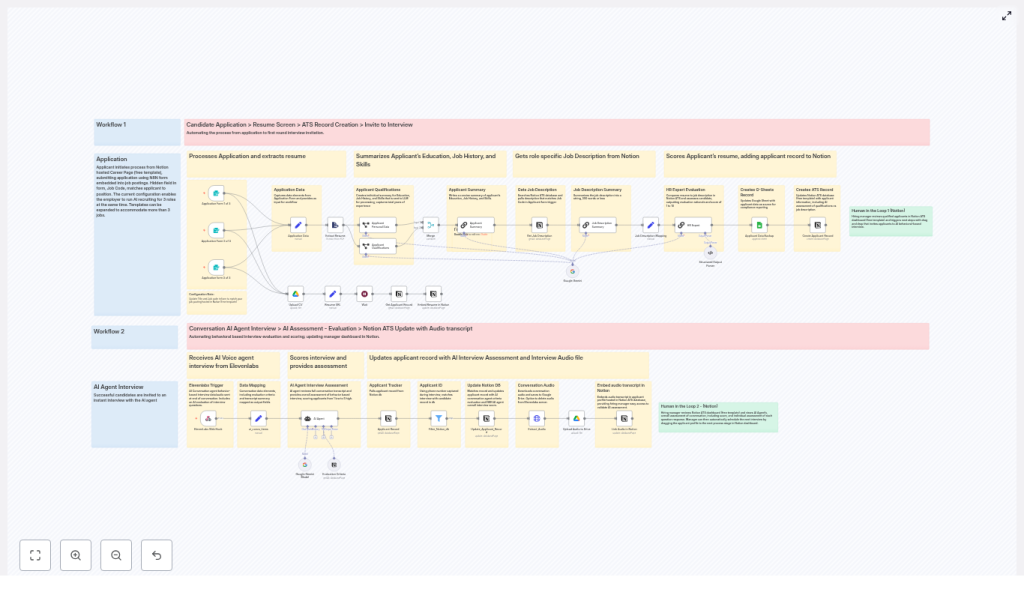
At the heart of this setup is n8n, acting as the orchestration layer that connects all your tools into a single, coherent flow. Here is the high-level journey a candidate takes through this automated system:
- The candidate submits an application via an embedded form or Notion-hosted careers page.
- The resume is uploaded to Google Drive, and n8n extracts the text from the PDF.
- Google Gemini (LLM) parses the resume into structured data like education, job history, skills, and total years of experience.
- The job description for the relevant role is pulled from Notion, summarized, and compared to the candidate profile by an HR Expert LLM that scores the resume from 1 to 10.
- The applicant record is created or updated in Notion ATS, and a backup row is written to Google Sheets for compliance and reporting.
- Qualified candidates are automatically invited to an AI-powered behavioral interview hosted by an ElevenLabs conversational voice agent.
- At the end of the conversation, ElevenLabs sends a webhook with the transcript, evaluation data, and metadata. n8n downloads the audio, stores it in Drive, and an AI agent evaluates the transcript using Notion-held criteria to produce a 1 to 5 interview score.
- The Notion applicant record is updated with the transcript, audio link, and AI evaluation, so hiring managers can perform a human-in-the-loop review and move candidates forward.
This is not just automation for automation’s sake. It is a structured journey that keeps humans where they add the most value and lets software handle the rest.
The Building Blocks: Tools That Work Together
n8n: The Orchestration Layer
n8n is the workflow engine that ties everything together. It:
- Receives form submissions and triggers
- Routes resume files and extracts text
- Calls Gemini and other LLMs for analysis
- Integrates with ElevenLabs webhooks
- Updates Notion ATS and Google Sheets
- Stores artifacts like resumes and interview audio in Google Drive
This template gives you a clear, visual flow that you can adjust as your process matures.
Google Gemini (LLM): Structured Understanding
Gemini is used for the “thinking” steps in the workflow, including:
- Extracting personal and professional attributes from resumes
- Summarizing job descriptions for focused comparison
- Running an HR Expert scorer that produces a
resume_score(1-10) and a rationale
By using separate prompts for contact details and qualifications, you get cleaner, more reliable data that can be reused across your process.
ElevenLabs: Conversational AI Interviews
ElevenLabs powers the AI voice agent that conducts behavior-based interviews. During each interview:
- The agent uses dynamic variables like candidate name and role
- Evaluation criteria are pulled from Notion to guide questions and scoring
- At the end, a webhook sends the full transcript, per-criteria results, rationale, and conversation metadata back to n8n
n8n then downloads the audio, stores it in Google Drive, and links everything back to the candidate record in Notion.
Notion ATS: Your Single Source of Truth
Notion acts as the applicant tracking system and the home for evaluation criteria. The workflow:
- Looks up job descriptions and evaluation frameworks by job code
- Creates or updates applicant pages with all AI-generated insights
- Exposes resume scores, interview scores, transcripts, and audio links to hiring managers
The result is a centralized, transparent view of each candidate’s journey.
Google Drive & Google Sheets: Storage and Audit Trail
Google Drive stores:
- Uploaded resumes
- Interview audio files
Google Sheets captures:
- Backup rows for each candidate
- Data needed for compliance, reporting, and analytics
This combination helps you build a robust audit trail while keeping your data organized.
From Idea to Implementation: Step-by-Step Journey
1) Capture Applications and Handle Files
Start by connecting the entry point of your funnel.
- Embed n8n form triggers into your Notion careers page, or use external forms that call an n8n webhook.
- Include a hidden
job_codefield to map each applicant to the correct role in Notion. - Require PDF resumes so the parsing process is reliable and consistent.
This simple setup gives you a clean, structured input for the rest of the automation.
2) Parse Resumes Reliably With Gemini
Once resumes land in Google Drive, n8n extracts text from the PDF using a PDF-to-text extractor node. Then, run two separate Gemini prompts:
- One prompt for personal and contact information
- Another prompt for qualifications, including education, job history, skills, and years of experience (YOE)
As part of this step, validate phone numbers and email addresses. This will help you match candidates to ElevenLabs conversation metadata later in the workflow.
3) Match Roles and Score Resumes
Next, connect each candidate to the right opportunity and evaluate fit at scale.
- Pull the job description from Notion using the
job_code. - Use Gemini to summarize the job description into a concise, structured representation.
- Run an HR Expert LLM prompt that compares the candidate summary to the summarized role.
The LLM should output:
resume_score: 1-10resume_evaluation: a short rationale for the score
With this score in hand, you can define routing logic, for example:
- 8-10: Automatically invite to AI interview
- 5-7: Send to recruiter for manual review
- <5: No further action, or store as low-priority candidates
This is where your automation starts to create real leverage, helping you prioritize effort where it matters most.
4) Orchestrate AI Behavioral Interviews With ElevenLabs
For candidates who qualify, the next step is a structured, scalable behavioral interview.
- Invite candidates to an ElevenLabs-powered interview, passing in dynamic variables like name and role.
- Provide the agent with the evaluation criteria stored in Notion so the conversation aligns with your standards.
After the call, ElevenLabs sends a webhook with:
- The full conversation transcript
- Per-criteria results and rationale
- Conversation ID and metadata
n8n then:
- Downloads the audio file and saves it to Google Drive
- Updates the candidate record in Notion with the audio link and initial AI assessment
5) Run AI Interview Evaluation and Save Insights
To create a consistent, comparable view of interviews, an internal AI Agent node evaluates the transcript against the Notion criteria.
- The agent reads the transcript and the evaluation framework.
- It outputs an overall interview score from 1 to 5.
- It generates a concise assessment that hiring managers can quickly scan.
These outputs are written back to the Notion applicant record, giving your team a complete snapshot: resume score, interview score, transcript, and audio, all in one place.
Staying Responsible: Privacy, Bias, and Compliance
As you automate, it is essential to stay intentional about privacy and fairness. This template supports that, but your practices matter too.
- Data privacy: Make sure candidates explicitly consent to voice recording and processing. Include clear consent language in your application forms.
- Bias mitigation: Periodically review LLM prompts and a sample of assessments to detect systematic bias. Keep humans in the loop, especially for borderline decisions.
- Audit trail: Retain transcripts, audio files, LLM outputs, and Notion updates with timestamps and version control to support compliance needs.
- Security: Protect your API keys, use least-privilege service accounts for Google Drive and Sheets, and enforce strict access controls in Notion.
Handled thoughtfully, automation can actually make your process more transparent and auditable, not less.
Operational Checklist Before You Go Live
To turn this template into a reliable production workflow, run through this checklist:
- Test the entire flow end-to-end with sample resumes for each job code.
- Verify that phone and email mapping between your form submissions and ElevenLabs webhook data is correct.
- Configure logging and alerts in n8n for failed API calls, parsing errors, or webhook issues.
- Define clear SLAs and manual hand-off rules so recruiters know when and how to step in.
These small investments upfront will pay off in a more stable, trusted automation over time.
Sample HR Expert Prompt You Can Build On
"You are an HR expert. Compare the candidate summary to the job description. Give a score 1-10 and explain your reasoning."
This is a shortened version that you can extend with your own guidelines, role-specific nuances, or company values. The template gives you a strong starting point, and you can keep refining it as you learn.
Next Steps: Turn This Template Into Your Hiring Advantage
This n8n workflow template is more than a collection of nodes. It is a stepping stone toward a more focused, automated way of working. Once you have it running, you will likely start seeing other opportunities to streamline and enhance your hiring process.
To get started:
- Clone the n8n template, or request the template export for your instance.
- Provision API keys for Gemini, ElevenLabs, Notion, Google Drive, and Google Sheets.
- Configure job codes, job descriptions, and evaluation criteria in Notion.
From there, experiment. Adjust scoring thresholds, refine prompts, tweak interview criteria, and add your own logic. Each iteration brings you closer to a recruiting engine that reflects how you want to hire.
If you are ready to accelerate hiring while maintaining quality, fairness, and compliance, you can contact us for a guided setup or download the example n8n template and try it directly in your own environment. This is your opportunity to let automation handle the busywork so you and your team can focus on what truly matters: finding and supporting the best people.
