


Automate Security: The Story of a Weekly Shodan IP Port Monitoring Workflow
A Monday Morning No One Wants
By 8:15 a.m., Alex already knew it was going to be a bad day.
As the lead security engineer for a fast-growing SaaS company, Alex was used to juggling alerts, audits, and anxious messages from stakeholders. But this Monday was different. Over the weekend, an external audit report had landed in Alex’s inbox with a worrying note:
“We observed unexpected open ports on one of your production IP addresses. Please confirm whether these are intentional.”
Alex’s stomach dropped. There was no easy way to answer that quickly. The team had a spreadsheet of “approved” ports and IPs, but it was updated manually and often out of date. Actual port checks were done ad hoc, whenever someone remembered or when a new incident forced the issue. It was fragile, inconsistent, and stressful.
Alex had already been thinking about automating network checks. The audit made it clear: manual port monitoring was no longer an option. The company needed something reliable, repeatable, and proactive.
Discovering a Better Way With n8n and Shodan
That same day, while looking for ideas, Alex came across a workflow template for n8n automation that used Shodan, the search engine for internet-connected devices. It claimed to run a weekly Shodan IP and port monitoring workflow that could automatically check important IPs and highlight unexpected open ports.
The promise was simple but powerful:
- Use Shodan to scan key IP addresses.
- Compare discovered open ports with an internal “expected” list.
- Automatically create alerts in TheHive when something unusual appears.
Instead of reacting to surprise findings from auditors or external scanners, Alex could have a scheduled workflow quietly checking the network every Monday morning, before anyone else noticed problems.
Setting the Stage: The Watchlist That Matters
Alex started by defining the heart of the workflow: the watchlist.
The security team already kept a list of IP addresses and expected open ports in a central system. It was not perfect, but it was the single source of truth they relied on. The n8n template expected this data in JSON format, which fit perfectly with their existing API.
Each entry in the JSON looked something like this:
- IP address – the external IP to monitor.
- Array of expected ports – the ports that should be open or closely watched.
Alex realized that this was exactly what the workflow needed. n8n would fetch this JSON via a secured API endpoint, then use it as the baseline for comparison against the live Shodan data.
The Weekly Rhythm: Scheduling the Workflow
Next, Alex configured the timing. The template suggested running every Monday morning, which made sense. The team wanted regular, predictable checks without constant noise.
By scheduling the workflow to trigger once a week, Alex could:
- Catch unauthorized open ports before they turned into real incidents.
- Give the team a clear weekly snapshot of exposure.
- Eliminate the need for someone to remember to run manual scans.
For the first time, port monitoring would happen automatically, without anyone clicking a button or updating a spreadsheet at the last minute.
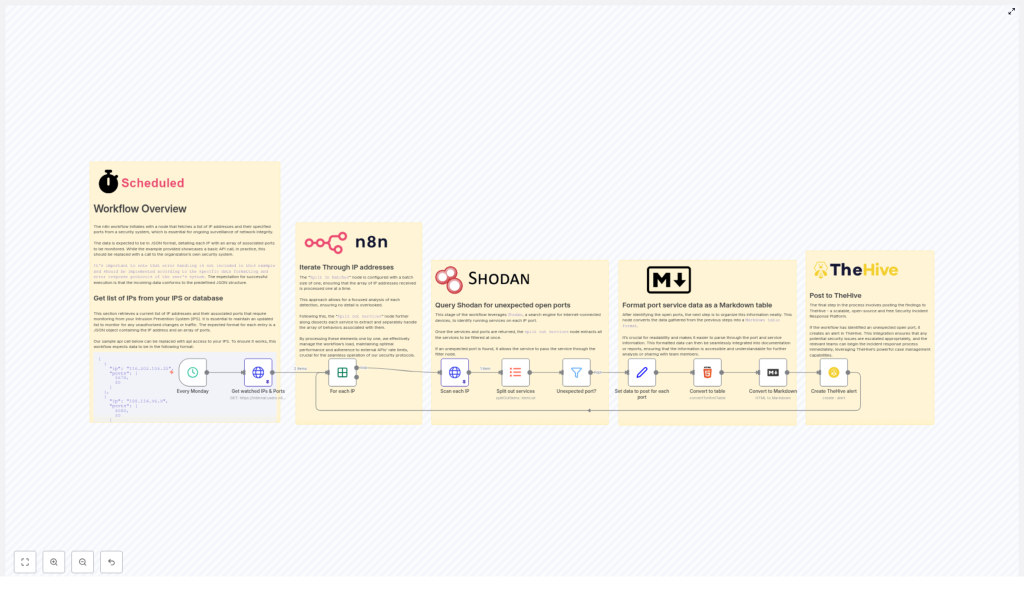
Inside the Workflow: How Alex’s Automation Actually Works
With the schedule and data source in place, Alex dug into the core steps of the workflow. n8n made it easy to visualize, but understanding each stage mattered. If something went wrong, Alex needed to know exactly where to look.
1. Fetching the Monitored IPs and Ports
The workflow begins by calling a secured API endpoint that returns the JSON watchlist. This list includes every IP address that matters to the company and the ports that are expected to be open on each one.
In Alex’s environment, this API was already protected and used by other internal tools, so plugging it into n8n was straightforward. The workflow simply reads the JSON and prepares it for processing.
2. Processing IPs One by One With Batch Handling
Instead of hammering Shodan with a flood of requests, the workflow uses n8n’s batch processing capabilities to iterate through each IP address individually. This is critical for:
- Reducing API load.
- Avoiding Shodan rate limits.
- Keeping the workflow stable and predictable.
Alex liked that this approach was scalable. If the company added more IPs later, the workflow would still handle them gracefully.
3. Querying Shodan for Each IP
For each IP in the list, the workflow calls the Shodan API to retrieve detailed information about open ports and running services. Shodan responds with rich data: which ports are open, what services are detected, and other metadata that can hint at potential misconfigurations.
This is where the magic happens. Instead of manually scanning or relying on external tools, Alex now had a programmatic, repeatable way to ask Shodan exactly what it sees on the company’s IPs.
4. Splitting Out Individual Services
The Shodan response can include multiple services per IP. To analyze them properly, the workflow splits each service into separate items. This makes it possible to examine each open port individually, compare it to the watchlist, and decide whether it is expected or suspicious.
For Alex, this meant granular visibility. No more scanning through long JSON blobs or flat lists. Each port and service became a clear, isolated data point.
5. Filtering Out the Unexpected Ports
Now came the crucial comparison. The workflow checks each discovered port against the list of expected ports for that specific IP. If a port appears in Shodan’s data but is not in the approved list, it is flagged as unexpected.
This step turns raw data into actionable information. Instead of flooding the team with every port Shodan finds, the workflow focuses attention only on deviations from what is supposed to be open.
6. Formatting Findings Into a Markdown Table
Alex knew that if alerts were messy or hard to read, they would be ignored. The workflow solves this by formatting each set of unexpected ports into a clean Markdown table. The table includes structured details about each port and service, making it easy to scan at a glance.
When the security team receives an alert, they do not need to parse raw JSON or hunt for key values. The information is already organized and ready for triage.
7. Creating an Alert in TheHive
The final step was where everything came together.
If the workflow finds any unexpected open ports, it automatically creates an alert in TheHive, the company’s Security Incident Response Platform. Each alert contains:
- Details about the affected IP.
- The Markdown table of unexpected ports.
- Context that helps analysts understand why the alert matters.
This integration turns passive monitoring into active incident response. TheHive receives a structured, actionable alert that can be assigned, tracked, and resolved within existing processes.
The Turning Point: From Panic to Proactive
A few weeks after setting up the workflow, Alex came in on another Monday morning. This time, there was no surprise audit report. Instead, there was a new alert in TheHive, generated by the n8n workflow.
One of the production IPs showed an SSH port that was not on the approved list. The Markdown table in the alert made the issue immediately clear. Within minutes, the team confirmed that a misconfigured rule had exposed the port after a routine deployment.
They closed the exposure, documented the fix, and updated their processes. What would once have been a high-stress incident discovered by someone outside the company was now a controlled, internal catch that never escalated beyond the security team.
Why This Workflow Changed Everything for Alex
Looking back, Alex could summarize the impact in a few clear benefits.
Automation That Frees Up Time
The weekly Shodan IP and port monitoring workflow removed the need for manual checks and spreadsheet maintenance. Routine monitoring and initial triage were now handled by automation, so the team could focus on deeper investigations and strategic improvements.
Timely Detection of Risk
By running every Monday, the workflow created a predictable rhythm of security checks. Unexpected changes, new open ports, or accidental exposures were caught early, instead of surfacing weeks later in an audit or after an incident.
Actionable, Clear Reporting
The Markdown tables and direct integration with TheHive meant that alerts were not just data dumps. They were clear, structured, and ready for incident response. Analysts no longer had to waste time cleaning up or reformatting information.
Scalable and Customizable for the Future
As the company grew, Alex could easily:
- Add new IPs to the monitored list.
- Incorporate additional error handling and environment-specific logic in n8n.
The workflow was not a rigid script. It was a flexible automation built on n8n that could evolve with the infrastructure and security requirements.
From Story to Action: Build Your Own Weekly Shodan Monitoring
Alex’s story is not unique. Many security teams struggle with the same problem: too many IPs to watch, too many ports to track, and not enough time to do it manually.
By combining Shodan, n8n automation, and TheHive, this workflow turns weekly IP and port monitoring into a reliable, automated safety net. It helps you move from reactive firefighting to proactive protection.
If you manage external-facing infrastructure or care about your organization’s security posture, setting up this workflow can:
- Boost your network security monitoring effectiveness.
- Accelerate incident response.
- Reduce the chance of being surprised by unexpected open ports.
Talk with your security team or automation specialist, connect your existing IP and port watchlist, and tailor the workflow to your environment. With the right setup, your Monday mornings can look a lot more like Alex’s new normal: calm, controlled, and confidently monitored.
