


Automate SERP Tracking with n8n and ScrapingRobot
Systematic monitoring of Google search results is a critical activity for SEO and competitive intelligence. Doing this manually does not scale and often introduces inconsistencies. This guide describes how to implement a production-ready n8n workflow that uses the ScrapingRobot API to collect Google SERP data, normalize and rank the results, then store them in your own data infrastructure for ongoing analysis and reporting.
Use case overview: Automated SERP tracking in n8n
This workflow is designed for SEO teams, data engineers, and automation professionals who need to:
- Track large keyword sets across multiple markets or domains
- Maintain a historical SERP dataset for trend analysis
- Feed dashboards, BI tools, or internal reporting
- Detect ranking changes and competitor movements quickly
The pattern is simple but powerful: pull keywords, request SERP data via ScrapingRobot, parse and enrich the results, assign positions, and persist the data into your preferred destination.
Benefits of automating SERP collection
Automating SERP tracking with n8n and ScrapingRobot provides several concrete advantages:
- Scalability – Monitor hundreds or thousands of keywords without manual effort.
- Consistency – Capture data in a standardized format suitable for time-series analysis.
- Integration – Connect easily to databases, spreadsheets, and dashboards already in your stack.
- Speed of insight – Surface ranking shifts and competitor entries on a daily or weekly cadence.
Once the workflow is in place, it can run unattended on a schedule, providing an up-to-date SERP dataset for your SEO and analytics initiatives.
Requirements and setup
Before building the workflow, ensure you have the following components available:
- An n8n instance (self-hosted or n8n cloud)
- A ScrapingRobot account with an active API key
- A keyword source, for example:
- Airtable
- Google Sheets
- SQL / NoSQL database
- Or a simple Set node for static test keywords
- A destination for SERP results, such as:
- Airtable
- Google Sheets
- Postgres or another SQL database
- Any other storage system supported by n8n
Align your naming conventions early, particularly for the keyword field, so that downstream nodes can reference it consistently.
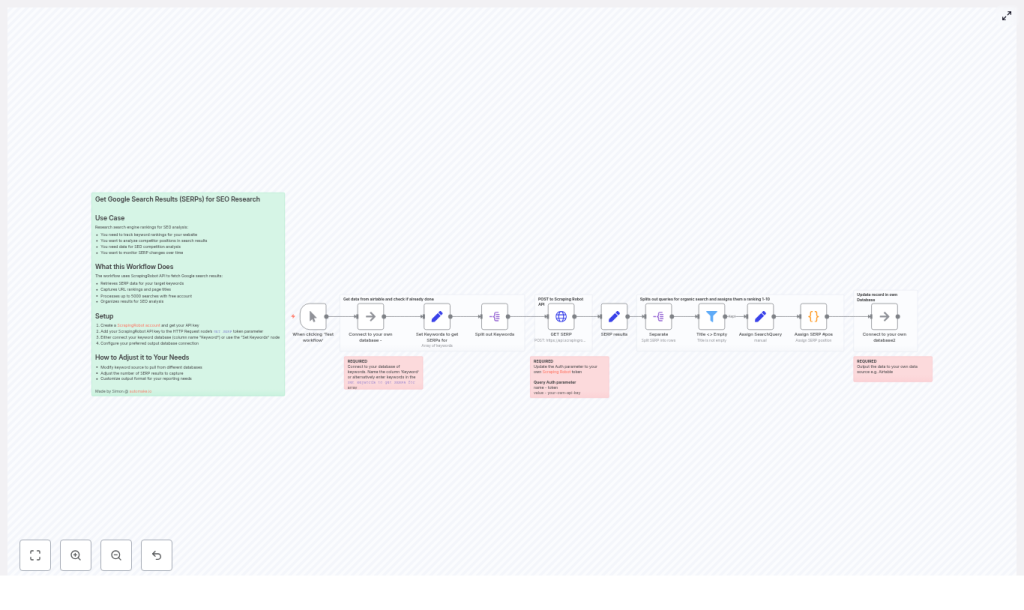
Architecture of the n8n SERP workflow
The workflow follows a clear sequence of automation steps:
- Trigger – Start the workflow manually for testing or via a schedule for production.
- Keyword ingestion – Pull keywords from your data source or define them in a Set node.
- ScrapingRobot request – Use an HTTP Request node to retrieve Google SERP data per keyword.
- Normalization – Extract and structure relevant SERP fields using a Set node.
- Result splitting and filtering – Split organic results into individual items and filter out invalid entries.
- Context enrichment – Attach the original search query to each result row.
- Position assignment – Use a Code node to compute the ranking position for each result.
- Persistence – Store the enriched, ranked data in your analytics datastore.
The following sections walk through each of these stages in detail.
Building the workflow step by step
1. Configure trigger and keyword source
Start with a Manual Trigger node while you are developing and debugging the flow. Once the workflow is stable, you can replace or augment this with a Cron or Schedule trigger to run daily, weekly, or at any interval appropriate for your SEO monitoring needs.
Next, define your keyword source. You have two main options:
- Connect to an external data source (recommended for production) such as Airtable, Google Sheets, or a database table that stores your keyword list.
- Use a Set node for initial testing or simple use cases. For example:
["constant contact email automation", "business workflow software", "n8n automation"]
Standardize on a field name, such as Keyword, to avoid confusion later. All subsequent nodes should reference this field when constructing requests and enriching results.
2. Call ScrapingRobot to fetch Google SERPs
With keywords in place, add an HTTP Request node configured to send a POST request to the ScrapingRobot API. This node will call the GoogleScraper module and pass the current keyword as the query parameter.
Typical JSON body configuration:
{  "url": "https://www.google.com",  "module": "GoogleScraper",  "params": {  "query": "{{ $json[\"Keyword\"] }}"  }
}
Key configuration points:
- Authentication – Provide your ScrapingRobot token. You can do this via headers or query parameters, depending on your ScrapingRobot configuration and security preferences.
- Batching – Use n8n’s batch options to process multiple keywords in manageable chunks instead of sending thousands of requests at once.
- Rate limiting – Respect ScrapingRobot’s quotas and rate limits. If necessary, introduce throttling or delays to avoid being rate-limited or blocked.
3. Normalize and structure SERP data
The ScrapingRobot response is a JSON payload that can contain multiple sections. To make downstream processing easier, introduce a Set node immediately after the HTTP Request node and extract only the fields you care about.
Typical fields to retain include:
organicResultspeopleAlsoAskpaidResultssearchQuery(or equivalent query field)
By normalizing the structure early, you reduce complexity in later nodes and make the workflow more maintainable and resilient to minor API changes.
4. Split organic results into individual rows
Most ranking analysis focuses on organic results. To work with each organic result as its own record, use n8n’s SplitOut (Split In Batches / Split Items) node on the organicResults array.
This step converts a single SERP response into multiple items, one per result. After splitting, add a Filter node to remove any entries that have empty or missing titles. This avoids storing meaningless rows and keeps your dataset clean.
5. Preserve keyword context on each item
Once the organic results are split, each item represents a single SERP result but may have lost direct access to the original keyword context. To maintain that relationship, use a Set node to copy the searchQuery or Keyword field onto every item.
This ensures that every row in your final dataset clearly indicates which keyword produced that result, which is essential for grouping and ranking logic as well as downstream analytics.
6. Assign SERP positions with a Code node
At this stage, you have many items across multiple search queries. To compute a position value (1-N) for each result within its respective query, add a Code node using JavaScript.
The following example groups items by searchQuery and assigns incremental positions within each group:
// Get all input items
const items = $input.all();

// Group items by searchQuery
const groupedItems = items.reduce((acc, item) => {  const searchQuery = item.json.searchQuery || 'default';  if (!acc[searchQuery]) acc[searchQuery] = [];  acc[searchQuery].push(item);  return acc;
}, {});

// Assign positions within each group
const result = Object.values(groupedItems).flatMap(group =>  group.map((item, index) => ({  json: {  ...item.json,  position: index + 1  }  }))
);

return result;
This approach:
- Retains all original JSON fields from the ScrapingRobot response and your earlier Set nodes.
- Adds a new
positionfield that represents the 1-based rank for each result within a given query. - Supports multiple keywords in a single workflow run by grouping on
searchQuery.
7. Persist enriched SERP data
With positions assigned, the final step is to write the enriched records to your storage layer. You can use any n8n-supported integration, such as:
- Airtable – For quick, spreadsheet-like storage and lightweight dashboards.
- Google Sheets – For teams already using Google Workspace.
- Postgres or other SQL databases – For scalable, queryable storage integrated with BI tools.
When designing your schema, consider storing at least the following fields:
keywordorsearchQuerypositiontitleurlsnippetor descriptiontimestampor crawl date
Optionally, you may also store the raw SERP JSON for each keyword in a separate table or column to enable future re-processing when you want to extract additional attributes.
Operational best practices
Rate limits and performance
- Respect ScrapingRobot quotas – Implement batching and delays to stay within your plan limits and avoid throttling.
- Shard large keyword sets – For tens of thousands of keywords, split them into multiple workflow runs or segments to balance load.
- Scale n8n workers – If you are self-hosting n8n, consider running multiple workers for parallel processing, within your infrastructure constraints.
Data quality and deduplication
- Use composite keys – Combine
keyword+urlas a unique identifier to deduplicate records and prevent duplicate inserts. - Validate SERP fields – Filter out rows with missing titles or URLs to keep your dataset clean.
- Store raw responses – Persist the unmodified JSON from ScrapingRobot in a separate field or table if you anticipate changing your parsing logic later.
Monitoring, error handling, and scheduling
- Error handling – Use n8n’s error workflows or retry logic to handle transient API failures gracefully.
- Logging – During development, add
console.logstatements in the Code node to inspect grouping and position assignment. - Scheduling – Run the workflow daily or weekly, depending on how volatile your SERP environment is and how fresh your data needs to be.
Scaling and cost considerations
When expanding from a small test set to thousands of keywords, both infrastructure and API costs come into play.
- Workload partitioning – Segment your keyword list by project, domain, or language and run separate workflows for each segment.
- Parallelism vs. quotas – Balance the number of concurrent requests against ScrapingRobot’s allowed throughput.
- Storage optimization – Store only the fields you actually use for analysis in your primary table. Archive raw JSON separately if required to keep storage costs predictable.
Troubleshooting common issues
If the workflow is not producing the expected results, review the following checkpoints:
- Authentication – Confirm that your ScrapingRobot API token is valid and correctly configured in the HTTP Request node.
- Response structure – Inspect the raw API response in n8n to ensure that
organicResultsexists and contains entries. - Field naming – Verify that the
Keywordfield used when building the request body matches the field name from your keyword source. - Code node behavior – Check the Code node for exceptions. Use temporary
console.logstatements to inspect grouped items and confirm thatsearchQueryis present and correctly populated.
Conclusion
By combining n8n’s workflow automation capabilities with ScrapingRobot’s SERP extraction, you can build a robust, repeatable process for collecting and analyzing search ranking data at scale. The pattern described here – fetch, normalize, split, enrich with context, assign positions, and store – is flexible and can be adapted to many SEO and analytics scenarios.
Once implemented, this workflow becomes a foundational piece of your SEO data infrastructure, enabling dashboards, reporting, and deeper analysis without manual SERP checks.
Call to action: Deploy this workflow in your n8n instance, connect your keyword source, and configure your ScrapingRobot API key to start collecting SERP data automatically. If you need support tailoring the workflow for large-scale tracking or integrating with your analytics stack, reach out for hands-on assistance or consulting.
