


Automate Strava to Twitter with n8n
On a cold Tuesday evening, Alex stared at their phone, thumb hovering over the Twitter (X) app. Another 10K run logged in Strava, another manual post to write, another few minutes spent formatting distance, time, and a half-hearted caption.
It was not the writing that bothered Alex. It was the repetition. Every run, every ride, every swim followed the same pattern: open Strava, check stats, open Twitter, type the same style of message, add a hashtag or two, hit publish. On busy weeks, Alex simply stopped sharing workouts altogether.
As a data-loving runner and part-time marketer, Alex wanted something better: a consistent, automatic way to share Strava activities on Twitter without thinking about it every time. That search led them to n8n and a simple Strava to Twitter automation template that quietly changed their routine.
The problem: manual sharing and inconsistent updates
Alex’s goals were straightforward:
- Stop manually posting every single workout
- Share consistent, polished messages that included key stats like distance and time
- Optionally drop in hashtags, team mentions, or branded phrases without retyping them
Yet every time Alex tried to stay consistent, life got in the way. Some workouts never made it to Twitter at all. Others had messy formatting or missing metrics. The whole process felt fragile and time consuming.
As someone already experimenting with automation, Alex wondered: “Could n8n listen for new Strava activities and tweet for me automatically?”
The discovery: a tiny n8n workflow with a big impact
During a late-night search for automation ideas, Alex came across an n8n workflow template: a Strava to Twitter integration that promised to post new activities automatically.
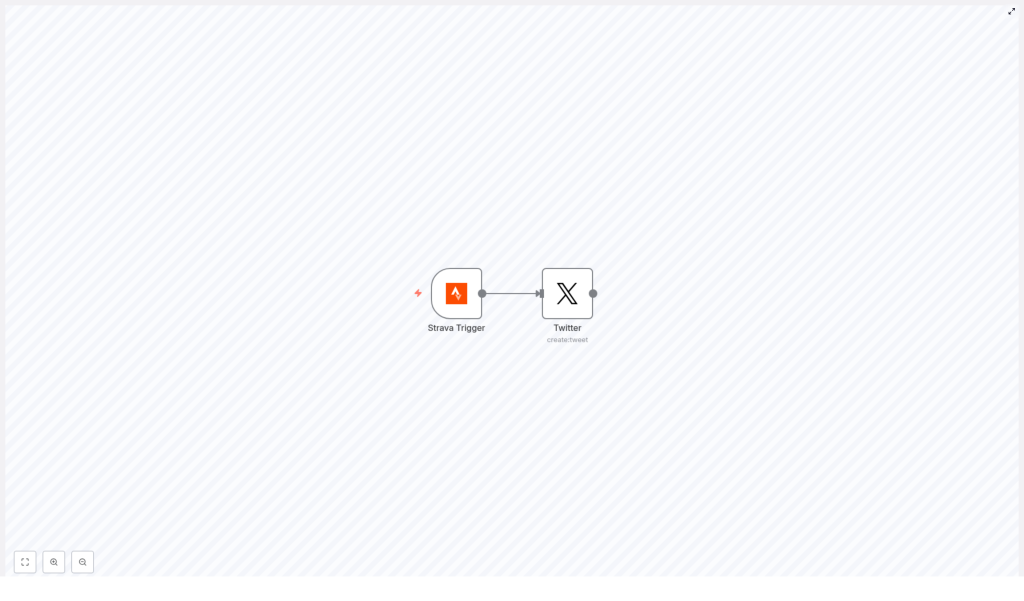
The idea was surprisingly simple. The entire workflow relied on just two nodes:
- Strava Trigger – listens for new Strava activities via webhooks
- Twitter (create:tweet) – posts a tweet using the data from that activity
In Alex’s mind, this looked like a tiny assembly line. Strava would send a webhook when a new workout was created, the Strava Trigger node would catch it, and the Twitter node would format a tweet and publish it right away. No more copy-pasting stats. No more forgetting to post after a long run.
There was only one question left: could Alex actually get it set up?
Setting the stage: accounts, keys, and credentials
Before the real magic could happen, Alex needed the basic pieces in place. If you follow along with their story, you will need the same prerequisites:
- An n8n instance, whether desktop, cloud, or self-hosted
- A Strava account and a Strava API application for webhooks or OAuth
- A Twitter (X) developer account with API keys, usually OAuth 1.0a credentials for n8n
- Basic familiarity with how n8n nodes and expressions work
Alex already had an n8n instance running and both Strava and Twitter accounts in use. The missing piece was the developer setup, which became the first step in the journey.
Rising action: Alex builds the workflow
Creating the Strava application
Alex headed to the Strava developer portal and registered a new application. The portal returned a Client ID and Client Secret, which would be necessary to authenticate n8n and subscribe to Strava activity events.
Those credentials felt like a key to a locked door. With them, n8n could now “speak” to Strava and receive notifications whenever Alex completed a workout.
Wiring the Strava Trigger node
Inside the n8n editor, Alex added the first piece of the automation: the Strava Trigger node.
They configured it to listen for new activities:
- Event:
create - Object:
activity
Next, Alex connected their Strava OAuth2 credentials to the node using n8n’s credential manager. Once saved, the node was ready to receive data whenever Strava sent a webhook.
Strava’s webhook payload would arrive in a field called object_data, containing details like:
distancein metersnameof the activitymoving_timeand other metrics
For the first time, Alex could see the structure of their workouts in raw JSON. It was a bit intimidating, but it also meant complete control over what the future tweet would say.
Designing the tweet with the Twitter node
With the trigger in place, Alex added the second and final node: Twitter (create:tweet). This node was connected directly to the Strava Trigger, forming a simple two-node chain.
The key step was to build a tweet text that used values from the Strava payload. In the Twitter node’s text field, Alex used an n8n expression similar to this:
=`I ran ${Math.round($node["Strava Trigger"].json["object_data"]["distance"] / 100)/10} km and completed my ${$node["Strava Trigger"].json["object_data"]["name"]}! #Strava`A few important details immediately stood out to Alex:
- Strava reports distance in meters, so the expression divided by 1000 (via a simple transformation) and rounded to one decimal place.
- The activity name came directly from
object_data["name"], making each tweet feel personal and specific. - Hashtags like
#Stravacould be customized or expanded with mentions, team tags, or branded phrases.
With this expression, Alex no longer had to think about formatting. Every time Strava sent a new activity, the tweet text would be built automatically using the latest data.
Authenticating Twitter securely
The last configuration step was to give n8n permission to post tweets on Alex’s behalf. In the Twitter node, Alex added their Twitter OAuth1 credentials through n8n’s credential manager.
Instead of storing keys in plain text, n8n kept them encrypted and reusable across workflows. That added a layer of security and made Alex feel more comfortable letting an automation access their Twitter account.
The turning point: the first automated tweet
With the workflow active, Alex did what any curious runner would do: they went for a test run.
Back home, sweaty and curious, Alex opened Strava and saved the activity. Within moments, the n8n workflow received the webhook. The Strava Trigger node passed the payload to the Twitter node, which evaluated the expression and sent off a formatted tweet.
When Alex refreshed their Twitter feed, there it was:
I ran 10.3 km and completed my Evening Run! #Strava
No manual typing, no copy-paste, no delay. The automation had quietly done the work in the background.
Under the hood: the n8n workflow JSON
Curious to understand how everything fit together, Alex examined the minimal workflow JSON that powered this automation. If you want to replicate the same setup, you can import a similar JSON into your own n8n instance and adjust the credentials:
{  "nodes": [  {  "name": "Strava Trigger",  "type": "n8n-nodes-base.stravaTrigger",  "parameters": {"event": "create", "object": "activity"},  "credentials": {"stravaOAuth2Api": "strava"}  },  {  "name": "Twitter",  "type": "n8n-nodes-base.twitter",  "parameters": {  "text": "=I ran {{$node[\"Strava Trigger\"].json[\"object_data\"][\"distance\"]}} meters and completed my {{$node[\"Strava Trigger\"].json[\"object_data\"][\"name\"]}}!"  },  "credentials": {"twitterOAuth1Api": "twitter-account"}  }  ],  "connections": {"Strava Trigger": {"main": [[{"node":"Twitter","type":"main","index":0}]]}}
}
Alex used this as a starting point, then refined the expression to convert meters to kilometers and tweak the copy. The structure, however, remained the same: a Strava Trigger node wired directly to a Twitter node.
When things go wrong: Alex’s troubleshooting journey
Of course, not everything worked perfectly on the first try. Along the way, Alex ran into a few common issues and learned how to fix them.
- No trigger events arriving
The workflow sat idle after a workout. Alex discovered that the Strava webhook subscription needed to be active and that thewebhookIdin the Strava app had to match the n8n endpoint. Once updated, events started flowing again. - Tweet failing silently
When a test tweet did not appear, Alex checked the Twitter node logs. The root cause turned out to be invalid or outdated Twitter credentials. After updating OAuth1 keys and checking rate limits and tweet length, the node worked reliably. - Strange or incorrect values in the tweet
At one point, the tweet showed raw meters without conversion. To debug, Alex inserted aFunctionnode between Strava Trigger and Twitter, logging the fullobject_datapayload. This made it easier to see which fields were available and how to reference them correctly.
Security, privacy, and what Alex chose to share
As the automation became part of Alex’s daily training, a new question appeared: “What am I actually sharing with the world?”
Strava activities can include location data and map information. Alex did not always want to reveal exact routes or home addresses. To stay safe, they decided to:
- Exclude any map URLs or GPS-based fields from the tweet text
- Use n8n’s credential manager to store OAuth tokens securely
- Limit access to the n8n instance to trusted users only
With these safeguards in place, the automation highlighted performance stats without exposing sensitive details.
Leveling up: how Alex customized the workflow
Once the basic Strava to Twitter automation was running smoothly, Alex started to see new possibilities. The original two-node flow became a foundation for more advanced customizations.
Filtering which activities get posted
Not every workout needed to be public. Recovery jogs and short commutes could stay private. Alex added a Filter node between Strava Trigger and Twitter to enforce simple rules, such as:
- Only tweet runs or rides above a certain distance
- Exclude specific activity types like “Commute”
- Use tags or metadata to decide what should be shared
Adding photos and richer content
To make tweets more engaging, Alex experimented with attaching images. They used an HTTP Request node to call Strava’s API for detailed activity data and photos, then configured the Twitter node to upload those images alongside the text.
This small enhancement made the feed more visual and increased engagement from followers.
Scheduling and pacing tweets
On race days or heavy training weeks, Alex preferred not to flood followers with multiple posts in a short time. To handle this, they tested queueing tweets through tools like Buffer or by adding scheduling logic inside n8n.
Instead of posting instantly, some tweets were delayed or batched, creating a more balanced presence on Twitter.
Refining metrics for storytelling
As a data enthusiast, Alex could not resist improving how metrics appeared in tweets. They adjusted expressions to format pace, moving time, and distances in a more readable way, turning raw numbers into friendly, shareable stats.
Best practices Alex learned along the way
After several weeks of running this Strava to Twitter automation in n8n, Alex had a short list of best practices to keep things smooth and follower friendly:
- Limit auto-posting frequency so your feed does not feel like spam
- Use consistent templates and hashtags so your posts are recognizable
- Test thoroughly with a private or test Twitter account before going live
- Review Strava privacy settings and tweet content to avoid oversharing
The resolution: automation as a quiet training partner
Weeks later, Alex noticed something subtle but important. Training logs on Strava and posts on Twitter were finally in sync. Every meaningful run or ride appeared on Twitter with clean formatting, accurate stats, and on-brand hashtags.
The workflow itself remained tiny: just a Strava Trigger node and a Twitter node, with optional filters and enhancements layered on top. Yet the impact on Alex’s routine was huge. No more forgotten race recaps, no more rushed posts after long runs, and more time to focus on training instead of typing.
If you want to follow the same path as Alex, you can:
- Import the template JSON into your n8n instance
- Connect your Strava and Twitter credentials through the credential manager
- Customize the tweet expression, filters, and any extra nodes you need
- Enable the workflow and let your next workout be the first automated test
From that point on, your n8n workflow becomes a silent partner, turning every new Strava activity into a polished tweet without you lifting a finger.
Call to action: Import the template, enable the workflow, and share one of your automated tweets. Tag us or subscribe if you want more n8n automation stories and templates.
