

Automate Stripe to QuickBooks with n8n and a RAG-Powered Workflow
Every payment your business receives tells a story. Yet when you are stuck copying Stripe data into QuickBooks by hand, those stories turn into late nights, repetitive clicks, and a constant fear of making a tiny mistake that becomes a big accounting headache.
It does not have to stay that way.
This guide walks you through a powerful n8n workflow template that turns Stripe events into organized, enriched QuickBooks-ready data using automation, embeddings, Supabase, and a RAG (Retrieval-Augmented Generation) agent. Along the way, you will see how one automated flow can free your time, reduce errors, and open the door to a more focused, scalable way of working.
From manual chaos to confident automation
Manually syncing Stripe and QuickBooks often looks like this:
- Copying and pasting transaction details into QuickBooks
- Trying to remember how you classified a similar payment last month
- Digging through spreadsheets or email threads to confirm a customer or order ID
- Double checking everything because one typo can throw off your books
It is slow, draining, and limits how much you can grow. Every new customer or product line adds more work to your plate.
Automation flips that story. Instead of you chasing data, your systems work together. Instead of decisions living in your head, they are captured as logic, context, and history that your workflow can reuse. The n8n template you are about to explore is not just a shortcut. It is a starting point for building a finance stack that scales with you.
Adopting an automation mindset
The most powerful part of this Stripe to QuickBooks integration is not only the tools. It is the mindset behind it:
- Let software handle the repetitive work so you can focus on strategy, customers, and growth
- Capture your best decisions once, then reuse them automatically for similar cases
- Build workflows that get smarter over time using context and history
n8n makes this possible with its low-code interface, and embeddings plus a RAG agent add something even more exciting: memory and intelligent retrieval. Your workflow can learn from past events, look up similar cases, and make consistent recommendations, all while keeping you in control.
Why n8n, embeddings, and a RAG agent are a powerful combo
At the heart of this template is n8n, a flexible automation tool that lets you connect triggers, APIs, and logic without heavy coding. By pairing n8n with embeddings and a RAG agent, you give your workflow three key superpowers:
- Contextual memory using Supabase as a vector store, so your workflow can store and search transaction-related context
- Smart enrichment and classification that uses historical data to interpret new Stripe events more accurately
- LLM-driven decision making with OpenAI, plus logging to Google Sheets so you can review and refine your process
Instead of hard-coding every rule, you create a system that can look up relevant history, interpret complex payloads, and suggest how to map Stripe events into QuickBooks.
The journey of a Stripe event through your automated pipeline
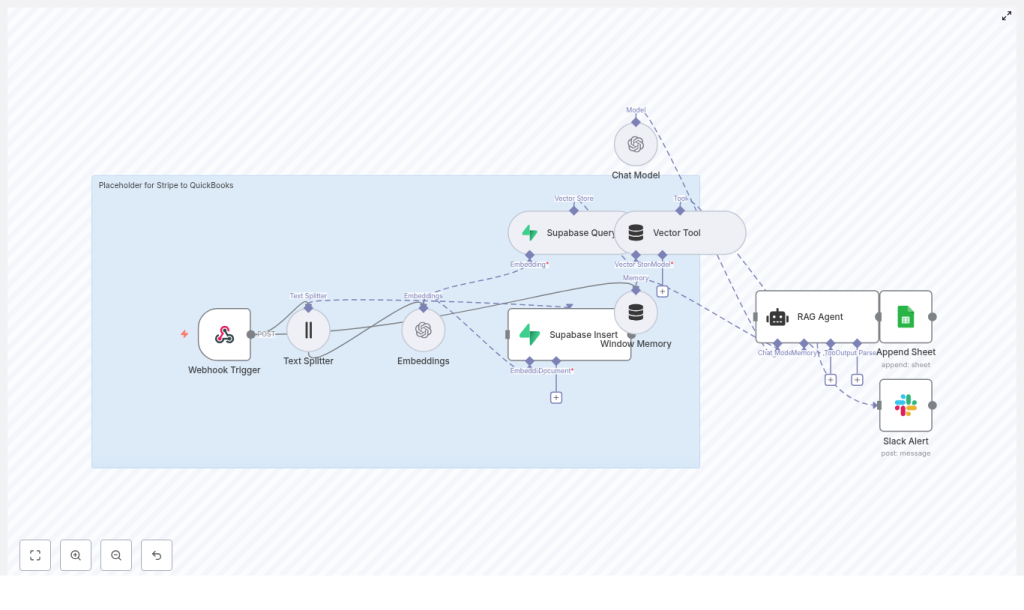
To understand how this template can transform your workflow, imagine a single Stripe payment event entering the system and being guided all the way to QuickBooks-ready output. Here is the high-level path it follows:
- Webhook Trigger receives the Stripe event
- Text Splitter prepares long text for embeddings
- Embeddings convert text into vectors
- Supabase Insert / Query stores and retrieves contextual vectors
- Window Memory + Vector Tool give the agent short-term and long-term context
- Chat Model + RAG Agent interpret the event and decide on QuickBooks mappings
- Append Sheet (Google Sheets) logs the outcome for traceability
- Slack Alert notifies you if something goes wrong
Each step is designed to be understandable, adjustable, and extendable. As you grow more comfortable with n8n, you can tweak, expand, or plug in direct QuickBooks API calls to complete the loop.
Step-by-step: How the n8n nodes work together
1. Webhook Trigger – inviting Stripe into your workflow
The journey starts with the Webhook Trigger node. Stripe sends POST events such as payment_intent.succeeded or charge.refunded to your n8n endpoint. In this template, that path is:
/stripe-to-quickbooksConfigure your Stripe dashboard to send webhooks to this secure HTTPS endpoint. Enable signature verification so you can be confident that only legitimate Stripe events enter your system. Once this is in place, every new payment can automatically flow into your workflow without manual intervention.
2. Text Splitter – preparing your data for intelligent search
Stripe payloads can be verbose, especially when metadata, descriptions, or receipts are involved. To handle this gracefully, the template uses a Text Splitter node.
It uses a character-based splitter with:
chunkSize = 400chunkOverlap = 40
These values help break large text into manageable pieces that fit within embedding model limits while keeping enough overlap so context is not lost. You can adjust these settings later to balance cost and context depth.
3. Embeddings – turning text into searchable vectors
Next, each text chunk is converted into a vector representation using OpenAI embeddings with the model:
text-embedding-3-smallThis Embeddings node is what makes semantic search possible. Instead of matching exact words, your workflow can find conceptually similar events, notes, or metadata. When your RAG agent needs to understand a new Stripe event, these vectors help it locate relevant historical context.
4. Supabase Insert & Query – building your long-term memory
Once you have embeddings, the template stores them in a Supabase vector table. This is your workflow’s long-term memory.
- Supabase Insert writes new vectors into your vector store so future events can reference them
- Supabase Query performs similarity searches to retrieve the most relevant past entries
This is especially powerful for:
- Mapping Stripe payments to the right QuickBooks accounts
- Identifying recurring customers or subscription patterns
- Reusing previous classification and mapping decisions
Over time, your vector store becomes a rich knowledge base that your RAG agent can draw from.
5. Window Memory & Vector Tool – giving your agent context
For the RAG agent to make smart decisions, it needs both short-term and long-term context.
- Window Memory keeps track of the immediate conversational state and recent messages
- Vector Tool connects the agent to your Supabase vector store, so it can pull in relevant documents or historical entries
Together, these nodes let the agent understand not just the current Stripe event, but also how it relates to past events and previous classifications.
6. Chat Model & RAG Agent – turning data into QuickBooks-ready insight
The core intelligence of this template lives in the Chat Model and RAG Agent nodes.
The Chat Model node calls an OpenAI chat model and is guided by a system message like:
You are an assistant for Stripe to QuickBooksUsing the retrieved context from Supabase, plus window memory, the RAG agent can:
- Classify events as income, refunds, fees, or other categories
- Recommend QuickBooks mappings such as customer, account, or tax code
- Generate structured outputs ready for downstream processing
For example, the agent might output a clean JSON structure that your workflow can append to Google Sheets or send directly to the QuickBooks API in a future extension.
7. Append Sheet (Google Sheets) – creating an auditable trail
To keep everything transparent and reviewable, the template uses an Append Sheet node to log each processed item in Google Sheets.
A typical row might include:
- Timestamp
- Stripe event ID
- Classification (income, refund, fee, etc.)
- Recommended QuickBooks mapping
- Status or notes
This log becomes your quick reference, your audit trail, and your feedback loop. As you review it, you can refine prompts, adjust mappings, or decide where to add human approval steps.
8. Slack Alert – staying in control when things go wrong
No automation is perfect from day one, and that is okay. The key is to know when something needs your attention.
The template includes a Slack Alert node that triggers whenever the RAG agent encounters errors or ambiguous cases. You get immediate visibility into potential issues so you can step in, correct, and improve your workflow without losing trust in your system.
What you need to get started
Before you activate the template, prepare the following pieces. Think of this as assembling your toolkit for automation:
- An n8n instance, either self-hosted or cloud
- An OpenAI API key for embeddings and the chat model
- A Supabase project with vector store enabled and an API key
- Google Sheets OAuth2 credentials with access to your target sheet
- A Slack API token to post alerts to your chosen channel
- A Stripe webhook configured to send events to your n8n webhook endpoint with signature verification enabled
Once these are in place, you are ready to turn a static template into a living, breathing automation.
Keeping financial data safe and compliant
Automation should not come at the cost of security. With financial data, it is especially important to be intentional and careful. As you set up this workflow, keep these practices in mind:
- Serve your n8n webhooks over HTTPS and verify Stripe signatures to block unauthorized requests
- Minimize stored PII in your vector store, and use anonymized or hashed IDs where possible
- Apply role-based access control for Supabase, Google Sheets, and Slack credentials
- Maintain an audit trail through logging, which the Google Sheets Append node already supports
Security is not a one-time configuration. Revisit these settings as you grow and as more people interact with your system.
Testing your workflow with confidence
Before you let your automation run in production, give it a safe space to learn. A sandbox or test mode lets you experiment, observe, and iterate without risk.
- Send synthetic Stripe events to your webhook and verify text chunking, embeddings, and Supabase inserts
- Check that the RAG agent returns consistent QuickBooks mapping recommendations for different scenarios such as new customers, refunds, or fees
- Confirm that successful runs append correct rows to Google Sheets and that failures trigger Slack alerts as expected
This testing phase is where you build trust in your automation. The more intentional you are here, the more confidently you can rely on the workflow later.
Planning for growth: scaling and cost optimization
As your transaction volume increases, your automation should grow with you without exploding costs. This template gives you several levers you can adjust over time:
- Batch or debounce events to avoid redundant embeddings and reduce unnecessary processing
- Use smaller or lower-cost embedding models for routine data, and reserve higher-cost models for complex reasoning or edge cases
- Prune or compress old vectors in Supabase once they fall outside your retention window, especially if historical context is no longer necessary
By tuning these pieces, you can keep your automation both powerful and sustainable.
Ideas to extend and customize your Stripe to QuickBooks automation
Once the core template is running smoothly, you can start to shape it around your specific workflow and business model. Here are some common next steps:
- Direct QuickBooks API integration: After the RAG agent recommends mappings, call the QuickBooks Online API to automatically create invoices, payments, or refunds.
- Human-in-the-loop review: For ambiguous or high-value transactions, add an approval step that notifies accounting via email or Slack, and only proceeds after a human signs off.
- Enriched customer profiles: Merge Stripe metadata with CRM data to improve customer matching and classification accuracy.
Think of the template as your foundation. As you experiment, you will discover new ways to automate not just bookkeeping, but your wider finance operations.
Example Stripe webhook payload
To help you visualize what the workflow processes, here is a trimmed example of a Stripe webhook payload:
{  "id": "evt_1Kxyz...",  "type": "payment_intent.succeeded",  "data": {  "object": {  "id": "pi_1Kxyz...",  "amount": 5000,  "currency": "usd",  "metadata": {"order_id": "1001"},  "charges": {  "data": [  {  "id": "ch_1Kxyz...",  "balance_transaction": "txn_..."  }  ]  }  }  }
}
This is the kind of data your Webhook Trigger receives, your Text Splitter and Embeddings prepare, and your RAG agent interprets into meaningful QuickBooks-style recommendations.
Quick start: your first automated run
You do not need to redesign your entire accounting process on day one. Start small, see the value, then build from there. Here is a simple path to your first working automation:
- Import the Stripe to QuickBooks n8n template into your workspace
- Connect your credentials for OpenAI, Supabase, Google Sheets, Slack, and Stripe
- Adjust chunk sizes or the embedding model if you want to fine tune cost and performance
- Send a few test webhooks, then inspect your Supabase entries and Google Sheets logs to confirm everything is working
Once you see your first Stripe event automatically classified, logged, and enriched, you will start to feel what is possible when your tools work for you.
Turning this template into your automation launchpad
This n8n template is more than a one-off integration. It is a stepping stone toward a more automated, focused way of running your business. By combining Stripe, QuickBooks, n8n, Supabase, OpenAI, Google Sheets, and Slack, you create a resilient pipeline that:
- Reduces manual data entry and errors
- Creates consistent, reviewable recommendations for QuickBooks
- Captures an auditable trail of every decision
- Can be extended as your needs grow
You do not have to automate everything at once. Start with this template, get comfortable, then keep iterating. Each improvement frees a little more time and mental space for the work that truly moves your business forward.
Call to action: Import the Stripe to QuickBooks template into n8n, connect your credentials, and run a test webhook today. Use the results as a baseline, then refine your RAG prompts, mappings, and extensions step by step. If you would like help tailoring the integration or designing more advanced workflows, reach out or

