


Automate Tenant Screening with n8n & Vector Search
Modern tenant screening involves large volumes of unstructured data, from application forms to reference letters and free-text notes. This workflow template shows how to operationalize that process with n8n, vector embeddings, and an AI agent, so that every application is processed consistently, summarized reliably, and logged in a structured, searchable format.
Business case for automated tenant screening
Manual tenant vetting is slow, subjective, and difficult to audit. For property managers and landlords handling multiple units or portfolios, an automated pipeline provides measurable advantages:
- Scalability – Process large volumes of applications without a linear increase in manual effort.
- Consistency – Apply the same decision criteria and summary structure across all applicants.
- Traceability – Maintain structured, searchable records that support audits, internal reviews, and dispute resolution.
The n8n workflow described below, named “Tenant Screening Summary”, is designed for automation professionals who want to combine LLM capabilities with vector search in a compliant and repeatable way.
Solution architecture overview
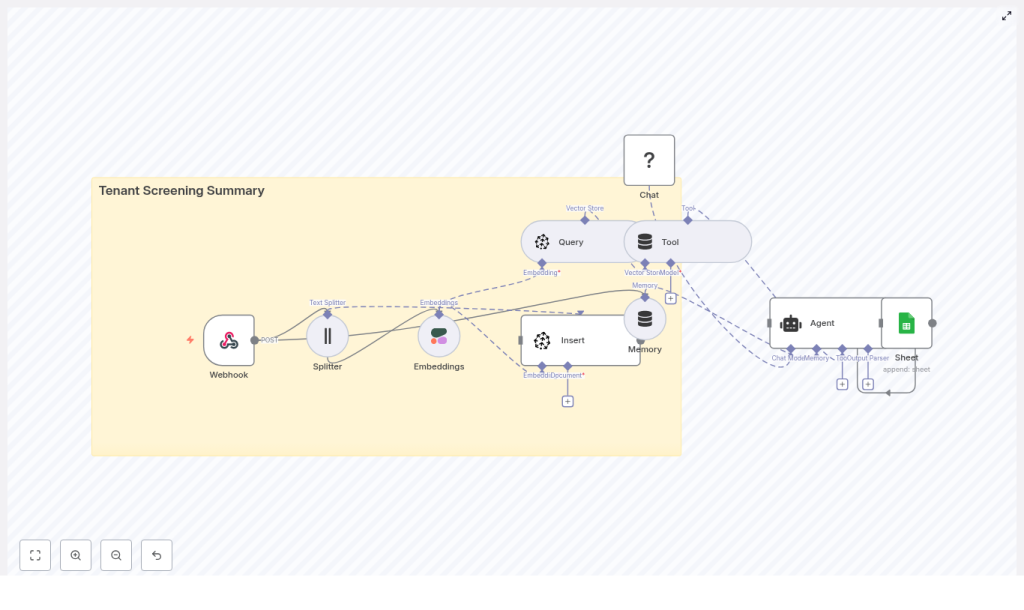
The workflow connects intake, enrichment, retrieval, and reporting into a single automated pipeline. At a high level, it:
- Receives tenant application data via a secure webhook.
- Splits long text into manageable chunks for embedding.
- Generates embeddings using a dedicated text-embedding model.
- Stores and indexes vectors in Pinecone for semantic retrieval.
- Uses a vector-store tool to provide contextual documents to an AI agent.
- Lets an LLM-based agent compose a structured screening summary.
- Appends the final output to Google Sheets for record-keeping.
Core n8n components in the workflow
- Webhook node – Entry point that accepts tenant application payloads via HTTP POST.
- Text Splitter node – Segments long-form text into overlapping chunks optimized for embedding.
- Embeddings node – Integrates with Cohere or an equivalent provider to convert text into vector representations.
- Pinecone node – Handles vector insertion and similarity queries against a dedicated index.
- Vector-store Tool / Query – Exposes Pinecone search as a tool that the AI agent can call when it needs context.
- Memory – Maintains short-term conversational context for the agent within the workflow execution.
- Chat Model (Hugging Face) – LLM used to generate natural-language summaries and recommendations.
- Agent – Orchestrates tools, memory, and the chat model to produce the final tenant screening summary.
- Google Sheets node – Persists the structured summary in a spreadsheet for compliance, reporting, and follow-up.
Detailed workflow execution
1. Intake: Receiving tenant applications
The process begins with the Webhook node, which is configured to accept POST requests from your application portal or CRM. The incoming JSON payload typically includes:
- Applicant identification (name, contact information).
- Employment details and income information.
- Previous rental history and references.
- Credit notes or score summaries.
- Free-form responses, comments, or attached narrative descriptions.
This raw data is passed downstream for preprocessing and enrichment.
2. Preprocessing: Splitting long text for embeddings
Long narrative fields, such as reference letters or detailed employment histories, are routed to the Text Splitter node. The objective is to create chunks that are:
- Short enough to be efficiently embedded and processed.
- Overlapping enough to preserve local context across boundaries.
A commonly effective configuration is a chunkSize of around 400 tokens with an overlap of 40 tokens. This balance helps maintain semantic continuity while controlling cost and latency.
3. Vectorization: Generating text embeddings
Each chunk produced by the Text Splitter is passed to the Embeddings node. In this template, Cohere is used as the embedding provider, although OpenAI or other high-quality embedding APIs can be substituted as long as the vector dimensions match your Pinecone index configuration.
The embeddings node returns high-dimensional vectors for each text chunk. These vectors capture the semantic meaning of the content and form the basis for similarity search in the vector database.
4. Storage: Inserting vectors into Pinecone
The generated embeddings are written to Pinecone using a dedicated index, for example:
tenant_screening_summary– the index that stores all tenant-related chunks.
Each vector is stored alongside metadata such as:
- Applicant ID or unique application reference.
- Document type (e.g., reference, employment, credit note).
- Timestamps or other relevant attributes.
This metadata is critical for filtering and grouping results during retrieval, especially when multiple applicants or document types are stored in the same index.
5. Retrieval: Querying the vector store as a tool
When the workflow reaches the analysis phase, the AI agent needs contextual information to generate a robust summary. This is achieved by configuring a vector-store tool that queries Pinecone for the most relevant chunks.
For example, if the agent is prompted to “Summarize this applicant’s risk factors”, it performs a similarity search against the tenant_screening_summary index using the applicant’s data and any internal prompts as the query. The most relevant chunks are returned to the agent and injected into the prompt as contextual documents.
6. Reasoning: Agent-driven summary generation
The Agent node orchestrates three elements:
- The chat model (Hugging Face LLM) that generates natural-language outputs.
- The vector-store tool that retrieves context from Pinecone.
- A short-term memory buffer that maintains context within the workflow execution.
Using a well-designed prompt, the agent composes a structured Tenant Screening Summary that typically includes:
- Overall recommendation (approve, conditional, or decline).
- Key employment and income details.
- Rental history highlights and reference insights.
- Identified red flags, such as prior evictions, criminal history, or inconsistent information.
- Suggested next steps or follow-up actions.
The quality and reliability of this output depend heavily on the prompt and the relevance of retrieved chunks, which is why prompt engineering and index configuration are important design steps.
7. Persistence: Logging results to Google Sheets
Finally, the workflow writes the structured summary to a Google Sheets spreadsheet. The Google Sheets node is configured to append a new row per application, typically including:
- Applicant identifiers.
- Summary fields (recommendation, risk factors, key facts).
- Timestamps and any internal notes or reviewer comments.
This creates a durable, audit-ready log that can be used for compliance, reporting, and collaboration across property management teams.
Design considerations and implementation best practices
Data privacy, security, and regulatory compliance
Tenant data is inherently sensitive, often containing personal identifiers, financial information, and potentially criminal history. When deploying this workflow:
- Store only data that is strictly necessary for screening decisions.
- Use encryption at rest and in transit wherever supported, especially in your vector store and storage layers.
- Restrict access to n8n, Pinecone, and Google Sheets to authorized service accounts and users.
- Ensure alignment with applicable regulations such as GDPR, CCPA, and local rental laws.
Chunking strategy for optimal retrieval
Chunking has a direct effect on retrieval quality and cost. Consider the following guidelines:
- Start with approximately 400 tokens per chunk and 40 tokens of overlap for narrative text.
- Adjust sizes based on empirical testing with real application data.
- Ensure that each chunk is semantically meaningful, for example by splitting at logical paragraph boundaries when possible.
Choosing and tuning the embeddings provider
The quality of semantic search is largely determined by the embedding model. When selecting a provider such as Cohere or OpenAI:
- Confirm that the embedding dimensions match your Pinecone index configuration.
- Test with representative samples, including edge cases like very short or very long answers.
- Monitor retrieval relevance and iterate on model choice or parameters if necessary.
Vector store configuration and metadata usage
Properly configured vector indices are essential for reliable retrieval:
- Align Pinecone index dimension with the embedding model output.
- Use metadata fields such as applicant ID, document type, and date to filter results for a specific application.
- Consider namespace separation if you manage multiple properties, regions, or customer accounts.
Prompt engineering for consistent summaries
To obtain predictable, structured summaries from the agent, design prompts that clearly specify the required output format and evaluation criteria. A conceptual prompt might look like:
Summarize the following applicant's information. Provide:
- One-line recommendation: Approve / Conditional / Decline
- Key facts: employment status, monthly income, rental history
- Red flags: criminal records, evictions, inconsistent info
- Suggested next steps

Context: {{retrieved_chunks}}
For production use, you can extend this with concrete examples (few-shot prompting) and stricter formatting guidelines, then align the Google Sheets mapping with the defined structure.
Operational usage and real-world scenarios
Once configured, this tenant screening workflow can support several operational scenarios:
- High-volume property management – Process hundreds of applications across multiple properties without saturating staff capacity.
- Audit-ready documentation – Maintain consistent, structured summaries that can be referenced during compliance checks or legal disputes.
- Standardized risk assessment – Apply uniform evaluation criteria across teams, locations, and time periods.
Monitoring, quality control, and iteration
As with any AI-driven workflow, ongoing monitoring is essential:
- Periodically review generated summaries for accuracy, completeness, and potential bias.
- Implement a human-in-the-loop review process during the initial deployment phase.
- Capture reviewer feedback and outcomes, then use this data to refine prompts, chunking strategies, and filters.
- Maintain a version history of prompt templates and model choices for traceability.
Troubleshooting and optimization tips
- Irrelevant retrieval results – Check that your Pinecone index dimensions match the embedding model, verify that metadata filters are correctly applied, and confirm that the correct namespace or index is used.
- Inconsistent or low-quality summaries – Tighten the prompt, introduce few-shot examples, and ensure that the agent is always provided with the most relevant retrieved chunks.
- Missing or misaligned fields in Google Sheets – Validate that the agent output keys match the expected column mapping in the Google Sheets node and adjust the parsing logic if necessary.
Security checklist for production deployments
- Protect webhook endpoints using authentication tokens, IP allowlists, or both.
- Store API keys and credentials as environment variables or in a secure secret manager, never directly in workflow definitions.
- Regularly audit access permissions for n8n, Pinecone, and Google Sheets, and restrict them to the minimum required roles.
Conclusion
By combining n8n, semantic embeddings, a vector database, and an AI agent, you can implement a robust, scalable tenant screening pipeline that reduces manual effort and enforces consistent decision-making. Whether you manage a small portfolio or operate as a large property management organization, this approach enables high-volume, standardized tenant evaluation with clear audit trails.
Practical next steps
- Deploy the webhook endpoint and connect it to your tenant application form or CRM to ingest a small set of sample applications.
- Configure a test Pinecone index, generate embeddings for the sample data, and validate retrieval quality.
- Iterate on the agent prompt, run end-to-end tests, and compare the generated summaries with human reviewer assessments.
Call to action: Ready to operationalize this workflow in your environment? Reach out to our team for expert implementation support or download the n8n workflow template and start customizing it for your tenant screening process today.
