


Automate Water Bill Calculation with Telegram and Google Sheets
Imagine Never Typing a Water Meter Reading Again
You know that monthly ritual where someone sends you a blurry photo of a water meter, you squint at it, type the numbers into a sheet, calculate the bill, and then copy everything into a message? Then do it again. And again. And again.
If you are tired of playing “guess that digit” from half-lit meter photos, this n8n workflow template is your new best friend. It uses a Telegram bot, Google Sheets, and Google Gemini AI to handle the entire water bill process for you, from image to invoice, with almost no manual work.
What This n8n Workflow Actually Does
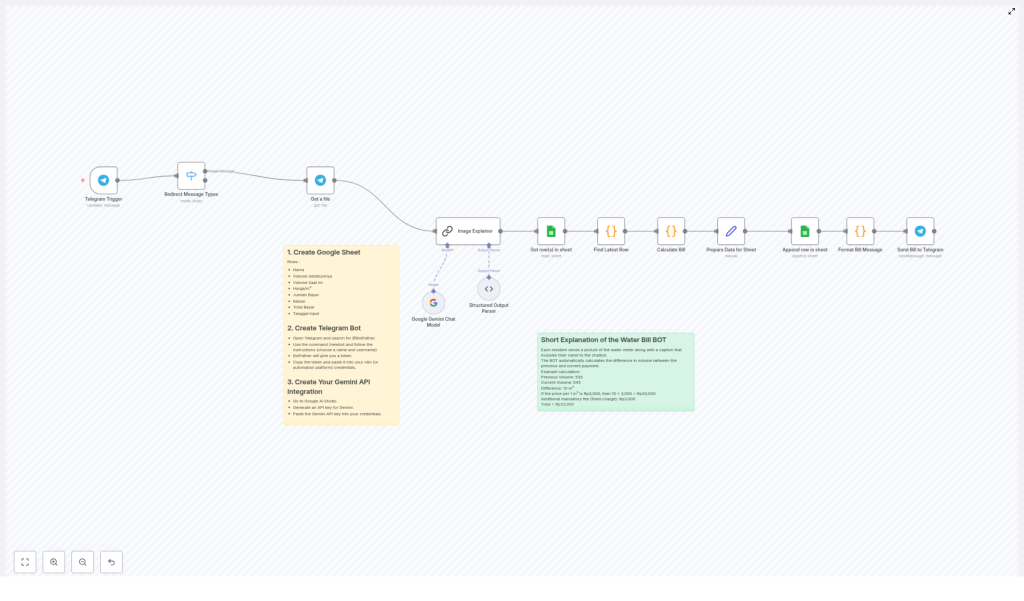
At a high level, this automation turns Telegram into a smart entry point for water bill data, uses AI to read the meter values from images, calculates the bill, logs everything in Google Sheets, and then sends the final bill back to the user in Telegram.
Here is the full journey your data takes:
- User sends a water meter photo through Telegram.
- The bot checks what type of message it is and only processes images.
- n8n downloads the image and sends it to Google Gemini AI.
- AI reads the numeric meter value and the customer name from the image or caption.
- The workflow parses that result into clean JSON data.
- Google Sheets is used to look up previous readings and pricing.
- The bill is calculated automatically, including consumption and fixed charges.
- New data is saved back into the sheet for future reference.
- The final bill, with payment details, is sent back to the user via Telegram.
In short, no more manual transcription, no more calculator, and far fewer “oops, wrong number” moments.
Step-by-Step: How the Template Works Behind the Scenes
1. Telegram Bot – Your Front Desk for Meter Photos
The workflow begins with the Telegram Trigger node. This node listens to your Telegram bot and waits for users to send messages. When someone uploads a water meter image, the bot receives it and passes it into the rest of the n8n workflow.
Think of it as a digital receptionist that only cares about your meter photos, not your memes.
2. Sorting Messages With a Switch Node
Not every Telegram message is useful for billing. Some might be text, stickers, or other random content. The Switch node steps in here to filter and route messages based on their type.
If it is an image, it continues down the workflow. If it is text or something else, it gets filtered out so you do not end up trying to compute a water bill from a thumbs up emoji.
3. Downloading the Image and Letting AI Read the Meter
Once an image passes the filter, the Get a file node retrieves the actual meter photo from Telegram. This file is then forwarded to the Google Gemini Chat Model and Image Explainer nodes.
Here is where the magic happens. Google Gemini AI looks at the image and extracts the numeric meter reading in cubic meters (m³). It can also pick up the customer name from the caption or other context, depending on how you structure your prompts and input.
4. Turning AI Output Into Clean Structured Data
AI often returns text that looks human friendly but is not exactly automation friendly. That is where the Structured Output Parser node comes in.
This node converts the AI result into structured JSON values, so you end up with clearly defined fields such as:
- Customer name
- Current volume (m³)
From here, the rest of the workflow can safely use these values for calculations and logging.
5. Looking Up Old Readings and Calculating the Bill
Next, the workflow talks to Google Sheets. Your sheet stores past meter readings, price per cubic meter, and other billing details. The workflow uses this data to:
- Find the customer’s previous meter reading.
- Retrieve the price per m³.
- Apply any fixed charges.
The Calculate Bill node then does the math for you. It:
- Computes the difference between current and previous readings.
- Multiplies the consumption by the price per cubic meter.
- Adds fixed charges to get the total payment.
- Formats the date for record keeping.
So instead of juggling spreadsheets and formulas, you just let the workflow crunch the numbers.
6. Saving Everything in Google Sheets
Once the bill is calculated, the workflow appends a new row to your Google Sheet. This row usually includes:
- Name
- Previous volume
- Current volume
- Price per m³
- Amount to pay
- Fixed charge
- Total payment
- Date of entry
This creates a complete history of usage and payments over time, which is very handy when someone asks, “Why is my bill higher this month?”
7. Sending the Final Bill Back Via Telegram
Finally, the workflow formats all the key billing details into a clear message and sends it back to the user through Telegram’s messaging API.
That message can include:
- Current and previous meter readings
- Calculated consumption
- Total amount to pay
- Any fixed charges or extra fees
- Payment instructions
The user gets an instant bill in the same chat where they sent the photo, and you do not have to lift a finger after the initial setup.
What You Need to Set This Up
1. A Google Sheet for All Your Billing Data
Start by creating a Google Sheet that will store your water billing records. At a minimum, include these columns:
- Name
- Previous Volume
- Current Volume
- Price per m³
- Amount to Pay
- Fixed Charge
- Total Payment
- Date of Entry
This sheet becomes your single source of truth for all water usage and payment history.
2. A Telegram Bot Set Up With @BotFather
Next, you need a Telegram bot that will receive the meter photos. To create one:
- Open Telegram and start a chat with
@BotFather. - Follow the prompts to create a new bot.
- Copy the bot token that BotFather gives you.
You will use this token in your n8n Telegram Trigger node so the workflow can connect to your bot.
3. Google Gemini AI Integration
To automatically read meter numbers from images, integrate the Google Gemini AI model in n8n. In this workflow template, Gemini is used via the Google Gemini Chat Model and Image Explainer nodes to extract the numeric reading and related details from the photo.
Once configured, Gemini takes care of the image analysis while the rest of the workflow just consumes its structured output.
Why Bother Automating Water Bills?
Besides saving your sanity, this automation brings several practical benefits:
- Less manual work – No more copying numbers from images into spreadsheets every billing cycle.
- Fewer errors – AI-based reading extraction reduces mistakes that come from misreading digits or typing too fast.
- Instant communication – Users get their bills and payment instructions directly in Telegram, often within seconds.
- Better tracking – Every reading and payment detail is logged in Google Sheets, so you always have a clear history.
Once you experience automated water billing, going back to manual entry feels like using a typewriter to send emails.
Beyond Water: Other Use Cases
This workflow is built for water meters, but the structure is flexible. With a few tweaks, you can adapt the same pattern to other utilities, such as:
- Electricity meter readings
- Gas meter readings
The same combo of Telegram, AI-based image recognition, and Google Sheets can support a wide range of meter-based billing setups.
Next Steps: Put the Template to Work
If you are ready to retire your calculator and stop manually decoding meter photos, this n8n template gives you a complete, ready-to-use workflow.
Set it up once, let it run, and never miss a payment again.
Learn more or reach out if you need help fine tuning your automation.
