


Automate Weekly Google Docs Summaries & Email Updates
From Manual Chaos to Calm Clarity
Every week, the same cycle repeats. Projects move forward, documents are updated, and somewhere in the middle of it all, you or someone on your team spends precious time trying to piece together what actually changed. Scrolling through Google Docs, skimming comments, copying snippets into an email update – it works, but it drains your focus and energy.
If you have ever felt that your attention is being pulled away from meaningful work just to keep everyone “in the loop,” this is your moment to change that. Automation is not just about saving time, it is about reclaiming your attention so you can focus on strategy, creativity, and growth.
This is where n8n and a simple, powerful workflow step in. With an automated Google Docs summary and email update system, your Monday mornings can shift from “catch up” mode to “move forward” mode.
Imagining a Better Way to Work
Imagine starting each week with a clean, concise summary in your inbox that highlights what changed in your key Google Docs, who edited what, and what needs attention next. No manual tracking, no copying and pasting, no worries about missing something important.
Automation like this is not only about efficiency, it is about building a more focused, less reactive workday. By letting n8n and AI handle the routine, you create space for deeper thinking, better decisions, and more intentional collaboration.
This mindset shift – from “I have to do everything myself” to “I can design systems that support me” – is at the heart of modern, scalable workflows. And this weekly Google Docs summary automation is a great stepping stone into that world.
What This n8n Workflow Helps You Achieve
This n8n workflow template automatically:
- Scans selected Google Docs every week
- Detects what was updated in the last 7 days
- Fetches both the content and key metadata for each document
- Uses GPT-4 to generate a clear, professional summary
- Sends a polished email update to your chosen recipients
The result is a recurring, reliable briefing that keeps your team aligned and informed, without anyone having to manually compile reports.
How the Workflow Flows Behind the Scenes
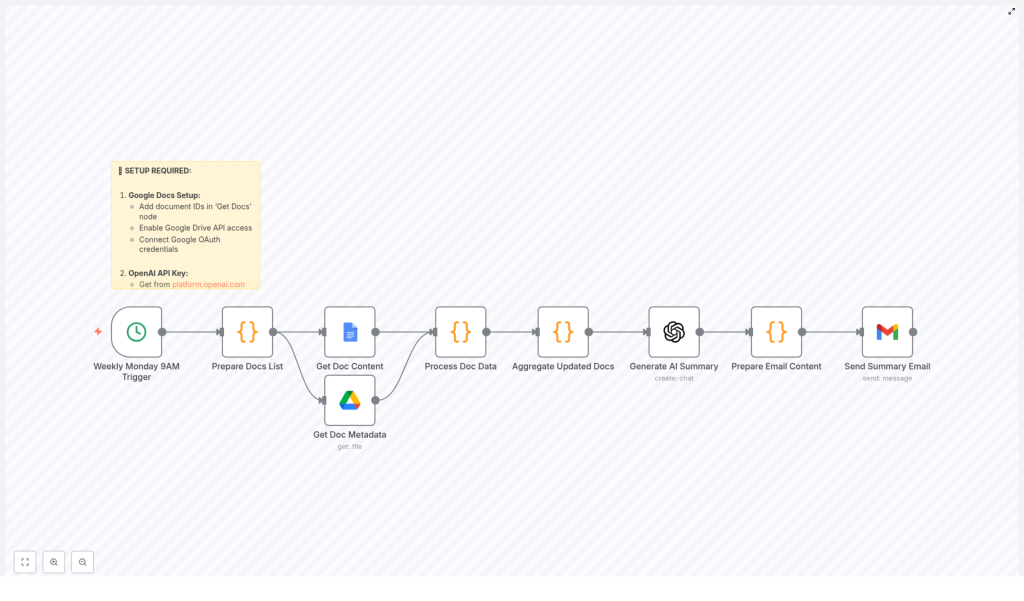
To understand the power of this template, it helps to see how the pieces fit together. This is the journey your data takes each week:
- 1. Scheduled Trigger – A cron-based trigger in n8n activates every Monday at 9 AM (or whatever time you choose) to kick off the workflow.
- 2. Document Selection – The workflow knows exactly which Google Docs to watch, based on the document IDs you configure.
- 3. Timeframe Calculation – It calculates the relevant timeframe, typically “last 7 days,” to check for recent changes.
- 4. Content & Metadata Retrieval – For each document, n8n retrieves the full text plus metadata such as modification date, last editor, and version information.
- 5. Update Filtering – The workflow checks which documents actually changed within the defined period so you only see what is new and relevant.
- 6. Clean Text Extraction – It processes the document content to extract clean text that is ready for summarization.
- 7. Aggregation for AI – All updated document contents are combined into a single structured request that will be sent to the AI model.
- 8. AI Summary Generation – GPT-4 creates a digestible, professional summary that highlights key changes, decisions, and action items.
- 9. Email Formatting & Sending – The workflow turns the AI output into a polished email (both HTML and plain text) and sends it automatically to your chosen recipients.
Once this is set up, you do not have to think about it again. The system quietly works for you in the background, week after week.
Setting Up Your Automated Weekly Summary in n8n
You do not need to be a developer to put this into action. Follow these steps to configure the template and adapt it to your team.
1. Connect Google Docs and Enable Access
Start by wiring n8n to your Google Docs environment:
- Use the “Get Doc Content” node to pull the full text of each document you want to track.
- Add the “Get Doc Metadata” node to retrieve details like last modified date, last editor, and version.
- Authenticate both nodes with your Google OAuth credentials so n8n can securely access your documents.
- Make sure the Google Drive API is enabled in your Google Cloud settings, otherwise the nodes will not be able to communicate with your documents.
Once this is done, your workflow can see and understand the documents that matter most to your team.
2. Decide Which Documents to Monitor
Next, you tell the workflow where to focus:
- Open the “Prepare Docs List” node in the template.
- List each Google Doc you want to track by its document ID.
- Optionally add names, categories, or labels so the final summary can group updates by project or theme.
This step puts you in control. You can start small with a few core documents and expand later as your automation strategy grows.
3. Configure AI Summarization with GPT-4
Now it is time to bring AI into the loop:
- Connect the workflow to OpenAI’s GPT-4 model.
- Enter your OpenAI API key in the relevant node so n8n can make requests on your behalf.
- Customize the prompt to match your communication style, for example:
- “Create a concise weekly summary of the following Google Docs updates.”
- “Highlight key decisions, open questions, and next steps.”
- “Use a professional, friendly tone suitable for a team status email.”
This is where you can shape the voice of your automated updates so they feel natural for your team and your culture.
4. Personalize Recipients and Email Content
With the summary generated, the next step is to deliver it to the right people:
- Open the “Send Summary Email” node.
- Add the email addresses of your team members or distribution lists.
- Customize the subject line, for example “Weekly Google Docs Update” or “Monday Project Summary.”
- Adjust the email body template so it reflects your brand, structure, and preferred greeting and sign-off.
Because the node sends both HTML and plain text versions, your summary will look good in most email clients.
5. Schedule the Workflow to Match Your Rhythm
Finally, choose when this automation should run:
- The template is preconfigured with a cron trigger that runs every Monday at 9 AM.
- If you prefer a different schedule, adjust the cron expression to match your team’s rhythm, for example:
- Every Friday afternoon for end-of-week recaps
- Twice a week for fast-moving projects
Once the schedule is set, your workflow is on autopilot. You can always come back later to refine timing as your needs evolve.
The Real Benefits: Time, Focus, and Momentum
The technical steps are straightforward, but the impact goes much deeper than a simple email.
- Save hours every week by automating report creation instead of manually scanning and summarizing documents.
- Keep everyone aligned with timely, relevant updates that arrive consistently without anyone having to remember to send them.
- Use AI to surface what matters so key points, decisions, and action items are highlighted instead of buried in long documents.
- Stay flexible with customizable document lists, email recipients, and summary prompts that you can tweak as your team grows.
- Scale effortlessly by adding more documents, adjusting frequency, or expanding the workflow to other tools and processes.
Each small automation like this becomes part of a larger system that supports your work instead of constantly demanding your attention.
Use This Template as a Launchpad
Think of this n8n workflow template as a starting point, not a finished destination. Once it is running, you can:
- Experiment with different prompts to refine the style and depth of your summaries.
- Add filters or conditions to focus on specific projects or document categories.
- Extend the workflow to log summaries in a database, post them to Slack, or archive them in another Google Doc.
- Replicate the pattern for other tools, like summarizing tickets, CRM notes, or meeting transcripts.
Each improvement builds your automation skills and frees more of your time for the work that truly moves you and your business forward.
Take the Next Step with n8n
If you are ready to stop chasing updates and start receiving them automatically, this template is a simple, powerful way to begin. Set it up once, let it run, and feel the difference in how you start your week.
Do not have n8n set up yet? Visit the n8n website to get started and explore the wider world of automation workflows, integrations, and templates that can support your growth.
Your time is valuable. Let automation handle the repetitive work so you can focus on leading, creating, and building what comes next.
