


Automate YouTube Video Alerts to Slack with n8n: A Story of One Marketer’s Breakthrough
The Moment Alex Realized Manual Sharing Was Broken
By Tuesday afternoon, Alex was already tired.
As the marketing lead for a small but fast-growing startup, Alex had launched a new YouTube series to support product education and brand awareness. The content was great, the team was excited, and the Slack channel called #content-updates was supposed to be the central place where every new video was shared.
In theory, it was simple. Record video, upload to YouTube, copy the link, paste it into Slack, add a short description, and hit send. In reality, it was chaos.
Some days Alex forgot to share the link until hours after publishing. Other days, someone else on the team shared it first, but the message format looked messy or incomplete. Occasionally, a video was never shared at all, which meant sales, support, and leadership missed content that could have helped them.
Alex caught a comment in a meeting that stung a bit: “Wait, we posted a new video yesterday? I didn’t see anything in Slack.”
That was the moment Alex realized the system was broken. The problem was not YouTube or Slack. The problem was manual work.
Discovering n8n and the Idea of a Self-Running Workflow
That evening, while searching for ways to connect YouTube and Slack, Alex stumbled across n8n, an open-source workflow automation tool. The promise was compelling: create workflows that run on autopilot, connect services like YouTube and Slack, and remove manual effort from repetitive tasks.
Alex imagined a simple outcome: every time a new YouTube video was published, the team should see a clean, well-formatted notification in Slack. No copying links, no forgetting, no inconsistent messages.
Then Alex found exactly what was needed – an n8n workflow template that checks a YouTube channel’s RSS feed every 30 minutes and posts new video links directly to Slack.
It sounded like magic, but Alex wanted to understand how it actually worked.
Why This Automation Mattered So Much to Alex’s Team
Before touching the template, Alex wrote down the real reasons this automation needed to exist:
- Free up time by removing the need to manually share every new video.
- Keep the whole team instantly aware of fresh YouTube content.
- Reduce the risk of missing or delaying important video announcements.
Slack was already the heartbeat of team communication. YouTube was becoming the company’s main content engine. Connecting them with automation was not a “nice to have” anymore, it was essential for keeping everyone aligned.
Rising Action: Piecing Together the Workflow in n8n
Alex opened n8n, loaded the template, and started exploring the workflow. It felt less like coding and more like assembling a story that ran every 30 minutes.
The Cast of Nodes in Alex’s Workflow
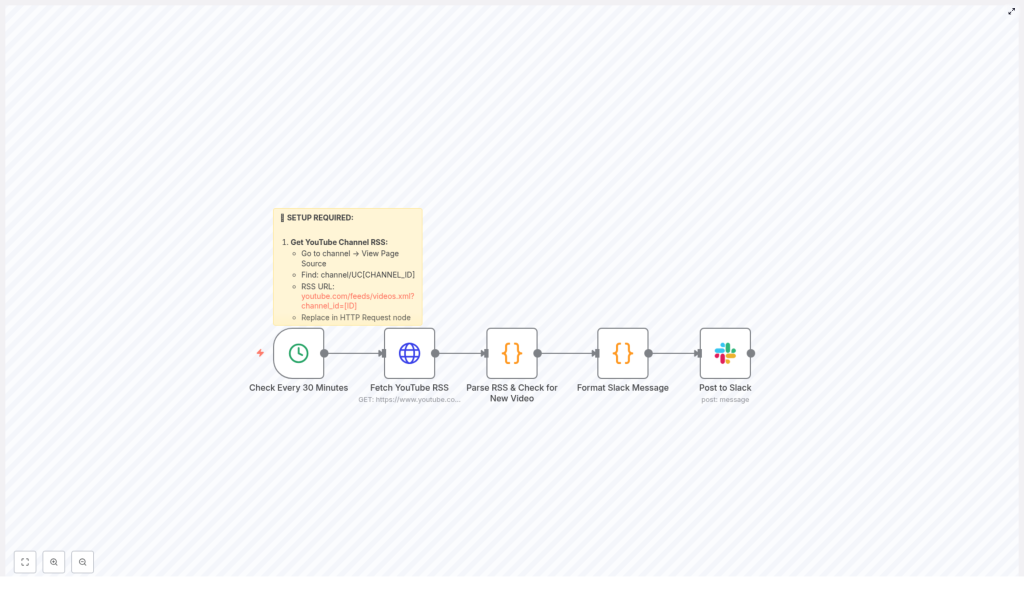
The template introduced Alex to a set of key nodes that would do all the heavy lifting:
- Cron Trigger – This node would wake the workflow every 30 minutes to check for new videos.
- HTTP Request – This node would fetch the YouTube RSS feed that lists recent uploads from the channel.
- Code Node (Parse RSS) – JavaScript here would parse the RSS XML, extract details about each video, and figure out which one was new.
- Code Node (Format Slack Message) – Another bit of code would take the video data and turn it into a structured Slack message.
- Slack Node – This final node would actually post the formatted message into the selected Slack channel.
Alex realized that the workflow already had a clear logic: check regularly, fetch data, filter for new content, format a message, then send it to Slack. The story of a new video would now be told automatically.
The First Obstacle: Getting the YouTube RSS URL
Everything hinged on one important detail: the correct YouTube RSS feed URL. Without it, the HTTP Request node would have nothing useful to fetch.
Alex followed the steps carefully:
- Opened the company’s YouTube channel page in the browser.
- Right-clicked the page and selected View Page Source.
- Searched the source code for the channel ID, which looked like
channel/UCxxxxxxxx. - Used that ID to build the RSS URL in the exact format:
https://www.youtube.com/feeds/videos.xml?channel_id=YOUR_CHANNEL_ID
Once Alex had the URL, it was pasted into the HTTP Request node inside n8n, replacing YOUR_CHANNEL_ID with the real channel ID. The first critical piece was now in place.
Connecting Slack: Bringing Notifications Where the Team Already Lives
Next, Alex needed to make sure that when the workflow found a new video, it could talk to the right people in the right place. That meant configuring the Slack node.
Inside n8n, Alex:
- Connected the Slack account using OAuth, so n8n could securely post messages.
- Chose the
#content-updateschannel as the destination for all video alerts. - Customized the bot appearance, adjusting the bot username and emoji icon so messages would stand out in the channel.
With the Slack node wired up, the workflow now had a voice.
The Turning Point: Understanding the Parsing Logic
Alex’s biggest concern was avoiding spam and duplicate posts. The team did not need the same video announced over and over again every 30 minutes. That is where the parsing logic became crucial.
Inside the Parse RSS code node, Alex saw JavaScript that did more than just read the feed. It extracted important details for each video, including:
- Title
- Video link
- Published date
- Description
- Video ID
The code then applied a smart filter. It checked whether the newest video in the feed had been published within the last two hours. If the video was older than that, the workflow would not post it again.
This simple rule meant the workflow would behave like a considerate teammate. It would tell the channel about truly new content, not flood Slack with old links.
Crafting the Perfect Slack Announcement
Alex wanted the Slack message to do more than just drop a URL. It needed to be clear, visual, and actionable so that busy teammates could quickly decide whether to click and watch.
The Format Slack Message code node handled this elegantly. It built a Slack message using blocks, which allowed for a structured and engaging layout. The formatted message included:
- The video title, displayed prominently.
- The publish date, so the team could see how fresh the content was.
- A short description pulled from the video details.
- A clickable “Watch Now” button that linked directly to the YouTube video.
When Alex previewed the payload, it looked exactly like the kind of announcement a thoughtful marketer would write manually, only now it was generated automatically every time a new video appeared.
The First Automated Run: From Manual Chaos to Reliable Rhythm
With all the pieces connected, Alex activated the workflow.
The Cron Trigger was set to run every 30 minutes. Each time it fired, the workflow would:
- Wake up and start the process.
- Use the HTTP Request node to fetch the latest YouTube RSS feed.
- Run the Parse RSS code to extract video information and check if there was a new upload less than two hours old.
- If a new video existed, send its details to the Format Slack Message node to prepare a clean, structured message.
- Finally, pass that message to the Slack node, which would post it into the chosen Slack channel.
The first time a new video was uploaded after the workflow went live, something small but important happened. Instead of Alex scrambling to copy and paste links, a polished notification appeared in #content-updates within minutes of the video going live.
Team members reacted with emoji, asked questions, and shared the link further. No one asked, “Did we post this in Slack yet?” because the answer was now always “Yes.”
Resolution: What Changed for Alex and the Team
Within a week, Alex could feel the difference:
- No more panicked last-minute sharing of YouTube links.
- Consistent, professional Slack announcements for every new video.
- More time to focus on strategy, content quality, and performance, instead of repetitive tasks.
The workflow had become part of the team’s invisible infrastructure. It quietly checked the YouTube channel every 30 minutes, filtered out old content, and surfaced new videos exactly where the team was already working.
The best part was the peace of mind. Alex no longer worried about forgetting to share a video or sending a messy, rushed message. n8n was handling the routine work, and the team was benefiting from timely, reliable updates.
Your Turn: Let n8n Share Your YouTube Videos to Slack Automatically
If you find yourself in Alex’s situation, manually copying links from YouTube to Slack and hoping you do not forget, you can let automation handle it instead.
With this n8n workflow template you can:
- Automatically check your YouTube channel RSS feed every 30 minutes.
- Detect newly published videos based on their publication time.
- Format a clear, engaging Slack message with title, date, description, and a “Watch Now” button.
- Post directly to your chosen Slack channel without lifting a finger.
All you need is your YouTube channel RSS URL, a connected Slack account, and a few minutes to plug your details into the template.
Set up this n8n workflow today so your team never misses another YouTube video update. Let your automation quietly handle the routine, while you focus on creating content that matters.
